

iTechGuides is reader-supported. When you buy through links on our site, we may earn an affiliate commission. As an Amazon Associate I earn from qualifying purchases. Learn more
Dell Inspiron 14 5000 Series 2-in-1: At First Glance
The Dell Inspiron 14 5000 Series 2-in-1 is a mid-range laptop. This laptop falls between Dell’s 3000-7000 Inspiron series.
It is the latest upgrade of Dell’s 2-in-1 budget line of laptops. However, this laptop feels and looks like a high-end laptop despite being a budget laptop.
The Dell Inspiron 14 5000 Series 2-in-1 is not only attractive, but it also packs very promising hardware configurations for a mid-range laptop.
Dell Inspiron 14 5000 Series 2-in-1: Design, Dimension, and Weight
The Dell Inspiron 14 5000 Series 2-in-1 comes in a Gray-colored plastic covering that has a matte finish. The laptop’s matte finish does an excellent job of keeping fingerprints away from its body.
Popular on Amazon
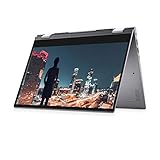
- Aspect Ratio:16:9
- 14.0-inch FHD (1920 x 1080) WVA LED-Backlit Convertible Touchscreen
- 11th Generation Intel Core i7-1165G7 Processor (12MB Cache, up to 4.7 GHz)
- 12GB 3200MHz DDR4, 512 GB M.2 PCIe NVMe SSD
- Intel Iris Xe Graphics with shared graphics memory
Moreover, the Dell Inspiron 14 5000 Series 2-in-1 doesn’t feel like plastic. It has a quality and sturdy feel, almost like the Lenovo Flex 514.
This laptop is designed with a 360-degree hinge that enables you to flip and fold its screen. Hence, you can use the Dell Inspiron 14 5000 Series 2-in-1 in laptop mode, stand mode, tent mode, or tablet mode.
Fortunately, this laptop’s hinge is very firm and it allows smooth flipping of the screen.
Do these 3 things before closing this tab:
1Clear out junk files and repair common Windows errors2Fix the driver behind crashes, sound loss and screen glitches3Repair Windows errors before they cause bigger problemsMoving on to dimensions and weight. The Dell Inspiron 14 5000 Series 2-in-1 measures 335.9 x 232.8 x 20.23 mm and weighs 1740 g. Its form factor makes it similar to laptops like the Lenovo Flex 5 and the HP Envy x360 m6.
Furthermore, the Dell Inspiron 14 5000 Series 2-in-1 features an Island-style backlit keyboard. Its keys are well spaced but they tend to get uncomfortable during long typing sessions.
However, the laptop’s touchpad is very large and responsive to multi-touch gestures. Also, the touchpad’s left and right buttons are integrated into the touchpad.
Dell offers a fair selection of ports for this laptop. Its ports include a USB 2.0 port, 2 USB 3.1 Gen 1 port, and 1 HDMI 1.4b port.
In conclusion, this laptop’s build is very solid for a budget laptop even though some shortcomings reduces its overall quality. Therefore it scores an eight in this review.
Dell Inspiron 14 5000 Series 2-in-1: Processor (CPU) Performance
Dell equipped the Dell Inspiron 14 5000 Series 2-in-1 with a quad-core Intel Core i5-8265U processor. This processor has a base frequency of 1.60 GHz and a maximum frequency of 3.90 GHz.
More importantly, the Intel Core i5 processor offers a strong performance. With this processor, the Dell Inspiron 14 5000 Series 2-in-1 is capable of handling regular tasks like web browsing, document editing, and sending emails.
Furthermore, the Dell Inspiron 14 5000 Series 2-in-1 scored 12,011 on a Geekbench 4 general performance test.
Recommended Free Tools
Surprisingly, on the Geekbench 4 test, this laptop surpassed its competitors that are equipped with Core i7 processor. It surpassed the Lenovo Flex 5 that scored 7,177 and the HP Envy x360 that scored 8322.
Only the Lenovo Yoga 720 came close Dell Inspiron 14 5000 Series 2-in-1, with a score of 11,951.
As a result of its excellent CPU performance, the Dell Inspiron 14 5000 Series 2-in-1 scores a nine in this review.
Dell Inspiron 14 5000 Series 2-in-1: Memory (RAM) Performance
The Dell Inspiron 14 5000 Series 2-in-1 comes with 8 GB DDR4 RAM. This laptop’s RAM can be upgraded thanks to the availability of two RAM slots on the motherboard.
PC Slower Than It Used to Be?
A free scan shows the junk files, broken settings and background clutter dragging Windows down - then fixes them in one click.Free scan · Windows 10 & 11Crashes, No Sound, or Screen Glitches?
Random freezes, missing sound and display glitches usually trace back to one bad driver. Find and replace yours safely.Free scan · under a minuteYou can easily get a 16 GB total RAM capacity by adding another 8 GB RAM to the existing one. I will advise you to upgrade to 16 GB RAM even though the 8 GB RAM is adequate for regular computing operations.
Moreover, to get the best performance on any modern Windows laptop, 16 GB RAM is recommended. The 16 GB RAM is ideal if you plan to run highly memory-intensive tasks like photo or video editing.
On memory performance tests, the Dell Inspiron 14 5000 Series 2-in-1 performed smoothly with the 16 GB. The laptop handled 25 Chrome browser tabs while a Netflix video was streaming.
In conclusion, the Dell Inspiron 14 5000 Series 2-in-1 scores an eight in this review for its good RAM performance and its upgradability feature.
The Tool Desk
Outbyte Driver Updater FREEFix the driver behind crashes, sound loss and screen glitchesFind Drivers →Outbyte PC Repair FREEClear out junk files and repair common Windows errorsFree Scan →Dell Inspiron 14 5000 Series 2-in-1: Storage Options and Performance
Dell offers two configurations for the Dell Inspiron 14 5000 Series 2-in-1’s storage. You can either get the laptop with 256 GB M.2 SSD or the 1 TB HDD.
In addition to that, Dell offers an SD card reader as part of this laptop’s storage options.
This review focuses on the 256 GB SSD. With this drive, it took the Dell Inspiron 14 5000 Series 2-in-1 28 seconds to copy a 4.97 GB folder at a rate of 187.5 MBps.
Also popular on Amazon

- VERSATILE DESIGN: 2-in-1 convertible laptop with 14-inch HD touchscreen display for flexible use as both laptop and tablet
- POWERFUL PROCESSOR: Intel Core i5-1135G7 with 4 cores reaching speeds up to 4.2 GHz for smooth multitasking performance
- STORAGE & MEMORY: Fast 512GB SSD for quick boot times and ample storage, paired with 8GB RAM for efficient multitasking
- DISPLAY SPECS: 14-inch HD touchscreen with 1366x768 resolution delivers responsive touch interactions
- OPERATING SYSTEM: Comes pre-installed with Windows 11 Home for the latest features and security updates
The Dell Inspiron 14 5000 Series 2-in-1 is faster than the HP Envy x360 that copied the same file at a rate of 50.89 MBps. However, it lagged behind the Lenovo Flex 5’s 338 MBps rate and the Lenovo Yoga 720’s 266.85 MBps rate.
Quick wins for a faster PC:
Fix the driver behind crashes, sound loss and screen glitchesFind Drivers →Repair Windows errors before they cause bigger problemsFix Now →Scan for outdated or missing drivers - takes under a minuteDriver Scan →Nonetheless, it scores a seven in this review for its good storage speed.
Dell Inspiron 14 5000 Series 2-in-1: Graphics Card Performance
The Dell Inspiron 14 5000 Series 2-in-1 features Intel’s integrated UHD GPU. The GPU has a base frequency of 300 MHz and a boost frequency of 1100 MHz.
This laptop is good enough for casual gaming and HD video viewing. However, you will need to reduce the graphics settings at native resolution in order to get playable frame rates with AAA title games.
On gaming tests, the Dell Inspiron 14 5000 Series 2-in-1 was able to play Dirt 3 at 34 FPS. It also ran Asphalt Nitro at 40 FPS, surpassing the 30 FPS playability rate.
Free tools Windows power users keep installed
One-click scans. No signup required.
Moreover, the Dell Inspiron 14 5000 Series 2-in-1 ran Dirt 3 at a better rate than the HP Envy x360 that ran the same game at 22 FPS. However, the Dell Inspiron 14 5000 Series 2-in-1 couldn’t measure up with the Lenovo Flex 5’s 70 FPS and the Lenovo Yoga 720’s 110 FPS.
In conclusion, the Dell Inspiron 14 5000 Series 2-in-1 scores a six for its average GPU performance.
Independent reader supportYour contribution helps us test, update, and keep practical guides available for everyone.Dell Inspiron 14 5000 Series 2-in-1: Battery Life and Performance
The Dell Inspiron 14 5000 Series 2-in-1 comes with a 3-Cell, 42 Whr Primus battery.
This laptop’s battery life is not very impressive. The Dell Inspiron 14 5000 Series 2-in-1 won’t last you more than half a day with a full charge.
On a battery life test, this laptop lasted for 3 hours and 55 minutes. This test involved a continuous web browsing process with the laptop’s screen slightly above medium.
In comparison with its competitors, the Dell Inspiron 14 5000 Series 2-in-1 doesn’t do well in terms of battery life. The Lenovo Flex 5 lasted 5 hours 40 minutes and the HP Envy x360 lasted 6 hours and 5 minutes.
Furthermore, the Dell Inspiron 14 5000 Series 2-in-1 couldn’t match up to the Lenovo Yoga 720 that lasted 9 hours. Hence, it scores six for its average battery life.
Frequently Asked Questions
The Dell Inspiron 14 5000 series 2-in-1 is very attractive. It is portable enough for you to move around. However, its low screen resolution – HD (1366 x 768) is a bit disappointing. Nonetheless, you will get good performance for your money when you purchase this laptop.
Yes, it does. The Dell Inspiron 14 5000 series 2-in-1 has an HD fixed front camera.
The Dell Inspiron 14 5000 series 2-in-1 became available for sale in the UK on September 6, 2019, and in the US on October 2, 2019.
Unlike the Inspiron 3000 series, the Inspiron 5000 series models come with a Full HD display. Also, the Inspiron 5000 series are slightly more expensive but they come with improved hardware specs.
Yes, it does. The Dell Inspiron 14 5000 series 2-in-1 features a Bluetooth 4.2 version.
What’s actually slowing this PC down?
Pick the symptom - the matching free tool is one click away.
Conclusion
The Dell Inspiron 14 5000 Series 2-in-1 comes with a lot of value for its price. Its performance is good and it has a very good build quality.
However, I wouldn’t recommend this laptop for gaming – but it is okay for students and professionals.
I hope you found this Dell Inspiron 14 5000 Series 2-in-1 review helpful. If you found the review helpful, click Yes to “Was this post Helpful?” below.
You could also review this product with the “Leave a Comment” form found at the end of this page.
What’s actually slowing this PC down?
Pick the symptom - the matching free tool is one click away.
Finally, for more laptop reviews, visit our Laptop Reviews page. You may also find our Laptop Specs page very helpful.


