
Outdated Drivers Are Slowing You Down
One free scan finds every outdated or missing driver and matches the right update for your exact hardware.Free scan · exact hardware matchPC Slower Than It Used to Be?
A free scan shows the junk files, broken settings and background clutter dragging Windows down - then fixes them in one click.Free scan · Windows 10 & 11iTechGuides is reader-supported. When you buy through links on our site, we may earn an affiliate commission. As an Amazon Associate I earn from qualifying purchases. Learn more
Short answer: Clubhouse is worth trying if you enjoy live voice conversations, informal networking, learning from people in real time, or building a niche community. It is a mobile social-audio app for live rooms, Houses, events, friend discovery, private voice messages, and chats. It is a weaker fit if you prefer text or video, dislike social notifications, want conversations to be completely private or ephemeral, or feel uncomfortable speaking in live rooms.
The basic experience is free, and Clubhouse is currently available on both iPhone and Android. It is no longer the invitation-only iPhone service described by many older articles. You can download the official Clubhouse app from the Apple App Store or find it on Google Play, create an account with a supported mobile number, and start by listening rather than speaking.
What is Clubhouse?
Clubhouse is a mobile social-audio service built around live voice conversations. Instead of scrolling through a conventional text, photo, or video feed, you enter a virtual hallway where rooms are being hosted by friends, friends of friends, Houses, interest communities, or Clubhouse recommendations.
A room can feel like a casual group conversation, an interview, a panel discussion, a networking session, a study group, or a question-and-answer event. You normally enter as an audience member, listen to the speakers, and raise your hand if you want to participate. Hosts and moderators decide who can speak and manage the room’s conversation tools. Clubhouse describes the product as a place for live audio rooms, community-building, friend connections, and conversations around both general and niche interests. See the current Clubhouse navigation guide for the latest interface terminology.
Popular on Amazon

- Wireless Freedom: With a 200 foot operating range (line of sight), it can move freely during performances, suitable for indoor and outdoor activities such as home karaoke, church, wedding, conference, speech, and small stage performances. Reliable signal, no need to worry about sound being cut off during use.
- Stable Signal & Strong Anti-Interference: wireless transmission boasts stronger anti-interference performance and zero audio delay than traditional Bluetooth mics. It delivers stable signal transmission up to 40 meters, supporting free movement during singing, hosting and stage performances. No sudden sound cutoff or signal loss in crowded indoor and outdoor scenarios, solving the common signal instability and stuttering issues of ordinary wireless microphones.
- Plug and play and multi compatibility: Insert the receiver into an audio device with a 6.35mm or 3.5mm microphone jack. Then turn on the receiver and wireless microphone, they will automatically pair. Compatible with devices with 6.35mm (1/4 inch) or 3.5mm (1/8 inch) microphone interfaces, such as party speakers, singing machines, amplifiers, PA systems, audio interfaces, truck speaker systems, dome speaker systems, etc. (AUX interface not applicable)
- Clear and rustic voice amplifier equipped with a high-sensitivity professional heart-shaped dynamic capsule, picking up clear, pure, and complete sound for greater gain, while eliminating annoying background noise and a certain degree of howling. No radiation, anti whistling, anti-interference, constant frequency, distortion<0.2%. High quality and excellent audio performance.
- You will receive: 2 handheld microphones, 1 x receiver with 6.35mm plug(Two versions are randomly shipped), 1 x 3.5mm adapter, 2 anti slip rings, 2 x microphone covers, 1 x manual. (Note: This system is not compatible with mobile phones, computers, or tablets.)
Clubhouse is not a physical clubhouse, a podcast directory, or a video-streaming platform. It is primarily a live, voice-first social network, although it now includes persistent communities, scheduled events, private voice messages, House chats, and selected replay features.
Is Clubhouse still invite-only?
No. The invite-only reputation comes from Clubhouse’s original launch period. Clubhouse’s transparency materials record that the Android version became available in May 2021 and that the service was generally released without an invitation requirement in July 2021. A current beginner should treat Clubhouse as an open mobile app rather than an invite-only product. Availability, account requirements, and features can still vary by country, device, or account.
How Clubhouse works
| Feature | What you can do | What beginners should know |
|---|---|---|
| Live rooms | Listen to or participate in real-time voice conversations. | You usually arrive in the audience. You raise your hand to request the stage, and moderators control speaking permissions. |
| Houses | Join persistent communities with member conversations, rooms, and scheduled events. | House rooms are not automatically public. Clubhouse says only House members can enter rooms created by a House. |
| Friends | Connect mutually with other users and receive discovery or activity notifications. | Clubhouse documents a limit of 5,000 friends. Adding people indiscriminately can make your hallway and notifications difficult to manage. |
| Search | Find people, rooms, and Houses. | Search is often more useful than waiting for the hallway to recommend the conversation you want. |
| Messages | Exchange private voice messages with connected friends and participate in House chats. | Some older asynchronous friend and friend-of-friend Chats have been archived and cannot be continued, so older Clubhouse guides may describe features that are no longer active. |
| Events | Schedule a House conversation with a title, date, time, description, cohosts, RSVP functionality, and sometimes a replay. | Events are useful when you want a recurring or planned conversation instead of relying on spontaneous discovery. |
Clubhouse’s current help center has separate documentation for creating live rooms, House rooms, and managing friends.
How to join Clubhouse as a beginner
- Install the official mobile app. Use the Apple App Store or Google Play rather than an unofficial download. Clubhouse is a mobile-first service, so a desktop replacement is not required for ordinary participation.
- Register with a supported mobile number. Sign-up uses one-time verification by phone. VoIP numbers, landlines, and some unsupported-device configurations may fail. Clubhouse recommends verifying an email address as an additional account-recovery method even though the phone number is used for login. The company’s getting-started documentation is the best reference if verification does not work.
- Choose interests carefully. Select subjects you genuinely want to hear about, but do not follow every suggested person or community. A smaller, relevant starting set produces a more manageable hallway.
- Review your profile and privacy settings. Decide whether you want a public or private profile, how much personal information to display, and whether you want your activity broadly visible.
- Enter a few rooms as a listener. Read the room title and description, observe how the moderator runs the conversation, and listen for a few minutes before deciding whether to participate.
- Use Search deliberately. Search for a person, topic, or House instead of relying only on the hallway. The current navigation includes the hallway, search, messages, profile settings, activity, and events.
- Reduce notifications early. If the activity feed becomes noisy, open your profile and settings and disable notification categories you do not need. Friends, Houses, and recommendations can all affect what Clubhouse surfaces to you.
A practical first session does not require buying anything. Join for free, listen to two or three rooms, follow only one or two genuinely useful communities, and leave if the experience feels distracting or uncomfortable.
What happens inside a live room?
Clubhouse divides a room broadly into an audience and a stage. Audience members listen. Speakers can talk, while moderators manage who is allowed to speak and how the conversation is organized. The first person entering a room may automatically be placed on stage; later arrivals generally enter as audience members.
Depending on the room and moderator settings, you may see or use:
- Raise hand: request permission to speak without interrupting the current speaker.
- Mute: silence your microphone when you are not talking.
- Moderator controls: manage the hand-raise queue, mute speakers, and control whether room chat is available.
- Room chat: communicate through text when the moderator has enabled it.
- Replays: listen later when the eligible House room’s creator has enabled recording and replay availability.
Do not assume that entering a room makes you a speaker. Listening is a normal and often preferable way to use Clubhouse, especially while you learn the platform’s tone and etiquette.
The Tool Desk
Outbyte PC Repair FREEClear out junk files and repair common Windows errorsFree Scan →Outbyte Driver Updater FREEFix the driver behind crashes, sound loss and screen glitchesFind Drivers →Clubhouse etiquette for your first room
Live audio is less forgiving than an ordinary feed: people hear background noise, pauses, interruptions, and accidental microphone sounds immediately. These habits make the experience better for everyone:
- Enter as a listener and read the room context before requesting the stage.
- Raise your hand instead of speaking over someone.
- Mute yourself when you are not speaking.
- Keep your first contribution relevant and reasonably brief.
- Do not reveal another person’s private information or repeat a sensitive story outside the room without permission.
- Leave, block, or report when a room becomes abusive or makes you uncomfortable.
- If you host, explain the room’s purpose, set expectations, and use the moderator controls actively.
These are practical recommendations rather than a guarantee that every room will be well moderated. Clubhouse provides moderation tools and community guidance, but no platform can guarantee uniformly high-quality or comfortable conversations.
Also popular on Amazon

- 【Multifunctional Wireless Bluetooth Speaker】We can use the speaker plays music, karaoke party, speech and outdoor events. Have it and enjoy your leisure time! We send 2 high quality wireless microphones that auto-pair—move freely up to 50ft with stable, interference-free transmission. Bluetooth 5.3 connects to phones, tablets, laptops, and TVs. Supports TWS ,AUX, TF, USB, wired mics, and instruments (6.35mm). Top slot holds your phone/tablet for live streaming or TikTok. (Tablet not included.)
- 【Superior Sound Quality】This portable speaker features dual subwoofers for clear vocal reproduction. With 10W (80W peak) output, it delivers room-filling sound that fills living rooms, patios, or backyards. Whether leading a fitness class, guiding a tour group, coaching a sports team, or presenting in a meeting, your voice stays crisp and natural—no distortion. Enjoy music, podcasts, or vocals in a dynamic world of sound.
- 【Long-Lasting Battery for All-Day Events】The rechargeable wireless speakers has a true 3600mAh battery capacity, delivering up to 10 hours of playtime. Take it to the beach, camping, the park, or a backyard BBQ without worrying about mid-event battery failure. (Note: For extended use, plug it in or use a power bank. The device auto-shuts off after 10 minutes of inactivity)
- 【TWS Stereo Sound】Requires to connect two party speakers via TWS for true stereo sound and an immersive experience—ideal for outdoor parties, weddings, or community events. With both speakers on and not connected to Bluetooth, press and hold the TWS button on one. The other connects automatically. Then pair via Bluetooth for bigger, room-filling audio that covers every corner.
- 【Rhythmic Lights】Built-in colorful lights pulse and change with the music—adding a fun visual experience to any event. Whether it's a birthday party, holiday gathering, or karaoke night, the rhythmic lights make you feel the beat. Choose different light modes or turn them off as needed.
Houses: the community layer
A House is a persistent Clubhouse community organized around a shared interest, identity, profession, or social group. A House can have member conversations, House rooms, and scheduled events. This makes Clubhouse more than a collection of one-off public rooms: you can return to the same community and recognize familiar participants.
House access matters for privacy. Clubhouse’s documentation says House rooms are visible to House members and that only House members can enter rooms created by a House. That does not mean every conversation on Clubhouse is private; public rooms, profiles, activity, and other features have their own visibility rules.
Quick wins for a faster PC:
Scan for outdated or missing drivers - takes under a minuteDriver Scan →Clear out junk files and repair common Windows errorsFree Scan →Fix the driver behind crashes, sound loss and screen glitchesFind Drivers →If you join a House, look at its activity before committing your attention. A House with regular events and useful discussions may be valuable. A quiet or notification-heavy House may not be worth following, and you can adjust your participation rather than joining every available community.
Are Clubhouse rooms private or recorded?
Not necessarily. Clubhouse should not be treated as a completely private or permanently ephemeral conversation service.
In eligible House rooms, creators can enable Replays. When enabled, room audio is recorded and stored according to the relevant House or creator settings and may later be available to other users. Separately, Clubhouse says it may record live rooms for trust-and-safety investigations and may generate transcripts for personalization in some public live rooms. The company also retains chats and voice messages so users can play them back.
The practical rule is simple: speak as though anything you say in a live room could be remembered, reported, recorded, or transcribed. Do not share passwords, financial information, confidential work details, someone else’s personal data, or anything you would not want repeated. The Clubhouse terms and privacy FAQ explains the company’s current approach, but policies and product behavior can change.
Privacy controls and social discovery
Clubhouse uses account, contact, activity, social-connection, and conversation-related information to operate the service, improve safety, and personalize discovery. If you sync contacts, Clubhouse says it stores a cryptographic hash derived from phone numbers rather than the raw phone numbers themselves. The company states that it does not sell private information, while publicly available information may be shared as described in its policies.
If you want a more limited starting experience:
- Use a private profile. Clubhouse says a private profile limits interactions and visibility for people who are not mutual friends. It does not make your activity invisible to everyone; friends can still see certain activity. See Private Profiles for the current behavior.
- Follow selectively. Friends, Houses, and recommendations influence discovery and notifications. Clubhouse documents a 5,000-person friend limit, but reaching that limit is not a sensible goal.
- Review contact access. Do not sync contacts automatically unless the convenience is worth the additional social discovery.
- Block when necessary. A blocked user cannot see or join House conversations created or moderated by the person who blocked them, according to Clubhouse’s help documentation.
- Consider activity visibility. If you subscribe to Clubhouse Plus, one documented option is choosing whether Clubhouse activity is shared on your profile. That setting is not the same as making all use of the platform anonymous.
How much does Clubhouse cost?
Joining Clubhouse and listening to ordinary rooms can be free. The app also offers optional in-app purchases, including a subscription and virtual items. You do not need Clubhouse Plus to participate in normal rooms.
| Option | What it means | Beginner advice |
|---|---|---|
| Free Clubhouse account | Access to the ordinary app experience, including discovering and listening to rooms. | Start here. Use the free experience long enough to decide whether the community and notifications are useful. |
| Clubhouse Plus | Optional subscription benefits currently include anonymous listening, profile-photo history, profile-view information, up to eight profile links, and a choice about whether Clubhouse activity is shared on your profile. | Consider it only if one of those specific features solves a problem for you. Prices and availability vary by store, country, account, and date. |
| Coins | Virtual items used for Premium Reacts. Coins are not cash and are not equivalent to a transferable user balance. | They are optional. Do not buy them assuming they can be withdrawn or converted into ordinary money. |
| Creator rewards | A documented rewards system involving Gold, Coins, Premium Reacts, Karma, and possible cash payouts. | Treat rewards as conditional and discretionary, not as dependable income. |
Clubhouse’s store listings describe the app as free with in-app purchases. Subscription management is handled in the app or through Apple or Google billing, and the displayed price may differ by location or account.
Also popular on Amazon
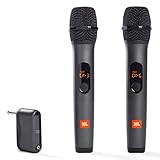
- HIGH Vocal Quality & JBL Original Pro Sound - The crystal clear clarity of JBL wireless microphones means they won't stuck, delay or distort. Your voice will sound on point, with the back of the amazing JBL Original Pro sound.
- RECHARGEABLE DUAL CHANNEL UHF WIRELESS RECEIVER - No need to fly alone, unless you want to take center stage, of course. Connect two wireless microphones together and hear both voices mixed seamlessly through the speaker for up to 6 hours of playback.
- PLUG AND PLAY - When you want to be heard, you want to be heard now. JBL wireless microphones have a super simple setup. Simply turn on the receiver and wireless microphone and you're ready to go instantly.
- MICROPHONES COME WITH REPLACEABLE AA BATTERIES - JBL wireless microphones come with easy-to-replace AA batteries, so put your slot all night long.
Can you make money on Clubhouse?
Possibly, but this should not be the reason most beginners join. Clubhouse documents a creator-rewards system with eligibility requirements that include being at least 18, meeting a minimum Karma threshold, living in a supported country, maintaining good account standing, and completing Stripe identity and payment setup.
Rewards can be placed on hold or reversed, and Clubhouse reserves the ability to change the requirements. The existence of a possible payout does not mean that hosting rooms produces predictable income. If you are interested in monetization, first build a useful community and read the current Rewards FAQ and policies before spending time or money on the feature.
Accessibility, age, and safety
Closed captions
Clubhouse supports closed captioning in live rooms. Its current documentation lists English and several additional beta-supported languages. At the time of the cited help article, live-room captioning was supported on Apple iOS, while Android support was limited to voice messages. This is a documented product limitation that may change, so check the current closed-captioning language and platform information before relying on it for access.
Minimum age
The minimum age generally depends on local law and is usually 13, although some countries impose higher requirements. Clubhouse’s help center also documents additional age-verification requirements in Mississippi, Tennessee, and Texas as of December 10, 2025. Families should check the current local requirements rather than assuming that the general age applies everywhere. See Clubhouse’s age-verification guidance.
Moderation and personal safety
Moderation controls can help, but they are not a guarantee of a safe or high-quality experience. A room can be poorly managed, a speaker can behave inappropriately, and live discussion creates pressure to respond quickly. Start with communities you can evaluate, avoid disclosing sensitive information, and use leave, block, and reporting options when needed.
What’s actually slowing this PC down?
Pick the symptom - the matching free tool is one click away.
Who should join Clubhouse?
Clubhouse is a good candidate if several of these statements describe you:
- You enjoy conversation but do not want to appear on camera.
- You like spontaneous discussion rather than waiting for a polished post or video.
- You want to learn from niche communities, creators, professionals, or subject-matter enthusiasts.
- You are comfortable listening first and speaking when you have something useful to add.
- You want to build a recurring voice-based community or host scheduled discussions.
- You value informal networking and voice-based introductions.
These are fit-based recommendations, not promises that you will find a particular expert, audience, or community. The quality of Clubhouse depends heavily on the Houses and rooms available to you.
Who should skip it or approach cautiously?
Clubhouse may be a poor fit if you:
- Prefer quiet, text-first, or fully asynchronous communication.
- Dislike live social pressure or the possibility of being asked to speak.
- Want every conversation to disappear and never be recorded or analyzed.
- Do not want recommendations influenced by friends, Houses, contacts, or other social connections.
- Need broad Android live-caption support and cannot rely on iOS or voice-message captioning.
- Expect creator rewards to provide reliable income.
- Want a conventional video-streaming workflow rather than live audio.
If notifications and visibility are the main concerns, you can still test Clubhouse with selective follows, a private profile, restricted contact access, and notification changes. If recording or transcript risk is unacceptable, the more honest answer is to skip live social audio rather than assume a privacy setting removes that risk.
A sensible first-week Clubhouse plan
- Day one: listen only. Join several rooms in different subjects. Notice which formats you enjoy: interviews, panels, informal hangouts, or focused discussions.
- Day two: clean up discovery. Unfollow irrelevant recommendations, review your notification settings, and avoid adding people simply because they appeared in a room.
- Day three: try Search. Look for one specific person, topic, or House instead of browsing passively.
- Day four: join one promising House. Check its member activity and events before joining several communities.
- Day five: participate carefully. Raise your hand in a room where you understand the topic, mute until called on, and make one concise contribution.
- Day six: evaluate privacy. Decide whether your profile should be private, whether contact syncing is worthwhile, and whether the platform’s recording and transcript practices are acceptable to you.
- Day seven: decide whether to stay free. Do not buy Clubhouse Plus or Coins until the free experience has demonstrated a clear benefit.
If you eventually host, a House event can provide a more organized format than an improvised room. Use a clear title and description, schedule a realistic time, choose cohosts carefully, and decide whether a replay is appropriate before enabling it.
Recommended Free Tools
Also popular on Amazon

- 【Clear Vocal Pickup & DSP Noise Reduction】Designed as wireless microphones for singing, the dynamic cardioid capsules focus on your voice while reducing surrounding noise. Built-in DSP noise reduction helps each wireless microphone deliver clear, natural vocals for karaoke, speeches, church, weddings and parties.
- 【Dual All-Metal Two-Tone Microphones】These dual wireless microphones feature durable all-metal bodies for a solid, balanced feel in the hand. Each wireless microphone comes in a contrasting color, making the pair easy to tell apart during duets, karaoke and group performances.
- 【Stable 2.4GHz One-to-One Pairing】Each wireless microphone uses an independent 1:1 connection with the receiver for stable 2.4GHz transmission, low latency and reduced interference. The wireless microphones connect automatically after power-on with no Bluetooth, app or manual pairing required.
- 【200FT Wireless Range & Plug and Play】These wireless microphones for karaoke provide up to 200 ft (60 m) of stable range in an open, unobstructed environment. Simply connect the receiver and power on each wireless microphone for easy use at home, on stage or at parties.
- 【Real-Time LCD & Independent Volume Control】Each wireless microphone features a clear LCD showing battery level and operating frequency in real time. Both wireless microphones have separate +/− volume controls, giving each singer independent control during karaoke microphone use.
How to delete your Clubhouse account
You can deactivate an account from profile settings. Clubhouse states that you can reactivate it by logging in during a 30-day period. After that period, the account and user data are permanently deleted, and a permanently deleted account cannot be restored. If you are undecided, deactivate first only if you understand the 30-day window; do not assume that deleting the app from your phone deletes the account.
For the current process and retention details, use the official Clubhouse account deactivation and deletion instructions.
Frequently Asked Questions
Do I need an invitation to join Clubhouse?
No. The original invitation-only period is over. Clubhouse is currently distributed as a mobile app for iPhone and Android, although phone verification, device, country, and age requirements can still affect sign-up.
Is Clubhouse free?
You can join and listen to ordinary rooms for free. Clubhouse Plus and Coins are optional in-app purchases, and prices or availability may vary by country, store, account, and date.
Are Clubhouse conversations private?
Not automatically. Eligible House rooms may have replays, Clubhouse may record rooms for trust-and-safety investigations, and it may generate transcripts for personalization in some public rooms. Avoid sharing confidential or sensitive information.
Can I use Clubhouse without speaking?
Yes. Listening is a central part of the experience. You normally enter as an audience member and can raise your hand only when you want to request the stage.
What happens after I delete my Clubhouse account?
Clubhouse provides a 30-day reactivation period after deactivation. After that period, the account and user data are permanently deleted and the account cannot be restored.
The Bottom Line
Bottom line: Try Clubhouse, but set boundaries first. Join through the official mobile app, follow selectively, listen before speaking, reduce notifications, use privacy controls when appropriate, and treat every live conversation as potentially recordable. Stay with the free experience until a specific community or feature proves valuable; Clubhouse is useful for the right live-audio user, but it is not an essential network for everyone.
Do these 3 things before closing this tab:
1Clear out junk files and repair common Windows errors2Fix the driver behind crashes, sound loss and screen glitches3Repair Windows errors before they cause bigger problems
