
Generally, no: don’t use a SATA-to-PCIe or Molex-to-PCIe adapter as a substitute for the graphics card’s intended PSU cable. A plug fitting the card does not establish that the adapter, PSU cable, or power path can safely meet the card’s requirements. Use the GPU’s specified power connector with a compatible PSU cable, and check the manuals for both devices.
Why SATA and Molex adapters aren’t a safe default
SATA and peripheral Molex connectors are not the PSU’s intended PCIe graphics-card connections. Converting one to a GPU plug does not change the limits of the connector or establish that the PSU’s wiring and power delivery are suitable for the card.
Corsair’s guidance lists a maximum current rating of 5 A for SATA or peripheral Molex connectors, equating to 60 W at 12 V and 25 W at 5 V. These are connector limits, not a guarantee that a particular adapter can safely supply a particular graphics card. They also do not establish a failure rate for adapters. [Corsair’s connector guidance, updated December 19, 2024]
For comparison, Corsair lists a PCIe 6-pin GPU connection at 75 W and an 8-pin connection at 150 W. The connector’s rating alone is not enough to determine whether a PSU is suitable: the card’s requirements and the PSU’s specifications and cabling matter too.
Do these 3 things before closing this tab:
1Scan for outdated or missing drivers - takes under a minute2Repair Windows errors before they cause bigger problems3Fix the driver behind crashes, sound loss and screen glitches#1 Best Overall
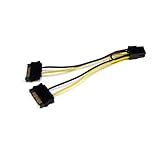
- SATA PCI EXPRESS POWER ADAPTER: 1x 6-pin PCI Express (male) connector to 2x 15-pin SATA (male) connectors; Connect a PCIe Video Card to a Power Supply that is not equipped with a PCIe connector
- SPECS: Cable length: 6.0in (15.2cm); Wire Gauge: 18AW; Connector Plating: Gold; Jacket Material: PVC; Color: Black; Connector(s): 2x SATA Power (15 pin), 1x PCI Express Power (6 pin, v 1.x)
- THE IT PRO'S CHOICE: Designed and built for IT Professionals, this SATA to PCI Express video card power adapter cable is backed for life, including free lifetime 24/5 multi-lingual technical assistance
Use the GPU’s specified PCIe power cable
Check the exact graphics-card model’s power-connector and PSU requirements, then check the PSU model’s manual for its native PCIe cables, rail capacity, and restrictions. Don’t infer the card’s needs from the adapter or from a similar-looking GPU.
A common GPU cable is a 6+2-pin PCIe connector. ASUS says to connect the PSU-labeled end to the PSU and the 6+2-pin end to the graphics card. Modular PSU cables are not automatically interchangeable between units: follow the exact PSU manual. Corsair specifically says to use only cables provided by Corsair for its PSU products. [ASUS modular PSU cable connection guide] [Corsair’s cable and connector guidance]
Rank #2

- 『SATA to 8 Pin GPU Power Adapter』The SATA to 8 Pin GPU Power Adapter provides a convenient and efficient solution for converting your SATA power connector into the 8-pin/6-pin PCIe GPU power connector, SATA connector is designed to power the PCIe graphics card from an older PSU, eliminating the need for a new power supply unit;
- 『Wide Compatibility』 Compatible with various GPUs, this adapter supports both SATA to 8 Pin PCIe and SATA to 6 PCIe connections, ensuring compatibility with a wide range of graphics cards;
- 『Parameters』Length(including connectors): 9-inch(23cm), Gauge: 1007-18AWG(standard tin-coating copper wire), Quantity: 2pcs, Rated power: 300W, Self-adhesive tape*1pcs;
- 『Durable and Reliable』Crafted with high-quality materials, this SATA to 8 Pin GPU Power Adapter ensures a secure connection and long-lasting performance, making it an essential accessory for your PC setup;
- 『Note』Please check the specifications of your graphics card and PSU for power requirements,and make sure that both ends of the cable fit your devices;
Don’t confuse SATA or Molex adapters with 6-pin-to-8-pin adapters
NVIDIA’s advice about 6-pin-to-8-pin PCIe adapters addresses a different conversion; it is not an endorsement of SATA-to-PCIe or Molex-to-PCIe adapters. NVIDIA says not to use an adapter that combines two 6-pin plugs into one 8-pin plug because it could damage the computer. It also advises against converting one 6-pin plug to one 8-pin plug, since many PSUs may not provide enough current.
NVIDIA gives a narrow caveat for the single-6-pin case: only if the PSU manual confirms that the 6-pin PCIe rail can handle the 150 W rating. Its recommended solution is to use a PSU with a native 8-pin power cable. That conditional guidance applies to the specific PCIe-to-PCIe conversion, not to peripheral-connector adapters. [NVIDIA Support’s 6-pin-to-8-pin guidance, updated September 29, 2021]
Rank #3

- PCI express power cable adapter connects a PCIe video card with an 8-Pin or 6-Pin PCIe connection to a power supply with a SATA power connection
- PSU upgrade saver power cable provides an option for a power supply without a PCIe connection for GPU power; a SATA connector is designed to power a PCIe video graphics card from an older PSU via a 6-Pin or 8-Pin PCIe connection
- 8 pin PCIe to 15 pin SATA female to male cable provides a convenient solution for video graphics card power with SATA connector for GPU cards that require more power
- Sturdy graphics card power cable has a male SATA connector with keyed rails and a female (6+2) Pin PCIe connector with a latch for a secure connection on each end to prevent accidental disconnections
- 6 pin PCIe to SATA cable is compatible with popular graphics cards such as Gigabyte, Radeon, and Sapphire
What to do if the PSU has no required GPU connector
- Identify the exact GPU model. Read its manual or manufacturer specification for the required connector type and count, and its PSU requirements.
- Identify the exact PSU model. Consult its manual and specifications for native PCIe cables, 12 V rail limits, and model-specific restrictions. MSI’s guide explains where to check a PSU’s specifications. [MSI: How to check power supply specification?]
- Connect a compatible native cable. Use the PSU’s intended PCIe cable and connect its ends as described in the PSU manual. For a modular PSU, use only cables confirmed compatible with that exact model.
- Replace the PSU if it lacks the required connector or capacity. Choose a unit that meets the specific card and system requirements and supplies the required native GPU cables; don’t use a SATA or Molex adapter to make an unsuitable PSU appear compatible.
- Pause if compatibility is unclear. Don’t power the card with a guessed adapter. Ask the GPU or PSU manufacturer about the exact model numbers.
How to evaluate a replacement PSU
There is no reliable wattage recommendation for an unspecified build. Once you know the components, compare the requirements against the PSU’s specifications and supplied cables:
- The GPU’s required connector type and number of connectors.
- The GPU and whole-system power requirements.
- The PSU’s 12 V rail limits and other model-specific instructions.
- Whether the PSU supplies the appropriate native PCIe or GPU cable.
- Compatibility of any modular cables with the exact PSU model.
NVIDIA’s workstation guideline gives a scoped example: for a 250 W card with one 8-pin connector, it calls for a dedicated 12 V rail capable of at least 18 A. This is guidance for that stated workstation-card configuration, not a universal PSU-selection formula. The same guideline describes typical ratings of 75 W for a PCIe slot and 150 W for an 8-pin connector. [NVIDIA workstation power guideline DA-07261-001 v11]
Quick Recap
Rank #4

- Use this SATA 15-pin to 6-pin adapter cable to power your graphics card; this is the perfect solution if you don’t have enough PCI-E power connectors to run your graphics card. Please note: Each cable has a maximum power rating of only 54W; please check your device’s power requirements for compatibility before purchasing.
- The 22 cm (approx. 8.66 in.) long connector makes this graphics card power cable ideal for internal cable management.
- Connecting a SATA power extension cable reduces the risk of damaging hard-to-reach and difficult-to-unplug internal connectors, while also reducing the strain on SATA drive or motherboard connectors.
- Connecting a SATA power extension cable reduces the risk of damaging hard-to-reach and difficult-to-unplug internal connectors, while also reducing the strain on SATA drive or motherboard connectors.
- 1-year limited warranty.
Product prices and availability are accurate as of the date/time indicated and are subject to change. Any price and availability information displayed on Amazon at the time of purchase will apply.

