
What’s actually slowing this PC down?
Pick the symptom - the matching free tool is one click away.
Not as a supported drop-in installation. AMD’s Wraith Spire mounting hardware is designed around AMD socket retention arrangements, while an Intel LGA1155 motherboard expects an Intel-compatible cooler mounting system. The reviewed manufacturer guidance does not establish a supported Wraith Spire-to-LGA1155 adapter, so do not force the cooler or improvise screws, clips or spacers to hold it down.
Why the Wraith Spire does not directly fit LGA1155
AMD’s Socket AM4 cooler instructions describe two mounting arrangements used by bundled AMD coolers:
- Retention clips: clips hook onto the motherboard’s socket mounting lugs.
- Spring screws: screws align with holes in the AMD backplate.
Those instructions are based on Socket AM4. Intel’s LGA1155 installation guidance describes its own processor fan-heatsink mounting process. The two systems use different retention hardware, so a cooler that physically sits over the processor is not automatically mechanically compatible.
There is no manufacturer-supported Wraith Spire-to-LGA1155 adapter established by the available guidance. That means the practical answer is no: treat the Wraith Spire as unsupported for direct installation on an LGA1155 board.
#1 Best Overall
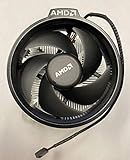
- Supports Motherboard Socket: AM4
- Aluminum heat sink - Pre-applied thermal paste
- 3.81-inch fan
- 4-pin power connector (9-inch length, approximate)
Does the LGA1150/LGA1155 hole match help?
Intel states that “LGA1150 and LGA1155 sockets have the same holes for mounting CPU coolers.” This is useful when choosing an aftermarket cooler: a cooler listed for LGA1150 may also support LGA1155, provided its manufacturer says so and supplies the correct hardware.
It does not make AMD-specific Wraith Spire hardware compatible. Matching holes between two Intel sockets cannot convert AMD retention clips or an AMD backplate arrangement into an Intel mounting system.
What about a homemade or 3D-printed adapter?
A community forum discussion describes a 3D-printed LGA115X-to-AM4 adapter example for a Wraith Prism. That is not a manufacturer-approved or tested Wraith Spire solution, and the result cannot be generalized across Wraith models.
Rank #2

- Supports Motherboard Socket: AM4
- Aluminum heatsink - Pre-applied thermal paste
- Direct screw mounting to socket AM4 motherboard
- 3.5-inch 90mm fan
- 4-pin PWM power connector (9-inch length, approximate)
An improvised adapter would need to provide more than approximate alignment. It would have to maintain safe, even mounting pressure; keep the heatsink flat on the CPU; clear the socket, capacitors and memory; withstand heat; and avoid damaging the motherboard or processor. The available material provides no validated Wraith Spire design, pressure data, temperature results or safety testing. An adapter might be engineerable in principle, but it should not be treated as a known working upgrade.
Use an LGA1155-compatible replacement cooler instead
Choose a replacement cooler whose manufacturer explicitly lists LGA1155 support and includes the required Intel mounting hardware. A cooler manual that lists Intel LGA1155 support demonstrates the relevant type of product, but availability and current product status must be checked separately.
Compatibility checklist
- Confirm “LGA1155” appears in the cooler’s official specification or installation manual.
- Check that the box includes the LGA1155 bracket, push-pins, screws, backplate or other required hardware.
- Verify the cooler’s height against the case’s CPU-cooler clearance limit.
- Check for interference with tall RAM modules, motherboard heatsinks and the graphics card.
- Match the cooler’s rated capacity and design to the actual LGA1155 processor and its intended power limits.
- Confirm the fan connector is suitable for the motherboard, normally a 4-pin CPU-fan header for PWM control.
Wraith Spire versus a suitable LGA1155 cooler
| Check | AMD Wraith Spire on LGA1155 | LGA1155-compatible replacement |
|---|---|---|
| Manufacturer-supported socket fit | Not established | Must be explicitly listed by the cooler manufacturer |
| Mounting hardware | AMD retention hardware; Intel compatibility not established | Intel LGA1155 hardware should be included or specified |
| Intel LGA1150 cross-compatibility | Does not apply to AMD mounting hardware | May help if the manufacturer lists LGA1150 and confirms the shared hole pattern |
| Validated adapter or performance data | Not established | Use the manufacturer’s installation documentation and specifications |
Safe installation path
- Remove the existing cooler according to the motherboard or cooler instructions, supporting the board and avoiding excessive force.
- Clean old thermal compound from the processor and cooler contact surface with an appropriate electronics-safe cleaner.
- Install only the mounting bracket or backplate specified for LGA1155 by the replacement cooler’s manual.
- Apply thermal compound as directed by that cooler’s instructions.
- Secure the cooler evenly in the prescribed sequence; never substitute random screws or washers.
- Connect the fan to the CPU-fan header and confirm that the fan starts and the motherboard reports a CPU-fan signal.
- Check temperatures and system stability under the processor’s normal workload before relying on the system.
Bottom line for this specific combination
The AMD Wraith Spire is not a supported drop-in cooler for an Intel LGA1155 motherboard based on the AMD and Intel installation guidance reviewed. The shared LGA1150/LGA1155 Intel hole pattern is relevant when selecting an Intel-compatible replacement, not when adapting AMD Wraith hardware. Unless you have a separately validated design with proven mounting pressure, clearance and thermal safety, replace the Wraith Spire with a cooler that explicitly supports LGA1155.
Quick Recap
Product prices and availability are accurate as of the date/time indicated and are subject to change. Any price and availability information displayed on Amazon at the time of purchase will apply.

