
The Tool Desk
Outbyte PC Repair FREERepair Windows errors before they cause bigger problemsFix Now →Outbyte Driver Updater FREEFix the driver behind crashes, sound loss and screen glitchesFind Drivers →iTechGuides is reader-supported. When you buy through links on our site, we may earn an affiliate commission. As an Amazon Associate I earn from qualifying purchases. Learn more
The best wall mount for an 85- to 90-inch television is the one whose published weight limit, VESA pattern, screen-size range and wall hardware all match your specific TV. For most centered seating, a low-profile or tilting mount is easier to level and keeps a very large screen close to the wall. Choose full motion when viewers sit far off center, you need to reach rear ports, or the screen must swivel toward more than one seating area.
Among the models documented for this size range, the SANUS VLT7-B2 is the strongest tilting choice, SANUS BLF228 is the most capable documented full-motion option, and ECHOGEAR EGLF2 is a full-motion alternative. Treat those as starting points, not automatic matches: check the television’s weight without its stand, its exact VESA hole spacing, the wall construction and the hardware supplied for that wall before ordering.
Quick comparison
| Mount | Movement | Published TV range | Published load information | Published fit information | Best use |
|---|---|---|---|---|---|
| SANUS VLT7-B2 Advanced Tilt 4D Premium TV Wall Mount | Tilt | 42–90 inches, according to SANUS’s VLT7 catalogue entry | Up to 68 kg, as reported by TechRadar in 2026 | VESA 200 × 200 to 600 × 400 mm; about 53 mm from the wall, according to TechRadar | A large screen mounted near the wall with glare control or a high position |
| SANUS BLF228 | Full motion: tilt, swivel, extension and leveling | 42–90 inches, according to SANUS | Up to 150 lb on SANUS’s current product page | Confirm the exact VESA limits for your regional listing | Corner seating, multiple viewing angles and rear-port access |
| ECHOGEAR EGLF2 | Full motion: swivel, tilt and extension | 42–90 inches, according to ECHOGEAR | Verify the current listing’s load rating | ECHOGEAR describes broad VESA compatibility; verify the exact pattern before purchase | A second full-motion option when its current specifications match your TV |
Screen-size labels are only a first filter. A 90-inch television can fall outside a mount’s load or VESA limits even when the diagonal size appears correct. Use the specifications printed in the TV manual and the current mount listing, not a retailer’s generic “fits large TVs” wording.
What to check before choosing a mount
1. Television weight without the stand
Remove the stand from the number you use for compatibility. The mount supports the television itself, not the shipping weight and not the combined weight of the stand, packaging or accessories. Write down the exact mass from the TV’s specification sheet, then compare it with the mount’s rated capacity. Do not assume that two televisions of the same diagonal size weigh the same.
Popular on Amazon
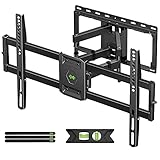
- Universal Design: This full motion TV mount fits for most of 42-90 inch TVs up to 132lbs with VESA size 200*100mm to 600*400mm available and max 16" Wood Stud space. Not perfect fit your TV? Please contact us and we'll do our best to solve the problem for you! If you need the screw M8*50, please message us to get it which be sent from USA.
- Adjustable View Comfortable : This TV bracket with dual articulating arms includes +5° /-15° tilt, ±45°swivel( maximum swivel angle depends on your TV). Want to more swivel angle? Please search for XML035 for the best options. +/-3° post-installation adjustment allows the perfect TV leveling. All these will make your TV flexibility and better view based on your seat in the room.
- Easy To Installation: Tilt mount with detailed instruction and all included hardware in pre-labeled bags. In particular, if your stud is for 16'' wood studs, please screw the bolts into the outermost edge of the holes on both side wall plates of the bracket to ensure compatibility with 16'' wood studs.
- Saving Space: This heavy duty mount can pull out to 16.49 and retract back to 2.40”, which save some valuable space for you and make your house look neat and Max weight 132lbs.
- Product Includes: The articulating mount Comes with bubble level, 3 pieces pack of cable ties and all standard mounting hardware, friendly US-based customer service. However, Concrete Anchors are not provided (If you need 10X50mm concrete anchors, please contact us to get it which be sent from USA).
Leave a safety margin rather than treating the rating as a target. The wall, fasteners and the mount’s moving arms must all carry the load. A full-motion arm also creates leverage when extended, so a borderline match is a poor choice even if the static numbers appear close.
2. VESA hole pattern
VESA dimensions are the horizontal and vertical distance between the threaded mounting holes on the back of the television, measured in millimetres. Record both dimensions, such as 600 × 400 mm, and check that the mount explicitly supports that combination. Do not infer compatibility from the screen size or from the number of holes.
Use the television’s manual when the rear panel is recessed or the holes are hidden behind a cover. Spacers may be required for a recessed back, but they must be used only as described in the mount instructions so the screws engage safely without bottoming out or damaging the panel.
Outdated Drivers Are Slowing You Down
One free scan finds every outdated or missing driver and matches the right update for your exact hardware.Free scan · exact hardware matchPC Slower Than It Used to Be?
A free scan shows the junk files, broken settings and background clutter dragging Windows down - then fixes them in one click.Free scan · Windows 10 & 113. Wall construction
Identify whether the mounting surface is wood-stud framing, steel studs, concrete, brick or another masonry material. A very large TV magnifies the consequences of a missed stud or an incorrectly selected anchor. Locate the load-bearing structure before drilling. For masonry, use anchors and fasteners rated for that specific material and load; do not substitute drywall plugs.
If the wall is covered by tile, stone, a thin decorative panel or unusually deep drywall, account for the extra thickness when selecting screw length and drilling bits. When the construction is uncertain, have a qualified installer inspect it rather than guessing from the surface appearance.
Also popular on Amazon

- STURDY TV WALL MOUNT BRACKET: Fits for most of 37-90"TVs; Support TV up to 132 lbs; Fit wood stud spacing 8", 12", 16", compatible with wood stud, solid brick or concrete wall
- VESA Standard: Fits for TV VESA sizes 200*100 mm,200*200 mm, 200*300 mm ,300*200 mm, 300*300 mm, 400*200 mm, 400*300 mm, 400*400 mm, 600*400 mm
- ADJUSTABLE VEIW ANGLE: This full motion tv wall mount with +5°/-15° tilt to reduce glare; Swivel tv mount with +/-45° swivel(max swivel angle depends on screen size); Level adjusts +/-4° for maximum viewing flexibility
- SAVING SPACE: Dual articulation arm design ensures reliable strength; This articulating tv mount can retract 2.52 inch from the wall in home position to save space and also extends up to 16.61 inch from the wall; With cable ties manage TV cables
- EVERY SPACE, PERFECTLY MOUNTED: Living room, bedroom, kitchen, study, patio, home gym, kids' room, conference rooms, lobbies, showrooms, retail stores, restaurants, commercial gyms, waiting rooms; your screen is always at your service
4. Required movement
Choose the least movement that solves the room’s problem. Fixed or tilting designs put less leverage on the wall and generally sit closer than articulated arms. Full motion adds extension and swivel, but the arm must be level, securely attached and kept within its operating limits.
Which movement style fits your room?
Fixed or low-profile mounting
A fixed mount is appropriate when one main seating position faces the wall and the screen can be installed at the correct height without glare problems. Its short projection reduces the visual gap and leaves less hardware to adjust. The trade-off is that you cannot angle the panel after installation, and rear ports become difficult to reach.
Tilting mounting
A tilting mount is the practical middle ground for many 85-inch installations. It helps aim the screen downward when the television is mounted higher than eye level and can reduce reflections from ceiling or window light. The VLT7-B2 is documented for 42–90-inch televisions, up to 68 kg, VESA patterns from 200 × 200 through 600 × 400 mm and approximately 53 mm of wall distance. Those figures are attributed to TechRadar’s 2026 report; confirm the current regional listing before purchase.
Tilt does not provide side-to-side viewing. If a sofa sits at a substantial angle to the wall, a tilting mount may leave the image visibly off-axis and make cable access inconvenient.
Full-motion mounting
Full-motion mounts combine tilt with horizontal swivel and forward extension. They suit corner seating, open-plan rooms with more than one viewing direction and installations where you need to pull the television forward to connect a cable. Extension also gives access to rear connectors without removing the television.
Also popular on Amazon

- Fit Check Before Purchase: Perlegear universal TV wall mount fits most flat and curved TVs with 1. TV Size: 42″–90″; 2. Weight: Up to 132 lbs; 3. VESA Pattern: 200×100mm to 600×400mm; 4. Wall Type: 8", 12", or 16" wood studs, concrete, or brick walls. NOT for drywall alone. If your stud spacing exceeds 16″, please contact us for an extension bracket that supports studs spaced up to 24″ apart. The TV mount is compatible with all major brands, including Samsung, LG, Sony, Vizio, and more.
- Built for Stability: This 75 inch TV wall mount is UL-listed, keeping your large screen securely mounted. Engineered for dependable strength, it is tested to withstand 60,000 motion cycles and 4x the rated load for long-lasting performance. The precision robot-welded bracket features 30% thicker arm, a reinforced wall plate, solid steel shaft, double-layer hooks, security locks, and anti-drop edges to support TVs up to 132 lbs with lasting stability and security while helping keep it out of reach of kids and pets.
- View from Any Angle: Built with solid steel bearings and precision washers at every joint, this full-motion TV Wall mount provides smooth +/-50° swivel for easy screen adjustment. Tool-free +5°/-15° tilt helps reduce glare, and +/-3° post-install leveling lets you fine-tune the TV for a perfectly aligned position. Whether you are binge-watching on the sofa, cooking in the kitchen, or hosting a game day party, this full-motion mount ensures you find the most comfortable viewing angle from anywhere in the room.
- Space-Saving, Clean Look: Create a sleek, floating-TV look in any room. This swivel TV wall mount extends 16.6" to bring the screen closer for a more immersive view or provide easy access to rear ports for quick cable changes. It retracts to a 3" low profile for a clean, space-saving finish. The open wall plate fits around an in-wall cable management kit, while the included cable ties help keep cords neat and keep your space clutter-free.
- Easy to Install: The 65 inch TV wall mount includes a bubble level, detailed instructions, pre-labeled hardware, a drilling template, and wall anchors for concrete or brick installation. It is designed to simplify setup and make installation easier, even for first-time installers. If any hardware is missing or needs replacement, please contact us for assistance. Perlegear offers 5-year product services and responsive U.S. based customer service to help with any questions.
The cost of that flexibility is mechanical leverage. When the arm is extended, the load is farther from the wall, so stud or masonry attachment, correct fastener length and careful leveling matter more than they do with a close-to-wall bracket. Keep cables long enough for the full movement range, but route them so they cannot snag or pull on the ports.
Do these 3 things before closing this tab:
1Repair Windows errors before they cause bigger problems2Fix the driver behind crashes, sound loss and screen glitches3Clear out junk files and repair common Windows errorsRecommended mounts in detail
SANUS VLT7-B2: best documented tilting option
SANUS lists the VLT7 family for 42–90-inch TVs. TechRadar reported a 68 kg maximum capacity, VESA support from 200 × 200 to 600 × 400 mm and roughly 53 mm of wall clearance for the VLT7-B2 in 2026. The exact commerce name to search is “SANUS VLT7-B2 Advanced Tilt 4D Premium TV Wall Mount.” Model suffixes and included parts can vary by region, so match the listing to your country and compare it with your TV’s specification sheet.
This model makes the most sense when the screen will stay aligned with one seating zone, the mounting position is high enough to need downward aim, or reflections are the main issue. Before buying, verify that your television’s VESA pattern falls inside the published range and that its stand-less weight is below the stated limit.
SANUS BLF228: best documented full-motion option
SANUS lists BLF228 for 42–90-inch flat-panel TVs up to 150 lb. The product description includes tilt, swivel, extension and leveling functions, covering the main reasons to select an articulated mount. SANUS also states: “Part of our UL testing procedure includes loading 4 times the rated weight capacity of the TV mount and verifying it passes safety standards.” That is a description of SANUS’s testing procedure, not permission to exceed the 150 lb rating.
Use BLF228 when the room requires side-to-side aiming or frequent access to rear ports. Confirm the current listing’s VESA range, supplied bolt sizes and wall-hardware instructions for your region; the 42–90-inch label and 150 lb figure do not by themselves establish that every 90-inch model fits.
What’s actually slowing this PC down?
Pick the symptom - the matching free tool is one click away.
Also popular on Amazon

- [Sturdy and Safe] You can relax knowing your TV is securely mounted to the wall with this UL-certified TV wall mount, which holds up to 132 lbs without a hitch. Its solid design keeps your TV steady, no wobbling or slipping here! Plus, we’ve got you covered with 10 years of support for this product.
- [Securely Supports TVs Up To 90 Inches] The VESA compatibility of up to 600x400mm ensures a seamless fit with most standard mounting patterns. Designed for 24-inch studs, it offers enhanced flexibility in installation options. This versatility makes it ideal for accommodating various room layouts and TV configurations.
- [Low Profile Design] This design allows your TV to be positioned close to the wall, optimizing space while creating a sleek and modern aesthetic. Despite its slim profile, the mount features a quick release mechanism that facilitates effortless adjustments and connections.
- [Tilt TV to Reduce Glare] The wall mount enables you to tilt your TV forward by up to 10 degrees, effectively reducing glare and enhancing viewing quality.
- [Easy Installation] The package includes all necessary hardware along with clear instructions. A paper template for marking drill holes would have been beneficial. Tips: Do not attempt installation into drywall alone; if concrete anchors are required, please contact us.
ECHOGEAR EGLF2: full-motion alternative
ECHOGEAR describes EGLF2 as a 42–90-inch full-motion mount compatible with major brands and broad VESA patterns. It provides swivel, tilt and extension, so it addresses the same room layouts as BLF228. Because the documented material does not specify one universal load rating or a complete VESA table, check the current EGLF2 listing for those two values and compare them with your television before ordering.
How to measure and verify compatibility
- Record the television model. Use the model number from the rear label or system menu so you consult the correct manual and regional specification sheet.
- Find the stand-less weight. Note the mass in the manufacturer’s technical specifications. If two values are shown, use the television-only figure rather than shipping or packed weight.
- Measure VESA spacing. Measure centre-to-centre between the left and right holes and then between the upper and lower holes. Confirm the result in the TV manual, especially if the back panel is recessed.
- Check the mount listing. Compare the exact model and regional suffix with the published screen range, load limit and VESA range. For VLT7-B2, the documented figures are 42–90 inches, up to 68 kg and 200 × 200 to 600 × 400 mm; for BLF228, SANUS states 42–90 inches and up to 150 lb.
- Inspect the wall. Locate studs or identify the masonry type. Check for electrical cables, plumbing and other services before drilling.
- Plan clearance. Measure the television’s depth, the mount’s projection, soundbar height, outlet location and cable bend radius. A screen can technically fit while still blocking a soundbar or making the power plug impossible to insert.
Installation procedure for a large television
Prepare the work area
Use two or more adults capable of controlling the television’s weight; an 85- to 90-inch panel is not a one-person lift. Read the mount manual from start to finish, lay out every washer, spacer and bolt, and protect the screen on a clean, flat surface while attaching the brackets. Do not place pressure on the panel itself.
Mark and attach the wall plate
- Choose the centreline and height from the seated viewing position, then account for the television’s bezel, stand-off distance and any soundbar.
- Use a stud finder or approved masonry method to locate the actual load-bearing points. Mark the holes through the wall plate and verify that the plate is level.
- Drill the diameter and depth specified for the supplied fasteners. For masonry, use only anchors rated for that material and load; for stud walls, drive structural screws into the centre of the studs.
- Tighten the fasteners in the sequence and torque guidance provided by the mount manufacturer. Do not replace structural hardware with convenience screws.
Attach the brackets to the TV
- Match the bracket rails to the measured VESA pattern and select bolts that fully engage the threaded inserts without bottoming out.
- Use supplied spacers when the rear housing is recessed or uneven. Keep the brackets parallel and avoid contact with vents, buttons and cable sockets.
- Check that the release latches or safety locks remain accessible after the television is lifted.
Hang, level and test
- With helpers, lift the television onto the wall plate and engage every hook or latch.
- Confirm the safety locks are closed, then test the built-in leveling adjustment before routing cables.
- Connect power and signal cables with enough slack for the planned tilt or extension. Move the screen slowly through its full range while watching for cable tension.
- Recheck that the wall plate remains level and that every fastener is tight after the first movement test.
Clearance, cable and soundbar planning
Large screens often expose installation conflicts that are invisible on a cardboard template. Measure from the wall to the deepest rear connector, not just to the television’s cabinet. Leave room for the power plug, HDMI connector bodies and any right-angle adapters. A close tilting mount can place a downward-facing cable against the wall; a full-motion mount can pull a cable tight when extended.
Place a soundbar only after checking the television’s lower edge, the mount’s tilt path and the soundbar’s own depth. A bar mounted too close can block downward tilt or strike the screen when the arm retracts. Locate the outlet so the plug can be removed without taking down the television, while keeping mains cables away from pinch points in an articulated arm.
Quick wins for a faster PC:
Scan for outdated or missing drivers - takes under a minuteDriver Scan →Repair Windows errors before they cause bigger problemsFix Now →Fix the driver behind crashes, sound loss and screen glitchesFind Drivers →Common failure modes and fixes
The television does not fit the holes
Re-measure the VESA spacing and check whether the mount supports that exact combination, not merely a nearby size. If the pattern is outside the published range, return the mount or select one explicitly rated for the TV. Do not drill new holes in the wall plate or use improvised adapters.
Also popular on Amazon
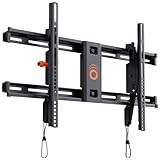
- Supports TVs up to 90": Designed for large screens, this mount can handle TVs up to 90" and 135 lbs. Give your entertainment setup VIP treatment with a sturdy, sleek, and reliable mount.
- Quick & Easy Installation: With a simple 3-step process, pre-divided hardware, and a drilling template, even DIY beginners can install this mount in under 20 minutes. No sweat, all style.
- Perfect Viewing Angle: Tilt your TV up to 10 degrees for glare-free viewing perfection. Whether it’s above a fireplace or in your bedroom, enjoy strain-free watching on the big screen.
- Universal Fit for Major Brands: LG, Sony, Samsung, Vizio, TCL—this mount fits them all! With a wide VESA range and included hardware, your TV is guaranteed to swipe right.
- Post-Install Adjustments: Forgot to level your TV on the first try? No worries! Fine-tune alignment with 5 degrees of post-install leveling for a flawless finish.
The mount feels loose in the wall
Stop using it immediately. Verify that every structural screw reached a stud or that every masonry anchor was installed at the specified diameter and depth. Drywall-only plugs are not a substitute for load-bearing attachment. If a hole is damaged or the wall material is uncertain, have the installation assessed before rehanging the screen.
The screen is tilted or crooked
First verify that the wall plate is level; a bracket-level adjustment cannot correct a plate installed at a severe angle. Then use the mount’s post-install leveling mechanism and check the television from the normal seating position. Tighten adjustment hardware only after the screen is aligned.
Cables pull when the arm moves
Turn off and unplug the system, then create a larger service loop and route it through the mount’s cable-management points. Remove rigid adapters that catch on the arm. If a cable still reaches its limit at full extension, replace it with a suitable longer cable rather than operating the mount against tension.
Glare remains after tilting
Change the tilt in small increments and check the reflection from the main seats. If the light source is behind the viewers or the room requires side-to-side aiming, tilt alone may not solve the problem; reconsider the screen position or a full-motion design.
Safety checks after installation
- Confirm the television is locked onto the wall plate and cannot lift off accidentally.
- Verify that all wall fasteners are tight and seated in the intended structural material.
- Check that no cable is pinched, sharply bent or carrying the television’s weight.
- Move a full-motion arm slowly through its usable range and stop if the wall plate shifts, creaks or pulls away.
- Keep children from pulling on an extended screen and do not hang accessories from the mount.
- Inspect the attachment points periodically, especially after moving furniture or servicing cables.
Availability and specification changes
Prices, stock, retailer bundles and regional model suffixes were not fixed in the available product information. Check the current manufacturer or retailer listing immediately before purchase. Beside any retailer listing, verify the television weight, VESA pattern, wall type, current stock and included hardware. A listing that omits one of those details is not enough evidence for an 85- to 90-inch installation.
Quick Recap
Decision guide
- Choose VLT7-B2 when your TV is within its documented 42–90-inch, 68 kg and 200 × 200 to 600 × 400 mm limits and you need tilt with approximately 53 mm of wall distance.
- Choose BLF228 when you need swivel and extension, and your television is within SANUS’s documented 42–90-inch and 150 lb limits after confirming the current VESA range.
- Consider EGLF2 when full motion is required and the current ECHOGEAR listing confirms its load and VESA specifications for your television.
- Choose a different model when the wall cannot provide a verified structural attachment, the TV exceeds the published load rating, or the VESA pattern is outside the mount’s range.
Product prices and availability are accurate as of the date/time indicated and are subject to change. Any price and availability information displayed on Amazon at the time of purchase will apply.

