
iTechGuides is reader-supported. When you buy through links on our site, we may earn an affiliate commission. As an Amazon Associate I earn from qualifying purchases. Learn more
For one box that can control both Zigbee and Z-Wave devices locally, Hubitat Elevation C-8 Pro is the clearest fit. It has built-in Zigbee and regional Z-Wave radios, and its product information also lists Matter 1.5, Thread, Z-Wave Long Range and Bluetooth capabilities. If you prefer an open platform, Home Assistant Green provides free local software, but you must add the appropriate radio hardware: Connect ZBT-2 for Zigbee, Thread and Matter, plus a separate Z-Wave controller. Aeotec Smart Home Hub is a sensible option for an existing SmartThings setup only after you verify the exact model and Z-Wave region.
“Subscription-free” means the core hub can run without a mandatory monthly plan. Optional services such as cloud backups, remote administration, voice integrations or extended support may still cost extra. The table and decision guide below separate built-in radios, local operation, expansion requirements and recurring-cost boundaries so you can choose without buying incompatible hardware.
What does “subscription-free” mean for a smart home hub?
A subscription-free hub gives you local device control and automation without requiring a recurring payment to keep basic routines running. That does not mean every feature is free: vendors can charge for optional remote access, cloud storage, backups, voice services or support extensions.
Windows Errors? Fix Them Before They Spread
Repair common Windows errors and clear accumulated junk for a smoother, more stable PC - no reinstall needed.Free scan · no reinstallOutdated Drivers Are Slowing You Down
One free scan finds every outdated or missing driver and matches the right update for your exact hardware.Free scan · exact hardware match- Core local control: automations and device commands are processed on the hub or on your local network.
- Optional cloud features: remote administration, secure off-site backups, extended warranties and some voice services can remain paid add-ons.
- Internet outage behavior: local routines can continue when the internet is unavailable, but cloud-dependent integrations and remote access will not.
- Hardware costs: a “free” software platform can still require USB radios, coordinators or a dedicated computer.
Home Assistant’s official FAQ states that “The full software is free, forever” (Home Assistant FAQ). Hubitat likewise describes optional subscriptions for extended warranty, secure cloud backups and remote access rather than a mandatory fee for local hub operation (Hubitat Hubs).
Popular on Amazon

- LOCAL PROCESSING FOR INSTANT RESPONSE: The Hubitat Elevation C-8 Pro runs automations directly on the hub, not on remote servers, so lights, locks, thermostats, and routines keep working even when your internet goes down; this local-first architecture delivers near-instant response to every trigger without relying on remote servers to process commands; compatible with 1,000+ devices across 100+ brands, and device data stays at home for enhanced privacy
- WORKS WITH ALEXA, GOOGLE HOME, AND APPLE HOMEKIT: Connect your preferred voice assistant and start controlling your smart home from day 1; the C-8 Pro is compatible with Amazon Alexa, Google Home, and Apple HomeKit, so your existing ecosystem works alongside the hub without compromise; Ring camera integration adds a concrete layer of security awareness; approachable setup is supported by step-by-step documentation and an active online community ready to guide you through every stage
- MULTI-PROTOCOL SUPPORT WITH EXTENDED RANGE: A single hub covers Matter 1.5, Z-Wave 800 Series with Long Range, Zigbee 3.0, and Bluetooth, so existing devices stay compatible without extra bridges or adapters; 800 Series Z-Wave and Zigbee 3.0 deliver improved reliability and mesh stability, backed by Z-Wave Alliance membership; 2 dedicated external antennas, one for Z-Wave and one for Zigbee, extend wireless reach in larger homes and device-dense environments where signal consistency is critical
- AI-ASSISTED AUTOMATION AND ADVANCED RULE ENGINE: The AI-assisted routine builder suggests and builds automations based on your connected devices, no programming required; Rule Machine enables multi-condition logic across lighting scenes, geofenced arrivals, layered security responses, and whole-home scheduling; when your family arrives after dark, the hub can unlock the door, activate pathway lights, and adjust the thermostat, turning complex sequences into reliable hands-free routines
- NO SUBSCRIPTION REQUIRED AND CONTINUOUS UPDATES: Full platform functionality needs no recurring subscription; every automation, integration, and advanced feature is available from setup; continuous platform updates since 2018 have expanded compatibility without requiring new hardware; an active community of tech-savvy homeowners and DIY smart home builders shares custom apps, drivers, and automation blueprints for ongoing value; compact at 3.23 x 2.95 x 0.67 in and just 0.16 lb, it fits anywhere
Which hub supports Matter, Zigbee and Z-Wave in one box?
Hubitat Elevation C-8 Pro is the simplest documented all-in-one choice for a mixed Zigbee and US-frequency Z-Wave network. Hubitat lists internal Zigbee and Z-Wave radios, along with Matter 1.5, Thread, Z-Wave Long Range and Bluetooth capabilities on its product information page (Hubitat Products).
Why the C-8 Pro fits mixed-device homes
- No radio dongle for the main protocols: Zigbee and Z-Wave are integrated into the hub, reducing adapter selection and USB-placement issues.
- Local automation: Hubitat positions its platform around local processing, so ordinary rules do not depend on a vendor cloud account or an active internet connection.
- Modern protocol coverage: Matter support addresses newer cross-platform devices, while Thread capability is relevant to Matter-over-Thread products.
- Regional Z-Wave qualification: Z-Wave radios are frequency-specific. Confirm that the listing is intended for your country before pairing devices.
Hubitat’s optional services are separate from the hub’s local operation. The company says subscriptions can add an extended warranty, secure cloud backups or remote access to the administrative interface (Hubitat Hubs).
Who should choose it?
Choose the C-8 Pro when you already own, or plan to buy, both Zigbee and Z-Wave sensors, locks, switches or thermostats and want one appliance rather than assembling a software server and several radio adapters. It is less attractive if you want the broadest possible open-source integrations and are comfortable managing separate USB coordinators.
Do these 3 things before closing this tab:
1Scan for outdated or missing drivers - takes under a minute2Repair Windows errors before they cause bigger problems3Fix the driver behind crashes, sound loss and screen glitchesDoes Hubitat work offline?
Local automations are designed to continue on the hub when the internet is down, but cloud-dependent services are unavailable. Rules that rely on a cloud API, remote access or a voice assistant can fail or become delayed during an outage even when local Zigbee and Z-Wave devices remain reachable.
What should remain available locally?
- Rules connecting devices paired directly to the hub.
- Local schedules, scenes and condition-based automations stored on the hub.
- Commands between the hub and its integrated Zigbee or Z-Wave radios.
What may stop working?
- Remote administration from outside your home network.
- Cloud-to-cloud integrations, internet weather data and other online APIs.
- Voice commands that require an external assistant service.
Before depending on an offline routine, keep a local wall control or physical fallback for critical lighting, heating and entry devices. Also check each integration’s documentation: “local hub” does not make an external service local.
Can I run Home Assistant without a subscription?
Yes. Home Assistant’s core software is free forever, and Home Assistant Cloud is optional. Home Assistant Green is the project’s appliance-style hardware, but protocol support depends on the radios you add (Home Assistant Green).
Also popular on Amazon

- Perfect Compatibility: Specially designed wall mount holder for Hubitat Elevation C8, C7 & C5 Automation Hub, ensuring an exact fit and maximum stability.
- Perfect Compatibility: Specially designed wall mount holder for Hubitat Elevation C8, C7 & C5 Automation Hub, ensuring an exact fit and maximum stability.
- Space-Saving Solution: Neatly mount your Hubitat hub onto any wall or vertical surface, freeing up valuable desk or shelf space and keeping your setup organized.
- Enhanced Stability & Protection: Sturdy bracket construction securely holds your Hubitat hub, preventing accidental falls and ensuring optimal performance.
- Proudly Made in the USA!
What Green includes and what it does not
Green provides a ready-to-run Home Assistant installation, making it easier than building a server from separate components. It is not, by itself, a universal Zigbee, Thread, Matter and Z-Wave radio hub. Home Assistant’s hardware guidance recommends Connect ZBT-2 for Zigbee, Thread and Matter, while Z-Wave requires a separate compatible USB adapter or another controller (Home Assistant hardware).
Quick wins for a faster PC:
Clear out junk files and repair common Windows errorsFree Scan →Fix the driver behind crashes, sound loss and screen glitchesFind Drivers →Repair Windows errors before they cause bigger problemsFix Now →What Connect ZBT-2 adds
Connect ZBT-2 is the official radio accessory for Zigbee, Thread and Matter connectivity (Connect ZBT-2). It does not replace a Z-Wave controller. If your device list includes Z-Wave locks, switches or sensors, budget for a compatible Z-Wave USB stick or network controller and verify that its frequency matches your region.
When Home Assistant is the better fit
- You want an open platform with extensive integrations and detailed automation logic.
- You accept selecting, updating and troubleshooting separate radio adapters.
- You want to keep the software free and decide independently whether cloud convenience features are worth paying for.
The trade-off is complexity. You are responsible for USB placement, coordinator firmware, backups and migration if a radio fails. A Green-plus-adapters installation can cover all three protocols, but it is not a single integrated radio appliance.
Which SmartThings hub still supports Z-Wave?
The Aeotec Smart Home Hub is the conditional choice for SmartThings households, provided the exact model is the Z-Wave-capable version for your region. Aeotec’s documentation lists Zigbee, Z-Wave, Matter, Thread and Wi-Fi support for its cited Smart Home Hub model (Aeotec Smart Home Hub; technical specifications).
Why model verification matters
SmartThings hardware names and availability have changed over time. Marketplace listings can use “SmartThings Hub,” “Hub v3” or a newer product name loosely, even when the radio set differs. Confirm the manufacturer, model identifier, included radios and Z-Wave frequency in the technical specification before ordering.
Who should buy it?
It is most convenient when your household already uses the SmartThings app and ecosystem. Starting from scratch, compare its model-specific availability and ecosystem dependence with Hubitat’s integrated local approach or Home Assistant’s expandable architecture.
Also popular on Amazon

- Secure wall-mount solution designed for Elevation C8, C7 & C5 hubs
- Compact, low-profile design keeps your workspace tidy and accessible
- Easy installation with included screws for a quick setup
- Durable, corrosion-resistant construction built to last
- Compatible with standard mounting channels for versatile placement
How do the leading subscription-free hubs compare?
The following comparison uses documented capabilities. Prices are publication-time snapshots, not fixed prices or guarantees of stock.
| Hub or setup | Zigbee | Z-Wave | Matter / Thread | Local operation | Extra hardware | Price snapshot |
|---|---|---|---|---|---|---|
| Hubitat Elevation C-8 Pro | Built in | Built in; verify regional frequency | Matter 1.5 and Thread listed by Hubitat | Designed for local processing | None for the listed core radios | $194.95 on Amazon, checked October 16, 2026, as reported by AEMind (source) |
| Home Assistant Green + Connect ZBT-2 | Connect ZBT-2 | Separate compatible adapter or controller | Connect ZBT-2 | Core software runs locally; Home Assistant Cloud optional | Green, ZBT-2 and Z-Wave hardware as needed | $219.00 for Green on Amazon, checked October 16, 2026, as reported by AEMind |
| Aeotec Smart Home Hub | Built in on the cited model | Built in on the cited model; verify model and region | Matter and Thread listed by Aeotec | SmartThings platform operation; cloud requirements vary by integration | None for the listed radios | $159.99 on Amazon, checked October 16, 2026, as reported by AEMind |
AEMind’s figures are a dated market snapshot, and Amazon prices, stock and exact model listings can change. Recheck the current listing and regional variant before purchase.
How should I choose between Hubitat, Home Assistant and Aeotec?
Choose Hubitat when integrated radios matter most
Hubitat minimizes parts: one appliance supplies Zigbee and Z-Wave, while its product page lists Matter, Thread, Bluetooth and Z-Wave Long Range capabilities. This is the most direct path for a household that wants local routines across both established mesh protocols without maintaining a separate server and USB radio stack.
The Tool Desk
Outbyte Driver Updater FREEFix the driver behind crashes, sound loss and screen glitchesFind Drivers →Outbyte PC Repair FREEClear out junk files and repair common Windows errorsFree Scan →Choose Home Assistant when flexibility outweighs simplicity
Home Assistant is the stronger architectural choice when you want to combine many brands, write sophisticated automations or keep control of the software and data. Green lowers the installation barrier, but you must plan the radio layer. Add Connect ZBT-2 for Zigbee, Thread and Matter; add a separate Z-Wave controller if needed.
Choose Aeotec when you are already in SmartThings
Aeotec’s hub can avoid an ecosystem migration for existing SmartThings users and, on the documented model, supplies the four key radio families. Verify exact hardware and regional Z-Wave support first; do not assume every current “SmartThings” listing has the same capabilities.
What do Matter and Thread require?
Matter is the application standard; Thread is one possible network transport for Matter devices. A hub that advertises Matter support may still need a Thread-capable radio and a compatible border-router arrangement for Matter-over-Thread products.
Also popular on Amazon
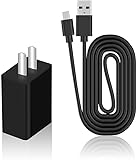
- Product Type: Replacement AC Adapter
- Input: 100–240V 50/60Hz Output: 5V
- Certification: ETL Listed,with FCC certified
- Compatibility: Hubitat Elevation Model C-8 Pro/C-8/ C-7/ C-5 C5 C7 C8 C8pro Home Automation Hub 5.0 Volts Power Supply Cord Wall Plug Charger Cable; Hubitat Elevation Model C-8 Pro, C-8, C-7, C-5 C5 C7 C8 C8pro Home Automation Hub
- Protection: OVP / OCP / SCP
- Matter over Wi-Fi or Ethernet: the controller and device communicate over your home IP network.
- Matter over Thread: you need Thread radio capability and a Thread border router on the network.
- Existing Zigbee or Z-Wave devices: they do not become Matter devices automatically. Keep their native coordinator and use ecosystem integrations or bridges where supported.
For Home Assistant, Connect ZBT-2 is the documented accessory covering Zigbee, Thread and Matter. For Hubitat and Aeotec, confirm the current firmware and device-support status for the specific Matter product you intend to use.
Free tools Windows power users keep installed
One-click scans. No signup required.
Why does Z-Wave region matter?
Z-Wave uses regional radio frequencies, so a hub purchased for one market may not pair reliably with devices intended for another. The same product family can have separate US, European or other variants.
- Identify the country in which the hub will operate.
- Check the listing and manufacturer specification for the Z-Wave frequency or regional model.
- Match every Z-Wave device to that region before opening the package.
- Do not import a cheaper variant unless the seller and manufacturer explicitly confirm compatibility and return coverage.
This check is especially important for Hubitat C-8 Pro and Aeotec listings, where marketplace titles can omit the regional suffix.
How do I set up a subscription-free mixed-protocol hub?
Hubitat Elevation C-8 Pro
- Place the hub near the center of the home, away from Wi-Fi access points and large metal objects.
- Confirm the hub’s regional Z-Wave variant before powering it.
- Connect Ethernet and complete the local hub setup.
- Pair Zigbee devices through the Zigbee settings, then include Z-Wave devices through the Z-Wave inclusion process.
- Add Matter or Thread devices only after confirming the required controller and border-router conditions.
- Create a simple local rule, disconnect internet access briefly and verify that the rule still runs; test critical devices with a manual fallback.
Home Assistant Green
- Connect Green to your network and complete the initial Home Assistant setup.
- Install Connect ZBT-2 according to Home Assistant’s current hardware guidance.
- Choose whether ZBT-2 will provide Zigbee, Thread or both roles for your installation, following the supported configuration.
- Attach a compatible Z-Wave USB adapter or controller if your device inventory requires Z-Wave.
- Pair each protocol through its corresponding Home Assistant integration and label devices by room.
- Configure local automations first; add Home Assistant Cloud only if you need its optional remote or convenience features.
Aeotec Smart Home Hub
- Verify the exact Aeotec model and regional Z-Wave specification.
- Install or update the SmartThings app and hub firmware as prompted.
- Pair Zigbee and Z-Wave devices using the SmartThings device-add flow.
- Check whether each desired Matter or Thread device requires a separate border router or account link.
- Test routines locally and identify which integrations depend on an internet service.
What can go wrong, and how do I recover?
A device will not pair
- Confirm that the hub supports the device’s protocol and that the device is reset for inclusion.
- For Z-Wave, check regional frequency and exclude the device from any previous controller before retrying.
- For Zigbee, move the device closer during pairing, then relocate it after the mesh has established routes.
- For Matter, confirm that the controller, network and Thread border-router requirements are satisfied.
Automations stop during an internet outage
Separate local device rules from cloud integrations. Replace a cloud trigger with a local sensor or schedule where possible, and keep physical controls for essential functions.
The hub becomes difficult to maintain
Document your device names, room assignments and automation dependencies. Back up configuration using the platform’s available method; remember that cloud backup is optional on Hubitat and Home Assistant Cloud is optional for Home Assistant, but a backup still requires a safe storage location.
A listing does not match the advertised radios
Stop before pairing devices. Compare the model number, radio list and regional specification with the manufacturer page. Return or exchange an incorrect variant rather than attempting to compensate with unsupported adapters.
Also popular on Amazon

- Output Voltage: DC 5V; Input Voltage: AC 100-240V, 50/60Hz; Connecter Size: Micro USB + USB-C (Refer to the pictures)
- 5V Micro-USB + USB-C AC/DC Adapter Compatible with Hubitat Elevation Model C-8 Pro, C-8, C-7, C-5 C5 C7 C8 C8pro Home Automation Hub
- Features: Low interference and noise. Advanced technology and high quality. High efficiency and reliability
- Safety& Reliability: PowerHOOD products has been tested many times for providing protection, featuring overcharging, overheating, overvoltage and short circuit protection, which will charge your devices efficiently and keep you and your devices safe
How much should I budget?
The dated prices below are useful for relative planning, not a promise of today’s checkout total:
- Hubitat Elevation C-8 Pro: $194.95 on Amazon in AEMind’s October 16, 2026 snapshot.
- Home Assistant Green: $219.00 in the same snapshot, before adding Connect ZBT-2 and any Z-Wave adapter.
- Aeotec Smart Home Hub: $159.99 in the same snapshot, subject to model, region, stock and seller.
Home Assistant’s software itself has no subscription charge, but Green, radio accessories and replacement hardware are separate costs. Hubitat’s local hub operation does not require its optional subscription services. Treat remote access, backups, voice control and extended support as line items rather than assuming they are included.
What is the practical verdict?
For a mixed Zigbee-and-Z-Wave home that wants the fewest components and local automation, buy the correctly regional Hubitat Elevation C-8 Pro. Pick Home Assistant Green when open-ended customization is more important than an all-in-one radio set, and budget for Connect ZBT-2 plus a Z-Wave controller. Pick Aeotec Smart Home Hub when SmartThings continuity is the priority, after verifying the exact Z-Wave-capable model.
Frequently Asked Questions
Will smart-home devices still work if the hub company shuts down its cloud service?
Local control depends on the hub and device integration, not merely on the absence of a subscription. Before buying, identify which routines are stored locally and whether the device requires a vendor cloud API; cloud-dependent integrations can fail even when the hub itself remains powered.
Can one home use Zigbee and Z-Wave at the same time?
Yes. A hub can maintain separate Zigbee and Z-Wave networks and expose both to one automation engine. Each network still needs compatible devices, its own pairing process and adequate mesh coverage.
Do Matter devices replace Zigbee and Z-Wave devices?
No. Matter is an application standard, while Zigbee and Z-Wave devices continue using their native protocols. A multi-protocol hub can automate them together, but existing devices do not acquire Matter support automatically.
Is a USB Z-Wave stick interchangeable between Home Assistant installations?
Not automatically. Check that the adapter is supported by your Home Assistant integration, uses the correct regional frequency and can be migrated or backed up in the way you expect. Moving a controller may require excluding and re-including devices.
Recommended Free Tools
How can I keep remote access without paying a subscription?
You can use a secure self-managed VPN or another local-network gateway, but that adds configuration and maintenance responsibility. Do not expose a hub’s administration interface directly to the public internet; use the platform’s documented security guidance.

