
Quick wins for a faster PC:
Clear out junk files and repair common Windows errorsFree Scan →Fix the driver behind crashes, sound loss and screen glitchesFind Drivers →Repair Windows errors before they cause bigger problemsFix Now →If you want more Pencil-on-screen friction when writing or drawing but prefer a bare display at other times, start with a removable, model-specific protector. Astropad Rock Paper Pencil is a reusable option that Astropad says attaches with NanoCling; ESR sells magnetic paper-feel protectors for specific iPad configurations. Neither is a substantiated overall winner: check your exact iPad fit, then choose by attachment style, storage and routine.
Which removable paper-feel protector fits your iPad?
Compatibility is the first filter. iPads that look alike may have different generations or display sizes, and product listings do not imply universal fit. On your iPad, open Settings > General > About and identify the model. Match that model and its size against the maker’s current compatibility guide or the exact product listing before buying.
Astropad maintains a model-by-model Rock Paper Pencil compatibility list and warns that the protector must match the right model and size. Astropad also notes that support for newly announced iPads can lag until official device measurements are available, so check the live list rather than relying on an older compatibility summary.
ESR’s compatibility claims are also listing-specific. For example, ESR lists one Paper-Feel Magnetic Screen Protector for 11-inch iPad Pro generations 1–4 and 10.9-inch iPad Air generations 4–5, and a separate protector for the 11th-generation A16 iPad. Those examples do not establish fit for other iPads.
#1 Best Overall

- Compatibility: only for iPad 11" (A16) 2025, iPad 10th Gen 2022, models: A3354, A3355, A2696, A2757, not compatible with any other iPad models
- Convenient Magnetic Attachment: magnetic edges allow for easy attachment to your iPad screen when it’s time to create and quick removal for a flawless view of your original display, while the protective envelope keeps your screen protector safe on the go
- Feels Like Paper: specially treated surface provides a professional-level drawing surface that transforms your tablet into a digital canvas or notebook
- Bubble-free: the convenient magnetic attachment makes it easy to snap on without any air bubbles interfering with your view of the screen
- Works with a Tempered Glass Screen Protector: compatible with a tempered-glass screen protector that is less than 0.33 mm thick and can be used with the magnetic protector without scratching the screen, providing double the protection
How the two attachment styles compare
| Option | Attachment and reuse | What the cited listing supports | Best fit for |
|---|---|---|---|
| Astropad Rock Paper Pencil | Astropad describes NanoCling application using static electricity, and its FAQ describes integrated magnetic edges and snapping the sheet into place for removal and reapplication. Do not treat that mechanism as identical to every magnetic protector. | Astropad describes it as a removable, reusable paper-feel protector paired with Apple Pencil tips. Check its current compatibility guide for your iPad. | Someone who wants a reusable sheet and values the included Pencil tips. |
| ESR Paper-Feel Magnetic Screen Protector for listed iPad Pro and Air models | ESR describes a magnetic attachment process on its product page. | The linked listing specifies 11-inch iPad Pro generations 1–4 and 10.9-inch iPad Air generations 4–5. Confirm the listing still matches your exact device. | Someone whose iPad is one of the configurations named in that listing and who wants the listed magnetic style. |
| ESR Paper-Feel Magnetic Screen Protector for 11th-generation A16 iPad | ESR describes a magnetic attachment process on its product page. | The linked listing is for the 11th-generation A16 iPad; it is a separate compatibility claim, not a general ESR fit guarantee. | Someone with the specifically listed 11th-generation A16 iPad. |
These are sourced product options, not a hands-on ranking. The available product information does not establish controlled head-to-head measurements for Pencil feel, clarity, wear or durability.
What to weigh before choosing
Removal and storage
Think about how often you will take the sheet off and where you will keep it so it stays clean and flat. Astropad’s FAQ says Rock Paper Pencil can be removed and reapplied. Check the instructions for the specific product you buy rather than assuming every removable protector uses the same attachment method or handles repeated removal in the same way.
Rank #2
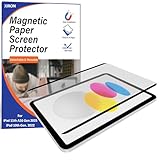
- DESIGNED FOR IPAD 11TH A16 2025/10TH GEN 2022 : Compatible with iPad 11th Gen (A16)2025/iPad 10th generation 2022(10.9-inch ),Fit Models: A2696/A3162/A2757/A2777/A3354/A3355/A3356. Please check your device model before purchasing. NOT COMPATIBLE WITH OTHER IPAD MODELS
- DETACHABLE MAGNETIC PAPER SCREEN PROTECTOR: Magnetic paper screen protectors for iPad 11th A16 generation use upgraded nano suction cups, which can securely attach to the edge of the iPad and provide you with the perfect writing experience. Take it gently to remove the screen protector for iPad 10th 10.9 inch and enjoy the original screen color charm.
- MINIMIZES GLARE & REFLECTIONS : magnetic paper screen protector 10.9" is coated with an anti-glare layer, reduces the light reflection, and releases eye stress from using the iPad under sunshine. It lets you draw, sketch, and write with a vibrant display under strong light.
- WRITES FEEL LIKE ON PAPER: The surface of the magnetic paper screen protector is treated with a 3H hard coating to prevent the surface of the film from being scratched during daily use. The ultra-thin thickness of 0.25mm allows you to write smoothly when using it.
- COMPATIBLE WITH A TEMPERED GLASS SCREEN PROTECTOR : the iPad 10th gen magnetic screen protector is compatible with a tempered-glass screen protector that is less than 0.33 mm thick without scratching the screen, providing double the protection for your iPad.
Pencil feel and display trade-offs
Paper-feel texture is intended to add friction for writing, drawing and annotation. The cited official pages do not provide independent comparative measurements of that feel, nor do they establish a particular protector’s effect on clarity, color or touch response. If those qualities matter to you, assess them on your own iPad and return policy rather than treating a general “paper-feel” label as a measured performance claim.
Case clearance
Astropad says Rock Paper Pencil works with many cases, including some with raised edges, but also says it has not tested every case. Check whether the bezel or case edge presses against the protector in your exact setup. Do not assume case compatibility based on the protector alone.
PC Slower Than It Used to Be?
A free scan shows the junk files, broken settings and background clutter dragging Windows down - then fixes them in one click.Free scan · Windows 10 & 11Crashes, No Sound, or Screen Glitches?
Random freezes, missing sound and display glitches usually trace back to one bad driver. Find and replace yours safely.Free scan · under a minuteRank #3

- Compatibility: Specifically designed for iPad 10th Generation 2022 and iPad 11th Generation (A16) 2025. Only for models: A2696,A2757,A2777,A3354,A3355,A3356.Please check back bottom of your iPad to find the model number. Designed to work seamlessly with Apple Pencil for a responsive and natural writing experience.Packaged with storage tool and cleaning wipe
- Turn Screen to Paper: Transform your iPad into a digital notebook that feels just like pen on paper. Its unique surface provides the perfect amount of resistance for a natural writing experience.Unleash your inspiration and creativity at will
- Upgraded Magnetic Nano Adsorption: With upgraded magnetic nano adsorption technology, it is easier to install or remove. No adhesive, no bubbles, no sliding after installation, no annoying bubbles or residue. Faster to fix the protector firmly on the screen, no natural displacement, write and draw as you like
- Removable & Reusable: After repeated disassembly and reassembly of the adsorption is still solid, long-term use of suction does not decrease. Take and use any switch, you can write and draw to your heart's content when you stick it on. Can be used with the tempered glass screen protector to provide double protection for your screen
- Anti-Glare & Sensitivity: Significantly reduces glare, provides clear screen visibility and reduces eye strain. Ultra-thin screen protector has high sensitivity and fast response. The added nano-scratch-resistant layer on the surface keeps scratches, grease and fingerprints at bay during daily use
Protection and layering
These products are presented as textured surfaces for Pencil use. The cited information does not establish impact protection equivalent to a rigid case or a tempered-glass protector. Astropad advises against placing Rock Paper Pencil over another screen protector because the extra layer may inhibit Pencil precision, gesture detection and screen clarity; that is Astropad’s guidance for its product.
Independent reader supportYour contribution helps us test, update, and keep practical guides available for everyone.Care and reapplication
For Rock Paper Pencil, Astropad recommends cleaning with 70% isopropyl alcohol and letting the sheet dry completely before reattaching it. Follow the directions for whichever product you own; do not transfer one manufacturer’s cleaning instructions to another model without confirmation.
Rank #4

- Compatibility: compatible with iPad Pro 11 inch (2022/2021/2020/2018), iPad Air 5th Generation (2022, 10.9 inch), and iPad Air 4th Generation (2020, 10.9 inch); models A2377, A2459, A2301, A2460, A2068, A2228, A2230, A2231, A1980, A2013, A1934, A1979, A2316, A2324, A2325, A2072, A2588, A2589, A2591, A2762
- Feels Like Paper: specially-treated surface provides a professional-level drawing surface that transforms your tablet into a digital canvas or notebook
- Convenient Magnetic Attachment: snap on to your screen when it’s time to create then take it off when you’re finished to admire your new masterpiece or catch up on your favorite show with a flawless display
- Perfect Precision: ultra-thin to ensure that your screen stays responsive and you always enjoy smooth, complete lines with full control
- Prolongs Nib Life: fine textured surface ensures perfect resistance with reduced nib abrasion
For the application mechanism, see Astropad’s NanoCling application instructions. Its Rock Paper Pencil FAQ covers reapplication, cleaning and the company’s case and layering advice.
Quick Recap
Best Value

- Compatibility: Specifically designed for iPad Air 11-Inch M2 2024 and iPad Air 11-Inch M3/M4 2026. Only for models: A2902, A2903,A2904,A3266,A3267,A3270.Please check back bottom of your iPad to find the model number. Designed to work seamlessly with Apple Pencil for a responsive and natural writing experience.Packaged with storage tool and cleaning wipe
- Turn Screen to Paper: Transform your iPad into a digital notebook that feels just like pen on paper. Its unique surface provides the perfect amount of resistance for a natural writing experience.Unleash your inspiration and creativity at will
- Upgraded Magnetic Nano Adsorption: With upgraded magnetic nano adsorption technology, it is easier to install or remove. No adhesive, no bubbles, no sliding after installation, no annoying bubbles or residue. Faster to fix the protector firmly on the screen, no natural displacement, write and draw as you like
- Removable & Reusable: After repeated disassembly and reassembly of the adsorption is still solid, long-term use of suction does not decrease. Take and use any switch, you can write and draw to your heart's content when you stick it on. Can be used with the tempered glass screen protector to provide double protection for your screen
- Anti-Glare & Sensitivity: Significantly reduces glare, provides clear screen visibility and reduces eye strain. Ultra-thin screen protector has high sensitivity and fast response. The added nano-scratch-resistant layer on the surface keeps scratches, grease and fingerprints at bay during daily use
A quick buying checklist
- Find the iPad model in Settings > General > About.
- Match the exact model, generation and display size to the current maker guide or individual listing.
- Choose the attachment approach that suits your removal routine: ESR’s listed magnetic products or Astropad’s described NanoCling/static-electricity application and integrated magnetic edges.
- Check case-edge clearance and decide whether you are seeking Pencil texture or impact protection; the cited product information does not establish the latter.
- Read the exact product’s current care and reuse instructions, and assess display and touch behavior on your device if those are priorities.
Product prices and availability are accurate as of the date/time indicated and are subject to change. Any price and availability information displayed on Amazon at the time of purchase will apply.

