
The Tool Desk
Outbyte PC Repair FREERepair Windows errors before they cause bigger problemsFix Now →Outbyte Driver Updater FREEScan for outdated or missing drivers - takes under a minuteDriver Scan →The best live shopping platform is the one that connects your audience to a clear product display and a workable checkout—not simply the one that lets you go live. TikTok Shop is a strong fit for discovery and in-app shopping; YouTube Shopping suits eligible creators and merchants with an established YouTube audience; Amazon Live is relevant when the products are on Amazon and the creator qualifies for the Amazon Influencer Program. Businesses that want to embed shopping on their own site or stream across channels can also investigate vendors such as Firework and Sprii, but should confirm current capabilities and prices directly.
What to compare before choosing a live shopping platform
A shoppable livestream has three connected parts: the broadcast, the way products appear while people watch, and the path from interest to checkout. A platform may be strong at discovery but less aligned with your existing audience or storefront. Compare these factors before committing to a format:
- Audience: Where do your customers already watch and interact with you? Starting with an engaged audience can matter more than choosing a platform with a shopping feature you have not yet built an audience for.
- Product display: Can viewers browse product cards, tags, pins, a showcase, or a carousel while watching? Can they still find the products after the live ends?
- Checkout: Does purchase happen within the platform, on a marketplace, or on your own store? The answer affects the viewer journey and how much control you retain over it.
- Eligibility and geography: Check current local rules for seller accounts, creator access, supported countries, delivery coverage, and compliance. Availability and checkout flows can vary by market.
- Store and catalog fit: Confirm how products, inventory, and orders connect to the commerce system you already use; do not assume a platform syncs your catalog just because it supports product links.
- Operations: Plan who will present, pin or update products, answer questions, moderate comments, manage the catalog, and handle the replay or follow-up.
Best live shopping platforms by use case
The options below differ in where they surface products and how viewers reach checkout. No single option is established as a universal winner, and this comparison is not a full price or feature-tier ranking.
| Platform | Best fit | How products appear | Checkout and key qualification |
|---|---|---|---|
| TikTok Shop | Creators and sellers prioritizing product discovery and shopping within TikTok LIVE. | TikTok Shop products can be sold through LIVE videos, in-feed videos, and Showcase. TikTok materials also describe affiliate creators and a product marketplace. | Creator e-commerce access is subject to eligibility and platform compliance checks. Check the current local Seller Center rules for admission, market availability, and commission terms; do not assume access or earnings. |
| YouTube Shopping | Eligible creators and merchants who want to present products to an existing YouTube audience during livestreams. | Eligible creators can tag and pin products during a livestream; viewers can use the Shopping panel while watching. | Shopify’s 2026 social-commerce guide describes checkout within YouTube for eligible US merchants and merchant-site checkout in other markets. Eligibility and checkout route depend on country and merchant; the US flow should not be assumed worldwide. |
| Amazon Live | Creators featuring products sold on Amazon and sellers seeking a live product showcase on the marketplace. | Amazon describes a product carousel in the video player so shoppers can browse featured products. | Creators using the Amazon Live Creator app must be members of the Amazon Influencer Program, according to Amazon’s Associates help. Membership and current terms need to be checked; approval or a particular commission rate is not guaranteed. |
| Firework | Merchants exploring a website-based or commerce-platform-integrated livestream experience. | Shopify’s 2026 small-business roundup describes Firework integrations with commerce platforms. | Current integrations, feature tiers, geography, and prices were not verified directly with the vendor here. Confirm that the specific integration and checkout flow work for your store. |
| Sprii | Businesses exploring livestream shopping across multiple channels. | Shopify’s 2026 small-business roundup describes Sprii as a multichannel streaming option. | Current supported channels, features, geography, and prices were not verified directly with the vendor. Confirm the details with Sprii before planning a campaign around them. |
Which platform should you choose?
Choose TikTok Shop when discovery and in-app shopping are the priority
TikTok Shop is a reasonable first candidate if your audience engages on TikTok and you want products presented through LIVE, in-feed content, and Showcase. Its affiliate creator and product marketplace features may also suit a seller seeking creator participation. Before building a launch plan around either feature, verify that your seller or creator account is eligible in your market and check the rules and terms shown in your account.
Do these 3 things before closing this tab:
1Fix the driver behind crashes, sound loss and screen glitches2Repair Windows errors before they cause bigger problems3Scan for outdated or missing drivers - takes under a minute#1 Best Overall

- ❤ Size:7x5FT
- ❤ Material:Upgraded Polyester fabric, ironed, washable and no-fade.
- ❤ Color:Color saturation high and fastness. Non-reflection, it makes shooting effect more real and more colorful.
- ❤ Application:Applicable occasions include video and photoshoot background, newscaster backdrop. Can be used as news studio backdrop, news reporter props, news video background, newsroom backdrop, recording studio backdrop, broadcast backdrop, news presentation background, Tiktok live background, etc.
- ❤ Customization:We can provide customized backdrops, customize your favorite picture, size, add text and so on. If you have any questions, please feel free to contact us, we will be committed to providing you with a better shopping experience.
Choose YouTube Shopping when your audience is already on YouTube
YouTube Shopping is a natural option to investigate if eligible viewers already watch your channel and you want to tag or pin products in a livestream. First confirm your eligibility and the checkout route for your country and merchant setup. In particular, do not assume that a checkout flow described for eligible US merchants is available in every market.
Choose Amazon Live when Amazon is central to the product journey
Amazon Live is relevant when the products are sold on Amazon and shoppers benefit from a product carousel alongside the live video. If you plan to stream using the Amazon Live Creator app, Amazon’s Associates help says you must be part of the Amazon Influencer Program. Check current program requirements and terms rather than assuming acceptance.
Rank #2
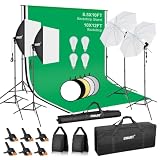
- 【8.5x10ft Backdrop Support System】The backdrop support system includes three 10x15ft muslin backdrops (black/white/green) and features adjustable backdrop stand with 2 section lockable crossbar.Easily adjust the height from 2.6ft to 8.5ft and an expand the width from 5.2ft to 10ft-perfect for heavy canvas, muslin, and paper backdrops. Ideal for studio portraits, product photography, and 4K video shoots.
- 【10 x 12 ft Muslin Backdrop】The 100% cotton black/white/green backdrop help absorb the light and eliminate reflection, thick and solid hang down feeling good. NOTE: due to transporting it, the backdrop may has wrinkles, please hung out the backdrop by 1-2 days if necessary, use steam iron to iron the reverse side.
- 【Photography Umbrella Lighting Kit,】The professional lighting kit features 2 white umbrellas with 2 adjustable 2.5-7ft stands and two 50W 5500K LED bulbs. Creates soft, natural lighting for portraits and products. Bulb holders rotate 180° for perfect positioning. Energy-efficient with long-lasting performance. Ideal for studios and content creators.
- 【Professional 24" Softbox Lighting Kit】 Features high-quality 5500K daylight-balanced LED lighting, perfect for studio shooting, portrait lighting. The 24"x24" softbox creates soft light to eliminate harsh shadows, while the silver interior lining maximizes light output and ensures even diffusion. Easily mounts on most standard light stands .
- 【Comprehensive Set of Accessories】 [2] 24"x24" Softbox, [1] 8.5 x 10ft Backdrop Stand Support System,[3] 10x12 ft Muslin Backdrop(Black, White and Green), [4]Backdrop Spring Clamps, [2] Sandbags, [4] 50W LED Bulb,[2]Lamp Holder, [2] 33inch Translucent Umbrella, [4] 7ft Light Stand, [1] 24" 5 in 1 Reflector. [1] Carrying Bag
Investigate Firework or Sprii when your own site or multiple channels matter
A merchant that wants a website-based experience or multichannel event may want to evaluate standalone vendors. Shopify’s 2026 small-business roundup identifies Firework integrations with commerce platforms and describes Sprii as multichannel. Those descriptions are a starting point, not confirmation of a particular integration, supported territory, or plan. Ask vendors to demonstrate your intended setup and spell out the current pricing and operational requirements.
How to sell products on a livestream
- Choose the audience and sales path. Decide whether you are selling to viewers already on a social platform, marketplace shoppers, or visitors to your own store. Select a platform only after confirming its local availability and the checkout destination for your setup.
- Confirm eligibility and connect the catalog. Check the current creator or seller rules in the platform account. Verify that the products you plan to feature are available to your intended customers, and confirm how the platform handles product listings, inventory, and orders.
- Build a focused product sequence. Select products you can explain clearly on camera, prepare accurate listings, and decide when each product will be shown or pinned. Make it easy for a viewer to identify the item being discussed and open its product details.
- Assign broadcast and moderation roles. Decide who presents, who manages product cards or pins, and who watches chat and handles questions. A solo creator may need to simplify the show so that presenting, product handling, and moderation remain manageable.
- Test the full viewer journey before announcing the event. Check the broadcast, product display, links or tags, and checkout route from the viewer’s perspective. Confirm that products open correctly and that the destination is the one you intended. Recheck market-specific availability.
- Explain the offer accurately during the live. Identify each product, describe relevant details plainly, and make the next step clear. Avoid promising delivery, discounts, or results unless you have verified the terms that apply to the viewer.
- Plan for the replay and follow-up. Check whether the live remains available and whether its products can still be found afterward. If the platform or your chosen setup does not preserve a useful shoppable replay, plan another route for viewers who missed the event.
Where can you host a shoppable livestream?
Host it where both the audience and the purchase path make sense. TikTok Shop, YouTube Shopping, and Amazon Live surface products within their respective platform experiences, subject to eligibility and market differences. A standalone vendor may be worth investigating when your goal is a website-based or multichannel event. Before scheduling, verify not just that you can broadcast, but that your intended viewers can see the products and complete checkout through the route you expect.
Production, moderation, and policy checks
Keep the shopping experience understandable
- State which product you are showing and make sure the corresponding product tag, pin, or carousel item is correct.
- Have someone monitor questions if the presenter cannot do so without interrupting the demonstration.
- Check product availability, listing accuracy, and the checkout destination before the event and again if anything changes during it.
- Decide how you will handle incorrect listings, unavailable stock, technical interruptions, and questions you cannot answer live.
Check platform rules before you promote
Eligibility and compliance rules can govern access to shopping features, and they can change. Review the rules shown in the relevant seller or creator account before promoting the event. Also ensure that you have the rights to any music, footage, or other material used in the broadcast or replay, and avoid assuming that a product or sales claim is permitted simply because it appears in another creator’s content. The evidence here does not establish one universal set of live-shopping rules across platforms or countries.
Common problems and how to respond
- You cannot access shopping features: Check the current account eligibility and compliance requirements for your country and account type. Do not assume that eligibility on one platform transfers to another.
- Viewers can watch but cannot find the product: Confirm the product is correctly tagged, pinned, shown in the relevant panel or carousel, and available to the viewer’s market. Test the path from a viewer account or device.
- Checkout differs from what you expected: Verify whether that merchant and country use in-platform checkout or a merchant-site destination. The YouTube flow, for example, is not the same in every market according to Shopify’s 2026 guide.
- Your store catalog or orders do not behave as expected: Confirm the exact integration and catalog or order workflow with the platform or vendor. Do not infer synchronization from a general mention of commerce-platform integration.
- Chat and product management overwhelm the presenter: Assign a moderator or simplify the product sequence and broadcast format. Test roles in advance so the presenter can focus on demonstrating products.
- A replay is not useful for later shoppers: Check the platform’s current replay and product-availability behavior, then provide a follow-up route that viewers can use after the live if needed.
When an always-on YouTube stream is a different need
Live shopping is interactive commerce: viewers need product discovery and a purchase path. If your goal is instead to keep prerecorded programming running as a 24/7 YouTube channel, StreamNeo is a separate tool for that narrower job, not a shoppable-livestream platform. Upload a recording or build a playlist, add your YouTube stream key once, and go live; StreamNeo loops the uploaded video from the cloud. Nothing has to stay on at home, uploaded quality streams as made up to 4K 60fps at one flat price per slot, and the service automatically recovers if YouTube drops the stream. The first day is free with no card. Monthly billing is $9.99 per month. Start the free day with StreamNeo.
Rank #4

- 【ADJUSTABLE TEMPERATURE AND BRIGHTNESS】Our video conference lights have 3 color temperatures (white light/warm light/natural light) which are 3200k-6800k, 5 levels of brightness adjustment, and 48 LED lamp beads with 10W brightness. Easily change your ideal lighting with the switch, to make your skin more perfect and more suitable your environment.
- 【CIRCLE DESIGN, MULTI-UTILISATION】Using ring light design, the light is more even than solid light illuminating the face, no glare, no shadow, soft light is not dazzling. It is also a mini ring light. Which could be widely used for remote online work, video conference, zoom call, self-broadcast, live streaming, makeup, YouTube, Tiktok.
- 【STABLE AND FLEXIBLE, EASY TO CARRY】The LED video light adopts a clip set design. You only need to clamp the clip to the edge of the computer screen, which is very solide and will not loosen off. The rotation can also adjust the direction and angle of the light. The size of the lamp is very light and portable, and it is a perfect partner for your work.
- 【USB POWERED】: There are more power options as all USB ports can be used to power the task light, such as a display ,laptop, mobile power supply or a mobile phone charger. It is environmentally friendly.
- 【AFTER-SALES SERVICE】 We will provide you with high-quality after-sales service. If you have any questions, please feel free to contact us, we are always on-line to help you. Wish you a pleasant shopping trip!
Bottom line
Match the platform to your audience, the way products appear during the show, and the checkout route your customers can actually use. Confirm local eligibility and integrations before investing in production; platform features alone do not establish that viewers can buy from your particular setup.
Quick Recap
Best Value

- Extra Large Green Screen Backdrop: 81.5 x 83 in (2.07m x 2.11m) provides a wider shooting area than standard 59 x 78.7 in screens, ideal for full body coverage in live streaming, video conferencing, YouTube, TikTok, and virtual studio production
- Dual Pneumatic Scissor Frame: Aluminum base and frame with rust-resistant coating, two rotating support legs and dual pneumatic scissor structure keep the screen stable and prevent tilting or curling during use
- Wrinkle-Resistant Oxford Fabric: The green screen is made of Oxford polyester material, resisting deformation and cracking even with prolonged use, providing a smooth surface for consistent green screen results
- Quick Setup and Storage: Position on the ground, open the support legs, lift to your desired height and the pneumatic frame auto-locks in seconds, retract and fold for storage when finished
- Portable and Compact with Stable Base: Open size 81.5 x 83 in, folds to 4.72 x 4.72 x 78.7 in, weighs 25 lb with aluminum case and two rotating support legs for easy carrying and stable placement anywhere
Product prices and availability are accurate as of the date/time indicated and are subject to change. Any price and availability information displayed on Amazon at the time of purchase will apply.
What’s actually slowing this PC down?
Pick the symptom - the matching free tool is one click away.

