
What’s actually slowing this PC down?
Pick the symptom - the matching free tool is one click away.
iTechGuides is reader-supported. When you buy through links on our site, we may earn an affiliate commission. As an Amazon Associate I earn from qualifying purchases. Learn more
For a PC close to Gendo the Gatherer’s published minimum, begin with the lowest graphics preset at 1280×720, disable or reduce shadows and post-processing, and use a frame-rate cap that your computer can hold consistently. Keep textures at their lowest setting initially; raise them only after frame pacing is steady. These are conservative starting settings based on the published hardware floor, not a promise of a particular frame rate.
The full game is listed for release on November 12, 2026, while the free demo was released on August 21, 2026. Because the Steam listings provide minimum hardware but no recommended tier, target FPS, tested presets, or benchmark, the demo is the safest way to validate your own system before buying the full version.
What the published requirements actually tell you
Steam’s current listings from UnintentionalLogic define a minimum configuration, not a performance guarantee. A minimum specification means the developer considers the game supportable on that class of hardware; it does not establish 30 or 60 frames per second, a graphics preset, or a target resolution. Your results will also depend on the exact processor model, cooling, driver state, background software, and whether the game build changes before release.
The game combines foraging, cooking, house customization, quests, exploration, and serving dishes to townsfolk. Those systems may place different demands on a computer as you move between areas or interact with busy scenes. The listing describes the experience as a cozy life simulation in which you “forage, cook and serve your way through Gendo’s journey navigating an abundant, ever changing landscape,” and invites players to “Navigate vast and varied landscapes, harvesting goodies as you go!” Neither description identifies a fixed performance target.
#1 Best Overall
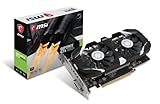
- Chipset: NVIDIA GeForce GTX 1050 Ti
- Video Memory: 4GB GDDR5
- Memory Interface: 128-bit. Core Clocks : 1455 MHz / 1341 MHz
- Bus: PCI-Express 3.0 x16
- Game stream to NVIDIA Shield.Dimensions: 182.0 x 69.0 x 35.0 mm
Full-game minimum
| Component | Published minimum | How to interpret it |
|---|---|---|
| Operating system | Windows 10 | Windows 10 is the stated baseline; the listing does not state a newer-version requirement. |
| Processor | Intel Core i5 | No generation, core count, clock speed, or AMD equivalent is specified, so the label alone cannot predict performance. |
| Memory | 8 GB RAM | This is the minimum system memory, leaving less room for Windows, drivers, browsers, and other programs. |
| Graphics | NVIDIA GeForce GTX 1050 Ti or equivalent | This is the only named GPU class. “Equivalent” does not define a precise modern comparison. |
| Storage | 10 GB available | Leave at least this much free space for the full installation; extra free space is useful for updates and normal Windows operation. |
These figures are attributed to UnintentionalLogic through the current Steam listing for the full game. They are minimums for the planned November 12, 2026 release, not recommended specifications.
Free-demo minimum
| Component | Published minimum | Difference from the full-game listing |
|---|---|---|
| Processor and operating system | 64-bit processor and operating system | The demo explicitly calls out 64-bit support. |
| Operating system | Windows 10 | Same stated Windows version. |
| Processor | Intel Core i5 | Same unspecified Core i5 class. |
| Memory | 8 GB RAM | Same minimum memory. |
| Graphics | NVIDIA GeForce GTX 1050 Ti or equivalent | Same named GPU class. |
| Storage | 5 GB available | Half the listed storage requirement of the full game. |
The demo’s requirements are also attributed to UnintentionalLogic through Steam. Matching CPU, RAM, and GPU classes make it a practical compatibility check, but a successful demo run cannot guarantee identical performance in every full-game area or in a later build.
A conservative baseline for a low-end PC
Use the following order when the graphics menu first appears. If a control is missing in your build, skip it rather than substituting an unverified setting. The exact slider names and any upscaling options have not been documented by the Steam listings.
| Option | Starting choice | Reason |
|---|---|---|
| Resolution | 1280×720 | Reduces the number of pixels the GTX 1050 Ti-class GPU must render. It is the safest first resolution near the minimum. |
| Overall quality | Lowest available preset | Applies the broadest reduction without requiring you to guess which individual options exist. |
| Shadows | Off or Low, if offered | Shadow maps and filtering can add GPU work; disabling them is a sensible first cut when frame delivery is uneven. |
| Post-processing | Off or Low, if offered | Reduces effects applied after the scene is rendered, such as some blur, glow, or depth treatments. |
| Textures | Low initially | Texture quality primarily consumes graphics memory. Test higher textures only after movement is consistently smooth. |
| Frame-rate limit | Set a cap below the rate your PC can sustain | A stable ceiling usually feels better than an uncapped rate that repeatedly rises and falls. The game’s target FPS is not published. |
| V-sync | Leave at the default, then test | The listings do not document its behavior. Compare input feel and tearing after establishing a stable cap. |
This table is a reasoned starting point, not a tested preset. The game may expose different labels, additional effects, or no separate control for one of these categories.
Step-by-step: configure the game without guessing
- Install the free demo first. Confirm that your PC meets the demo’s Windows 10, 64-bit, Core i5, 8 GB RAM, GTX 1050 Ti-class GPU, and 5 GB storage requirements. If you are short on storage, clear space before installation rather than relying on an almost-full drive.
- Close nonessential programs. Exit browsers with many tabs, launchers, recording tools, and overlays before starting. On an 8 GB system, this preserves memory for the game and reduces the chance of background activity interrupting frame delivery.
- Open the graphics or video menu. Look for resolution, an overall preset, shadows, post-processing, textures, frame-rate limit, and vertical synchronization. Your build may use different names; change only controls that are actually present.
- Select the lowest preset. Apply it, confirm the prompt if one appears, and return to the game. This establishes a known low-load reference before you make individual changes.
- Set 1280×720. Play in the same type of scene for several minutes, including movement through an outdoor landscape and any available interaction-heavy area. Do not judge performance from a static menu.
- Reduce shadows and post-processing. If the game still stutters or feels inconsistent, turn each option off or to Low. Change one option at a time when possible so you can identify which adjustment helps.
- Choose a frame cap. Start with a conservative cap that remains stable during your most demanding observed scene. Since no target FPS is published, do not assume that 60 is achievable or necessary. If the menu offers only broad choices, select the lowest cap that eliminates large swings.
- Test frame pacing. Walk, rotate the camera, enter buildings, and load a new area. A steady but lower rate is preferable to brief high readings followed by hitching. If the game offers an in-game frame counter, use it as an observation tool, not as an official benchmark.
- Raise one quality setting. Once the baseline is stable, try textures first, then other visual options one at a time. Keep the change only if movement remains consistent in the same demanding situations.
- Record your working values. Write down the resolution, preset, texture level, shadow level, post-processing level, cap, and synchronization choice. This makes it easy to recover after a driver update or an in-game reset.
Choosing between 1280×720 and 1600×900
Resolution is often the quickest way to change GPU workload. At 1280×720, the renderer handles 921,600 pixels per frame. At 1600×900, it handles 1,440,000 pixels, which is 56.25 percent more pixels. That extra work can matter on a GPU near the published GTX 1050 Ti floor.
Use 1280×720 when
- Movement is uneven at the lowest preset.
- Turning the camera causes frequent dips or hitching.
- You need the largest performance margin for background activity.
- You are testing whether the PC is viable at all.
Try 1600×900 when
- The 1280×720 baseline is stable in outdoor and interior scenes.
- You prefer sharper image detail and accept a lower frame cap if necessary.
- Your monitor’s native resolution makes 1280×720 noticeably soft and the game remains comfortable at the higher option.
Do not move to 1600×900 and increase several quality settings at the same time. Change only the resolution, repeat the same route through the demo, and keep it only if frame pacing remains acceptable. The listings do not specify a native resolution, scaling mode, or upscaler, so any additional image-scaling recommendation would be speculative.
Which settings to lower first
1. Overall preset
The lowest preset is the fastest way to apply a broad reduction when you do not yet know which options the build exposes. It may lower several effects at once, so use it before fine-tuning.
Crashes, No Sound, or Screen Glitches?
Random freezes, missing sound and display glitches usually trace back to one bad driver. Find and replace yours safely.Free scan · under a minutePC Slower Than It Used to Be?
A free scan shows the junk files, broken settings and background clutter dragging Windows down - then fixes them in one click.Free scan · Windows 10 & 112. Shadows
Shadows can require extra scene rendering and filtering. If a Low option still produces uneven movement, test Off. The visual trade-off is simpler lighting and fewer cast shadows, but the listings do not state how the game implements either mode.
3. Post-processing
Post-processing is applied after the primary scene render. Reducing it can remove expensive or distracting effects. Because the exact effect list is unknown, judge the result by frame consistency and readability rather than by a named effect.
4. Resolution
If the game remains GPU-limited after the preset and effects are reduced, return to 1280×720. Resolution affects every frame, so it generally has a larger and more predictable workload impact than a single visual effect.
Rank #2

- Chipset: NVIDIA GeForce GTX 1050 It
- Video Memory: 4GB GDDR5
- Memory Interface: 128-bit
- Max. Resolution: 2560 x 1600, Support 3x Display Monitors
5. Textures
Keep textures low while diagnosing performance. Once frame pacing is steady, test Medium or the next available level. Higher textures may improve surface detail but can consume more graphics memory; if you see new hitching after raising them, return to Low before changing other options.
Frame caps, synchronization and smoothness
No official target frame rate is listed for either version. A cap should therefore be based on what your computer sustains in the heaviest scene you can reach, not on a universal number. An uncapped setting can produce a high peak in a simple area and then drop sharply when the view becomes more complex. Those fluctuations are often more distracting than a lower, steady limit.
- Run the lowest-preset baseline for several minutes.
- Observe the most demanding camera movement and area transition you can reproduce.
- Choose a cap that the system maintains during those moments.
- Repeat the route after changing resolution or quality, because the sustainable rate may change.
Vertical synchronization can reduce visible tearing but may alter input feel or add waiting when the frame rate falls below the display refresh. Since the Steam listings do not describe the implementation, test it after choosing your cap. Keep the option that gives you the better combination of consistent motion, acceptable input response, and tolerable tearing on your display.
CPU, RAM and background-process checks
The published processor requirement is simply “Intel Core i5,” without a generation or model. Two Core i5 systems can therefore behave very differently. If lowering resolution and effects does not improve hitching, the processor or another system limit may be involved rather than the GPU.
- Use Windows Task Manager to close programs you recognize and do not need during play.
- Leave the game on an internal drive with the required free space instead of filling the drive to its limit.
- On an 8 GB machine, avoid running a browser with many active tabs, video calls, large downloads, or other memory-heavy applications at the same time.
- Allow Windows and graphics-driver updates to finish before testing; an installation or scan in the background can make a valid graphics setting look unstable.
- If the game stutters while the frame counter appears high, watch for memory pressure, disk activity, or a CPU thread staying busy. A lower resolution will not fix a CPU or memory bottleneck.
These checks do not change the game’s requirements. They simply ensure that your test reflects the game rather than an avoidable competing workload.
Use the demo as a compatibility test
The free demo is the most useful validation path because it is available before the full game’s planned November 12, 2026 release and lists the same CPU, memory, and GPU classes. Treat it as a structured test rather than a quick launch check.
- Verify the operating system is Windows 10 or later and that the system is 64-bit, as explicitly required by the demo listing.
- Check available storage against the demo’s 5 GB requirement, leaving additional room for Windows and updates.
- Install with background downloads paused.
- Apply the conservative baseline and play through more than one type of area.
- Repeat the route after each major setting change.
- Note any crashes, missing textures, severe hitching, or settings that reset on restart.
A demo that is playable at the baseline gives you evidence about your particular PC. It does not establish how every full-game location will perform, nor does it guarantee that a later build will behave identically.
If your PC is below the stated minimum
Below-minimum hardware has no documented performance guarantee. The most useful first step is to identify which part falls short.
GPU below GTX 1050 Ti class
Try the demo at 1280×720 and the lowest preset only as an experiment. Disable or reduce shadows and post-processing if available, and cap the frame rate conservatively. If the game still shows severe hitching or unusable motion, software settings cannot turn unsupported hardware into a supported configuration. A graphics upgrade should be evaluated against the published GTX 1050 Ti-or-equivalent floor, the power supply, available slots, and the case’s physical clearance.
Do these 3 things before closing this tab:
1Fix the driver behind crashes, sound loss and screen glitches2Clear out junk files and repair common Windows errors3Scan for outdated or missing drivers - takes under a minuteLess than 8 GB RAM
Close every nonessential program and retest, but recognize that the listing still calls for 8 GB. Frequent swapping, long pauses, or crashes can indicate memory pressure rather than a graphics setting. Upgrading system memory may help general responsiveness, but it does not change the need for a compatible GPU and processor.
Rank #3

- The NVIDIA GeForce GTX 1050 Ti is a desktop GPU that supports various technologies, including DirectX 12 and NVIDIA Pascal
- Silver plated PCB & all solid capacitors provide lower temperature, higher efficiency & stability
- HDMI+DP Support 7680*4320 pixel resolution output, multi monitors to enjoy wider audio and video entertainment.
- Boost Clock / Memory Speed : up to 1392 MHz / 4GB GDDR5 / 7000 MHz Memory / PCIe 3.0 x16
- Slim Low profile desgin (6.5*2.71inch/16.7*6.9cm) perfect in Mini Small Form Factor SFF computer pc cases & easy to fit most of brand SFF pc such as: Dell OptiPlex 7070 / 7020 / Lenovo ThinkCentre M720Q/ M710S / HP EliteDesk 800 / 400 etc
Older or unspecified processor
Because the minimum only names a Core i5 class, there is no reliable way to infer support from the label alone. Test the demo with low graphics settings and observe whether lowering resolution changes the problem. If frame pacing remains poor while the GPU is not fully occupied, the processor may be the limiting component.
Insufficient storage or unsupported operating system
Free the required space or use another suitable drive, and confirm Windows compatibility before troubleshooting visual quality. Storage capacity and operating-system support are prerequisites, not graphics options.
Troubleshooting by symptom
The image is blurry but motion is steady
Confirm that the game is actually running at the selected resolution and that Windows display scaling has not introduced an unexpected mode. If 1280×720 is stable, try 1600×900 without changing the preset. Keep the higher resolution only if the resulting motion remains consistent.
Motion hitches when entering a new area
Keep textures low, close memory-heavy programs, and repeat the same transition. If the hitch improves after reducing other effects, retain the lower setting. If it persists with the lowest preset, investigate RAM, storage activity, and CPU load rather than continuing to lower unrelated visual options.
Frame rate swings between areas
Use a lower cap based on the slowest area you can reproduce. Check shadows and post-processing before raising textures. Do not select an uncapped mode simply because a quiet area reports a higher peak.
Controls feel delayed after enabling synchronization
Compare the same route with synchronization disabled and with a conservative frame cap. Keep the combination that feels responsive without unacceptable tearing; the game’s listing does not specify a preferred synchronization mode.
Settings revert after restarting
Apply changes, exit through the game’s normal menu, and relaunch. Record the values that persist. If options continue to reset, treat that as a build-specific issue and report the exact setting, resolution, operating system, and hardware rather than assuming a different preset will solve it.
Free tools Windows power users keep installed
One-click scans. No signup required.
What to expect from future updates
The full game is currently listed for November 12, 2026, so its final settings menu and performance behavior may still change. Steam has not published a recommended hardware tier, target resolution, target FPS, benchmark, or complete graphics-menu inventory. Until those details are documented by the developer, avoid buying or upgrading on the assumption that a particular preset will deliver 60 FPS.
Recheck the official store listing after release for changes to the minimum requirements. If a first-party settings guide later names exact options or recommended targets, use those values in place of this conservative baseline. Keep your own demo results as a reference because they reflect your complete PC, display, drivers, and background software—not just one component.
Quick low-end checklist
- Meet or exceed Windows 10, Core i5-class CPU, 8 GB RAM, GTX 1050 Ti-class GPU, and the required storage.
- Install the 5 GB demo before committing to the 10 GB full-game installation.
- Start at 1280×720 and the lowest available preset.
- Disable or reduce shadows and post-processing when those controls exist.
- Keep textures low until frame pacing is stable.
- Set a cap that your slowest tested scene can sustain; no official target FPS is available.
- Test 1600×900 only after the lower resolution is consistent.
- Change one option at a time and record the values that work.
- Close memory-heavy background programs on an 8 GB system.
- Do not treat a successful demo run as a guarantee for every full-game area or future build.
The Bottom Line
Use the free demo to validate your PC, begin at 1280×720 with the lowest preset, reduce shadows and post-processing, and add visual quality only when frame pacing remains stable. The published requirements establish a GTX 1050 Ti-class GPU, Core i5, 8 GB RAM, Windows 10, and 10 GB for the full game, but they do not establish a guaranteed FPS or tested preset.
Quick Recap
Product prices and availability are accurate as of the date/time indicated and are subject to change. Any price and availability information displayed on Amazon at the time of purchase will apply.
Quick wins for a faster PC:
Fix the driver behind crashes, sound loss and screen glitchesFind Drivers →Clear out junk files and repair common Windows errorsFree Scan →
