
Recommended Free Tools
iTechGuides is reader-supported. When you buy through links on our site, we may earn an affiliate commission. As an Amazon Associate I earn from qualifying purchases. Learn more
The best case or screen protector depends on your Redmi’s complete model name, not its green color. Open Settings → About phone and copy the model exactly, including labels such as Pro, Plus, Max, 4G or 5G. Then buy a case and protector listing that exact model. A clear case shows the green back, while a green or contrasting case changes the appearance after fit has been confirmed.
Start with the exact Redmi model
“Green Redmi phone” identifies a finish, not a physical design. Redmi phones with similar names can have different body dimensions, display curves, camera islands, button positions, speaker openings and charging-port locations. A case made for the wrong generation may still slide over the phone but leave a camera partly covered, press a button continuously or block a port.
On the phone, open Settings → About phone. Copy the complete name shown there. Keep every meaningful suffix, such as Pro, Pro+, Plus, Max, 4G or 5G. If the page shows both a marketing name and a model number, record both. Use that wording when searching for accessories and compare it with the compatibility list on the product page.
Do these 3 things before closing this tab:
1Scan for outdated or missing drivers - takes under a minute2Clear out junk files and repair common Windows errors3Fix the driver behind crashes, sound loss and screen glitchesWhy a family name is not enough
- A Redmi Note model and its Pro version can use different camera cut-outs.
- 4G and 5G editions may have different thicknesses or button placement even when the names look almost identical.
- A standard model and a Plus or Max variant can have different screen sizes and corner radii.
- Two generations can share a color name while changing the camera housing or side controls.
If a listing says only “Redmi case” or “Note case,” treat it as incompatible until the seller explicitly names your full model. Color matching cannot compensate for an incorrect fit.
#1 Best Overall
![Anvzle for Xiaomi Redmi 15C Case with [2 Pack] Tempered Glass Screen Protector, for Redmi 15C 4G/5G [Military-Grade] Protective,with Lens Protects Magnetic Kickstand Car Mount Holder Case](https://m.media-amazon.com/images/I/41N2PpE-n7L._SL160_.jpg)
- 【Compatible With】Specially designed for Xiaomi Redmi 15C - 171mm,[Also come with 2pcs tempered glass screen protectors. Please Attention! Please confirm your phone model before buying, Please feel free to contact us if you have any questions.
- 【Ugraded 360° Full Body Protection】This phone case is made of anti-scratch hard rigid PC bumper and shock resistance soft TPU, Military-Grade Protection with Air-Cushion Technology for all corners and the raised TPU bezel design, provide all around double protection of your phone from drops, scratches and bumps.
- 【360° Rotable Magnetic Kickstand】 Metal kickstand can rotate 360°, easy to rotate and sturdy on the case. Built in kickstand gives you the convenience to watch videos and movies hands-free with desired comfort and stability. Built-in metal magnetic sheet which can be directly adsorbed stably to the magnetic car mount holder. ( Not includes the magnetic car mount holder !)
- 【Unique Slide Camera Cover】The slide camera lens protects your phone camera from scratches, abrasions and shocks. It can slide smoothly left and right,perfect to hide the camera. Besides,the sliding cover is slightly locked on both sides and can not be slid at will,which will not affect the normal use of the phone lens.
- 【Tempered Glass Screen Protector】With 2 pack screen protector,HD clear scratch resistant tempered glass[9H Hardness]. No need to buy the screen protector.
Choose the case after verifying compatibility
Once the model is confirmed, select a listing that spells out the exact model and generation. Check the product photographs against your phone before ordering, especially the camera opening, fingerprint reader location and speaker cut-outs.
| Case decision | What to verify | Why it matters |
|---|---|---|
| Model fit | Complete Redmi name, generation and 4G/5G suffix | Prevents mismatched dimensions and openings |
| Camera opening | All lenses, flash and microphone are unobstructed | Stops vignetting, glare and blocked audio |
| Buttons and ports | Power, volume, USB-C, speakers and microphones line up | Maintains normal controls and charging |
| Screen protection | Raised bezel around the display | Helps keep a face-down screen from touching a flat surface |
| Back protection | Camera-lens lip or a camera island that sits below the case edge | Reduces direct contact with tables and pockets |
| Construction | TPU, rigid back, hybrid layers and reinforced corners | Determines grip, flexibility and bulk |
| Protector pairing | “Case-friendly” edge spacing | Reduces lifting or bubbling when the case is fitted |
Case materials and protection designs
Flexible TPU cases
Thermoplastic polyurethane (TPU) cases bend around the phone and are generally easy to install or remove. Their flexible sides can provide a secure grip and absorb minor knocks without adding the weight of a rigid shell. Look for a lip above the screen and raised protection around the camera rather than choosing solely by color or transparency.
Hybrid cases
Hybrid designs combine a flexible inner layer with a more rigid back or frame. They usually offer more structure than a thin TPU shell, but can add pocket bulk. Inspect the corners: reinforcement is useful only when it does not interfere with wireless signals, buttons or the charging cable.
Flip and folio cases
A flip case covers the display when closed and may include card slots or a stand. It is useful if the phone spends time in a bag with keys, but the cover adds thickness and must be opened for many interactions. Confirm that the folio is made for your exact camera and speaker layout; universal folios do not provide the same edge fit.
Thin shells and clear cases
A thin clear shell preserves the green finish and adds little bulk. It is an appearance-first choice, not a guarantee of heavy-impact protection. Clear material can show fingerprints and may change appearance as it ages. A green case coordinates with the phone but can hide the original finish; a contrasting color is purely an appearance decision. Make that choice only after model compatibility and protective geometry are settled.
How to select a screen protector
Match the protector to the exact display shape and to the case you intend to use. A protector that is too wide can catch on a case rim; one that is too small leaves unnecessary exposed glass. Product descriptions should identify your full Redmi model and state whether the edges are case-friendly.
Tempered glass
Tempered glass is a rigid, transparent layer that resists scratches and can take some surface abuse before the phone’s display is affected. “9H” and “10H” are hardness specifications used in product catalogs, including Hama Clear Protect and Premium Crystal Glass listings. They are not standardized drop-test results and do not prove that one product will protect a phone better in every fall.
Rank #2
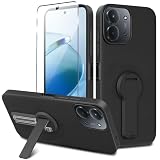
- ✅【Compatibility Fit】Designed for Xiaomi Redmi 15C / C85 2025, Please verify your phone model before purchase! Come with 1Pcs Tempered Glass Screen Protector And 1 x Phone Film Wipe Bag.
- ✅【Adjustable Kickstand】Built in a sturdy foldable kickstand. Excellent horizontal and vertical stand ways. Adjustable for different viewing angles makes you hands free to enjoy your games, videos.
- ✅【Lens Screen Heightening Design】Well made, Easy to use, covers and protects buttons while allowing for full use and wraps around the edge of the phone to protect your screen. Edge around the camera lens is 1.0 mm higher and the screen is 0.8 mm higher, provides a decent protection buffer structure to effectively absorb impact damage, these raised lips prevent your phone from scratches when putting your phone down on surfaces.
- ✅【High Quality Material】Premium flexible TPU rubber material provides ultimate non-slip grip,which provide a good drop protection, easy to take off and put on.
- ✅【Perfect Fit】Precise cutouts make all buttons, speakers and charging ports easily accessible.
Non-tempered protectors and electrostatic films
Non-tempered films are thinner and more flexible. Electrostatic films adhere without a liquid glue layer and can be useful when maintaining touch response and edge fit is a priority. They generally provide less rigid impact protection than glass, so choose according to the hazards your phone actually faces.
Official protective film
For the Redmi Note 14 Pro+ 5G, Xiaomi advises considering its official protective film when thick third-party films reduce pressure sensitivity. The recommendation is model-specific: do not assume that every Redmi phone uses the same film or has the same touch behavior.
Liquid UV adhesive: an avoidable risk
Xiaomi warns that liquid UV adhesive can seep into physical keys, the charging port, speaker holes or the battery cover. That leakage can cause malfunctions and may create warranty concerns. Xiaomi recommends alternatives such as tempered glass, non-tempered protectors or electrostatic films that do not require liquid UV-based glue. Unless you have a specific, well-supported reason and professional installation, select a dry-applied protector instead.
Cases and protectors that match documented Redmi models
Compatibility catalogs demonstrate why the full model name matters. Hama’s catalog lists Clear Protect and Premium Crystal Glass products for Redmi 13, Redmi 14C, Redmi Note 14 4G, Redmi Note 14 5G, Redmi Note 14 Pro 4G and Redmi Note 14 Pro 5G variants. The catalog includes case-friendly designs and 9H or 10H glass specifications. Select the row that exactly matches your phone; a Note 14 4G listing is not evidence of compatibility with a Note 14 5G or a Pro model.
Crashes, No Sound, or Screen Glitches?
Random freezes, missing sound and display glitches usually trace back to one bad driver. Find and replace yours safely.Free scan · under a minuteWindows Errors? Fix Them Before They Spread
Repair common Windows errors and clear accumulated junk for a smoother, more stable PC - no reinstall needed.Free scan · no reinstallModel-specific Redmi cases are available in flexible, flip and other constructions. The useful specification is the exact model confirmation, followed by the cut-out and raised-edge design. No authoritative comparative drop-test or failure-rate statistic establishes that one of these case types protects every Redmi phone better than another.
Do you need a protector if the phone already has a film?
First identify what is already installed. A factory-applied film is usually a thin layer intended to reduce scratches and preserve normal touch behavior. Adding another layer can create edge interference, bubbles or reduced sensitivity. If the existing film is intact and your main concern is scratches, keeping it may be reasonable. If you need a rigid surface against keys or grit, replace it with one correctly sized for the exact model rather than stacking protectors.
Before adding glass, check whether the case will press the current film’s edges. Remove dust, compare the new protector’s dimensions with the display and confirm that the packaging permits installation over or instead of the supplied film. Follow the protector maker’s instructions; do not apply liquid UV glue merely to solve an edge-fit problem.
Rank #3

- 【Fit For】Specially Designed for Xiaomi redmi Note 13 4G phone
- 【Multi Function】360 Degree Rotating Metal Ring Kickstand supports to work with magnetic car mountand .The Ring at back cover can also work as kickstand to hold up your redmi Note 13 4G Phone while you are warching movie or video.
- 【Premium Material】Dual-layer hard PC + Flexible TPU bumper is with High quality Material.And it provides great grip in hand and can protect your redmi note 13 4g phone from dust, dirt, scratches,shocks and accidental drops.
- 【Precise Cutouts】Precise cutouts for all buttons and ports, exactly fit, easy to use all buttons and ports, opening mould using the original physical phone of Redmi Note 13 4G.Raised lips 0.2mm to protect Camera Lens from Scratch.
- 【Screen Protector Gift】Edge to Edge Tempered Glass Screen Protector for Xiaomi redmi Note 13 4G is with 9H Hardness ,HD Clear,Anti-explosion, Anti-fingerprint, Shatterproof, Anti-glare, Sensitive touch and HD display
Installation procedure for a case-friendly protector
- Confirm the model. Recheck Settings → About phone and compare the full name with the protector packaging.
- Test the case and protector together. Place the protector over the unprotected phone without removing its backing, then hold the case around the edges. Make sure the case does not overlap the glass.
- Prepare a clean area. Wash and dry your hands. Work away from fans, fabric and loose dust. A steamy bathroom can reduce airborne dust, but keep the phone and accessories dry.
- Clean the display. Use the supplied wet wipe, dry wipe and dust-removal sticker in the stated order. Inspect under a bright light.
- Align before exposing adhesive. Match the earpiece, camera opening and display edges. If an alignment frame is supplied, use it rather than estimating by eye.
- Apply gradually. Remove the backing only as directed and lower the protector from one edge. Let the adhesive spread; do not press hard in the center first.
- Remove bubbles correctly. Push trapped air toward the nearest edge with the supplied squeegee or a wrapped card. A dust speck requires lifting the protector carefully and removing the speck with the dust sticker.
- Fit the case last. Press each corner into place without forcing the case over the protector. Test touch, scrolling, the front camera and the earpiece.
Check touch response and clearances after installation
- Type across every part of the keyboard, including near the display edges.
- Drag icons from the center toward each corner to detect dead or dampened edge response.
- Open the camera and photograph a plain wall to check for an obstructed lens or glare.
- Make a call and play audio to confirm that the earpiece and speaker openings are clear.
- Connect the charging cable fully. A case or protector must not stop the plug from seating.
- Press the power and volume buttons repeatedly; they should click without excessive force.
If touch becomes unreliable immediately after fitting, remove the case first. A tight case can lift an edge or press the protector. If the issue remains, compare with the phone after removing the protector and contact the seller or manufacturer rather than applying extra adhesive.
Common fit problems and fixes
The case covers part of the camera
Remove it and compare the cut-out with the phone’s camera island. Do not trim the opening with a knife; an uneven edge can expose lenses or leave sharp plastic near the glass. Replace the case with one explicitly made for the exact model.
The protector lifts at the corners
Check for dust, a display curve, or a case edge pushing upward. Clean the phone, confirm that the protector is case-friendly and reinstall only if the manufacturer allows it. Persistent lifting means the protector dimensions and case are not a suitable pair.
The protector has a permanent bubble
Air can usually be pushed to an edge, but a bubble surrounding dust will not disappear on its own. Lift that section carefully, remove the particle with the supplied sticker and lower the glass again. If adhesive has already collected lint, replacement is more reliable than repeated lifting.
Buttons or charging are difficult to use
Check that the case has not been fitted over a misaligned edge. Remove it and test the bare phone. If the bare phone works normally, choose a case with better-matched openings; never enlarge a port opening in a way that weakens the frame.
The Tool Desk
Outbyte PC Repair FREEClear out junk files and repair common Windows errorsFree Scan →Outbyte Driver Updater FREEFix the driver behind crashes, sound loss and screen glitchesFind Drivers →Touch feels less sensitive
Thick third-party films can dampen pressure sensitivity. This is specifically documented by Xiaomi for the Redmi Note 14 Pro+ 5G. Remove the case as a test, then try a thinner or official film intended for that model. Avoid adding a second protector.
A practical buying checklist
- Write down the complete model name from Settings → About phone.
- Confirm the generation and 4G/5G designation in the listing title and specifications.
- Compare camera, flash, microphone, speaker, button and USB-C openings with your phone.
- Choose a raised screen bezel and camera protection appropriate to your daily handling.
- Decide between flexible TPU, hybrid, flip or thin clear construction based on grip and bulk.
- For the protector, verify display size, edge shape, case-friendly spacing and adhesive method.
- Treat 9H or 10H as hardness specifications, not as a universal drop-protection ranking.
- Avoid liquid UV systems unless a qualified installer and the manufacturer’s instructions specifically support them.
- Check return terms before opening the package, since an incorrect model cannot be made compatible by changing color.
Which color should you choose?
Color is the final decision, not a compatibility shortcut. Choose a clear case when preserving the green back is the priority. Choose green when you want a coordinated appearance and do not mind covering the original finish. Choose a contrasting color when visibility or personal style matters more than matching. For a protector, transparency is normally preferable because tint or decorative layers can affect viewing and do not improve model fit.
Bottom line for a green Redmi phone
Identify the complete Redmi model first, then buy a model-specific case and a case-friendly protector. A TPU or hybrid case with raised screen and camera edges is a sensible starting point; select clear, green or contrasting color afterward. Use tempered glass, a non-tempered protector or an electrostatic film instead of liquid UV adhesive, and pay particular attention to Xiaomi’s touch-sensitivity warning for the Redmi Note 14 Pro+ 5G. Proper openings, edge clearance and normal touch response matter more than the color printed on the box.
Quick Recap
Product prices and availability are accurate as of the date/time indicated and are subject to change. Any price and availability information displayed on Amazon at the time of purchase will apply.
Free tools Windows power users keep installed
One-click scans. No signup required.

