
The Tool Desk
Outbyte PC Repair FREEClear out junk files and repair common Windows errorsFree Scan →Outbyte Driver Updater FREEFix the driver behind crashes, sound loss and screen glitchesFind Drivers →The Creative Pebble X Plus is the best all-around computer speaker system under $150 if you want a compact 2.1 setup, Bluetooth, USB audio, a subwoofer, and enough output for everyday room listening. It is not the right choice for everyone, though. The Edifier MR3 is a better fit for balanced nearfield sound and creative work, while the Logitech Z407 is the stronger pick for bass, movies, and games.
At this price, the main decision is not simply which speaker sounds “best.” You are choosing among compactness, bass, connection options, and a more neutral presentation. The recommendations below separate those priorities instead of pretending that one model wins every category.
Price note: Prices in this guide are observed U.S. prices from the cited research and can change. The $150 limit should be treated as a price-at-publication target, not a permanent guarantee. Check the retailer price, included cables, and power requirements before ordering.
Best budget computer speakers under $150: at a glance
| Speaker | Observed price | System | Inputs and wireless | Subwoofer | Best for |
|---|---|---|---|---|---|
| Creative Pebble X Plus | $119.99 | 2.1 | USB-C, 3.5mm, Bluetooth 5.3 | Yes, 4-inch | Best overall balance of size, features, and bass |
| Edifier MR3 | $149.99 | 2.0 powered monitor pair | Balanced TRS, RCA, 3.5mm, Bluetooth 5.4, headphone output | No | Balanced sound, music, editing, and nearfield listening |
| Logitech Z407 | $129.99 | 2.1 | USB, 3.5mm, Bluetooth | Yes, 20W | Bass, movies, games, and wireless volume control |
| Creative Pebble Pro | $64.99 | 2.0 | USB-C, 3.5mm, Bluetooth 5.3 | No | Small desks, laptops, and inexpensive upgrades |
| Creative Pebble | $19.99 | 2.0 | USB-A power, 3.5mm audio | No | The lowest-cost improvement over laptop or monitor speakers |
These are powered desktop speakers: amplification is built into the speakers, so you do not need a separate stereo receiver. The Edifier MR3 is the outlier in purpose and design. It is a powered nearfield monitor-style pair rather than a small multimedia system with a dedicated bass unit.
What’s actually slowing this PC down?
Pick the symptom - the matching free tool is one click away.
1. Creative Pebble X Plus — best overall under $150
Choose it if: you want the most complete compact setup, including a subwoofer, Bluetooth, USB audio, and a traditional analog input.
Popular on Amazon

- External computer speaker in Black (set of 2) for amplifying PC or laptop audio
- USB-Powered from USB port of PC or Laptop
- In-line volume control for easy access
- Blue LED lights; metal finish and scratch-free padded base
- Bottom radiator for “springy” bass sound
The Creative Pebble X Plus offers the broadest combination of features in this group. It uses two satellite speakers and a 4-inch flat-cap subwoofer with dual passive radiators. Creative specifies a 45Hz–20kHz frequency range, Bluetooth 5.3, USB-C audio and power, a 3.5mm input, and headset support.
Creative rates the system at up to 30W RMS when it is connected to a compatible 15V/2A USB-PD adapter. That higher-power adapter is not included, so do not assume that every setup will achieve the maximum advertised output. At the observed $119.99 street price, it remains below the $150 ceiling before any optional power-adapter purchase.
The X Plus is the easiest recommendation for a general desktop: it is compact enough for many desks but has a separate subwoofer for more convincing low-end than tiny 2.0 USB speakers. Bluetooth is useful when you want to play audio from a phone or tablet, while USB-C can avoid relying on a computer’s analog headphone output.
Crashes, No Sound, or Screen Glitches?
Random freezes, missing sound and display glitches usually trace back to one bad driver. Find and replace yours safely.Free scan · under a minutePC Slower Than It Used to Be?
A free scan shows the junk files, broken settings and background clutter dragging Windows down - then fixes them in one click.Free scan · Windows 10 & 11Trade-offs: The satellite speakers are compact, cable lengths are fixed, and the highest output mode requires a separately purchased compatible USB-PD adapter. It is also not the best choice if you specifically want a neutral monitor-style presentation for editing or music production.
Why it is the best overall pick
- Dedicated subwoofer without taking up the space of a full-size desktop system.
- USB-C, 3.5mm, and Bluetooth connectivity.
- More flexible than basic USB-powered speakers.
- Suitable for general music, games, video, and everyday computer use.
2. Edifier MR3 — best for balanced sound and creative work
Choose it if: you care more about a balanced, monitor-like presentation and flexible wired connectivity than about having a subwoofer.
The Edifier MR3 is listed at $149.99 in Edifier’s U.S. store, placing it exactly at the stated budget limit. It is a powered stereo pair with 3.5-inch mid-low drivers, 1-inch silk-dome tweeters, and 18W RMS per channel. Edifier specifies a 52Hz–40kHz frequency response and positions the speakers for nearfield listening, home studios, video editing, and everyday listening.
Connectivity is one of its strongest advantages. The MR3 provides balanced TRS, RCA, and AUX inputs, along with Bluetooth 5.4 and a headphone output. That makes it more adaptable than many inexpensive computer speaker sets, particularly if you use more than one source or want to connect audio equipment with balanced outputs.
Recommended Free Tools
Its stated flat-response, monitor-oriented design suggests a more measured presentation than a bass-emphasized multimedia system. That is an editorial interpretation of its positioning and specifications, not a claim that we independently measured its response or performed a controlled listening test. In practical terms, buyers looking for immediate, prominent bass may prefer one of the 2.1 systems below.
Also popular on Amazon

- [COMPATIBLE WITH USB DEVICES] - Our USB Speakers are compatible with Windows, macOS, ChromeOS, and Linux, making them ideal for PC, laptop, and desktop computer. Incompatible Devices: Monitors TVs and Projector.
- [COMPATIBLE WITH USB-C DEVICES] - Thanks to the built-in USB-C to USB Adapter, our USB-C speakers are now compatible with devices that only have USB-C interface, such as the latest MacBook, Mac mini, iMac, iPad, Android phones, and tablets.
- [INCREDIBLE LOUD SOUND WITH RICH BASS] - Our small computer speaker is equipped with dual ultra-magnetic drivers and dual passive radiators, providing high-quality stereo sound with powerful volume and deep bass for an incredible audio experience.
- [ADAPTIVE-CHANNEL-SWITCHING WITH G-SENSOR] - Ensures the left and right sound channels remain correctly positioned whether the speaker is clamped to the top or bottom of your monitor.
- [CONVENIENT TOUCH CONTROL] - Three intuitive touch buttons on the front allow for easy muting and volume adjustment.
Trade-offs: There is no separate subwoofer, the speakers are larger than tiny USB desktop models, and the $149.99 official U.S. price leaves no room for a price increase if your ceiling is strict. The MR3 makes the most sense on a desk where you can position a left and right speaker properly, with the listener sitting relatively close to them.
Why choose the MR3 over a 2.1 system?
- You want a more balanced presentation for music or editing.
- You need several analog connection options.
- You use nearfield speakers rather than filling a large room.
- You do not want a separate subwoofer on or under the desk.
3. Logitech Z407 — best for bass, movies, and games
Choose it if: you want a conventional 2.1 computer speaker system with a subwoofer and a convenient wireless control dial.
The Logitech Z407 is listed at $129.99 and includes two satellite speakers, a down-firing ported subwoofer, and a wireless control dial. Logitech specifies 80W peak power and 20W bass output. It supports Bluetooth, USB, and 3.5mm input modes.
Quick wins for a faster PC:
Clear out junk files and repair common Windows errorsFree Scan →Scan for outdated or missing drivers - takes under a minuteDriver Scan →The wireless dial is the feature that most clearly separates the Z407 from the other recommendations. You can place it where it is easy to reach instead of leaning across the desk to adjust the speaker or using keyboard controls. The subwoofer-oriented design also makes the Z407 a natural choice for films, games, and music where a stronger bass impression matters more than a compact footprint.
Trade-offs: The subwoofer needs additional floor or desk space, so this is not the best option for a very small workstation. Logitech’s USB connection is also an older implementation than the USB-C audio arrangements on the Creative models. Before buying, check the cables included with the particular package and confirm that your computer has an available USB port, 3.5mm output, or Bluetooth support.
Z407 versus Creative Pebble X Plus
Both are compact 2.1 options below $150. The Pebble X Plus is the more modern, small-format choice on paper, with USB-C and Bluetooth 5.3. The Z407 emphasizes conventional multimedia use, a larger stated peak-power figure, a dedicated 20W bass channel, and its wireless control dial. Choose the Z407 when remote volume control and bass-heavy entertainment are priorities; choose the X Plus when USB-C, compactness, and a broad feature set matter more.
4. Creative Pebble Pro — best compact budget upgrade
Choose it if: you have a small desk, use a laptop, or want a simple step up from built-in speakers without spending close to $150.
Free tools Windows power users keep installed
One-click scans. No signup required.
The Creative Pebble Pro is listed at $64.99 and is an easy-to-place 2.0 speaker pair. It uses 2.25-inch full-range drivers and supports USB-C audio and power, Bluetooth 5.3, and 3.5mm AUX. It also includes headset and microphone ports, customizable RGB lighting, and Creative’s Clear Dialog processing.
Also popular on Amazon
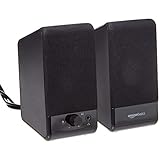
- USB-powered (5V) speakers plug directly into your computer for portable convenience
- Turn the speakers on and adjust the volume using one simple control (located on the front of the speakers); volume control includes On/Standby
- Simple plug-and-play setup (no drivers needed); can be used with headphones via the 3.5mm jack connector
- Frequency range of 103 Hz - 20 KHz; 2.2 watts of total RMS power (1.1 watts per speaker)
- Measures 2.76 by 3.55 by 5.3 inches (LxWxH); weighs approximately 1.4 pounds;
Without an additional power adapter, Creative specifies up to 10W RMS, or 20W peak. A compatible 30W USB-PD adapter can raise the stated output to as much as 30W RMS, but that adapter is not included. This is an important distinction: the advertised maximum depends on the power supply and should not be treated as the standard output of every package.
Compared with the original Pebble, the Pro adds Bluetooth, USB-C connectivity, headset and microphone connections, and optional higher-power operation. Compared with the Pebble X Plus, it lacks a separate subwoofer, so it is better suited to compact desks and general desktop listening than to buyers specifically seeking strong low-frequency impact.
Trade-offs: The small 2.0 enclosure cannot provide the same low-end extension as a 2.1 system with a dedicated subwoofer. RGB lighting is a bonus rather than a sound-quality feature, and the optional USB-PD adapter adds to the real cost if you want the higher-power mode.
Do these 3 things before closing this tab:
1Fix the driver behind crashes, sound loss and screen glitches2Repair Windows errors before they cause bigger problems3Scan for outdated or missing drivers - takes under a minute5. Creative Pebble — best ultra-budget option
Choose it if: your main goal is spending as little as possible while replacing weak laptop or monitor speakers.
The original Creative Pebble is the simplest recommendation here. PCWorld reported a $19.99 retail price in its price comparison at research time. It uses USB-A for power and a 3.5mm connection for audio, and it does not include Bluetooth.
At this price, the Pebble should be viewed as a basic powered stereo upgrade, not as a high-output system or a bass-focused entertainment setup. It is useful for spoken audio, casual videos, notification sounds, and everyday desktop use when built-in speakers are inadequate.
Trade-offs: Operation is wired, bass is limited, output is lower than the larger recommendations, and you need both an available USB-A port and a 3.5mm audio output. If your laptop has only USB-C ports, the Pebble Pro or Pebble X Plus will be easier to integrate without adapters.
How to choose the right budget computer speakers
2.0 versus 2.1: decide whether bass or desk space matters more
A 2.0 system has two full-range speakers and no separate subwoofer. It is usually easier to place, requires fewer cables, and works well on a small desk. The Creative Pebble Pro and Edifier MR3 are 2.0 systems.
Also popular on Amazon

- Versatile setup with speakers that connect easily to computers and other devices via Bluetooth wireless or 3.5mm cable
- Logitech Easy-Switch technology lets you seamlessly switch between audio devices Just by pausing the Audio on one device and pressing play on the other
- Each speaker has one active/powered driver that delivers full range Audio and ONE passive radiator that provides bass extension.
- On-speaker headphone jack Plus convenient controls for easy access to Bluetooth wireless pairing, power and Volume adjustments, Bluetooth version: 4.2
- Works with Bluetooth enabled devices and any device with a 3.5mm input including a computer, television, smartphone, tablet and music player
A 2.1 system adds a dedicated subwoofer. It generally makes bass more noticeable and gives games, films, and music more impact, but it needs more space and introduces another box and cable. The Creative Pebble X Plus and Logitech Z407 are 2.1 systems.
- Choose 2.0: small desk, laptop use, simple setup, nearfield listening, or balanced sound.
- Choose 2.1: games and movies, stronger bass, or a larger desk with room for a subwoofer.
Powered speakers versus passive speakers
Every model in this guide is powered. The amplifier is built in, so you connect the speakers directly to a computer, monitor, phone, tablet, or other source. Passive bookshelf speakers require a separate amplifier or receiver and are outside the convenience and cost target of this guide.
USB, 3.5mm, and Bluetooth connections
USB audio sends digital audio to the speaker system and can reduce dependence on the quality or noise level of a computer’s analog headphone jack. Check whether the speaker expects USB-A or USB-C, and distinguish an audio-capable USB connection from a power-only port.
3.5mm analog audio remains the most broadly compatible option. It works with many desktops, laptops, monitors, handheld devices, and other audio sources. It is especially useful if the computer does not support Bluetooth or if you want a simple wired connection.
Bluetooth is convenient for phones and tablets and lets you play audio without running a cable across the desk. It should not automatically be considered the best connection for latency-sensitive gaming. Wireless delay varies with the device, operating system, Bluetooth implementation, and application; the specifications cited here do not provide a measured latency comparison for these speakers.
Check power requirements before buying
Some compact USB speakers have different power and output modes depending on the adapter used. The Pebble Pro reaches its stated higher-power mode with a compatible 30W USB-PD adapter, which is not included. The Pebble X Plus reaches its stated up-to-30W RMS mode with a compatible 15V/2A USB-PD adapter, also not included.
Do not buy a random charger solely because its wattage appears high enough. Confirm the required voltage, current, USB-PD compatibility, connector, and whether the speaker’s power adapter is included. If you do not want to research an additional adapter, treat the speaker’s standard included-power configuration as the relevant baseline.
Measure your desk before choosing 2.1
Compact satellite speakers can still require space on both sides of a monitor, while a subwoofer may need room under the desk or beside it. Check the satellite cable length, subwoofer location, power-cable reach, and whether the control dial can sit somewhere convenient. Fixed cable lengths can make an otherwise good speaker system awkward on a wide or unusually arranged desk.
Also popular on Amazon

- 【SMALL HIFI BOOKSHELF SPEAKERS】With its modern aesthetic and compact design, this stylish black speaker complements contemporary home or office décor. The space-saving design fits seamlessly into any environment, maximizing desktop space. Ideal for desktop setups or small room audio systems like home offices or gaming stations.
- 【Experience powerful sound】Unleash powerful 30Wx2 distortion-free sound. Featuring a 0.75-inch carbon fiber silk dome tweeter and a 3-inch carbon fiber full-range driver, this speaker delivers crystal-clear highs and rich mid-bass. The rear bass port amplifies low-end depth, while the integrated independent sound card ensures smooth, detailed audio playback for the ultimate listening experience.
- 【Durable Performance】Built with a premium MDF wooden enclosure, this computer speakers effectively reduces box resonance for clearer, stream studio-quality,more precise sound. The easy-to-reach volume control knob on the front panel allows for quick adjustments during gaming or music sessions. Crafted from high-quality materials, it’s designed for long-lasting durability, providing consistent, stable performance even during intense gaming use.
- 【Multiple Input Options】These speakers are designed to offer versatile connectivity, featuring Bluetooth 5.3 along with RCA, AUX, and USB inputs. This variety ensures compatibility with a wide range of devices, giving you the flexibility to connect seamlessly to your preferred audio source.
- 【Versatile Use】The computer speakers for desktop pc Ideal for gaming, music streaming, and enhancing your computer audio experience, these speakers are compatible with smartphones, turntables, desktop or laptop computers, TVs, audio mixers, streaming devices , gaming pc, media players , subwoofers, audio receivers, and more. No matter your setup, these speakers meet all your audio needs with ease.
Connection and setup checklist
- Place the left and right speakers symmetrically and aim them toward your seated position. Nearfield speakers work best when they are not hidden behind a monitor or pushed into a corner.
- Keep the subwoofer unobstructed if you choose a 2.1 system. Avoid placing it where a cabinet or wall completely blocks the driver or port.
- Choose one primary connection. Use USB when you want digital audio from the computer, 3.5mm when compatibility is the priority, and Bluetooth for convenient mobile playback.
- Set the computer volume to a moderate level and use the speaker control for everyday adjustment. If the sound distorts, reduce the computer or speaker volume rather than assuming more power will solve it.
- Test left and right channels after setup. A reversed or missing channel can indicate a cable or operating-system setting problem rather than a defective speaker.
- Keep the manufacturer’s support page available if USB audio, Bluetooth pairing, a headset jack, or an optional power adapter does not work as expected.
What to buy at each budget
- About $20: Creative Pebble for basic wired stereo audio.
- About $65: Creative Pebble Pro for a compact USB-C/Bluetooth setup with more features.
- About $120–$130: Creative Pebble X Plus for the most complete compact package, or Logitech Z407 for bass and a wireless control dial.
- Exactly $150: Edifier MR3 for a monitor-style pair with balanced inputs and nearfield listening in mind.
Price, availability, and evidence note
Retail prices and stock change frequently, especially for older computer-speaker models. Recheck the price before publication and before purchase; a product that fits under $150 today may not do so later. The Edifier MR3’s cited official U.S. price is $149.99, while the Creative prices cited here include retailer observations reported by PCWorld.
This guide relies on manufacturer specifications and the cited PCWorld editorial coverage and price observations. It does not claim original hands-on testing, controlled listening comparisons, measured frequency response, measured latency, or verified maximum sound-pressure levels. PCWorld describes its own speaker reviews as testing products in a typical home-office environment and comparing audio fidelity and practicality; that testing should be attributed to PCWorld, not to this guide.
Affiliate disclosure: This article may contain retailer links. If you buy through one, the site may earn a commission at no additional cost to you. Prices and availability are subject to change.
Frequently Asked Questions
What are the best computer speakers under $150?
The Creative Pebble X Plus is the best all-around choice for a compact 2.1 system with Bluetooth, USB-C, and a subwoofer. The Edifier MR3 is better for balanced nearfield sound and creative work, while the Logitech Z407 is better for bass, movies, games, and wireless volume control.
Are 2.1 computer speakers better than 2.0 speakers?
Neither layout is universally better. A 2.1 system adds a subwoofer and is usually preferable for stronger bass, games, and movies. A 2.0 system is easier to place and may be better for a small desk or nearfield listening.
Do the Creative Pebble Pro and Pebble X Plus include the USB-PD adapter needed for maximum output?
No. Creative states that the Pebble Pro’s higher-power mode requires a compatible 30W USB-PD adapter and that the Pebble X Plus’s up-to-30W RMS mode requires a compatible 15V/2A USB-PD adapter. The required adapter is not included in the cited product information.
Is Bluetooth good for gaming with computer speakers?
Bluetooth is convenient, but it should not automatically be chosen for latency-sensitive gaming. Delay depends on the computer, Bluetooth implementation, operating system, and application. Use USB or 3.5mm when minimizing connection uncertainty is more important than wireless convenience.
Are the Edifier MR3 suitable for a small desk?
They are designed for nearfield listening but are larger than tiny USB desktop speakers. They make sense when you have room for a properly positioned stereo pair and value balanced sound and multiple inputs more than a minimal footprint or a dedicated subwoofer.
The Bottom Line
Buy the Creative Pebble X Plus for the best overall blend of compact size, connectivity, and bass under $150. Choose the Edifier MR3 for balanced nearfield listening and creative work, the Logitech Z407 for bass and convenient control, the Creative Pebble Pro for a small and inexpensive USB-C/Bluetooth setup, or the original Creative Pebble when the lowest possible price is the priority.

