
Free tools Windows power users keep installed
One-click scans. No signup required.
iTechGuides is reader-supported. When you buy through links on our site, we may earn an affiliate commission. As an Amazon Associate I earn from qualifying purchases. Learn more
Choose the Lenovo ThinkPad X1 Carbon Gen 13 for the lightest, travel-first executive setup; choose the HP EliteBook 1040 G11 when vPro fleet management is mandatory; choose the Microsoft Surface Laptop for Business when you want a compact, premium Windows experience. Keep the Dell Pro 7 Series 14 if its built-in HDMI, USB-A, Thunderbolt 4, display choices, optional mobile broadband and measured endurance match your itinerary. Dell already lists a 2.80 lb (1.27 kg) starting weight, so replacing it only makes sense when a specific priority matters more than its port mix or service model.
Quick comparison
The alternatives are not universal upgrades. Each addresses a different business-travel constraint, and the exact processor, memory, screen, modem and warranty can change the result. Use this table as a screening tool, then verify the regional configuration before ordering.
| Model | Travel advantage | Important specifications reported | Trade-off or verification point |
|---|---|---|---|
| Dell Pro 7 Series 14 | Balanced ports and business configuration choices | 2.80 lb (1.27 kg) starting weight; Windows 11 Pro; two USB-A, two Thunderbolt 4/USB-C and HDMI 2.1 in a University of Pennsylvania review; optional 500-nit WQXGA display | Battery figures vary by test method: 10 hours 18 minutes of provisional video playback in the University of Pennsylvania review versus 26 hours 18 minutes in StorageReview’s measured test |
| Lenovo ThinkPad X1 Carbon Gen 13 | Best fit for frequent flyers and executive portability | Configurations reach Core Ultra 7, 32 GB Lunar Lake or 64 GB Arrow Lake memory, 2 TB storage and a 2.8K OLED display | Exact weight is not stated in the cited material; premium pricing and limited upgradeability require confirmation |
| HP EliteBook 1040 G11 | Best fit for centrally managed fleets | Core Ultra 5/7 U- and H-series choices; vPro Enterprise configurations are listed | Listed Meteor Lake versions are below 40 TOPS and therefore are not Copilot+ PCs; exact CPU, RAM, panel and WWAN vary by regional SKU |
| Microsoft Surface Laptop for Business | Compact premium Windows experience | 13.8-inch business configuration; 2.99 lb (1.36 kg); reported starting price of $1,949.99 | Confirm whether the offered model is the business Intel version or a consumer Snapdragon version, because compatibility and management differ |
What the Dell Pro 7 Series 14 already does well
Dell’s baseline is unusually competitive for a 14-inch business laptop. The listed starting weight is 2.80 lb (1.27 kg), lighter than the 2.99 lb (1.36 kg) business Surface configuration whose price was reported by Windows Central. The Dell is positioned with Windows 11 Pro and includes both USB-C and USB-A connectivity, so a traveler can often leave a legacy peripheral adapter at home.
The University of Pennsylvania’s 2026 review gives the port layout in more detail: two USB-A ports, two Thunderbolt 4/USB-C ports and HDMI 2.1. That combination covers a conference-room display, wired accessories, fast external storage and modern docks without depending on a single dongle. An optional 500-nit WQXGA screen is also documented, useful in bright offices or airport lounges, although a higher-resolution, brighter panel can affect battery life and price.
#1 Best Overall

- The ThinkPad X1 Carbon Gen 13 Aura Edition weighs less than a kilogram, so you can manage it with one hand — and open it easily with one finger. But the best part? This super-thin laptop includes lots of connectivity options to hook up a monitor, quickly charge other devices, transfer files, and even plug in a headset if you’re old school.
Dell says the redesigned battery is 10% thinner while providing 24% more power capacity than the prior generation. Its vendor statement describes this as “Get the power you need without the bulk thanks to a compact battery design that is 10% thinner with 24% more power capacity than the prior generation.” That is a design comparison with the previous generation, not a guarantee of a particular number of hours.
Two independent endurance figures illustrate why test conditions matter. The University of Pennsylvania recorded a provisional 10 hours 18 minutes in a video-rundown test. StorageReview measured 26 hours 18 minutes in its Dell Pro 7 14 Intel test and recorded a PCMark 10 score of 8,438. These results use different workloads, brightness, power settings and procedures; they are evidence from separate tests, not equivalent promises that can be averaged or ranked directly.
Which alternative fits your travel priority?
For the smallest practical carry-on load
Start with the Dell’s 2.80 lb baseline. The cited material calls the ThinkPad X1 Carbon Gen 13 an “ultra-portable executive laptop,” but it does not provide a verified weight for a specific configuration. Do not assume every X1 Carbon SKU is lighter than the Dell: a 2.8K OLED panel, larger battery or different modem can change the shipping weight. Ask the seller for the configured machine’s weight, including the battery, before treating it as the lightest option.
Do these 3 things before closing this tab:
1Repair Windows errors before they cause bigger problems2Scan for outdated or missing drivers - takes under a minute3Clear out junk files and repair common Windows errorsThe Surface Laptop for Business is explicitly listed at 2.99 lb for its 13.8-inch business configuration, so it is compact but not lighter than the Dell figure. Charger mass also matters. A small USB-C charger can offset several ounces saved in the computer, while a proprietary or high-wattage adapter adds to the bag. Compare the complete travel kit rather than the notebook alone.
For the longest day away from an outlet
Use test-method labels instead of a single “best battery” headline. Video playback is a relatively light, repeatable workload; PCMark-style testing mixes office activity and other tasks; neither predicts a day of video meetings, local development, high brightness and cellular radio use exactly. The Dell’s 10-hour-18-minute provisional video result and StorageReview’s 26-hour-18-minute measured result demonstrate the spread that methodology can create.
For any alternative, request the exact battery capacity, panel resolution and processor in the quote. OLED, high brightness, sustained CPU activity, 5G or frequent sleep-wake cycles can reduce runtime. If your itinerary includes long flights, configure the machine with the standard-resolution panel unless the brighter or OLED option solves a real visibility need, and carry a charger that supports the laptop’s required wattage.
Rank #2

- Intel Core Ultra 7 258V, 8C (4P + 4LPE) / 8T, Max Turbo up to 4.8GHz, 12MB Intel Smart Cache
- 14" 2.8K (2880x1800) OLED 500nits Anti-glare / Anti-reflection / Anti-smudge, 100% DCI-P3, 120Hz VRR, DisplayHDR True Black 500, Dolby Vision
- 32GB LPDDR5X-8533, MoP Memory
- 1TB SSD M.2 2280 PCIe 4.0x4 NVMe
- Windows 11 Pro, Backlit Keyboard, Fingerprint Reader, WiFi+Bluetooth, 1-Year Warranty
For conference rooms and client sites
The Dell has the clearest documented advantage in this group: HDMI 2.1 plus two USB-A and two Thunderbolt 4/USB-C ports. That reduces the chance of arriving at a meeting with the wrong adapter. The X1 Carbon, EliteBook and Surface configurations can have different port counts by generation and region; the cited material does not establish a complete port list for them. Confirm HDMI, USB-A, charging over USB-C and the number of external-display outputs on the exact SKU.
What’s actually slowing this PC down?
Pick the symptom - the matching free tool is one click away.
If you routinely connect to projectors, smart-card readers, wired Ethernet adapters and a phone at the same time, count ports under that real scenario. A dock is a workable solution at a desk, but it does not remove the need for a compact travel adapter when visiting unfamiliar sites.
For a bright, comfortable screen
Dell’s optional 500-nit WQXGA display is the only brightness figure established in the supplied specifications. The X1 Carbon can be configured with a 2.8K OLED panel, which may provide high contrast and sharp text but can cost more and use more power depending on content and brightness. The Surface’s cited 13.8-inch size emphasizes compactness; no brightness or panel-resolution figure is established here. Verify brightness, anti-glare treatment, aspect ratio and webcam framing if you spend hours reviewing documents or presenting from the laptop.
For corporate controls and imaging
Windows 11 Pro on the Dell supports common business deployment scenarios. The EliteBook 1040 G11 is the most targeted option when your organization requires Intel vPro Enterprise: the cited comparison lists Core Ultra 5 and Core Ultra 7 U- and H-series choices and vPro configurations. vPro is a platform and management feature set, not simply a speed rating, so your IT team should confirm that the exact processor and firmware support the remote-management functions it uses.
Do not treat every EliteBook 1040 G11 as a Copilot+ PC. The listed Meteor Lake versions are below the 40-TOPS threshold and therefore are not Copilot+ PCs. If local AI features are a procurement requirement, check the processor’s NPU specification rather than relying on the family name.
The Surface choice needs the same discipline. Windows Central distinguishes a business Intel configuration from consumer Snapdragon models. Application compatibility, driver availability, virtualization behavior and enterprise management can differ, so obtain the business model number and operating-system edition in writing.
Rank #3

- UNOPENED RETAIL PACKAGING, sold as configured by Lenovo. Includes one year Lenovo Onsite Warranty. Add up to 5 years of Lenovo Premier Onsite Support Plus when you register your computer with Lenovo.
For mobile connectivity
WWAN and eSIM availability is configuration- and region-dependent. The Dell baseline specifically leaves room for modem choices, while the cited alternatives do not establish a universal 4G or 5G option. If your work depends on connectivity outside hotel or client Wi-Fi, confirm the modem bands, SIM or eSIM support, carrier certification and whether the antenna is installed in the selected SKU. A laptop that is merely “WWAN ready” may still require a separate module or may not be serviceable in your region.
Alternative 1: Lenovo ThinkPad X1 Carbon Gen 13
The ThinkPad X1 Carbon Gen 13 is the travel-first recommendation when executive portability matters more than maximum built-in connectivity. TechRadar’s 2026 ranking describes it as an ultra-portable executive laptop. Available configurations reach Core Ultra 7, 32 GB Lunar Lake or 64 GB Arrow Lake memory, 2 TB of storage and a 2.8K OLED display, giving a mobile professional room for large documents, virtual machines or local data sets without immediately relying on an external drive.
Why it suits frequent flyers
- Its product positioning prioritizes a thin, light executive format.
- Up to 64 GB memory and 2 TB storage are useful when your work cannot be kept entirely in cloud services.
- The optional 2.8K OLED screen can favor detailed spreadsheets, code and presentations when its power and price trade-offs are acceptable.
What to check before buying
- The cited material does not state a single configured weight. Obtain the weight for the exact CPU, panel, battery and modem combination.
- Premium pricing is a consideration; the reported comparison lists the X1 Carbon at $1,853, but that figure is not tied to the same memory, storage or display as every other model.
- Limited upgradeability means choosing RAM and storage conservatively at purchase.
- Confirm the port layout and whether it covers your HDMI, USB-A and display needs without a dock.
Choose this model when shaving space and presenting a polished executive setup are worth paying for, and when your IT team can accept its upgrade path and adapter requirements.
Alternative 2: HP EliteBook 1040 G11
The EliteBook 1040 G11 is the management-oriented choice. The cited comparison lists Core Ultra 5 and Core Ultra 7 U- and H-series processors and vPro Enterprise configurations. That breadth allows an organization to align performance and remote-management requirements, but it also makes the model name insufficient for procurement: two regional 1040 G11 listings can have materially different processors, screens, memory, storage and wireless options.
Why managed fleets may prefer it
- vPro Enterprise configurations can fit organizations that standardize hardware inventory, firmware policy and remote support around that platform.
- U- and H-series choices let IT balance battery-oriented operation against sustained performance.
- A single business-family model can simplify imaging, accessories and help-desk documentation when the regional SKU is controlled.
Important limitations
- Meteor Lake versions listed in the comparison fall below 40 TOPS, so they are not Copilot+ PCs.
- The available evidence does not state a universal weight, battery result, brightness, port map or WWAN configuration.
- vPro features only help when the organization’s management tools, policies and support contracts use them.
Choose the EliteBook when your procurement checklist starts with vPro, fleet imaging and lifecycle control. Have IT approve the exact processor and display before a travel team places a bulk order.
Alternative 3: Microsoft Surface Laptop for Business
The Surface Laptop for Business targets buyers who want a compact, premium Windows design rather than the broadest connectivity. Windows Central documents a 13.8-inch business configuration weighing 2.99 lb (1.36 kg) and reports a $1,949.99 starting price. That price is a reported starting figure, not a like-for-like quote against a particular Dell or ThinkPad configuration; memory, storage, warranty and display options can change the total.
Rank #4
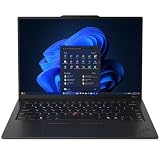
- ULTRA-PORTABLE DURABILITY - The ThinkPad X1 Carbon Gen 13 Aura Edition is Lenovo's flagship ultra-premium AI business laptop. Weighing just 2.17 lbs with up to 15 hours of battery life, it delivers exceptional portability for professionals on the go. AI-powered Smart Mode enables seamless phone-to-PC sharing and intelligently optimizes collaboration, privacy, and performance. Built to MIL-STD-810H military-grade standards for dependable performance in demanding business and travel environments
- POWERFUL AI PROCESSING - Powered by Intel Core Ultra 7 258V processor (up to 4.8GHz, 8 cores) for fast, efficient computing, featuring a dedicated 47 TOPS NPU for AI acceleration and smooth local LLM workloads. Integrated Intel Arc Graphics 140V graphics deliver smooth visuals for creative and professional tasks. Paired with 32GB DDR5 8533 MT/s RAM for seamless multitasking and a 512GB PCIe NVMe M.2 SSD for ultra-fast data access and ample storage
- STUNNING VISUALS - 14" 2.8K QHD+ (2880x1800) OLED display with 500 nits brightness, 120Hz VRR, and 100% DCI-P3 color delivers ultra-smooth visuals and vibrant detail. Features Dolby Vision and DisplayHDR True Black 500 with anti-glare coating for premium viewing comfort. It supports expanding the workspace with 3 external monitors via HDMI (max 4K@60Hz) or Thunderbolt 4 (max 8K@60Hz), without a docking station. The 1080P FHD IR Webcam ensures crisp video calls and supports facial recognition
- VERSATILE CONNECTIVITY - Includes 2x Thunderbolt 4, 2x USB-A 3.2 Gen 1, HDMI 2.1, and a headphone/mic combo. Experience blazing-fast wireless speeds with Intel Wi-Fi 7 and seamless device pairing via Bluetooth 5.4. Boost security with fingerprint reader and work comfortably in any lighting with a backlit keyboard
- OPERATING SYSTEM - Pre-installed with Microsoft Windows 11 Pro, offering enterprise-grade security with BitLocker and Remote Desktop, designed to support demanding professional applications and enhanced by AI Copilot for smarter, more efficient productivity across business and creative tasks
Why it can work for mobile professionals
- The 13.8-inch format is compact for airline trays and small client desks.
- The business configuration is the relevant reference for enterprise deployment, rather than a consumer model selected solely by appearance.
- Its premium positioning may appeal to executives who value a cohesive, minimalist device.
Configuration warning
Confirm whether the seller is offering the business Intel model or a consumer Snapdragon model. Processor architecture affects application compatibility, drivers, virtualization and management tooling. Do not assume a consumer listing has the same support lifecycle, firmware controls or enterprise features as the business configuration. Also verify the port map and display outputs before relying on it for presentations.
Quick wins for a faster PC:
Scan for outdated or missing drivers - takes under a minuteDriver Scan →Clear out junk files and repair common Windows errorsFree Scan →The cited comparison places the ThinkPad X1 Carbon at $1,853, below the reported $1,949.99 Surface starting price, but those are not standardized configurations. Compare matching RAM, SSD, screen, warranty and connectivity rather than choosing by the headline price.
Ports, displays and management: a decision table
| Decision factor | Dell Pro 7 Series 14 | ThinkPad X1 Carbon Gen 13 | EliteBook 1040 G11 | Surface Laptop for Business |
|---|---|---|---|---|
| Starting or cited weight | 2.80 lb (1.27 kg), Dell listing | Not stated in the cited material; verify exact SKU | Not stated in the cited material | 2.99 lb (1.36 kg) for the 13.8-inch business configuration reported by Windows Central |
| Processor choices | Intel business platform; exact options vary | Up to Core Ultra 7; Lunar Lake and Arrow Lake memory configurations are reported | Core Ultra 5/7 U and H; vPro Enterprise configurations listed | Confirm Intel business model versus consumer Snapdragon |
| Memory and storage | Exact combination depends on SKU | Up to 32 GB Lunar Lake or 64 GB Arrow Lake memory and 2 TB storage reported | Exact values not stated; verify regionally | Exact values not stated in the cited material |
| Display evidence | Optional 500-nit WQXGA panel | Optional 2.8K OLED | Exact panel options not stated | 13.8-inch business configuration; brightness not stated |
| Ports | Two USB-A, two Thunderbolt 4/USB-C and HDMI 2.1 in the University of Pennsylvania review | Exact port map not established here | Exact port map not established here | Exact port map not established here |
| Business controls | Windows 11 Pro positioning; modem choices available by configuration | Business ThinkPad support model; exact management features depend on SKU | vPro Enterprise configurations listed | Business Intel model has different compatibility and management implications from consumer Snapdragon models |
How to choose and order the right configuration
- Write the travel constraint first. Decide whether the non-negotiable is carry weight, all-day outlet independence, HDMI and USB-A access, vPro management, mobile broadband or application compatibility.
- Specify the workload. Name the applications, external monitors, virtual machines, local data and video-meeting pattern. This prevents an attractive display or processor label from hiding an unsuitable configuration.
- Request a complete SKU. The quote should identify processor generation, memory capacity and type, SSD capacity, panel resolution and brightness, operating-system edition, wireless card, WWAN/eSIM hardware, charger wattage and warranty region.
- Check the physical travel kit. Add the charger, cable, dongles and privacy accessories to the carry weight. Confirm that the charger can power the laptop while it is under sustained load.
- Validate meeting-room connectivity. Count the ports needed for HDMI, USB-A peripherals, wired networking, storage and charging. If the chosen alternative needs a dock, pack a tested travel adapter and a spare cable.
- Have IT validate management. Confirm vPro requirements, firmware-update policy, Windows edition, disk-encryption support, imaging compatibility and remote-recovery procedures before purchase.
- Check regional support. Warranty, keyboard layout, cellular bands, replacement parts and on-site service can differ by country. A specification that is correct in one market may not describe the unit delivered to another.
- Compare equivalent prices. Match RAM, SSD, panel, WWAN, warranty and accessories. Treat the reported $1,853 X1 Carbon and $1,949.99 Surface prices as reference points, not universal totals.
Business-travel setup checklist
- Install all firmware, operating-system and driver updates before departure, then restart and test sleep, wake and docking.
- Set a practical battery profile for flights and client visits; test the profile with your actual browser tabs, meeting software and documents.
- Enable full-disk encryption and confirm that recovery keys are escrowed according to company policy.
- Carry a tested USB-C charger, the correct video adapter for your common venues and one spare cable.
- Download airline, hotel and presentation files for offline use; do not assume reliable inflight or guest Wi-Fi.
- Record the serial number, asset tag, support contact and recovery procedure in your travel documentation.
- If using WWAN, activate the SIM or eSIM and test roaming before leaving your home region.
Common buying mistakes and how to avoid them
Assuming the family name guarantees a specification
“EliteBook 1040 G11,” “X1 Carbon Gen 13” and “Surface Laptop for Business” each cover multiple configurations. A product-family page is not a purchase specification. Require the exact model identifier and component list.
Ranking battery hours without the test method
A video-rundown result and a PCMark result answer different questions. Keep the method, workload and source attached to every battery number, and test your own software mix before a long trip.
Buying an OLED or high-resolution panel by default
A 2.8K OLED or 500-nit WQXGA screen can improve readability and presentation quality, but it may increase cost and power use. Select it when visibility or image quality is a real requirement, not simply because the option exists.
Confusing “ready for” with “included”
WWAN-ready hardware may not include a modem, antenna configuration or carrier certification. Likewise, a laptop that can connect to a dock may still lack the HDMI or USB-A port needed for an unplanned meeting. Verify included hardware.
Ignoring the charger and adapter burden
A lighter notebook can lose its travel advantage when paired with a large power brick and several dongles. Weigh the complete kit and test every adapter with the target display before departure.
Bottom line for business travelers
The Dell Pro 7 Series 14 remains the sensible baseline: 2.80 lb, Windows 11 Pro positioning and a documented mix of HDMI 2.1, USB-A and Thunderbolt 4/USB-C are difficult to replace without adding adapters. Choose the ThinkPad X1 Carbon Gen 13 when executive portability is the overriding goal and you accept premium pricing and limited upgradeability. Choose the EliteBook 1040 G11 when vPro-centered fleet management is the deciding requirement, while checking that the selected Meteor Lake or newer configuration meets your AI and performance needs. Choose the Surface Laptop for Business when its compact premium design justifies the reported $1,949.99 starting price and your IT team confirms the business Intel configuration. In every case, buy the exact regional SKU—not merely the family name—and keep battery claims tied to their test method.
Quick Recap
Product prices and availability are accurate as of the date/time indicated and are subject to change. Any price and availability information displayed on Amazon at the time of purchase will apply.

