
iTechGuides is reader-supported. When you buy through links on our site, we may earn an affiliate commission. As an Amazon Associate I earn from qualifying purchases. Learn more
For browser-first schoolwork, a Chromebook is usually the best alternative to a new $200 Windows laptop. Near this price, the Acer Chromebook 315 is a representative choice: the configuration cited by iTechGuides in 2026 has a 15.6-inch Full HD display, 4GB of RAM and 64GB of storage, with observed prices of about $159–$199. The ASUS Chromebook CX15 was reported at about $159.99 in a 2026 student-laptop guide.
If the student needs Windows-only desktop software, choose a refurbished business laptop instead. Lenovo ThinkPad T480, Dell Latitude 7490 and HP EliteBook 840 G5-class systems with 8GB of RAM and 256GB SSDs were listed around $200–$340 in 2026. That is above the nominal budget, but it generally buys a more usable Windows computer than a brand-new low-end model.
The deciding question is not the lowest sticker price. It is whether the computer runs every required school app, has enough remaining operating-system support, and comes from a seller that protects you with a return window and warranty.
The Tool Desk
Outbyte Driver Updater FREEScan for outdated or missing drivers - takes under a minuteDriver Scan →Outbyte PC Repair FREERepair Windows errors before they cause bigger problemsFix Now →What you can realistically buy for $200
A new Windows laptop at exactly $200 usually involves compromises in processor performance, memory, storage and build quality. The strongest new alternatives at this price are generally Chromebooks, because ChromeOS is designed around a browser and web services rather than a full desktop operating system.
#1 Best Overall

- ✅【Processor】Powered by an Intel Celeron N4020 Dual-Core Processor(Up to 2.80 GHz), the Chromebook loads content-rich webpages fast, provide crisp video playback, and enables you to multitask effortlessly by allowing multiple pages to run at the same time.
- ✅【15.6” HD Display】The large 15.6” HD display with an anti-glare coating and narrow 0.37-inch bezel gives users a greater workspace, so they can be more productive in bright conditions. For added functionality and to keep numerists happy, an integrated numeric keypad has been included.
- ✅【RAM & Storage】4GB RAM, 64GB eMMC meets the needs of people who need Google operating system in companies or schools.
- ✅【Connectivity】12.5 hours of battery life goes a long way. Work efficiently and browse the web knowing that your connection remains secure with Wi-Fi and Bluetooth. Ports & Slot: 2 x USB-C 3.1, 2 x USB-A 3.1, 1 x Headphone Jack.
- ✅【Operating System】Chromebook is a computer for the way the modern world works, with thousands of apps. It is secure, fast, up-to-date, versatile and simple.
Around $200, a Chromebook can handle school portals, browser assignments, email, web documents, video calls, research, streaming and other basic home tasks. It is a good fit when the student works primarily online and the school does not require a Windows-only application.
A refurbished business-class Windows laptop is a different proposition. Older corporate models often have stronger keyboards, more ports, easier serviceability and better multitasking hardware than a new bargain Windows notebook. The trade-off is age: you must verify Windows 11 eligibility, battery condition, storage health, remaining support and the seller’s return terms.
Best browser-first choice: a Chromebook
Acer Chromebook 315
The Acer Chromebook 315 is a representative large-screen option near this budget. The configuration described by iTechGuides in 2026 includes a 15.6-inch Full HD display, 4GB RAM and 64GB storage. Its reported $159–$199 street-price range is a snapshot rather than a guarantee; configurations, sellers and prices change quickly.
Quick wins for a faster PC:
Fix the driver behind crashes, sound loss and screen glitchesFind Drivers →Repair Windows errors before they cause bigger problemsFix Now →Scan for outdated or missing drivers - takes under a minuteDriver Scan →The 15.6-inch screen is useful for split-screen research, document editing and video lessons. Full HD resolution gives school documents and web pages more workspace than a small 11- or 12-inch panel. Four gigabytes of RAM is adequate for a modest number of browser tabs, but students who routinely keep many tabs, video calls and extensions open should close unused tabs or consider a higher-memory configuration when available.
ASUS Chromebook CX15
The ASUS Chromebook CX15 was reported at a starting price of about $159.99 in a 2026 student-laptop guide. Treat that figure as a listed starting point: check the exact processor, memory, storage, display resolution, seller and ChromeOS support date before ordering. Two laptops with the same family name can have materially different specifications.
What Chromebook ownership is like
- Assignments, school portals, email and documents run through Chrome and web applications.
- Google Workspace and Microsoft 365 web applications can be used in a browser. Check whether your school requires desktop Office features, add-ins or offline workflows that the web versions do not provide.
- ChromeOS supports Android and Linux features on compatible models, but availability and performance vary. Do not assume that an Android or Linux version of an app is an equivalent replacement for a Windows program.
- Local storage is limited on many inexpensive models, so plan for cloud storage or external storage for large files.
- ChromeOS updates are tied to the model’s Auto Update Expiration date. A low purchase price is poor value if only a short support period remains.
When a refurbished Windows laptop is the better answer
Choose refurbished Windows hardware when the student must run a Windows desktop application, use a school testing tool that requires Windows, connect to specialized peripherals, or work offline with traditional desktop software. Business systems also tend to provide more comfortable keyboards and a wider selection of ports than ultra-cheap new consumer laptops.
Representative business-class models
| Model class | Typical cited configuration | 2026 reported price range | Why consider it |
|---|---|---|---|
| Lenovo ThinkPad T480 | 8GB RAM, 256GB SSD | About $200–$340 | Business-oriented keyboard, ports and upgrade-friendly design |
| Dell Latitude 7490 | 8GB RAM, 256GB SSD | About $200–$340 | Business-class construction and conventional Windows support |
| HP EliteBook 840 G5 class | 8GB RAM, 256GB SSD | About $200–$340 | Professional keyboard, ports and durable chassis |
Human-I-T reported the $200–$340 range for 8GB/256GB refurbished business laptops in 2026 listings. These are listing snapshots, not independent price guarantees. A lower-priced unit may have a worn battery, a smaller or slower drive, cosmetic damage, a missing charger or limited return coverage.
Rank #2

- Chromebook laptops run on Chrome OS - An operating system by Google that is built for the way we live today. It updates automatically, boots up in seconds and continues to stay fast over time. (Internet connection is required).
- All the Google apps you know, and love come standard on every Chromebook, which means you can edit, download, and convert Microsoft Office files in Google Docs, Sheets and Slides.
- Get access to more than 3 million Android apps from Google Play to learn and do more.
- Chromebooks come with built-in storage for offline access to your most important files and an additional 100GB of Google Drive space to ensure that all your files are backed up automatically.
- Intel Celeron N4000 Dual-Core Processor (Up to 2.6GHz) | Intel UHD Graphics 600
Windows 11 eligibility matters
Before buying an older business laptop, verify that the exact processor and configuration are eligible for Windows 11. A computer that runs Windows 10 today may have limited future support if it cannot officially move to Windows 11. Ask the seller to identify the Windows edition and activation status, and confirm that the advertised specification matches the machine you will receive.
Chromebook or refurbished Windows: the deciding comparison
| Decision factor | Chromebook near $200 | Refurbished business Windows laptop |
|---|---|---|
| Software | Browser and web applications; selected Android or Linux apps on compatible models | Windows desktop applications and broader peripheral support |
| Support life | Check the model’s ChromeOS Auto Update Expiration date | Check Windows 11 eligibility and Microsoft support for the installed edition |
| Hardware value | New device, commonly 4GB RAM and 64GB storage in the cited Acer configuration | Often 8GB RAM and a 256GB SSD in the cited business-class listings |
| Keyboard and ports | Varies by model; inexpensive systems may be basic | Business models generally offer a stronger keyboard and more ports |
| Risk | New-device warranty, but verify configuration and update date | Used-device condition varies; warranty, battery and returns are critical |
| Form factor | Conventional or convertible Chromebook designs | Usually a conventional laptop |
Check software compatibility before spending anything
Compatibility is the most important step because ChromeOS does not run every Windows or macOS program. Make a complete list before comparing models.
- List required school services. Include the learning-management portal, document tools, video-conferencing platform, browser extensions, printer workflow and any offline requirements.
- Identify testing software. Some exam systems require a particular browser, a lockdown application, screen monitoring or an operating-system feature that is unavailable on ChromeOS. Ask the school or testing provider for its current supported-platform list.
- Separate web access from desktop access. A service that opens in Chrome is not automatically equivalent to a desktop application. Confirm whether advanced features, plug-ins, macros or add-ins are required.
- Check peripheral needs. Verify support for printers, scanners, external displays, USB accessories, specialized lab hardware and headphones.
- Plan offline work. If the student regularly works without internet access, confirm that the required apps can save and edit files offline on the chosen platform.
If any required application is Windows-only and has no approved web, Android or Linux alternative, select the refurbished Windows route or obtain explicit confirmation from the school before buying a Chromebook.
How to evaluate a Chromebook listing
Confirm the exact configuration
Look beyond the product-family name. Record the processor, RAM, storage capacity, screen size and resolution, wireless standard, ports, keyboard layout and included charger. The cited Acer Chromebook 315 configuration has 4GB RAM and 64GB storage, but another listing under the same family name may differ.
What’s actually slowing this PC down?
Pick the symptom - the matching free tool is one click away.
Check the Auto Update Expiration date
Find the exact model number in Google’s Chromebook support information and verify its Auto Update Expiration date before checkout. The date determines how long Google is scheduled to provide automatic ChromeOS updates. A device with a lower price but little remaining update life can cost more over its useful period.
Decide whether a convertible design helps
A convertible Chromebook can fold into a tablet mode for reading, annotation and media. It can be convenient for students who frequently mark up documents or watch lessons away from a desk. The hinge and touch display add complexity, so inspect the return policy and do not pay extra for tablet flexibility that the student will not use.
Check memory and storage against the workload
Four gigabytes of RAM can work for ordinary browsing and documents, but heavy multitasking may require more. Sixty-four gigabytes of storage is suitable for a cloud-centered workflow, not for a large offline media library. Budget for cloud storage or an external drive if the student keeps many videos, photos or downloaded files.
Rank #3
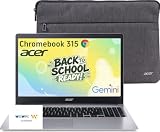
- 15.6" Full HD Display: Experience clear and vibrant visuals on a spacious 15.6-inch FHD (1920×1080) screen. The large display provides more room for multitasking, online classes, document editing, web browsing, and entertainment, making it ideal for students and everyday home use.
- Full-Size Keyboard with Numeric Keypad: Type more comfortably and work more efficiently with a full-size keyboard that includes a dedicated numeric keypad. Ideal for students, data entry, spreadsheets, and everyday productivity tasks, providing a desktop-like typing experience in a portable laptop design.
- ChromeOS with Gemini AI – Fast, Simple & Secure: Enjoy a streamlined computing experience with quick startup, built-in virus protection, automatic updates, and easy access to Google apps including Chrome, Google Docs, Drive, and Classroom for learning, work, and entertainment.
- Designed for Students & Everyday Use: Built for K-12 learning, remote classes, homework, research, and home productivity. With a thin and portable design, this Chromebook is easy to carry between classrooms, home, and everyday activities while keeping you connected wherever you go.
- Faster Wireless Connectivity: Stay connected with fast and stable wireless performance for smooth video calls, online classes, streaming, and everyday browsing. Designed to keep you productive anywhere with reliable internet access at home, school, or on the go.
How to evaluate a refurbished Windows laptop
Target a usable baseline
For school use, target at least 8GB of RAM and a 256GB SSD. An SSD makes startup and application loading substantially more practical than an older mechanical hard drive, while 8GB gives a student room for a browser, documents and a video call at the same time.
Free tools Windows power users keep installed
One-click scans. No signup required.
Verify condition and included items
- Ask for the exact model, processor generation, RAM, SSD capacity and Windows edition.
- Confirm that the charger is included and is the correct wattage.
- Request the battery-health policy or a stated minimum runtime. Business laptops can arrive with batteries at very different stages of wear.
- Inspect the return window, warranty length, restocking rules and procedure for reporting defects.
- Check the keyboard, display, webcam, microphone, Wi-Fi, USB ports, headphone jack and charging connector as soon as the laptop arrives.
- Confirm that the serial number and specification on the delivered machine match the listing.
Check Windows 11 support before purchase
Use Microsoft’s compatibility guidance or the seller’s documented compatibility result for the exact processor and model. Do not rely solely on a generic statement that the laptop is Windows 11-ready. If the seller cannot identify the processor or operating-system license, treat that as a reason to choose another listing.
Budget for the complete purchase
The computer price is only part of the cost. Compare the final delivered total after adding a charger if one is missing, shipping, tax, a protective case, warranty coverage and any required school-management service.
- Chromebook: The cited Acer configuration was observed at about $159–$199, and the ASUS Chromebook CX15 at about $159.99 starting price. Verify live prices, sellers and configurations immediately before ordering.
- Refurbished Windows: The cited 8GB/256GB business-class listings were about $200–$340. A unit near the top of that range may be the better value if it includes a healthier battery, a longer warranty and a reliable SSD.
- Accessories: Include a case, mouse, headphones, external storage or display adapter only when the student’s workflow actually needs them.
Match the computer to common student scenarios
Browser-based assignments and streaming
Choose the Chromebook. Web documents, school portals, email, video calls and streaming are its strongest use cases, and a new model avoids the unknown battery and cosmetic condition of used equipment.
Microsoft 365 for ordinary documents
A Chromebook can use Microsoft 365 in a browser for common document, spreadsheet and presentation work. Confirm that the student does not need desktop-only features, add-ins, macros or dependable offline editing before choosing ChromeOS.
Lockdown testing or specialist software
Choose Windows unless the school explicitly confirms that its testing software supports the exact Chromebook model and ChromeOS workflow. A browser that opens the school portal does not prove that a proctoring or lockdown tool will work.
Programming or technical courses
Ask whether the course requires a Windows IDE, virtual machine, device driver or local development stack. ChromeOS Linux support may help with some workloads, but it is not a universal substitute for Windows compatibility.
Rank #4

- Chromebook laptops run on Chrome OS - An operating system by Google that is built for the way we live today. It updates automatically, boots up in seconds and continues to stay fast over time. (Internet connection is required).
- All the Google apps you know and love come standard on every Chromebook, which means you can edit, download, and convert Microsoft Office files in Google Docs, Sheets and Slides.
- Get access to more than 2 million Android apps from Google Play to learn and do more.
- Chromebooks come with built-in storage for offline access to your most important files and an additional 100GB of Google Drive space to ensure that all of your files are backed up automatically.
- Intel Celeron N4500 Dual-Core Processor (Up to 2.8GHz) | Intel UHD Graphics
Reading, annotation and media
A convertible Chromebook is attractive when tablet mode will be used regularly. If the student mainly types essays, a conventional Chromebook or business Windows keyboard may be more comfortable and less expensive.
Long offline periods
A refurbished Windows laptop is usually the safer choice when the student works away from reliable internet or stores substantial files locally. Confirm battery health rather than assuming that a business-class chassis means a new battery.
Recommended Free Tools
First-day setup checklist
- Install every required browser, school application and approved extension.
- Sign in with the student’s school account and test access to the learning portal, documents, video calls and file storage.
- Run a practice assignment and, if applicable, a practice test using the same browser or lockdown tool required for real exams.
- Connect the intended printer, display, headphones and other peripherals.
- Apply all ChromeOS or Windows updates before the first deadline.
- Set up automatic backups or cloud synchronization, then open a saved file while offline to confirm the planned workflow.
- Record the purchase date, serial number, seller contact information and return deadline.
Common buying mistakes and fixes
Choosing by price alone
A $150 listing may omit a charger, have a nearly exhausted battery or offer little return protection. Compare the delivered total and coverage, not just the headline price.
Assuming every Chromebook runs every school tool
Check the school’s supported-platform list, especially for testing, monitoring and specialized applications. If support is unclear, obtain confirmation before the return period expires.
Buying an old Windows laptop without checking Windows 11
Verify the exact processor and eligibility. If the machine is limited to an operating system nearing the end of its support lifecycle, the apparent bargain may create a replacement expense soon.
Ignoring storage type
An SSD is a practical baseline for a refurbished Windows computer. Ask the seller to identify the drive type and capacity rather than accepting a vague statement such as fast storage.
Failing to test immediately
Use the first days to test battery behavior, keyboard, webcam, microphone, wireless connection, ports, display and school applications. Report defects while the return window is open.
Bottom-line buying decision
Buy a new Chromebook near $200 when the student’s work is browser-based and the exact model has a healthy Auto Update life. The Acer Chromebook 315 configuration cited at $159–$199 and the ASUS Chromebook CX15 cited around $159.99 show what this category can offer, but verify the live listing.
Spend about $200–$340 on a refurbished business Windows laptop when Windows software, stronger ports and keyboard, offline work or specialized school tools matter more than buying new. A Lenovo ThinkPad T480, Dell Latitude 7490 or HP EliteBook 840 G5-class machine with 8GB RAM and a 256GB SSD is the type of configuration to seek, provided Windows 11 support, battery condition, warranty and returns are documented.
Quick Recap
Product prices and availability are accurate as of the date/time indicated and are subject to change. Any price and availability information displayed on Amazon at the time of purchase will apply.

