
Quick wins for a faster PC:
Fix the driver behind crashes, sound loss and screen glitchesFind Drivers →Clear out junk files and repair common Windows errorsFree Scan →iTechGuides is reader-supported. When you buy through links on our site, we may earn an affiliate commission. As an Amazon Associate I earn from qualifying purchases. Learn more
There is no single best AI video generator for every ad or product demo. Choose by the asset you need: generated footage, a scripted presenter or avatar, or an edit built from footage you already have. Runway is a candidate for generation plus editing; HeyGen and Synthesia are options for presenter-led content; Adobe Firefly is worth considering in an Adobe-centered workflow; and editing suites are better suited to repurposing existing material. Compare the actual output limits, revision costs, commercial terms and review effort before choosing.
Start with the video you need to make
“AI video generator” covers several different kinds of software. A tool that creates new footage from a prompt does not necessarily solve the same problem as one that creates an avatar reading a script or one that edits a recording you already own. Shortlisting by deliverable is more useful than ranking unlike products as though they were interchangeable.
| Deliverable | Category to consider | What to check first |
|---|---|---|
| A new product-style shot or visual scene | Footage generation, or a generation-and-editing workspace | Whether the output can show the real product accurately, how many retries the plan allows, and the export limits |
| A presenter reading an approved script | Avatar or presenter video | Voice and likeness permissions, language options, output formats, and whether paid-ad use is allowed for the specific plan and model |
| Several versions of footage you already have | Editing or repurposing software | Editing controls, review workflow, and whether the tool preserves the source material and details you need |
| A mix of new shots and existing footage | A combined generation-and-editing workflow | How generation credits, editing features, audio tools, watermark rules and exports interact |
For product demos, distinguish a visually appealing scene from evidence that a product really works as shown. A generated image or synthetic presenter cannot establish a product feature, customer experience, performance result or other factual claim. If the demo depends on a real interface, physical product behavior or a specific result, preserve verifiable source material where possible and inspect every generated detail before publishing.
Options and published plan facts
The following comparison reflects the public product and pricing information available on October 25, 2026. Vendor pages can change and may display different prices or terms by country, account or billing cycle. The listed prices are not a measure of the cost of a finished, approved clip: generation retries, editing time, and the limits on a particular model or export all matter.
Popular on Amazon
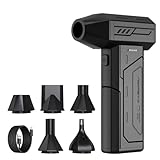
- Powerful Turbo Fan:CAGIWIRU Electric Air Duster have reached speed up to 130000RPM,Can efficient remove dust and debris.With LED light and Three Adjustable Speed to meet with different cleaning tasks.
- With Attached USB C Fasting Charging cable.Charing 3 hours,Enjoy up to 240 minutes of use on the lowest setting, For third speed can use for 25mins.with four charging options to meet with your needs.
- Wide Application: attached 5 different nozzles,making it suitable for a variety of scenes, such as car,pet, pc, keyboards, and other electronic devices. It also serves for office and home clean duster.
- Handy Design & Portable:Cordless air duster electric nozzle is Light weight and small size, design and comfortable to hold and space saving, convenient to carry around. You can put it in your room or inside the car without taking up space.
- Economical &Reusable: Built durable materials with a long-lasting battery,our CAGIWIRU air duster it's a sustainable alternative to disposable air cans.
| Tool | Best-fit workflow indicated by its published information | Published facts as of October 25, 2026 | What to verify before committing |
|---|---|---|---|
| Runway | Generating new shots and editing footage in one workspace | Free lists 125 one-time credits. Standard lists $15 monthly, or $12 per month when billed annually, and 625 credits per month. The Standard page lists video and image models, music, voice and sound effects, no watermark on paid Standard, and ad creation. | Credit use varies by model. Check the model-specific estimate, plan limits, billing cycle and whether the actual export meets the campaign requirements. |
| HeyGen | Presenter-led videos and generated scenes for social formats | The product page lists 16:9, 9:16 and 1:1 formats and describes generation of pictures, dialogue and sound. The pricing page lists Free with three videos per month and a watermark; Creator at $29 per month; and Pro at $49 per month. | Confirm the current checkout price, plan limits and license for the exact model and output. Use only likenesses and voices you are authorized to use. |
| Adobe Firefly | Teams already working in Adobe creative tools | Adobe’s plans page groups Firefly video generation with broader creative features. A specific video entitlement or price is not established here. | Check the live plan page for included video capability, usage limits and differences between Adobe and partner models. |
| Synthesia | Recurring scripted avatar explainers and localized communications | The official product page lists AI avatars, video creation, translation, dubbing and product-video use cases. A price or paid-ad entitlement is not established here. | Review current plan details and terms for the exact avatar, output and advertising use. |
| Editing and repurposing suites | Teams starting with existing footage or recordings | Shopify’s 2026 roundup includes Descript and other editing or repurposing products alongside generative tools. A comparable price or feature set is not established here. | Compare editors with other editors for the work at hand; do not assume an editor replaces a footage-generation model. |
Prices shown are the public US page displays observed on the date above where a price was published; recheck the vendor’s checkout page for your location and billing choice. Features and licensing can also vary by model and plan, so a headline product description is not a substitute for checking the terms that apply to the specific output.
How to choose without paying for the wrong workflow
- Specify the deliverable. Write down what the finished asset must be: for example, a vertical hook, a close-up product detail, a presenter reading approved copy, or versions of an existing recording in multiple languages. Include the intended placement and aspect ratio.
- Inventory the source material. Note whether you have product photography, real footage, a screen recording, a script, or only an idea. When factual product behavior matters, a workflow anchored in inspectable source material is generally easier to verify than one built entirely from a prompt.
- Choose a category before a brand. Consider Runway for a combined generation-and-editing workflow; HeyGen or Synthesia for scripted presenter content; Adobe Firefly if your team already uses Adobe creative tools; and an editing suite if the starting point is recorded material. These are workflow fits, not guarantees of ad suitability.
- Calculate the production constraint. Check credits or minutes, model-specific generation cost, retries, clip duration, resolution, aspect ratios, watermarks, editing controls and the steps needed for review. Estimate how many finished variants you expect to deliver, not just how many initial generations you hope to make.
- Read the relevant commercial terms. Confirm permissions for the exact plan, model, likeness, voice, stock asset and music, as well as the intended destination and region. The product’s ability to generate a clip does not establish that every component is cleared for a paid campaign.
- Assign a human reviewer. Have someone responsible check product accuracy, claims, synthetic identity and applicable platform disclosure requirements before publication. The available information does not establish one disclosure rule that applies to every platform and use.
What plan limits mean for a finished ad
Credits are not the same as usable seconds
A credit allowance is only useful when you know what a generation consumes. Runway’s pricing page expresses credits as estimated seconds for particular models, which is a reminder that the same plan balance may yield different amounts of output depending on the model and task. Treat an estimate as a planning aid, then verify the current model-specific rate in the product before building a budget around it.
For a campaign, the relevant unit is not the first generated clip. It is the approved asset after retries, trimming, editing and review. A concept that needs repeated regeneration to correct a product detail or framing issue can use credits quickly and may still need additional editing. Make a small test using the intended model, format and workflow before committing to a larger batch.
Also popular on Amazon

- Screen Cleaner is Your Screen’s New Bestfriend! - EVEO is proud to present a screen cleaner that’s perfectly suited for your TV. Meet your new screen cleaner, computer screen cleaner, laptop cleaner, iPad cleaner, Macbook,tv cleaner or any other electronic device. Our screen cleaner spray and wipe along with the included plush microfiber cloth, easily removes dust, fingerprints & other smudges on the screen’s surface. Clean effectively for a streak-free screen
- Gentle on your Screens - Our screen cleaner spray and wipes is compatible to be used even for the most sensitive LCD, LED, CRT, and OLED screens in proper use. Be at ease knowing that this product is compatible with all the major brands: LG, SONY, Samsung, Sharp, iPad, iPhone, Android screens, Kindle, PC monitors - we’ve got you covered! Can be used as LCD screen cleaner, tv cleaner, smart tv screen cleaner, and more
- Premium Super Soft Plush Microfiber Cloth - Included in this efficient screen cleaning kit. This screen cleaner spray and wipe has our signature plush microfiber cloth specially designed to comply with screens and monitors and leave them streak-free. Has been shown to effectively absorbs stubborn stains, zero streaks, and no fiber shedding. Always use this together with our screen cleaner for the best results
- Easy-to-Use Screen Cleaner Kit + microfiber cleaning cloth - The EVEO Screen Cleaning Kit will easily be your new favorite tool when it comes to taking care of the things you love most, quick and easy solution for a streak-free screen. Simply screw on the sprayer gun on the screen cleaner bottle. Spray the cleaning liquid onto the microfiber cloth, then wipe the screen until desired cleanliness & shine is achieved.
- Quality Screen Care Kit Worth Purchasing - Enjoy a convenient Screen Cleaner anytime, anywhere you need it. Your satisfaction is our top priority. We stand behind the quality of our products and that’s why, you shouldn’t be worrying at all. We manufacture the Best Screen Cleaner. and can be used for laptop cleaning kit, laptop screen cleaner, tv screen cleaner for smart tv. MacBook screen cleaner, monitor cleaner or screen cleaner spray for electronic devices with microfiber cleaning cloth
Watermarks and exports can change the economics
Runway’s published Standard information says paid Standard exports have no watermark; the cited plan information does not establish an equivalent export rule for every other tier or tool. HeyGen’s Free plan is listed as watermarked. If an ad must be delivered without a watermark, confirm the export rule for the plan you intend to use before producing a library of clips.
Likewise, do not infer resolution, maximum duration, team approval features or other export entitlements from a monthly price alone. Those details are not established for all the options in this comparison. Check the current plan page and the in-product export settings against the delivery requirements of the campaign.
Aspect ratio matters before generation
HeyGen’s product page lists 16:9, 9:16 and 1:1. Those formats cover common landscape, vertical and square layouts, but the right format depends on the placement and the asset’s composition. Specify the frame before generating; cropping an existing shot later can cut off a product, caption or presenter. For other tools in this comparison, the cited pages do not establish a complete aspect-ratio list, so verify it directly rather than assuming the same formats are available everywhere.
Also popular on Amazon

- 【Large size】:Measuring 800 x 300 mm/ 31. 5×12 inches, which is wider and taller than others. Large mouse pad can perfectly fit your keyboard and mouse of any size, and there is also ample space for peripherals such as phones, tablets, etc.
- 【LED backlight mouse pad】:Blade Hawks RGB mouse pad provides 7 static modes and 7 dynamic modes will give you the options you are looking for. Power-off memory function remembers the last lighting mode you selected. The super glow fiber Chroma will give you a colorful gaming setup that you want.
- 【Anti-slip rubber base】:Made from Natural rubber, this gaming mousepad will firmly grip your desktop, allowing you to enjoy the ultimate precision in the games you are most passionate about. It also comes with a texture that enhances this ability even further.
- 【Smooth and waterproof surface】: Micro-textured cloth surface, for extremely precise mouse control and a smooth movement. When liquid splashes on the gaming mouse pad, it forms water droplets and slides down. Will not delay your work or gameplay.
- 【Plug and play】: This mouse and keyboard pad is powered by USB, plug and play, no driver required. One button control light modes. Press one time to change the lighting mode, press twice to change the brightness, press and hold about 3 seconds turn ON/OFF.
Where each option fits—and where the evidence stops
Runway: generation alongside editing
Runway is the most directly documented option here for teams that want to create new shots and edit material in one workspace. Its published Standard plan combines a monthly credit allowance with access to video and image models and audio tools. That makes it a plausible shortlist choice when a campaign needs both generated visuals and post-production, but the actual fit depends on which model you use and how much iteration the deliverable requires.
Free tools Windows power users keep installed
One-click scans. No signup required.
Its listed 125 free credits are a one-time allowance, not a recurring monthly balance. Standard’s 625 credits are listed per month; the page gives a $15 monthly price or $12 per month billed annually. Those figures describe the public plan display, not a guaranteed total cost for a particular ad. Check current terms and do a representative test before scaling up.
HeyGen: presenter-led and format-conscious content
HeyGen is a relevant candidate when the concept depends on a presenter, a scripted line or generated scenes arranged for common social formats. Its listed Free plan allows three videos per month and includes a watermark. The listed Creator and Pro prices are $29 and $49 per month respectively; the available facts do not establish all plan limits or clarify which specific advertising rights attach to each tier.
Also popular on Amazon

- 【Softer and More Comfortable】Vaydeer wrist rest has unique diamond pattern, which is the combination of softness and aesthetics. The materials of wrist rest are improved into higher quality memory foam and covered with silky smooth lycra. The computer wrist rest makes you as comfortable and cushiony as like rest your wrists on clouds.
- 【Ergonomic Wrist Saver】The wrist rests for keyboard and mouse comes with a 17.32×3.15×0.83 inch keyboard wrist pad and a 5.94×3.15×0.83 inch mouse wrist support. Based on ergonomic design, the unique concave shape is the perfect fit for your wrist joints. The wrist rest pad fits most computer keyboards and laptops, improve hand and wrist posture, release your wrist and arm stress.
- 【Non-Slip Rubber Bottom】Featuring an anti-skid silicone base on the bottom, this wrist keyboard support stays firmly in place on your desk, preventing the padding from sliding around, ensuring stable and consistent wrist support during extended computer sessions.
- 【Better Experience & Pain Relief】Our keyboard arm rest is beneficial to alleviate the soreness caused by direct contact and friction between your arm and a hard desk surface, reducing the risk of wrist fatigue or carpal tunnel. The soft texture of memory foam can evenly distribute the pressure around your wrists and provide good support with just enough give.
- 【Helpful in Multiple Scenarios】Whether you're working, studying, writing, typing, gaming, this keyboard and mouse rest combo is an essential accessory to add comfort and support to your hands and wrists. It’s also a great gift for men, women, family, friend, coworker, gamer, teacher, etc.
Before using an avatar or voice, get authorization for the identity being represented and check the applicable model and plan terms. A synthetic presenter may deliver approved copy, but the presence of a person on screen does not make the message a genuine customer testimonial or proof of personal experience.
Adobe Firefly: a workflow to verify inside Adobe’s ecosystem
Firefly is most relevant to teams that already use Adobe creative applications and want to evaluate video generation within that broader workflow. Adobe’s plans page groups video generation with other creative features, but the information available here does not establish a standalone price, a specific included allowance or identical terms for Adobe and partner models. Consult the current plan and feature details before deciding that an existing subscription includes the video capability you need.
PC Slower Than It Used to Be?
A free scan shows the junk files, broken settings and background clutter dragging Windows down - then fixes them in one click.Free scan · Windows 10 & 11Outdated Drivers Are Slowing You Down
One free scan finds every outdated or missing driver and matches the right update for your exact hardware.Free scan · exact hardware matchSynthesia: scripted explainers and localization
Synthesia’s official product information identifies avatars, video creation, translation, dubbing and product-video use cases. That makes it a candidate for recurring presenter-led explainers or communication that needs localized versions. The cited information does not settle the price, the limits of particular plans or whether every avatar and plan is suitable for paid advertising. Confirm those points for the intended campaign rather than extrapolating from the use-case description.
Also popular on Amazon

- 【No Drill Mounted】Cable management tray can be assembled in as little as 3 minutes or less-simply. Side clips easily clampe the edge of desk, pass through the holes on the sides, and secure excess cables with baskets. Desk cable management supports inward or outward installation to meet your needs in different scenarios, and provides you with great convenience when collecting and organizing wires.
- 【Rubber Pad Protects Desk】Wire organizer under desk built-in soft rubber pads on the clamp protect your desk from scratches, so you will not damage your furniture or office.
- 【Sturdy and Beautiful】Cord management under desk is made of high-quality carbon steel and holds about 15 lbs. The wire basket has 2 holes on each side of the tray to enable your cables to pass freely. Cable baskets are suitable for desk thickness use from 0.4" to 2.4".
- 【Space Saving & Keep Organized】Desk cable management tray holds all your power cords, outlet strips, USB hubs and computer transformers hidden from your feet, and the data cables will not enter the vacuum cleaner to keep your desk clean and tidy. Desk wire organizer is also suitable for use in the kitchen and outdoors.
- 【Reduce Safety Risks】Cable tray under desk keeps all plugs away from your kids, no more worry about tripping. Using 2 holes wire tray saves extra space, helps you easily cabling and wire protection. The mesh design is not easy to accumulate dust, but avoids safety accidents caused by messy wires.
Editing suites: the better starting point when you already have footage
Editing and repurposing products appear in broad roundups next to generative video tools, but the category distinction matters. If the core task is trimming a recording, reshaping it for social channels or producing variants from source material, an editor may be a better match than a model whose main role is generating new footage. If the task is to invent a scene that does not exist in the source material, an editor alone may not be enough. Compare tools within the category that matches your starting point.
Independent reader supportYour contribution helps us test, update, and keep practical guides available for everyone.Accuracy, rights and review for advertising
Generated video can make a polished visual, but polish is not evidence. A product demo should not imply a feature, result or customer experience unless that claim is supported independently. Check details such as interface text, controls, packaging, product proportions, on-screen behavior, dialogue and captions; generated content can introduce errors that are easy to miss in a fast-moving clip.
- Product truth: Compare any demonstrated feature with the actual product or a verified recording. Correct or remove details that are inaccurate.
- Claims: Ensure every express or implied claim in narration, text and visuals is approved and supportable. A generated scene does not validate a performance claim.
- Identity and voice: Use only likenesses and voices for which the team has appropriate permission, and confirm the tool’s terms for the particular model and use.
- Assets and music: Check rights for stock elements, music, voice and other included materials, not just the generated video itself.
- Placement and disclosure: Review the rules relevant to the campaign’s platform, geography and format. The available evidence does not establish a universal disclosure requirement.
- Final export: Watch the rendered file from beginning to end, including captions and sound, and verify it matches the required aspect ratio and delivery specification.
These checks are especially important when the output depicts product use. A synthetic scene may be suitable as a clearly illustrative visual, but it should not be presented in a way that misleads viewers about a real demonstration or a real person’s experience.
Market context: adoption and performance are different questions
An Advertain 2026 marketing roundup reports that 86% of US ad buyers use or plan to use generative AI to build video ad creative, attributing the figure to IAB in July 2025. It also reports an Ipsos and Syracuse University test from May 2026 in which human-made ads had 14% higher short-term sales impact than matched AI versions. These figures describe different things: reported industry adoption intentions and one test result. The latter is not evidence that human-made ads will outperform in every category or campaign, and the adoption figure should not be treated as a market-wide measure without consulting IAB’s original definitions and survey method.
Neither statistic identifies a best software product. For an individual team, the practical decision is whether the chosen workflow can produce accurate, rights-cleared assets at an acceptable revision cost and with the review controls the campaign needs.
A practical pilot before a larger rollout
- Select one representative asset. Use a real brief—such as a product detail, a short vertical hook or a presenter reading approved copy—rather than a generic prompt that does not resemble the intended campaign.
- Run the same brief through the shortlisted category options. Keep the source material, copy and delivery requirement consistent enough to compare usefulness, while recognizing that different tools are designed for different jobs.
- Record the full effort. Note plan or credit use, number of retries, time spent editing and reviewing, export restrictions, and whether the final asset meets the brief. A low entry price is not necessarily the lowest-cost route to an approved deliverable.
- Review legal and factual fit. Verify product details, claims, identity permissions, asset rights and the relevant platform requirements before the clip is treated as campaign-ready.
- Recheck the live terms at purchase. Public plan details can change, and prices may vary by account, billing cycle or region. Confirm the checkout amount and the exact entitlements for the plan and model you will use.
A pilot gives a team a concrete basis for deciding whether it needs a generator, an avatar product, an editor or a combination. It also exposes the cost of iteration and review—two factors that a tool’s headline monthly price cannot answer on its own.

