
The Tool Desk
Outbyte PC Repair FREERepair Windows errors before they cause bigger problemsFix Now →Outbyte Driver Updater FREEFix the driver behind crashes, sound loss and screen glitchesFind Drivers →iTechGuides is reader-supported. When you buy through links on our site, we may earn an affiliate commission. As an Amazon Associate I earn from qualifying purchases. Learn more
The ASUS ROG Swift OLED PG27UCDM is a premium 27-inch 4K 240Hz QD-OLED gaming monitor priced at $1,099 in the United States when checked on August 16, 2026. It is worth buying for high-end PC gamers who need DisplayPort 2.1, USB-C, KVM, and ASUS features, but not for bright rooms, midrange GPUs, or static desktop work without OLED precautions.
The PG27UCDM combines a 26.5-inch 3840×2160 tandem QD-OLED panel with 240Hz refresh, HDMI 2.1, 90W USB-C charging, Dolby Vision, and an extensive OLED-care system. The result is one of the most complete 27-inch 4K OLED monitors available, although the premium price makes competing models and larger 32-inch OLEDs important comparisons.
Key takeaways
- The PG27UCDM uses a 26.5-inch 3840×2160 tandem QD-OLED panel with a 240Hz refresh rate and ASUS-advertised 0.03ms GtG response time.
- One DisplayPort 2.1a UHBR20 input supports up to 80Gbps and can carry 4K at 240Hz without DSC when the GPU, cable, firmware, and display mode are compatible.
- Tom’s Hardware measured approximately 1,000 nits on a 3% HDR window and approximately 465 nits on a 25% window, so small HDR highlights are much brighter than large bright scenes.
- USB-C provides DisplayPort video and up to 90W power delivery, while the built-in KVM can share peripherals between a desktop PC and laptop.
- QD-OLED image quality is strongest in controlled lighting; ambient light can raise the appearance of blacks and reduce perceived contrast.
- The $1,099 US price observed on August 16, 2026 is easiest to justify when ASUS-specific features matter; a discount or a cheaper similarly specified competitor makes the decision harder.
What is the ASUS ROG Swift OLED PG27UCDM?
The ASUS ROG Swift OLED PG27UCDM is a 27-inch-class 4K OLED gaming monitor designed for buyers who want unusually high pixel density without giving up a 240Hz refresh rate. ASUS announced immediate pre-order availability on January 21, 2025 and described the monitor at launch as the world’s first 27-inch 4K OLED gaming monitor at 240Hz. That “world’s first” wording is a launch-period ASUS marketing claim, not a timeless independent ranking.
What’s actually slowing this PC down?
Pick the symptom - the matching free tool is one click away.
The more useful description today is that the PG27UCDM is one of the first and most fully featured 27-inch 4K 240Hz OLED monitors. The combination of 4K resolution, tandem QD-OLED, full-bandwidth DisplayPort 2.1, USB-C charging, KVM, Dolby Vision, and OLED-care hardware is its real selling point.
Popular on Amazon
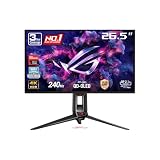
- High-Performance Display Specifications: 26.5-inch 4K (3840 x 2160) QD-OLED gaming monitor with 240Hz refresh rate and 0.03ms response time
- Advanced QD-OLED Technology: Latest 4th-gen QD-OLED technology delivers sharper imagery and crystal-clear text, a longer lifespan over previous-gen OLEDs
- Enhanced Viewing Comfort: OLED Anti-Flicker 2.0 technology includes a new luminance compensation algorithm that reduces flicker by 20% compared to previous-gen panels, ensuring comfortable viewing
- Intelligent Burn-In Protection: New ASUS OLED Care Pro functions with Neo Proximity Sensor that precisely detects when the user is away, switching to a black screen to reduce the risk of burn-in
- Comprehensive Connectivity Options: Extensive connectivity options include DisplayPort 2.1a UHBR20 with full 80Gbps bandwidth, USB-C (90W PD), HDMI 2.1, and a tripod socket
ASUS listed a US e-store price of $1,099 when checked on August 16, 2026. Monitor pricing and availability change, so the price should be checked again before publication or purchase on the official ASUS PG27UCDM product page.
Specifications at a glance
| Feature | PG27UCDM detail |
|---|---|
| Usable panel size | 26.5 inches |
| Resolution | 3840×2160, commonly called 4K UHD |
| Panel technology | Tandem QD-OLED |
| Refresh rate | 240Hz |
| Response-time claim | 0.03ms GtG, advertised by ASUS |
| DisplayPort | DisplayPort 2.1a UHBR20, up to 80Gbps |
| HDMI | Two HDMI 2.1 inputs |
| USB-C | DisplayPort functionality and up to 90W power delivery |
| USB hub | One USB upstream port and three USB downstream ports |
| Adaptive sync | G-SYNC Compatible; console VRR support is reported by RTINGS |
| HDR | VESA DisplayHDR True Black 400 and Dolby Vision support |
| Color | 99% DCI-P3 and true 10-bit color listed by ASUS |
| OLED protection | OLED Care Pro, custom heatsink, OLED Anti-Flicker 2.0, and Neo Proximity Sensor |
| Audio | 3.5mm headphone output; no built-in speakers reported by Tom’s Hardware |
These specifications are drawn from the ASUS product specifications, the Tom’s Hardware review, the PG27UCDM user manual, and RTINGS’ independent testing. Stand adjustment, VESA mounting, warranty terms, and regional specifications should be confirmed against the manual and exact local SKU.
Is 27-inch 4K OLED better than 32-inch 4K OLED?
Twenty-seven-inch 4K OLED is sharper and easier to frame at a normal desktop distance, while 32-inch 4K OLED is more immersive and easier to view from farther away. Neither size is universally better; the correct choice depends on viewing distance, desk space, and whether competitive clarity or cinematic scale matters more.
| Choose 27-inch 4K OLED when you want… | Choose 32-inch 4K OLED when you want… |
|---|---|
| Approximately 163 pixels per inch | A larger image and easier-to-read interface elements from farther away |
| Sharper text, fine UI details, and game geometry | More immersive single-player games and HDR media |
| The entire display comfortably within a closer field of view | A monitor that can serve more like a small television |
| A compact fit for a competitive setup or multi-monitor desk | A larger screen for relaxed, single-display gaming |
The PG27UCDM suits users who sit relatively close and deliberately prefer a compact, high-density desktop monitor. The ASUS ROG Swift OLED PG32UCDM or another 32-inch 4K OLED is more convincing for viewers who sit farther back, play cinematic games, or want a single large screen.
How good is the PG27UCDM’s 4K OLED image?
The PG27UCDM produces exceptionally sharp 4K imagery for a desktop display. At 27 inches, the high pixel density makes fine game geometry and small interface elements look clean, while QD-OLED supplies per-pixel black control and strong color saturation.
In a dark or controlled room, the combination of OLED contrast, wide-gamut color, and glossy presentation can look outstanding. Independent coverage consistently praises the monitor’s image quality, motion performance, factory accuracy, and HDR impact. A glossy surface can preserve a clearer, more vibrant-looking image than a heavily matte coating in controlled lighting, but windows and lamps are also more obvious reflections.
Room lighting changes the result. RTINGS identifies loss of perceived contrast in ambient light as a weakness of this display class. Direct sunlight or strong overhead lighting can make QD-OLED blacks appear more gray or purple than they do in darkness. A matte LCD or Mini-LED monitor can therefore look more convincing during daytime use even though it cannot match OLED’s per-pixel black control.
How clear is text for work and productivity?
The 4K resolution is a major productivity advantage, but QD-OLED subpixel structure can produce color fringing around text for some people. The effect varies with operating-system scaling, application rendering, font, viewing distance, and individual sensitivity; it is not universally severe, but it can matter more in office work than in games.
Also popular on Amazon

- Immersive QHD OLED Display: 26.5-inch QHD (2560 x 1440) OLED gaming monitor with 240 Hz refresh rate for immersive gaming
- Advanced Heat Management: Highly efficient custom heatsink, plus intelligent voltage optimization for better heat management to reduce the risk of burn-in
- Anti-Glare Coating: Anti-glare micro-texture coating reduces reflections for accurate colors and better viewing experiences
- Exceptional HDR Performance: Ultrafast 0.03 ms response time, plus the darkest black hues, high perceptual 1000 nits peak brightness (3% of the screen with HDR on), 99% DCI-P3 gamut, and Delta E < 2 color difference for astonishing HDR performance
- Smooth Gaming Technology: G-Sync compatible technology delivers seamless, tear-free gaming; and optional uniform brightness setting ensures consistent luminance levels
Windows scaling is likely to be useful at 27 inches because native 4K makes interface elements smaller than they would be on a lower-density panel. Users should test their preferred scaling level and common applications rather than judging text from game screenshots. Text may look acceptably sharp in one application and show more visible fringing in another.
The PG27UCDM is a reasonable mixed-use display for someone who values sharpness and OLED contrast. A conventional IPS monitor remains the safer choice for users who spend all day reading documents, editing code, viewing spreadsheets, or keeping fixed application chrome on screen and who are especially sensitive to text artifacts or OLED wear.
Is the HDR performance genuinely good?
Yes, the PG27UCDM can deliver excellent OLED HDR impact, especially in dark scenes and on small bright highlights, but the monitor is not a full-screen brightness champion. Tom’s Hardware reported approximately 1,000 nits on a 3% HDR test window and approximately 465 nits on a 25% window; those measurements show why a small sun, spark, or reflection can look intense while a large white scene is less bright.
Do these 3 things before closing this tab:
1Clear out junk files and repair common Windows errors2Fix the driver behind crashes, sound loss and screen glitches3Repair Windows errors before they cause bigger problemsThe PG27UCDM carries VESA DisplayHDR True Black 400 certification and supports Dolby Vision in addition to HDR10 workflows. Dolby Vision can be useful with compatible content and devices, but Dolby Vision support does not remove the panel’s large-window brightness limitation.
In a dim room, OLED contrast and highlight control make HDR games and films look especially impressive. In a sunlit room, the raised appearance of QD-OLED blacks and limited sustained full-screen brightness reduce the effect. Buyers who need maximum daytime brightness should consider a high-brightness LCD or Mini-LED display instead.
Can a GPU really use 4K at 240Hz?
4K at 240Hz is a capability, not a promise that every game will render at 240 frames per second. Esports games, older titles, and well-optimized games may approach the refresh ceiling with suitable high-end hardware, while modern AAA games can require reduced settings, upscaling, frame generation, or a very powerful graphics card.
| Workload | What 4K/240Hz means in practice |
|---|---|
| Competitive esports | The most plausible workload for approaching 240fps, depending on the game and GPU |
| Older or well-optimized games | May make substantial use of the 240Hz refresh rate |
| Current AAA games with upscaling | Can benefit from high refresh, but 240fps is not guaranteed |
| Ray-traced AAA games at native 4K | Often require major settings compromises, upscaling, or frame generation to approach the panel’s ceiling |
The display still benefits a game running below 240fps. OLED response speed, lower refresh intervals, and variable refresh rate can produce smoother motion and lower latency than a slower display, provided the frame rate is within the VRR range. However, buyers should not pay specifically for 4K/240Hz if their system normally operates around 120–165fps at 4K. A 4K/144Hz or 4K/165Hz monitor may offer better value for that system.
Free tools Windows power users keep installed
One-click scans. No signup required.
GPU requirements vary substantially by game, ray-tracing settings, upscaling mode, and frame-generation technology, so no single graphics card can honestly be called “required” without a defined test suite.
Also popular on Amazon

- High-Performance QHD OLED Display: 26.5-inch QHD (2560 x 1440) TrueBlack Glossy WOLED gaming monitor with 240 Hz refresh rate and 0.03ms response time
- Advanced OLED Protection Technology: ASUS OLED Care Pro functions with Neo Proximity Sensor that precisely detects when the user is away, switching to a black screen to reduce the risk of burn-in
- Exceptional HDR and Color Accuracy: VESA DisplayHDR 400 True Black compliance, 99% DCI-P3 gamut, true 10-bit color, and Delta E < 2 color difference for astonishing HDR performance
- Intuitive Monitor Control Software: Exclusive ASUS DisplayWidget Center application allows users to easily access OLED Care Pro functions and adjust monitor settings using a mouse
- AI-Enhanced Gaming Features: ROG Gaming A.I technology with AI-powered features to enhance users' gaming experience
What does DisplayPort 2.1 UHBR20 change?
The PG27UCDM’s DisplayPort 2.1a UHBR20 input supports up to 80Gbps and can carry 4K at 240Hz without Display Stream Compression under suitable conditions. The feature is valuable for compatible future graphics cards and for buyers who specifically want an uncompressed signal path.
DisplayPort 2.1 does not automatically make the image visibly better than a properly functioning DSC connection. Its practical benefits are bandwidth, compatibility, and avoiding compression-related limitations. The entire chain must support the desired mode:
- The graphics card must provide a compatible DisplayPort 2.1 output.
- The cable must support the required bandwidth.
- The monitor firmware and selected input mode must support the configuration.
- The operating system, HDR setting, color depth, resolution, and refresh rate must fit within the available bandwidth.
HDMI 2.1 remains useful for consoles and HDMI-based devices, but HDMI 2.1 has a 48Gbps ceiling. Console users should not expect 4K/240Hz: supported PlayStation 5, PlayStation 5 Pro, and Xbox Series X|S setups are generally limited to 4K/120Hz with VRR, according to RTINGS’ console compatibility findings.
Recommended Free Tools
How good is gaming performance?
OLED pixel response is the PG27UCDM’s natural strength. The 240Hz refresh rate provides fast motion handling, while G-SYNC Compatible support and VRR help synchronize the display with changing game frame rates. ASUS’s 0.03ms GtG number is an advertised response-time claim, not a universal measurement of total input latency in every mode.
The combination is most valuable in competitive PC games, where a high frame rate, fast response, and the ability to see fine 4K detail can coexist. It is less valuable when a game is locked near 60fps or when the GPU cannot render beyond 120–165fps at the chosen settings.
OLED anti-flicker features can help with brightness fluctuation in some VRR situations, but any anti-flicker mode may involve a trade-off with behavior, brightness, or motion settings. Buyers should test their preferred VRR and HDR combination rather than assuming every mode behaves identically.
How useful are USB-C and KVM?
USB-C is one of the PG27UCDM’s most practical features: a compatible laptop can receive DisplayPort video and up to 90W of power through one cable, while the monitor’s KVM can switch shared keyboard and mouse peripherals between the laptop and a desktop PC.
A useful arrangement is:
- Desktop PC: connect DisplayPort 2.1 for the high-refresh 4K signal and the appropriate USB upstream connection for peripherals.
- Laptop: connect USB-C for video, USB data, and charging, subject to the laptop’s USB-C capabilities and power needs.
- Keyboard and mouse: connect them to the monitor’s USB downstream ports so KVM can switch them between systems.
- Console: connect a PlayStation 5, PlayStation 5 Pro, or Xbox Series X|S through HDMI 2.1 for supported 4K/120Hz VRR operation.
- Headset: use the 3.5mm headphone output; the monitor has no built-in speakers reported by Tom’s Hardware.
USB-C power delivery does not make the PG27UCDM a universal docking station. Verify the laptop’s charging requirement, USB data routing, cable capability, video-output mode, and the exact KVM arrangement before treating the monitor as a one-cable workstation.
Also popular on Amazon

- 27 inch QHD (2560 x 1440) gaming monitor with ultrafast 300Hz refresh rate designed for professional gamers and immersive gameplay
- ASUS Fast IPS technology enables a 1ms response time (GTG) for sharp gaming visuals with high frame rates.
- G-SYNC Compatible and FreeSync Premium Pro technology delivering a seamless, tear-free gaming experience.
- High dynamic range (HDR) technology with DisplayHDR 600 compliance combined with DCI-P3 color gamut ensures exceptional contrast and color performance.
- ASUS Extreme Low Motion Blur Sync (ELMB SYNC) technology enables ELMB together with G-SYNC Compatible, eliminates ghosting and tearing for sharp gaming visuals with high frame rates.
What are OLED Care Pro and the proximity sensor for?
OLED Care Pro is designed to reduce OLED wear, not to eliminate burn-in risk. ASUS lists a custom heatsink, OLED Anti-Flicker 2.0, and a Neo Proximity Sensor alongside its OLED-care software and hardware features. The proximity sensor can detect when the user moves away and blank the screen, reducing the time that static content remains visible.
Useful habits include allowing pixel-refresh routines to complete, enabling automatic screen blanking, reducing persistent taskbars or logos where practical, and avoiding the disabling of protective features merely to maximize brightness. Pixel shifting, logo protection, screen blanking, and panel-refresh cycles are risk-management tools rather than guarantees.
Static taskbars, browser bars, application chrome, fixed windows, and logos remain relevant long-term risks. ASUS’s general OLED support guidance warns that image persistence or burn-in can occur when static high-contrast images remain on screen for prolonged periods. The guidance does not by itself establish current PG27UCDM US burn-in coverage.
Do not buy the PG27UCDM assuming OLED Care Pro makes static desktop use risk-free. Buyers should check the exact warranty document for their country, retailer, and product SKU before purchase.
What is the firmware and setup situation?
The current PG27UCDM firmware version, release notes, and complete update path require a final check on ASUS’s support page immediately before publication. The available research does not verify a current firmware number, so an old review’s firmware version should not be presented as current.
ASUS promotes DisplayWidget Center, which can mirror aspects of the monitor’s on-screen controls and support firmware-related functions. Before relying on the software, document these details for the exact unit and current release:
- Check the firmware version on the monitor when it arrives.
- Download the latest firmware and release notes from the official PG27UCDM support page.
- Confirm whether the update requires USB, DisplayPort, Windows software, or a specific service process.
- Check which input must be active during the update.
- Record picture, HDR, KVM, and OLED-care settings because an update may reset them.
- Do not interrupt power during the update; if an update fails, follow ASUS’s documented recovery or service procedure rather than repeatedly disconnecting cables.
For initial PC setup, select the DisplayPort 2.1 input, enable 3840×2160 at 240Hz in the operating system and GPU control panel, then configure HDR and VRR separately. Confirm that the selected color depth and refresh rate are actually active rather than assuming the cable or input negotiated the intended mode.
Quick wins for a faster PC:
Fix the driver behind crashes, sound loss and screen glitchesFind Drivers →Clear out junk files and repair common Windows errorsFree Scan →Scan for outdated or missing drivers - takes under a minuteDriver Scan →How does the PG27UCDM compare with alternatives?
| Alternative | Why consider it | What the ASUS does differently |
|---|---|---|
| MSI MPG 272URX QD-OLED | Similar 27-inch 4K/240Hz QD-OLED design, DisplayPort 2.1a UHBR20, USB-C up to 98W, OLED Care 2.0, and an advertised three-year OLED warranty including burn-in | ASUS adds Dolby Vision, Neo Proximity Sensor, OLED Care Pro, and its own OSD/software ecosystem |
| Alienware AW2725Q | Competing 27-inch 4K/240Hz QD-OLED option for buyers who value Dell/Alienware support | Current US price, inputs, USB-C capability, and burn-in terms require verification from Dell before purchase |
| Samsung Odyssey OLED G8 G81SF | Another 27-inch 4K/240Hz OLED option for buyers who prefer Samsung’s design, software, or pricing | Current specifications and price require confirmation from Samsung before making a direct value claim |
| ASUS ROG Swift OLED PG32UCDM | 32-inch 4K/240Hz OLED for a larger, more immersive image | The PG27UCDM is denser, more compact, and better suited to close competitive viewing |
| 4K Mini-LED LCD | Better fit for bright rooms, sustained full-screen brightness, and long static desktop sessions | The ASUS delivers more precise per-pixel black control and typically faster OLED response |
| 27-inch 1440p/240Hz OLED | Better value and a more practical resolution for systems that cannot drive 4K effectively | The ASUS provides substantially sharper 4K imagery at the cost of higher GPU demand and price |
The MSI MPG 272URX QD-OLED is the closest direct comparison. MSI advertises up to 98W USB-C power delivery and a three-year OLED warranty including burn-in coverage on its official MPG 272URX product page. That does not mean the MSI warranty applies to ASUS. The ASUS choice is easier to defend when Dolby Vision, the proximity sensor, ASUS’s OLED-care implementation, or the preferred OSD matters; the MSI choice is more compelling when warranty language, USB-C power, or price leads the decision.
Also popular on Amazon

- Immersive QHD OLED Display: 26.5-inch QHD (2560 x 1440) glossy WOLED gaming monitor with 240 Hz refresh rate and 0.03 ms response time for immersive gaming
- Advanced Cooling and OLED Protection: Highly efficient custom heatsink, advanced airflow design, and ASUS OLED Care functions to reduce the risk of burn-in
- ROG OLED Anti-flicker Technology: ROG-exclusive OLED Anti-flicker technology helps reduce the flicker during refresh-rate fluctuations
- Third-Generation WOLED Panel: Third-generation WOLED technology provides brighter full white windows, clearer text, and improved motion clarity
- Uniform Brightness Setting: Optional uniform brightness setting ensures consistent luminance levels across the display
How much should you pay for the PG27UCDM?
At the observed US price of $1,099, the PG27UCDM is a specialist premium purchase rather than an automatic recommendation. The price is easier to justify for a buyer who has already chosen 27-inch 4K/240Hz OLED and will use DisplayPort 2.1, USB-C, KVM, Dolby Vision, or ASUS’s protection features.
| Price situation | Buying judgment |
|---|---|
| Near $1,099 | Buy mainly when the ASUS feature set and full-bandwidth DisplayPort 2.1 matter specifically |
| Meaningful discount | The PG27UCDM becomes a much easier recommendation against similarly specified models |
| Premium over MSI or Alienware | Require a clear reason such as Dolby Vision, proximity detection, preferred OSD, or better local service |
| Similar price to 32-inch 4K OLED models | Choose based on compact high-density viewing versus larger-screen immersion |
Because the $1,099 price was observed on August 16, 2026 rather than guaranteed as a permanent price, any buying box should display the date checked and avoid presenting the price as current indefinitely.
Who should buy the ASUS PG27UCDM?
Buy the PG27UCDM if you specifically want a 27-inch 4K OLED, have a high-end GPU or play games that can make meaningful use of 240Hz, and value full-bandwidth DisplayPort 2.1 UHBR20. The monitor is particularly well matched to competitive PC gamers who sit close, mixed PC-and-laptop users who need USB-C and KVM, and HDR gamers with controlled room lighting.
PC Slower Than It Used to Be?
A free scan shows the junk files, broken settings and background clutter dragging Windows down - then fixes them in one click.Free scan · Windows 10 & 11Crashes, No Sound, or Screen Glitches?
Random freezes, missing sound and display glitches usually trace back to one bad driver. Find and replace yours safely.Free scan · under a minuteThe PG27UCDM is also a sensible choice when ASUS-specific features have real value rather than merely appearing attractive on a specification sheet. Dolby Vision, the Neo Proximity Sensor, OLED Care Pro, anti-flicker features, and the broader ASUS control ecosystem can distinguish the monitor from a similar panel.
Who should skip it?
Choose something else if your GPU is unlikely to exceed 120–165fps at 4K, your room receives direct sunlight or strong overhead light, or you primarily want a large cinematic display. A 32-inch OLED is more immersive, a Mini-LED LCD is better for sustained bright-room use, and a 1440p OLED may provide a better performance-to-price balance.
Heavy static-content users should also think carefully. Anyone who spends many hours with fixed spreadsheets, browser tabs, development tools, taskbars, or application panels must be willing to use screen blanking and OLED maintenance routines and accept residual long-term burn-in risk. Users who want the strongest explicitly stated burn-in warranty at the lowest price should compare the exact regional terms of the MSI MPG 272URX and other alternatives before choosing ASUS.
Frequently Asked Questions
Can the ASUS ROG Swift OLED PG27UCDM run 4K at 240Hz over DisplayPort?
The ASUS ROG Swift OLED PG27UCDM can carry 4K at 240Hz without DSC through its DisplayPort 2.1a UHBR20 input when the GPU output, cable, firmware, operating-system mode, color depth, and monitor configuration are compatible. A DisplayPort 2.1 input alone does not guarantee that every setup will achieve the mode.
Can PS5 or Xbox use the PG27UCDM at 240Hz?
No. Supported PS5, PS5 Pro, and Xbox Series X|S consoles are generally limited to 4K/120Hz with VRR; 4K/240Hz is primarily a PC feature for the PG27UCDM.
Does ASUS OLED Care Pro prevent burn-in?
No. OLED Care Pro, pixel shifting, refresh routines, logo protection, screen blanking, and the proximity sensor can reduce OLED wear, but they do not eliminate burn-in risk. Static high-contrast content remains a long-term risk, and warranty coverage must be checked for the exact country and SKU.
Is the PG27UCDM suitable for office work?
The PG27UCDM provides very sharp 4K text at 27 inches, but some users may notice color fringing from the QD-OLED subpixel layout. The monitor is best for mixed gaming and productivity rather than users who spend all day with static documents and are uncomfortable managing OLED-care routines.
The Bottom Line
Bottom line: The ASUS ROG Swift OLED PG27UCDM is an excellent but specialized monitor. Its 27-inch 4K/240Hz QD-OLED panel, fast response, DisplayPort 2.1 UHBR20, USB-C/KVM, Dolby Vision, and OLED-care features make it one of the most complete options in its class. Buy it when those features match your setup and the price is competitive. Skip it for a bright room, a modest GPU, extensive static desktop work, or a preference for a larger 32-inch screen.

