
Neither is universally better. An FPGA retro system can put several console implementations in one configurable device and make digital video output convenient, but how closely it matches a particular console depends on its core and setup. Original hardware remains the direct reference for that console’s specific revision, behavior, cartridges, accessories, and output. Choose according to the games and peripherals you care about, the display you use, and how much setup you are willing to do.
What an FPGA retro system does
An FPGA is a programmable logic device. A platform such as MiSTer loads a different “core” to configure the device to simulate a target system; loading an NES core, for example, changes what system the FPGA is configured to represent. The MiSTer core overview describes this process and notes that cores are system-specific.
This approach can reproduce console behavior in hardware-oriented logic, but the use of an FPGA does not by itself prove that a core duplicates every circuit, game behavior, or peripheral. MiSTer founder Sorgelig distinguishes functional recreations from true circuit recreations, observing in the project’s FAQ: “Currently, it’s hard to find a core that can truly be called a replica – most cores are based on more-or-less functional recreations rather than true circuit recreation.” That distinction matters: “FPGA” describes the programmable hardware, not a universal accuracy guarantee.
How closely does an FPGA match the original console?
Accuracy is core-specific. MiSTer says most of its console and computer cores have been compared with original hardware to a high level of precision, with audio-capture comparisons among the examples, and directs users to each core’s documentation for known issues and limitations. That is useful evidence about the project’s validation, not proof that every game, console revision, accessory, or output mode behaves identically.
Crashes, No Sound, or Screen Glitches?
Random freezes, missing sound and display glitches usually trace back to one bad driver. Find and replace yours safely.Free scan · under a minutePC Slower Than It Used to Be?
A free scan shows the junk files, broken settings and background clutter dragging Windows down - then fixes them in one click.Free scan · Windows 10 & 11#1 Best Overall

- [Compatible with Various SOMs] Sipeed Tang Console FPGA development board enjoy powerful FPGA performance with configurations up to 60K/138K LUT4s, onboard Mega 138k/60K SOM CPU, 468Kbit SSRAM 2124Kbit BSRAM/1080Kbit SSRAM 6120Kbit BSRAM, 4Gbit 16bit DDR3 RAM/8Gbit 32bit DDR3 RAM. Ensuring smooth operation for your projects and games.
- Rich Expansion] Sipeed Tang Console FPGA Dev Board onboard PCIe Gen2/3 x 1 FPC connector, USB3 x 2 (Type-A, Device, 5Gbps or 10Gbps), USB2 x 2 (Type-A, Host, 1.5Mbps or 12Mbps), HDMI TX x 1 (1080P 30Hz/720P 60Hz), Soft-PHY USB2 x 1 (Typc-C, Device, 480Mbps), PMOD x 2 Standard Pitch Port, microSD slot x1 (Supports 4-bit SDIO/MMC or SPI mode). Support USB JTAG and UART.
- [High Performance] Sipeed Tang Console FPGA single board computer supports multiple Tang Core emulator cores,(NESTang/SNESTang/GBATang/MDTang/SMSTang), Onboard BL616 MCU, supports running TangCore firmware for BL616, which can be used as FPGA debugger. Able to meet different developers' needs.lts small size allows it to fit in a card box, making it highly portable and easy to integrate into any setup.
- [Multi-Mode Functionality] Sipeed Tang Console uses it as an FPGA development board, a RPi5 PCle FPC HAT, a retro gaming console, or a handheld device-endless possibilities in one versatile package. Equipped with dual PMOD and dual 40P interfaces, supports fast switching between emulator cores. The Tang Console offers strong expandability for your custom projects.
- [Gamestick HDMI Gaming Experience] Sipeed Tang Console FPGA Retro Game Console support 1080P HD HDMI output, suitable for different monitors, can be connected to TV/computer/TV set-top Box /PC/Laptop/Projector, perfect to meet your high resolution and game configuration needs. The retro game Console stick also support saving game progress, perfect for gaming at any time
The same FAQ offers a general project assessment that most MiSTer cores are as accurate as, or more accurate than, other major FPGA offerings. Treat this as MiSTer’s own characterization rather than an independent guarantee or a ranking for every system. For a specific game, check the current documentation for its core and look for reported compatibility gaps, timing issues, or peripheral limitations.
Original hardware is the practical reference when exact behavior from a particular physical console revision is the priority. It preserves that unit’s circuitry and quirks rather than relying on a core’s implementation. Even then, a fair comparison should account for the rest of the setup: controller, video connection, scaler, and display can all affect what you experience.
Latency depends on the whole input-to-screen chain
There is no single latency figure that describes every FPGA setup. MiSTer’s latency guide separates the chain into input, system processing, video output, and display. Controller behavior and USB polling contribute at the input end, while a television or monitor may add processing after the video signal leaves the system.
Rank #2

- 🎮 20,000+ Classic Games: This retro gaming console comes preloaded with over 40,000 classic games from your favorite retro consoles. Play instantly—no downloads, no internet needed!
- 📡 Dual Wireless Controllers: Enjoy smooth, lag-free gaming with two 2.4GHz wireless controllers. Play comfortably from anywhere without tangled wires, making multiplayer fun hassle-free.
- 🖥 4K HDMI Output: Connect the game stick to your TV, PC, or projector via HDMI and experience stunning 4K visuals for an immersive and crystal-clear gaming experience.
- 🔌 Plug & Play: Setup is super easy! Simply plug in the console, connect to your TV, and start playing immediately—no complicated installation required.
- 🎁 Perfect for All Ages: Whether you're introducing the next generation to classic entertainment or reliving nostalgic moments, this system makes an ideal gift for any occasion. Perfect for family gatherings, holidays, or just downtime fun.
MiSTer gives USB polling examples to illustrate one part of that chain: at 1,000 Hz, the worst-case polling interval is 1 ms and the average is 0.5 ms; at 125 Hz, the worst case is 8 ms and the average is 4 ms. Those are polling intervals—not end-to-end measurements comparing an FPGA system with an original console. The guide also notes that a 60 Hz frame is typically about 16 ms, which helps explain why added or variable delay can matter in games that demand quick responses.
What’s actually slowing this PC down?
Pick the symptom - the matching free tool is one click away.
For MiSTer specifically, the guide describes analog output as unbuffered and effectively identical in latency to a real console from the output-path perspective. HDMI requires scaling, and the selected setting changes the balance between latency and display compatibility:
| MiSTer HDMI setting | Behavior described in MiSTer’s latency guide |
|---|---|
vsync_adjust=2 |
Low-latency option when the display is compatible. |
vsync_adjust=1 |
Uses a framebuffer with one frame of latency. |
vsync_adjust=0 |
Most compatible option; may add roughly one to two frames and can introduce jitter. |
These are MiSTer documentation descriptions of configuration behavior, not measurements that apply to every display or FPGA product. If a mode causes blanking, stutter, or an unusable picture, favor a compatible setting over the lowest-latency option.
Rank #3

- MASSIVE 20,000 CLASSIC GAMES: Built-in 20,000 classic video retro stick with 4k hdmi, games and 23 emulators console for retro gaming, game emulators support arcade, tv game, video gaming nostalgia.
- ULTRA 4K HD EXPERIENCE: Retro gaming console 4k hdmi video game, hdmi tv game console, retro gaming console for tv in classic white, 4k hd hdmi tv retro stick design for gaming and console nostalgia.
- DUAL 2.4G WIRELESS CONTROLLERS: Wireless controllers for game console, 2.4g wireless tv game console with low-latency response, play video game console for tv with family, no tangled cables.
- EASY PLUG & PLAY SETUP: Plug and play video games for tv via hdmi tv gaming console with 4k hdmi game experience, connect the retro game console to hd hdmi tv in seconds, ideal for all ages.
- WHAT YOU GET: Retro wireless gaming console stick video retro stick built-in, console stick with 23 emulators, dual 2.4g controllers, hdmi cable, user guide, compact white retro stick for travel.
Video output and display compatibility
FPGA systems can make digital output practical, while original consoles may offer the analog output associated with the specific hardware. Neither signal path guarantees a preferred result by itself: the display, scaling method, and display processing all matter. A low-latency HDMI configuration is useful only if the screen accepts the resulting signal.
MiSTer’s native video modes chart lists example core output modes, including NES at 256×224 and SNES at 512×224 in the versions listed there. The chart cautions that modes can change and are not a compatibility list for any individual display. Check the current core and display behavior rather than assuming a television will accept every native mode.
Free tools Windows power users keep installed
One-click scans. No signup required.
Controllers, cartridges, and other peripherals
Support for original controllers and accessories is not automatic just because a system has an FPGA core. Compatibility depends on the platform’s interfaces, adapters or I/O hardware, and the individual core. MiSTer’s core overview points users toward per-core documentation, so check there for the exact controller, light gun, storage device, or other peripheral you intend to use.
Rank #4
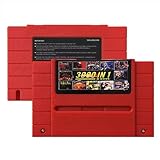
- Vast Retro Game Collection: Comes pre-loaded with thousands of classic 16-bit game ROMs on an 8GB mini SD card, offering instant access to an immense library right out of the box.
- Broad System Compatibility: Designed to be highly compatible with most original 16-bit Super Console systems (supports NTSC/PAL auto-switching), making it ideal for diverse retro gaming setups.
- Personalized Game Management: Easily add, delete, and rename your own game ROMs (supports up to 32GB TF cards, 8GB recommended for stability) with simple folder navigation for a truly customized experience.
- Reliable Battery-Free Saves: Features 32KB FRAM for automatic, persistent game progress saving, eliminating the need for internal batteries and ensuring your achievements are never lost.
- Authentic & Smooth Gameplay: Equipped with a low-latency FPGA chip that replicates original console performance, minimizing screen smearing and sound delays for a genuine, immersive retro gaming experience.
Original hardware is the more direct option if you want to use a console’s native cartridges and accessories with the original unit. An FPGA setup may offer a convenient alternative, but verify the particular core and connection path before assuming an accessory works as it did on the console.
Independent reader supportYour contribution helps us test, update, and keep practical guides available for everyone.Which option fits your priorities?
| Your priority | Better starting point | What to verify |
|---|---|---|
| Playing across several supported systems on one configurable device | FPGA platform | That the cores cover your games and have no relevant documented limitations. |
| Digital video output and configurable scaling | FPGA platform, if its output options suit your display | Display compatibility, scaling behavior, and the latency trade-off of the chosen mode. |
| A specific console revision’s behavior and original analog output | That original console | That the hardware and output path are in the condition you want. |
| Native cartridges, controllers, or unusual peripherals | Original hardware is the safer starting point | For FPGA use, confirm support for the exact game, core, accessory, and adapter. |
| Minimal configuration and troubleshooting | Whichever setup already matches your display and accessories | FPGA convenience varies with core setup and display tuning; original systems may also need video or controller accommodations for modern displays. |
A practical way to decide
- Choose the target first. List the console, games, revision-sensitive behaviors, controllers, and accessories you actually need.
- Check the core before buying around it. Read the current documentation for known issues and compatibility for those games and peripherals.
- Match the video path to your screen. Confirm the display accepts the intended output mode and understand whether scaling or display processing adds delay.
- Decide whether flexibility beats fidelity to one unit. A multi-system FPGA platform may simplify access to supported systems; a matching original console is the direct choice for that unit’s particular behavior and native hardware.
- Test the complete setup if responsiveness matters. Controller, polling, core, output settings, and screen all contribute, so one specification cannot settle the end-to-end result.
The strongest published technical detail here comes from MiSTer project documentation. It explains that platform’s architecture and configuration, but does not establish an independent, exhaustive head-to-head result for every FPGA product and original-console revision. Keep comparisons tied to the exact core and setup under consideration.
Quick Recap
Product prices and availability are accurate as of the date/time indicated and are subject to change. Any price and availability information displayed on Amazon at the time of purchase will apply.

