
What’s actually slowing this PC down?
Pick the symptom - the matching free tool is one click away.
iTechGuides is reader-supported. When you buy through links on our site, we may earn an affiliate commission. As an Amazon Associate I earn from qualifying purchases. Learn more
ESLOV was not a normal Arduino product launch. Arduino announced the modular IoT system on September 28, 2016 as a Kickstarter project, promising small plug-in sensors and actuators, a visual programming editor, Wi-Fi connectivity and Arduino Cloud integration. The campaign was later identified as canceled, and ESLOV does not appear in Arduino’s current hardware catalog.
That distinction matters if you are trying to buy one, follow an old tutorial or reproduce its advertised cloud workflow. ESLOV is best understood as a historical Arduino project and proposed hardware platform—not as a currently supported kit.
What ESLOV was supposed to be
ESLOV was designed as a modular invention system built around an ESLOV Wireless & Motion Hub. Instead of wiring individual components directly to an Arduino board, a user would connect small purpose-built modules to the hub using ESLOV cables or by mounting them on the hub.
The proposed system had three layers:
- Hub: the Wi-Fi-enabled controller and connection point for the modules.
- Modules: compact sensors, inputs, displays and actuators, each intended to handle a specific function.
- Software: a visual editor for connecting module blocks, plus conventional Arduino programming for advanced work.
Arduino’s intended beginner workflow was straightforward:
Popular on Amazon

- BUILD BREADBOARD CIRCUITS AND MINI PROJECTS - Create LED indicators, button inputs, traffic-light sequences, light-activated circuits, RGB effects and buzzer alarms for electronics practice, classroom demonstrations and maker projects
- 235 PARTS FOR REPEATABLE EXPERIMENTS - Includes a 400-tie-point solderless breadboard, power module, jumper wires, Dupont wires, potentiometer, buttons, LEDs, resistors, capacitors, diodes, transistors, buzzers and light-sensitive components
- LEARN HOW CORE COMPONENTS WORK - Use the 74HC595 to expand outputs, the 4N35 optocoupler to explore signal isolation, PN2222 transistors to switch loads and 1N4007 diodes for polarity protection and rectification experiments
- POWER AND REWIRE PROJECTS QUICKLY - Use the breadboard power module for selectable 3.3 V or 5 V rails, while rigid jumpers and female-to-male leads simplify connections; use a suitable 6.5–9 V DC input and do not exceed 9 V
- COMPONENT KIT WITH CLEAR EXPECTATIONS - A controller board, programming cable and wall power adapter are not included; use a compatible microcontroller for coded projects and follow the current tutorial, datasheets and wiring guidance
- Attach modules to the hub.
- Connect the hub to a computer over USB.
- Allow the visual editor to identify the connected modules.
- Draw logical connections between inputs, processing blocks and outputs.
- Publish the project to Arduino’s then-called Cloud service for remote monitoring or control.
That approach would have made simple hardware experiments much less intimidating than starting with a breadboard, a pinout diagram and a blank sketch. A button, LED, microphone or air-quality sensor could theoretically be combined through a graphical interface rather than wired and programmed from scratch.
Announced hardware specifications
The following specifications describe the design Arduino announced in 2016. They should not be read as specifications for a currently supported retail product.
| Part | Announced details |
|---|---|
| Wireless & Motion Hub | Microchip SAM D21 ARM Cortex-M0+, 48 MHz, 32 KB RAM, 256 KB flash and built-in 802.11 Wi-Fi |
| Hub connection | USB for computer connection, power, testing and programming |
| Modules | Approximately 2.5 × 2.5 cm, 3.3 V operation and an ATmega328P processor |
| Proposed module family | 25 planned modules, including buttons, LEDs, air-quality sensors, microphones and servos |
| Connector | Five-pin interface based on I²C, with an additional multifunction signal |
Contemporary descriptions also mentioned OLED displays and motor-control modules. However, the Kickstarter cancellation means the proposed count and selection should not be treated as a confirmed retail inventory.
The Tool Desk
Outbyte Driver Updater FREEFix the driver behind crashes, sound loss and screen glitchesFind Drivers →Outbyte PC Repair FREERepair Windows errors before they cause bigger problemsFix Now →It was more than ordinary I²C
Calling ESLOV “plug-and-play I²C” would be misleading. Its connector was based on I²C, but the platform added an ESLOV-specific protocol and an extra multifunction pin.
That additional signal was intended to support:
- Automatic module discovery
- Wake-up signaling
- Interrupt requests
- Sleep-state management for lower power consumption
The announced protocol used a minimum physical-layer speed of 400 kHz and a binary service-and-characteristic model designed for short wake periods. In practical terms, a generic Arduino I²C sensor would not automatically become an ESLOV module. It would also need compatible electrical connections, identification behavior, protocol handling and firmware.
How the visual programming idea worked
The central usability promise was that the editor would recognize attached modules automatically. A user could then create behavior by drawing relationships between visual blocks. For example, an input module could be connected to a display, LED or servo without manually writing the code that reads the input and drives the output.
Also popular on Amazon
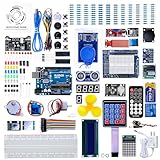
- 30+ Guided Electronics Projects: Start with LEDs and build toward LCD1602 displays, RFID access, motion detection, distance sensing, motor control and environmental monitoring for STEM learning, coding clubs, classrooms and hobby projects
- 200+ Components Across 63 Types: Includes an ELEGOO UNO R3 controller, LCD1602, RC522 RFID, RTC, HC-SR501 PIR sensor, ultrasonic sensor, DHT11, GY-521, MAX7219, keypad, joystick, relay, SG90 servo, stepper motor, breadboard and more
- Begin Without Soldering: Pre-soldered modules, a solderless breadboard, organized storage case and small-parts box reduce setup time and help beginners move from lesson to lesson while keeping LEDs, ICs, wires and sensors easy to find
- Learn, Modify and Create: Program the ELEGOO UNO R3 board with Arduino IDE using the included PDF tutorial and example code, then adjust sensor thresholds, timing, display text and motor behavior to turn guided lessons into original projects
- Flexible Power and Project Setup: Includes a 9 V, 1 A power supply, breadboard power module, 9 V battery and USB cable to support controller, breadboard and module experiments without sourcing basic setup accessories separately
That is what the “no programming knowledge required” message referred to. It did not mean that programming disappeared. Users would still need conventional code for custom firmware, new module types, protocol changes or behavior outside the visual editor’s supported blocks.
Arduino also said the hub and modules could be programmed through the Arduino Editor or desktop IDE using supplied libraries. Module firmware was intended to be reprogrammable through the I²C bus or an external programmer, while USB and planned over-the-air mechanisms were supposed to support updates.
Where Arduino Cloud fitted in
The proposed Wi-Fi hub would have acted as the bridge between the local hardware and Arduino’s cloud service. Arduino described remote projects with controls such as sliders, buttons and value fields, allowing users to monitor data or change connected hardware over the internet.
Do not confuse that 2016 proposal with the current Arduino Cloud interface. There is no verified current menu path such as:
Arduino Cloud → Devices → Add Device → ESLOVToday’s Arduino Cloud documentation includes workflows such as Devices → Add Device → Arduino boards for supported hardware. That current path does not establish ESLOV compatibility. Current Cloud features—including dashboards, mobile access, the Cloud Editor and over-the-air updates—are available only where the relevant device and service support them.
Do these 3 things before closing this tab:
1Repair Windows errors before they cause bigger problems2Fix the driver behind crashes, sound loss and screen glitches3Clear out junk files and repair common Windows errorsThe biggest limitation: ESLOV did not become a supported product
The main problem with ESLOV is not a faulty cable or an obscure IDE setting. The Kickstarter campaign was canceled. Consequently, there is no reliable basis for claiming that the announced hub, module range, visual editor, cloud workflow or delivery schedule reached customers at production scale.
Also popular on Amazon

- TURN CODE INTO REAL-WORLD RESULTS — Follow 22+ guided lessons to make LEDs blink, read temperature and distance, move servo and stepper motors, control an LCD and respond to joystick or IR input; ideal for a family weekend build, homeschool unit, coding club or STEM classroom
- MORE PROJECT VARIETY IN ONE ORGANIZED KIT — Includes the UNO R3 controller, LCD1602 with pre-soldered header, breadboard power module, ultrasonic and DHT11 sensors, joystick, IR receiver and remote, SG90 servo, stepper motor, relay, DC motor, fan blade, displays, LEDs, buttons, resistors and jumper wires
- START WITHOUT SOLDERING — Plug-in modules, a solderless breadboard and the pre-soldered LCD help beginners focus on wiring, code and testing; the illustrated component list makes it easier to find each part and move from one lesson to the next
- LEARN THE LOGIC, THEN CREATE YOUR OWN — Use Arduino IDE and the included example code to understand digital input and output, analog sensing, timing, motor control and display functions, then change thresholds, speeds and sequences for alarms, environmental monitors, reaction games and motion projects
- CLEAR SETUP SUPPORT FOR FIRST-TIME BUILDERS — Download the latest tutorial and code, select the UNO board and correct computer port, check component polarity and breadboard rows, and keep power-module input at 9V or below; younger learners should work with an experienced adult
Arduino’s current hardware catalog lists newer products, including the Oplà IoT Kit, Sensor Kit, Modulino products and Plug and Make Kit. ESLOV is not listed as an active kit, and no current official ESLOV setup, firmware-update procedure or supported cloud-device entry could be verified.
You may still encounter photographs, prototype demonstrations and old articles describing ESLOV as if it were available. Some of those accounts combine different stages of the project:
- A 2015 concept associated with the PELARS project
- The 2016 Kickstarter announcement
- A finished, mass-produced retail kit
Those are not equivalent evidence. A prototype demonstration shows what was explored; a Kickstarter page shows what was proposed; neither proves that a supported product reached the market.
Quick wins for a faster PC:
Clear out junk files and repair common Windows errorsFree Scan →Scan for outdated or missing drivers - takes under a minuteDriver Scan →What the proposed pricing meant
Arduino described Kickstarter pledge levels ranging from approximately $55 to $499, with larger tiers including more modules. Contemporary reporting also cited a proposed $500,000 funding goal.
These were campaign pledge amounts, not a current price, resale value or confirmed retail cost. Anyone offering an alleged ESLOV kit today should be treated cautiously. Verify what hardware is physically included, whether the hub boots, whether the modules are genuine and whether any software needed to use it still exists before paying a premium.
Can you build an equivalent system today?
You can reproduce the general idea—small sensors and actuators connected to a Wi-Fi controller—but that does not make the result an ESLOV system.
Also popular on Amazon

- 35+ Guided Electronics Projects: Progress from LEDs and buttons to RFID access, real-time clocks, motion and distance sensing, environmental monitoring, motor control and interactive displays for STEM learning, coding clubs and maker projects
- More I/O and Memory for Larger Builds: The MEGA 2560 R3 provides 54 digital I/O pins, including 15 PWM outputs, 16 analog inputs, 4 hardware serial ports and 256 KB flash for projects that combine more sensors, controls and displays
- 200+ Components for Prototyping: Includes LCD1602, RC522 RFID, RTC, DHT11, HC-SR501 PIR, ultrasonic and water-level sensors, GY-521, MAX7219, keypad, joystick, rotary encoder, relay, SG90 servo, stepper motor, DC motor, breadboard and more
- Learn, Modify and Create: Follow 35+ guided lessons with example code, then adjust sensor thresholds, timing, display text, motor behavior and control logic to turn structured exercises into access systems, monitors, alarms and interactive projects
- Organized for Repeatable Learning: Pre-soldered modules, a solderless breadboard, storage case and small-parts box reduce setup time and keep sensors, LEDs, ICs, wires and other components easy to find between projects
A modern substitute might use an Arduino board with supported Cloud connectivity, separate I²C modules, a breadboard and ordinary Arduino libraries. That route is practical, but it requires selecting compatible voltage levels, wiring SDA and SCL correctly, assigning addresses and writing or adapting firmware. It will not provide ESLOV’s proposed automatic discovery or its proprietary module protocol.
For a current beginner-friendly Arduino product, consult Arduino’s active hardware catalog rather than relying on old ESLOV articles. Select a kit with an available manual, current board support and documented software workflow.
Independent reader supportYour contribution helps us test, update, and keep practical guides available for everyone.ESLOV’s place in Arduino history
ESLOV was an interesting attempt to narrow the gap between electronics kits and connected IoT prototypes. Its combination of automatically identified modules, visual logic, conventional Arduino access and cloud control addressed real beginner problems: wiring mistakes, unfamiliar libraries and the difficulty of turning a local experiment into an internet-connected device.
But the project’s design goals became confused with product availability. The accurate description is narrower:
ESLOV was Arduino’s 2016 proposal for an open, modular IoT invention system. It was not a currently available Arduino kit, and its Kickstarter campaign was later canceled.
Special offer. See more information about Outbyte and uninstall instructions. Please review EULA and Privacy policy.
FAQ
Is the Arduino ESLOV IoT Invention Kit available now?
No current Arduino product listing or supported Arduino Cloud workflow for ESLOV could be verified. Arduino announced it as a 2016 Kickstarter project, and the campaign was later identified as canceled.
Also popular on Amazon

- The basic and cheap learning programming starter kit.
- All components compatible with IDE, can be used directly.
- 100% Compatible with program.
- Include High Quality R3 Controller Board,400 tie-points Breadboard,DHT11 Module,Soil Humidity Sensor ,LED, etc.
- A nice plastic packaging box is included for easy and neat storage.
Did ESLOV require programming?
Basic projects were intended to use a visual editor, so users could connect module blocks without writing a traditional sketch. Custom behavior, firmware changes, new modules and protocol work still required programming.
How many ESLOV modules were planned?
Arduino announced a planned family of 25 modules, including buttons, LEDs, air-quality sensors, microphones and servos. Because the campaign was canceled, that number does not establish a current commercial inventory.
Can an ordinary I²C sensor be connected to an ESLOV hub?
Not automatically. ESLOV used an I²C-based five-pin interface with an additional signal for discovery, wake-up, interrupts and sleep handling. Its protocol was more specific than ordinary plug-compatible I²C.
Windows Errors? Fix Them Before They Spread
Repair common Windows errors and clear accumulated junk for a smoother, more stable PC - no reinstall needed.Free scan · no reinstallOutdated Drivers Are Slowing You Down
One free scan finds every outdated or missing driver and matches the right update for your exact hardware.Free scan · exact hardware matchWhat did ESLOV cost?
The announced Kickstarter pledge levels ranged from approximately $55 to $499. Those were campaign tiers, not current retail prices or confirmed market values.
Is ESLOV compatible with the current Arduino Cloud?
There is no verified current ESLOV device setup in Arduino Cloud. Current Cloud features and menu paths apply to supported modern devices and should not be presented as proof of ESLOV support.
The Bottom Line
Bottom line: ESLOV promised an appealing way to connect sensors and actuators without starting from raw wiring and code. Its planned SAM D21 Wi-Fi hub, ATmega328P modules, visual editor and cloud integration were technically ambitious for 2016. But the Kickstarter campaign was canceled, and ESLOV is not a current Arduino product. Treat its specifications, prices, module list and cloud workflow as historical project plans—not instructions for buying or setting up a supported kit today.

