
Do these 3 things before closing this tab:
1Repair Windows errors before they cause bigger problems2Scan for outdated or missing drivers - takes under a minute3Clear out junk files and repair common Windows errorsAcer’s Predator X32 X2 and X27U X1 are two QD‑OLED gaming monitors announced on March 31, 2025. The X32 X2 targets players who want a large 4K image, while the X27U X1 uses a smaller QHD panel that is easier to drive at very high frame rates. Both are specified for up to 240 Hz and a 0.03 ms gray-to-gray response, but those are Acer’s manufacturer figures rather than independent test results.
Key differences at a glance
| Specification | Predator X32 X2 | Predator X27U X1 |
|---|---|---|
| Panel and size | QD‑OLED, 31.5 inches | QD‑OLED, 26.5 inches (27-inch class) |
| Resolution and aspect ratio | UHD 3840 × 2160, 16:9 | WQHD 2560 × 1440 |
| Maximum refresh rate | 240 Hz | 240 Hz; Dynamic Refresh Rate can switch between 240 Hz and 60 Hz over DisplayPort |
| Response-time rating | 0.03 ms GTG (Acer specification) | 0.03 ms GTG (Acer specification) |
| Launch price in North America | From US$999.99 | From US$599.99 |
| Speakers | Two 2 W speakers | Two 5 W speakers |
| Stand adjustment | Tilt −5° to 25°, swivel ±20°, 150 mm height | Tilt −5° to 20°, swivel ±20°, 120 mm height |
The launch prices are Acer’s March 2025 starting prices for North America, not current street prices. Acer said regional pricing, specifications and availability can differ.
What both monitors have in common
Each model uses a QD‑OLED panel with 99% DCI‑P3 coverage, 1.07 billion colors and 10-bit color support. Acer lists a 1,500,000:1 contrast ratio, VESA DisplayHDR True Black 400 certification, 250-nit native brightness and a 1,000-nit peak measured at a 3% HDR window.
Connectivity is also shared: two HDMI 2.1 inputs, one DisplayPort 1.4 input, audio out, integrated speakers and a VESA 75 × 75 mm mounting pattern. AMD FreeSync Premium Pro is listed for both displays.
#1 Best Overall

- OLED Makes All The Difference: With a display of these mammoth-like proportions, everything must look good. The WQHD quantum dot OLED display with true 10Bit is obligated to offer stunning contrast, cinematic color. Image retention-refresh keeps the images from sticking.
- AMD FreeSync Premium Technology: Say “goodbye” to stuttering and tearing. With AMD FreeSync Premium, the monitor’s frames are synced with the graphics card’s frames, which eliminates screen tearing and provides the smoothest gaming experience.
- Fast and Furious: If you want seamless gameplay at ridiculous levels of speed, you’ve come to the right place. With an 240Hz refresh rate and 0.03ms (G to G) response time, your sessions will be fluid, unbroken and unmatched – with little to no ghosting.
- Brilliant Colors: With the DCI-P3 99% color gamut, Delta E<2, and HDR10, colors are practically bursting out of the screen. Enjoy the best imagery your games have to offer!
- Center of Vision: At 26.5-inches, the X27U is directly in your field of view. Considered a hallmark of eSports tournaments, this is the perfect size to gain an edge over your opponents. The addition of a ZeroFrame design also removes the bezels – giving you have even more visibly over every match and every movement your rivals make.
Predator X32 X2: the 4K choice
Who it suits
The X32 X2 is the option for a larger desktop image and 4K sharpness. Its 3840 × 2160 resolution gives games, productivity software and high-resolution media more pixels than the X27U X1, but driving 4K at 240 frames per second demands substantially more graphics performance. It makes the most sense with a high-end gaming PC or for buyers who value image detail and screen area over the lower rendering load of QHD.
Physical adjustment
Its stand provides 150 mm of height adjustment, tilt from −5° to 25° and ±20° swivel. A 31.5-inch panel also occupies more desk space than the 26.5-inch model, so check desk depth and viewing distance before buying. The monitor can be mounted to a compatible VESA arm using its 75 × 75 mm pattern.
Predator X27U X1: the QHD high-refresh choice
Who it suits
The X27U X1 keeps the same 240 Hz ceiling while reducing the workload to 2560 × 1440. That makes it a practical fit for competitive games and systems that can reach very high frame rates without a flagship GPU. Its 26.5-inch panel is physically smaller, which can suit a compact desk or a closer viewing position.
Rank #2
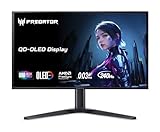
- OLED Makes All the Difference: With a display of these mammoth-like proportions, everything must look good. The 4K UHD quantum dot OLED display with true 10Bit is obligated to offer stunning contrast, cinematic color. Image retention refresh keeps the images from sticking.
- Brilliant Colors: Boasting a DCI-P3 99% color gamut, Delta E<2 and VESA DisplayHDR True Black 400, vibrant colors leap from the screen. Revel in the finest visuals your games can deliver!
- AMD FreeSync Premium Pro Technology: Get in the game with the AMD FreeSync Premium Pro display. Each display is validated by AMD to bring you a smooth, variable refresh rate (VRR) gaming experience that eliminates tearing, stuttering, artifacts, and flicker.
- Fast and Furious: If you want seamless gameplay at ridiculous levels of speed, you’ve come to the right place. With a 240Hz refresh rate and 0.03ms (G to G) response time, your sessions will be fluid, unbroken and unmatched – with little to no ghosting
- Port Haven: Do you stream? Do you have multiple consoles in addition to your PC and want them all plugged in at once? Well, now you can! No more fiddling with cables as the X27 includes a USB Type-C port, two HDMI 2.1 ports and two Display Ports 1.4.
Dynamic Refresh Rate over DisplayPort
Acer says the X27U X1 can switch between 240 Hz and 60 Hz over DisplayPort using Dynamic Refresh Rate. This is a connection-specific feature described in the launch release; verify the monitor’s on-screen-display behavior and your graphics driver settings for the exact SKU you purchase.
Quick wins for a faster PC:
Fix the driver behind crashes, sound loss and screen glitchesFind Drivers →Repair Windows errors before they cause bigger problemsFix Now →Stand and audio differences
The X27U X1 stand offers 120 mm of height adjustment, −5° to 20° tilt and ±20° swivel. Acer lists two 5 W speakers, giving it a higher rated speaker output than the X32 X2’s two 2 W units, although these wattage figures do not establish listening quality.
Understanding the 240 Hz and 0.03 ms claims
“240 Hz” is the maximum refresh rate specified by Acer. To benefit from it, the computer, game and connection must deliver frames quickly enough, and the display must be configured for the high-refresh mode. The 0.03 ms figure is a gray-to-gray response-time rating supplied by Acer; it is not an end-to-end input-lag measurement and should not be treated as proof that the complete system responds in 0.03 ms.
Rank #3

- OLED Makes All the Difference: Ever seen an QD-OLED in action? They go above and beyond colors so vivid that you might just question reality. The addition of Image Retention Refresh also works to prevent burn-in. Enjoy longer.
- Brilliant Colors: With the DCI-P3 99% color gamut, Delta E<2, and HDR10, colors are practically bursting out of the screen. Enjoy the best imagery your games have to offer!
- AMD FreeSync Premium Pro Technology: Get in the game with the AMD FreeSync Premium Pro display. Each display is validated by AMD to bring you a smooth, variable refresh rate (VRR) gaming experience that eliminates tearing, stuttering, artifacts, and flicker.
- Fast and Furious: If you want seamless gameplay at ridiculous levels of speed, you’ve come to the right place. With an 240Hz refresh rate and 0.03ms (G to G) response time, your sessions will be fluid, unbroken and unmatched – with little to no ghosting
- Port Haven: Do you stream? Do you have multiple consoles in addition to your PC and want them all plugged in at once? Well, now you can! No more fiddling with cables as the X27U includes two HDMI 2.1 ports and a one display port 1.4.
No independent measurements in the cited material establish image quality, motion performance, sustained brightness, input latency or burn-in behavior. Those characteristics can vary with settings, content and test method.
HDR, color and panel considerations
Both monitors are specified for the same QD‑OLED color and HDR features, including DisplayHDR True Black 400 certification and a 1,000-nit peak at a 3% HDR window. A small-window peak does not mean the screen sustains 1,000 nits across a full white image. Likewise, the listed 99% DCI‑P3 coverage describes gamut coverage, not factory calibration accuracy.
OLED ownership decisions should include your own tolerance for potential image-retention or burn-in risk. The supplied Acer material does not provide a long-term burn-in test, usage limit or panel-care guarantee, so consult the warranty and care guidance for the exact regional SKU.
Rank #4

- OLED Makes All The Difference: With a display of these mammoth-like proportions, everything must look good. The 4K UHD quantum dot OLED display with true 10Bit is obligated to offer stunning contrast, cinematic color. Image retention refresh keeps the images from sticking.
- Brilliant Colors: Boasting a DCI-P3 99% color gamut and VESA DisplayHDR True Black 400 (Min. 0.0005 nits), vibrant colors leap from the screen. Revel in the finest visuals your games can deliver!
- Curved Glory: The 1700R curvature, combined with a 16:9 aspect ratio, creates an all-encompassing gaming environment that draws users in. This meticulously designed display wraps around your field of vision, providing an unmatched sense of immersion and allowing you to lose yourself in the most captivating gaming experiences.
- Fast and Furious: For blazing-fast gameplay that defies expectations, look no further. With a 240Hz refresh rate and 0.03ms (G to G) response time, enjoy fluid, uninterrupted sessions with minimal ghosting. Achieve unrivaled gaming performance with this powerhouse display.
- Adaptable Ergonomics: Every gamer is unique, just like every avatar in the neon-lit cityscapes. Adjust tilt, swivel, and height to find your perfect viewing angle, ensuring comfort through those extended gaming marathons.
Launch availability and regional SKUs
Acer’s launch plan placed the X32 X2 in North America in June 2025 from US$999.99, EMEA in August from €1,199 and China in the second quarter from RMB 5,999. The X27U X1 was announced for North America from US$599.99, EMEA from €699 and China from RMB 3,999; the release associated those regional months with the March 31, 2025 announcement but did not separately state a year for every month.
An Australian Acer store listing for the X27U X1 (reference UM.GXXSA.101) showed A$999.00 and “In stock” when checked. That is a time-sensitive listing, not a global or enduring price. Acer’s UK specification page identifies another X27U X1 variant, X27U X1biiphx (UM.GXXEE.104). Because the X27U family includes similarly named products, confirm the complete X1 SKU, warranty, stock and local specifications with the seller.
Which one should you choose?
Choose the X32 X2 if:
- You specifically want 4K resolution on a 31.5-inch screen.
- Your graphics hardware can make good use of 4K at high refresh rates.
- You prefer a larger workspace for games and general desktop use.
Choose the X27U X1 if:
- You want 240 Hz gaming at the lower rendering load of 1440p.
- Your desk or viewing distance favors a 26.5-inch display.
- You value the listed 5 W-per-channel speakers or DisplayPort Dynamic Refresh Rate.
Neither model is categorically faster on paper: Acer gives both the same 240 Hz maximum and 0.03 ms GTG rating. The decisive choice is 4K at 31.5 inches versus QHD at 26.5 inches, followed by your GPU capability, desk space and local price.
Quick Recap
Product prices and availability are accurate as of the date/time indicated and are subject to change. Any price and availability information displayed on Amazon at the time of purchase will apply.

