
Quick wins for a faster PC:
Repair Windows errors before they cause bigger problemsFix Now →Scan for outdated or missing drivers - takes under a minuteDriver Scan →Choose a tactile sensing system by starting with the robot’s task: identify the contacts it must detect, the quantities it needs to estimate, and the action that should follow. Then check whether the complete sensor-to-controller setup supplies those signals with adequate spatial detail, timing, stability, and integration support. No sensing architecture or headline specification is best for every physical AI task.
Start with the contact task, not the sensor type
Write down the conditions the robot will encounter before comparing hardware: the objects and materials, contact locations, speeds and forces, expected variation, and what counts as failure. A robot handling a deformable item may need to limit grip force; one manipulating an object behind an occluding hand may need contact location and local shape; another may need to detect slip soon enough to adjust its grasp.

For each task, specify the signal the controller actually needs. Possible outputs include contact location, normal force, shear force or direction, vibration, local surface shape, texture, compliance, temperature, or proximity before contact. Decide what the robot will do with each signal. A channel that does not change an estimate or action may add cost, data, and integration work without helping the task.
Tactile sensing is especially relevant when a camera cannot see the contact region during dexterous manipulation. It should be evaluated as part of a system: sensing element, contact surface, mounting, calibration, signal processing, communications, and controller all affect what the robot can reliably perceive and do.
Crashes, No Sound, or Screen Glitches?
Random freezes, missing sound and display glitches usually trace back to one bad driver. Find and replace yours safely.Free scan · under a minutePC Slower Than It Used to Be?
A free scan shows the junk files, broken settings and background clutter dragging Windows down - then fixes them in one click.Free scan · Windows 10 & 11#1 Best Overall

- 10PCS FSR402 FORCE SENSORS: Includes 10 high-quality FSR402 pressure-sensitive resistor modules—ideal for detecting force or pressure in DIY electronics, robotics, and IoT projects.
- PRECISE PRESSURE DETECTION: Resistance decreases as pressure increases, providing accurate and responsive force measurements for interactive and tactile applications.
- BREADBOARD FRIENDLY DESIGN: Easily integrates with breadboard setups for fast prototyping. Built-in self-adhesive backing allows flexible mounting on any surface.
- WIDE MICROCONTROLLER COMPATIBILITY: Compatible with Arduino, ESP32, ESP8266, Raspberry Pi, and MicroPython platforms. Tutorials and examples available—search “DIYables Force Sensor.”
- DURABLE AND EASY TO USE: Reliable for educational, hobby, and professional projects involving pressure sensing, touch detection, and interactive system development.
Compare architectures by their outputs and trade-offs
Resistive, capacitive, piezoelectric, triboelectric, and vision-based tactile sensors use different transduction approaches. Reviews of tactile sensing, including the 2025 robotics review by Yang and colleagues, cover these families, but do not establish a universally superior choice. Compare what each candidate measures and how its output fits the task rather than treating the technology label as a performance rating.
| Design choice | Compare | Ask before selecting |
|---|---|---|
| Resistive, capacitive, piezoelectric, triboelectric, or vision-based transduction | Measured quantity, range, sensing area, flexibility, noise, drift, processing needs, and operating conditions. | Does the output directly represent the task variable, or must a model infer it? |
| Single-point sensor or distributed array/skin | Contact coverage, localization, wiring and data load, calibration effort, and repairability. | Does the robot need localized fingertip feedback or broad contact coverage? |
| Tactile sensing alone or fused with vision | Occlusion handling, robustness, latency, compute, and calibration between modalities. | Which failure case should tactile input improve, and how will that improvement be measured? |
| Research prototype or deployment-oriented hardware | Repeatability, serviceability, durability evidence, software support, and safety evidence. | Do tests represent the objects, cycle counts, and environment of the intended use? |
Imaging-based optical tactile sensors can encode detailed contact geometry, but an image or deformation map is not automatically a calibrated force measurement. Likewise, a force-related signal may not reveal the local shape or texture needed by another task. The comparison table is a decision aid, not a standardized scorecard.
Check spatial detail and force performance in task terms
Ask for effective spatial resolution at the contact surface, usable sensing area or field of view, minimum detectable feature, force range, sensitivity, directionality, repeatability, hysteresis, cross-talk, and calibration method. Check what a quoted “resolution” means: taxel pitch, image pixels, millimeters per pixel, and accuracy of reconstructed geometry are different quantities.
A 2014 review summarized historical design criteria of at least 1.6 mm fingertip spatial resolution, 5 mm palm resolution, force sensitivity from 0.01 to 10 N, and desirable force-direction discrimination. Those are review-cited targets, not a universal standard or evidence that a current product meets them. The same review described approximately 1 ms response as a reasonable real-time design target; ask for measured performance of the complete current setup rather than treating that figure as a guarantee.
What’s actually slowing this PC down?
Pick the symptom - the matching free tool is one click away.
Rank #2
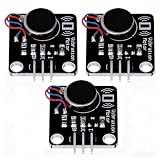
- High-Speed Vibration: 1027 phone motor delivers 9000RPM tactile feedback at 5V (60mA rated current) for clear alerts in smart devices
- PWM Intensity Control: MOS-driven design allows digital port/PWM adjustment of vibration strength (3.7-5.3V input range)
- Plug-and-Play Integration: 3mm mounting holes (15mm pitch) for secure installation, suitable for multiple project applications
- Compact & Efficient: 30×21mm module with 10mm×2.7mm flat motor fits wearables; 10MΩ insulation ensures safety
- Multi-Project Pack: Package includes 3pcs modules for interactive art, IoT notifications, or DIY haptic feedback systems
Request the conditions behind every specification: contactor shape and material, loading direction and speed, sensing area, filtering, calibration, and whether the value is measured on the sensor or derived by software. A number measured under unlike conditions may not predict performance on the robot’s actual contact surface.
Measure timing across the complete control loop
Obtain the sensor’s sample or frame rate, but also measure end-to-end delay from contact to the robot’s response. That delay can include acquisition, image or signal processing, data transport, model inference, and the controller cycle. Test with the processor, software, network, and control stack intended for deployment, including missed-contact behavior.
High-resolution streams can increase compute and data demands; a lower-bandwidth tactile channel may be more useful if it reliably detects the event the controller needs. GelSight’s robotics repository reports a comparison of 24 Hz for the Mini and 60 Hz for DIGIT. This vendor-maintained comparison is not a full latency benchmark, so confirm the current model, interface, and task setup before relying on it.
Treat calibration and durability as operating requirements
Ask how performance changes over repeated contacts and what maintenance it requires. Relevant evidence includes calibration drift, hysteresis, repeatability, sensitivity to loading direction, friction effects, environmental exposure, surface wear, elastomer or gel replacement, contamination, and recalibration time.
Do these 3 things before closing this tab:
1Clear out junk files and repair common Windows errors2Scan for outdated or missing drivers - takes under a minute3Repair Windows errors before they cause bigger problemsThe 2026 review by Ahmed, Bakhy, and Baqer, which synthesizes 115 studies published from January 2020 through December 2025, identifies long-horizon reliability as an unresolved issue. A short demonstration or successful trial on one object does not establish deployment life. Request results across representative cycles and conditions, and establish how performance degradation will be detected and corrected.
Verify mechanical and software integration before committing
Check that the sensing surface and package fit the intended fingertip, gripper, hand, or wrist. Confirm mounting stiffness, cable routing, protection, power needs, access for replacement, and compatibility with the robot’s motion and contact loads. An otherwise capable sensor can be unsuitable if its contact area, mount, or cables interfere with grasping.
On the software side, verify exact supported operating systems, driver and ROS/ROS2 distributions, SDK and API access, data formats, licensing, and access to raw data. Determine whether adapters or mechanical interface files are available for the target gripper. Manufacturer compatibility statements should be checked against the exact combination being deployed.
GelSight lists ROS/ROS2 and PyTouch compatibility for the Mini, and its robotics repository provides examples of mounting-adapter CAD. These are manufacturer-provided resources, not independent verification that every software or mechanical configuration will work.
Rank #4
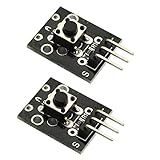
- Model: KY-004.Rating: 50mA 12VDC.
- Contact Resistance : 50mOhm max(initial). Package Included:2PCS.
- Key switch module and a digital interface, built-in 13 LED build a simple circuit to produce key warning lamp.
- This module is ideally suited to adding a button to your projects and will output a high signal when pressed.
- Good for use just anywhere on your project and great for debugging a project.
Evaluate the full perception-and-control pipeline
Define a task-level measure before testing. Depending on the application, that could be slip-recovery rate, grasp success across object variation, maximum safe force, insertion success, damage rate, or cycle time. Test representative shapes, materials, friction levels, placement errors, contact speeds, and repeated trials. Compare against a relevant baseline, such as the existing controller or vision-only setup, under the same conditions.
Ahmed, Bakhy, and Baqer report that vision-tactile fusion was frequently associated with stronger manipulation robustness than vision-only baselines in the studies they reviewed. The advantage varied with sensing quality and controller design, so this review finding is not a guarantee for every robot. Prefer real-hardware evidence that resembles the intended task over simulation-only claims.
The same 2026 review identifies inconsistent benchmark practices and gaps in standardized reporting and safety certification for close human-robot proximity. If people will share the workspace, assess safety requirements separately; a tactile sensor’s presence is not evidence of certification or safe operation.
Independent reader supportYour contribution helps us test, update, and keep practical guides available for everyone.Use the GelSight Mini as a concrete example, not a default choice
GelSight’s official Mini page describes a robot-mountable tactile sensor with 2D/3D mapping and ROS/ROS2 and PyTouch compatibility. Its Mini System product page, checked on October 4, 2026, lists a $510 system with the sensor, standard gel, focus tool, and USB cable, and an estimated four-week lead time. The page says orders placed from January 3, 2025 ship with a reformulated standard gel intended to improve durability. Price, contents, lead time, and formulation are volatile manufacturer statements; verify them with the vendor.
Best Value

- Characterize surface pressure between any two mating, touching, or impacting surfaces. The dimensions of this film are 16.4 ft. x 10.6 in.
- Prescale provides a surface pressure “map” that illuminates actual pressure magnitude (in precise PSI or kg/cm^2) and distribution between your two surfaces. The pressure range of this film is 28 - 85 PSI (2 - 6 kg/cm²)
- Prescale reveals the contact surface pressure by virtue of a color change. This color change is instantaneous (less than a millisecond) and permanent
- Prescale comes on a roll, is super thin, and can easily be cut from the supplied roll with scissor or laser to your precise application requirement
- The color intensity of the film is directly related to the amount of pressure applied to it
In its robotics repository, GelSight describes converting Mini image data to 3D point-cloud data and reports 0.0634 mm per pixel for a down-sampled 240 × 320 image. In the workflow described there, applied force is not provided as a direct calibrated value; height displacement can instead be used to train a model that outputs force. Treat these as product-specific vendor details and confirm them against current documentation and the intended setup.
This example illustrates why feature lists need interpretation: mapping detail, update rate, force measurement, mounting, and task reliability answer different questions. Whether the Mini fits depends on the signals, timing, area, and integration the robot requires, as well as the evidence available for its operating conditions.
A practical selection sequence
- Define the task: list contact events, objects, materials, speeds, forces, failure modes, and the controller action each tactile signal should inform.
- Set measurable requirements: specify the needed output, sensing area, spatial detail, force range and directionality, repeatability, and acceptable sensor-to-action delay.
- Shortlist architectures and packages: compare candidate transduction methods and single-point versus distributed coverage against those requirements.
- Confirm integration: check mechanical fit, mounting and cabling, power, drivers, software versions, APIs, formats, and raw-data access.
- Request relevant evidence: ask for calibration procedures, repeat-contact results, environmental conditions, wear and maintenance expectations, and measured timing.
- Run representative hardware trials: evaluate task success against a baseline across object and contact variation, then assess repeatability and maintenance burden before deployment.
A good choice is the system that reliably supplies the signals a particular robot task needs, at the required spatial and temporal scales, with stable calibration and workable integration. Make the decision from task-relevant evidence about the full sensor-to-control path, not from a generic “best sensor” claim.
Quick Recap
Product prices and availability are accurate as of the date/time indicated and are subject to change. Any price and availability information displayed on Amazon at the time of purchase will apply.

