
The right backup internet is the one that can reach your address, uses a sufficiently separate connection path, and keeps your essential tasks online for the outage duration you expect. For homes, the documented options include an eligible AT&T phone-linked fallback and T-Mobile’s dedicated home backup plan. Small businesses can consider provider-managed cellular failover or a compatible dual-WAN router with a separately arranged connection. None should be assumed to match normal broadband performance or survive a power outage without backup power.
How to choose backup internet
Start with the failure you need to cover: a fault on your broadband line, a wider provider outage, weak local cellular service, or a power cut. A backup helps only if its network path and required equipment are still working. Provider names alone do not establish that two connections are independent; local networks can share infrastructure, and the reviewed providers do not quantify the risk of correlated outages.
- Check availability at the exact address. Confirm service eligibility and, for cellular options, adequate indoor signal. Availability can vary by location.
- Identify the failure path. Ask what access network the backup uses and whether it is separate from the primary connection. Do not assume a second service is diverse just because it has a different plan name.
- Choose automatic or manual switching. Confirm how failover starts, whether the equipment returns to the primary connection automatically, and what the user must do during an outage. Do not assume a specific switch time.
- Match the allowance and speed to the work. Compare hourly or data allowances, speed reductions, congestion terms, and any restrictions on temporary use.
- Account for hardware and power. Check required gateways, routers, phones, SIMs, installation, and battery coverage. A powered cellular link cannot help if the router or modem is off.
- Calculate the full cost. Include the backup plan, required primary service, equipment, installation, taxes, and other charges. Some offers require an active subscription with the same provider.
Backup internet options for home
Use an eligible AT&T phone as the fallback
AT&T’s Internet Backup is intended for eligible AT&T Fiber customers. Its support instructions list a BGW320 or BGW620 All-Fi Hub, a smartphone or tablet on an eligible AT&T Wireless unlimited plan associated with the Fiber account, and the Smart Home Manager or AT&T app as requirements. During a fiber outage, the hub connects through the participating mobile device; AT&T says it returns to fiber automatically when service is restored. The support page was last updated August 18, 2026. AT&T Internet Backup requirements and setup
AT&T says the service uses eligible plan unlimited data rather than the mobile hotspot allowance. The phone or tablet must be present and charged, and the connection remains subject to cellular coverage and congestion; AT&T notes that wireless speeds vary and may slow when the network is busy. This can be convenient for a qualifying household that already has the required services, but it is not a separate wired broadband line.
The Tool Desk
Outbyte Driver Updater FREEFix the driver behind crashes, sound loss and screen glitchesFind Drivers →Outbyte PC Repair FREERepair Windows errors before they cause bigger problemsFix Now →#1 Best Overall

- Wide Carrier Compatibility: Works with major 4G providers including AT&T and T-Mobile with download speeds up to 150Mbps. Simply insert a SIM card and get all your Wi-Fi devices connected to the internet, convenient for places where cable internet is unavailable, such as holiday cabins or remote cameras. Fully supports 4G LTE Frequency Band: B2/B3/B4/B5/B7/B8/B12/B13/B17/B25/B26/B66/B41 WCDMA: B2/B4/B5/B8 (Verizon requires TTL set to 64 or 65 based on different data plan)
- High-Speed Connectivity: 4G LTE Cat4 with cellular download up to 150Mbps and N300 dual-band wireless speeds reaching 300Mbps for smooth streaming, lag-free online gaming, and quick file sharing
- Enhanced Signal Coverage: High-gain four antennas expand signal reach throughout houses, providing reliable internet connection for 32 smart home devices via wired LAN links with 4 fast Ethernet ports
- Advanced Security Features: Embedded L2TP, PPTP, OpenVPN, and WPA3 encryption safeguard data privacy, while Mesh capability allows seamless roaming network expansion across rooms
- Simple Setup Process: Built-in standard SIM card slot with plug-and-play functionality allows immediate cellular internet access without configuration, featuring user-friendly web interface for effortless management
Get a dedicated T-Mobile home backup plan
T-Mobile describes Home Internet Backup as automatically switching to its network when the primary home internet goes down, with automatic failover or manual session control. Its plan page lists 100 hours per billing cycle, plus three Backup Passes per year that add 100 hours each. After the monthly 100-hour allowance, speeds can be up to 600 Kbps. The page also notes congestion and data-prioritization terms, and says service is not available everywhere. It lists no annual contract or equipment fees and a $35 device connection charge at sale; check the current offer and address eligibility before signing up. T-Mobile Home Internet Backup plan details
Think of the hour allowance in relation to likely outage length and how many people or devices need access. A reduced-speed connection after the allowance may not suit video calls or several simultaneous users. Check the plan’s current terms for your intended use rather than assuming “backup” means unrestricted broadband.
Rank #2

- 4G LTE Cat 4 Cellular Connectivity: Reliable Cat 4 LTE with speeds up to 150/300 Mbps download for rural and backup connectivity — insert a SIM card and get online anywhere with cellular coverage, no cable or D
- Dual-Band Wi-Fi 5 Performance: Delivers 867+300 Mbps for buffer-free 4K streaming, competitive gaming, and video conferencing across your entire home with dual-band beamforming technology
- Comprehensive VPN & WAN Failover: WireGuard, OpenVPN, IPsec VPN server and client built in; automatic WAN failover switches to cellular when your primary internet drops — keep critical connections alive without interruption
- 4x Fast Ethernet ports for wired devices plus a nano SIM slot supporting major carriers worldwide. Connect desktop PCs, IP cameras, and IoT gear directly. Compact design with external antennas for reliable LTE reception
- Compact design ideal for small offices, retail kiosks, and failover WAN. Plug in a SIM and get internet anywhere cellular signal is available. 4G Cat.4 delivers up to 150 Mbps download speed
Small-business backup internet options
Provider-managed cellular failover
Managed services can simplify setup, but they may require a primary subscription, specific provider equipment, or a qualified address. The figures and conditions below are provider-stated, not comparative performance tests.
| Service | Documented requirements and switching | Allowance, power, and cost details |
|---|---|---|
| T-Mobile Small Business Internet Backup | Switches to T-Mobile 4G LTE/5G when the primary internet goes down; speeds vary with cellular conditions. | 130 GB per month, with up to three additional 130 GB allotments per year. No annual contract or equipment fee; taxes and fees may apply. T-Mobile small-business plan |
| Comcast Business Wireless Connect | Requires active Comcast Business Internet and a compatible leased router; professional installation is required. Comcast says it can switch among two cellular networks and Wi-Fi hotspots. | Comcast says there are no data caps, overage charges, or throttling. Its page describes up to 8 hours of wireless backup and, in detailed terms, up to 8–16 hours of battery power for the device; actual battery duration varies with service and connected devices and is not guaranteed. Additional monthly charges apply. Comcast Business Wireless Connect |
| Spectrum Business Wireless Internet Backup | Integrates with Spectrum Fiber Internet Access and provides automatic failover and failback to an encrypted 4G signal. | Spectrum describes unlimited data without overage fees, included wireless hardware and battery backup, installation management, and 24/7/365 U.S.-based support. Runtime is not stated on the reviewed page. Spectrum Business Wireless Internet Backup |
| AT&T Business Wireless Backup Advanced | Fixed wireless backup for qualified addresses, for intermittent use during eligible primary-service outages. Choose automatic failover or manual activation; AT&T-sold or compatible customer-owned routers may be used. Adequate indoor cellular coverage is required. | The product brief lists $30 per month, unlimited data, and speeds up to 3 Mbps after 30 GB; congestion may reduce speeds further. A separately purchased battery backup is needed during a power outage. Terms limit the service to temporary backup use and say AT&T may move the customer to another plan or terminate service after seven days of continuous use. Confirm current price, eligibility, and terms. AT&T Business Wireless Backup Advanced product brief |
| Cox Business Net Assurance | Describes automatic rerouting to LTE during an outage; included with select plans. Confirm plan and equipment availability at the address. | The page describes a surge-protected battery providing up to four hours of connectivity. Cox Business Net Assurance |
For T-Mobile, the 130 GB monthly allowance and up to three additional 130 GB allotments per year are plan terms, not a promise of a fixed speed. For AT&T, the $30 price and post-30-GB speed ceiling come from the product brief and should be reconfirmed before purchase. Comcast’s battery figures describe different operating details on its page, so treat them as variable rather than guaranteed runtime.
Rank #3

- 5G FAST INTERNET from just about ANYWHERE! This travel router can achieve download speeds up to 3.4 Gbps on 5G NSA, ensuring rapid data transfer and seamless streaming.
- 5G ROUTER and BACKWARD COMPATIBLE with 4G LTE Cellular Networks. Supports standalone (SA) and non-standalone (NSA) 5G networks. Can be used as a 5G router with Sim card Slot, LTE router, or 4G router
- 4X MORE WIFI CAPACITY with the highest 4X4 5GHz MIMO radios, to deliver exceptional WiFi speeds of up to 5.4 Gigabits for unmatched coverage and bandwidth performance.
- CELLULAR FAIL-OVER CAPABILITY acts as a safeguard for uninterrupted connectivity for both residential and SOHO users when maintaining an Internet connection is crucial.
- CERTIFIED TO WORK with T-Mobile, AT&T and US Cellular. Requires a Nano SIM card from one of three certified carriers.
Use a dual-WAN router with a separate connection
A customer-managed setup lets a business choose its primary and backup services separately and use a router that supports more than one WAN connection. AT&T says compatible customer-owned routers can be used with its business backup service, while Comcast Wireless Connect requires a compatible leased router; neither fact means any dual-WAN router will work with any carrier or plan. Confirm router configuration, SIM or modem support, failover behavior, and service terms for the exact combination before relying on it. AT&T router compatibility terms · Comcast router requirement
For a self-managed arrangement, the backup data service is a separate requirement: a router does not provide cellular coverage or a data plan by itself. Verify that the backup carrier has adequate signal indoors and that its network is sufficiently separate from the primary service for the outage you are trying to cover.
Rank #4
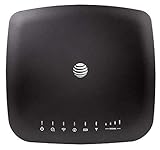
- AT&T Internet has 99% internet reliability. AT&T smart dual-band wireless router; Dual-band Wi-Fi network, Plug and play connectivity. Connect your phones, tablets, and computers with a single gadget. Dimensions -7.21Inches x 6.74Inches x 1.71Inches
- In case of power cut, the AT&T Wireless Internet can run on its backup battery for up to 29 hours in standby mode and provide up to 180 minutes of use time. Battery Capacity - 3000mAh Li-ion (removable); Processor Chipset - Qualcomm Snapdragon X16; Cores 1.2GHz quad-core; Memory RAM 512 MB
- Nano SIM Type supported; Linux 3.18.31 Operating System; 4G LTE Network.
- Keep fast speeds, even when the entire family is online. Stream on multiple devices at once.Up to 20 Devices via WiFi (10 per band) , More Via Ethernet can be Connected; Control Panel -att.wirelessinternet, or 192.168.0.1, ; MIMO Support -2x2; LTE Performance Category -Category 16; Cellular Antenna Ports -2 x SMA; Other Ports -1x Gigabit Ethernet (1000Mbps), 1x Analog Phone Jack.
Plan for power outages as well as internet outages
Internet failover and electrical backup solve different problems. A battery-equipped service may keep some of its own equipment running, but check exactly which device is powered and for how long. AT&T says its business backup needs separately purchased battery backup during a power loss. Comcast, Spectrum, and Cox describe battery provisions, but their inclusions and stated runtimes differ. If supplying power yourself, size a UPS for the modem, router, and any cellular radio or gateway that must remain online; a battery connected to only one device may not preserve the full link. Check whether provider-supplied battery hardware is already part of the service before buying another unit.
Independent reader supportYour contribution helps us test, update, and keep practical guides available for everyone.Which option fits your situation?
- Eligible AT&T Fiber household with the required phone plan and hub: consider the phone-linked Internet Backup if keeping a charged participating device at home is practical.
- Household seeking a dedicated fallback: compare T-Mobile’s hourly allowance and post-allowance speed against expected outage duration, household use, and local availability.
- Business already tied to a provider’s broadband: check its managed failover offer, especially the primary-service requirement, router rules, installation, allowance, battery, and total monthly cost.
- Business needing control over both links: consider a compatible dual-WAN router and separately arranged backup service when someone can verify and maintain the configuration.
No single provider is established as best for every address or workload. The provider pages document features and terms, but they do not provide independent comparative tests, universal coverage, or evidence that failover will be seamless. Select against your critical applications and verify availability and current terms at the service address.
Recommended Free Tools
Quick Recap
Best Value

- 🏢【What is C910 4G LTE Router?】 This is a 4G LTE wireless router that can access the Internet through UMTS/HSPA/LTE. The 4g router with sim card slot has the function of converting 4G to WiFi hotspot, which can cover 300-500 meters at the same time, and can connect to 32 devices at the same time. The mobile wifi router is suitable for home/office use. The independent 12V / 2A power adapter can extend the continuous power supply time, bringing safety and stability. 4g router hotspot router
- 🌎【Network Frequency of Hotspot Router】VSVABEFV 4G Unlocked Wireless Wifi Router support 4G LTE FDD B2/B4/B5/B12/B13/B17/B18/B25/B26 Network Frequency for USA/CA/Mexico. Please you confirm whether your SIM card frequency band is compatible with it before buying this mobile router. The router is made of environmentally friendly ABS materials, wear-resistant, you don't have to worry about the external hard disk drive cabinet easily damaging the hard disk interface. unlocked hotspot sim router
- 🚀【Why Choose C910 Sim Card Wifi Router】The high-speed 4G lte modem has 4 high-performance non-detachable antennas, equipped with 2 LAN, 1 WAN port and 1 SIM card slot interface. The unlocked hotspot has a download speed of up to 150mbps, upload speed of up to 50mbps, and wireless transmission speed of 300mbps. The same frequency interference is effectively prevented, and the wifi signal transmission is stable. wifi router with sim card slot sim card wifi router router 4g lte unlocked sim card
- 【How to Use LTE Router with Sim Card Slot】The router 4g is easy to operate, you need to insert a SIM card compatible with the router's frequency band and turn on the router's power. If your SIM card is compatible with the router sim card but cannot be used, you need to disable the PIN code of the SIM card and modify the APN. Enter the router IP address: 192.168.10.1, and then click Network — APN — Enable. Modify APN. (Note: Roaming service, virtual SIM card and IoT SIM card are not supported)
- 【Several Working Modes】The wifi router with sim card slot supports Router Mode, AP Mode and Repeater Modes. Router/AP Mode is suitable for converting wired networks into wireless networks, Repeater Mode can amplify and extend WiFi coverage of existing wireless networks.
Product prices and availability are accurate as of the date/time indicated and are subject to change. Any price and availability information displayed on Amazon at the time of purchase will apply.

