
Recommended Free Tools
Google Play does not require one universal screenshot size. For ordinary Store Listing screenshots, upload a JPEG or 24-bit PNG without alpha transparency. The shortest side must be at least 320 px, the longest side no more than 3,840 px, and the longest side cannot exceed twice the shortest. For assets eligible for Google’s recommendation surfaces, use either 1,920 × 1,080 px landscape (16:9) or 1,080 × 1,920 px portrait (9:16). Google documents dimensions primarily as width × height, so the orientation labels below prevent height and width from being swapped.
Google Play screenshot dimensions at a glance
| Asset or device | Official pixel guidance | Orientation and other rules |
|---|---|---|
| Standard Store Listing screenshot | Shortest side at least 320 px; longest side no more than 3,840 px | Longest side no more than twice the shortest; JPEG or 24-bit PNG; no alpha channel |
| Phone, recommendation-ready portrait | 1,080 × 1,920 px (width × height) | 9:16 portrait |
| Phone, recommendation-ready landscape | 1,920 × 1,080 px (width × height) | 16:9 landscape |
| Tablet or Chromebook | 1,080–7,680 px along the relevant dimensions | Use 16:9 landscape or 9:16 portrait; up to eight per supported device type |
| Wear OS | At least 384 × 384 px | 1:1 square; show the current interface only |
| Android Automotive OS | 800 × 1,280 px portrait; 1,024 × 768 px landscape | If supplied, provide at least two of each orientation; use a generic system image |
| Android XR | 1,920 × 1,200 px minimum; 3,840 × 2,400 px recommended | 8:5 ratio; upload four to eight screenshots |
| Android TV banner (separate graphic) | 1,280 × 720 px | JPEG or 24-bit PNG without alpha; this is a banner, not a screenshot |
These values come from Google Play Console Help. The page uses width × height notation in most places. Thus “1,080 × 1,920 portrait” means 1,080 px wide and 1,920 px high.
What size should a normal phone screenshot be?
For a listing that only needs to satisfy upload validation, any canvas within the 320–3,840 px limits can work if its aspect ratio is no wider than 2:1. There is no single mandated phone canvas on Google’s page. A practical target is 1,080 × 1,920 px portrait or 1,920 × 1,080 px landscape, because those are the 1080-class dimensions Google identifies for recommendation eligibility.
Portrait phone assets
Set the canvas to 1,080 px wide by 1,920 px high (9:16). Keep interface text and controls inside a comfortable margin so they remain legible when the Play listing is displayed in smaller cards.
#1 Best Overall

- 【High Performance】URAO Android tablet features the latest operating system Android 16 and an 1.8 GHz octa-core processor ensure of excellent performance, seamless multitasking, getting rid of annoying ads, emphasizing privacy and security by designing enhanced app permissions, providing you complete management control.
- 【Massive Storage 】Our Android tablet comes with 30GB (6+24GB) RAM 128GB ROM and maximun 1TB TF card ( not included )expandable ensures you of a fast APP launch and smooth gaming experience. URAO tablet also come with pre-installed Google Play Store, you can easily download any needed Apps.
- 【HD Displaywith Low Blue Light】URAO tablet equipped with a high resolution 1280*800 IPS display, which shows a brightly colored wide-screen for a more realistic viewing experience with sharper and brighter images.The front 5MP and rear 8MP cameras can easily satisfy video calls, online learning, etc. The tablet LCD designed with low blue light technology, the screen flicker caused by irritating blue light will be reduced.
- 【Large Capacity Battery with Fast Charge】The built-in large capacity and low consumption CPU enable our URAO 10 inch tablet to stand by for up to 3 days and allows you to enjoy up to 8 hours of mixed reading, watching TV shows, playing games, surfing the web. URAO tablet dopts fast-charging technology which can be fully charged in 1.5 hour and easily charge via the USB Type-C port and rest assured the battery will last. It is a good companion for you to play and study!
- 【Wi-Fi 6+Bluetooth5.4】Adopts the lastest 6th generation WiFi technology & upgraded BT 5.4. Dual band integrated chips make the 5g WiFi more stable,lastest BT 5.4 connection supports all your favorite accessories, highly increased the speed of data transfer.
Landscape phone assets
Use 1,920 px wide by 1,080 px high (16:9). Do not rotate a portrait capture and leave letterboxing; capture or compose the app in a genuine landscape layout.
Can you use 1080 × 1920 for every app?
You can use that size for a portrait phone screenshot, but it is guidance for recommendation-ready assets, not a universal upload requirement. A game or app whose experience is fundamentally landscape should show that experience in 1,920 × 1,080 instead. Google’s stated purpose is to convey the real capabilities, look and feel, and experience of the app.
Publication minimums versus recommendation eligibility
These are different checks:
- Publishing a listing: Google requires at least two screenshots across different device types.
- Recommendation guidance: Google suggests at least four screenshots at 1080-class resolution, using 1,920 × 1,080 landscape or 1,080 × 1,920 portrait. For games, the guidance is at least three screenshots in one of those orientations.
Meeting the larger dimensions does not guarantee recommendation placement or more installs. Google’s documentation does not provide a conversion-rate or download-lift statistic tied to a particular screenshot size.
Show the product, not a mock advertisement
Use images of the actual in-app or in-game experience. Google advises against relying on fingers, device mockups, or promotional claims in the screenshots. A decorative frame may consume pixels without helping a reviewer or user understand the interface, and it can make important text too small.
Do these 3 things before closing this tab:
1Fix the driver behind crashes, sound loss and screen glitches2Repair Windows errors before they cause bigger problems3Scan for outdated or missing drivers - takes under a minuteTablet and Chromebook screenshot sizes
For tablets and Chromebooks, Google specifies uploads from 1,080 to 7,680 px along the relevant dimensions. Compose each image in either 16:9 landscape or 9:16 portrait. You may upload up to eight screenshots for each supported device type; Google recommends at least four for large-screen experiences.
Design for the large screen
Capture the tablet or Chromebook layout itself rather than simply enlarging a phone screenshot. Show navigation, multi-column views, keyboard support, or other large-screen behavior only when those elements are genuinely available in the app. Keep text at a readable scale and avoid placing key controls at the extreme edges.
Rank #2

- POWER FOR ALL YOU DO: Galaxy Tab A11+ gives your family the optimal performance they need for all their day-to-day activities. Power through tasks, relax with a movie or jump into a game — the upgraded chipset⁴ keeps everything responsive
- CHARGES UP FAST. LASTS FOR HOURS: Galaxy Tab A11+ keeps your family going with a long-lasting battery that’s perfect for browsing, streaming and play. When you finally need a boost, fast charging gets you back to 100% quickly.⁵
- MEMORY AND STORAGE THAT KEEP UP: With up to 8GB of memory and 256GB⁶ of storage, Galaxy Tab A11+ gives your family the space and speed to multitask seamlessly and handle large files.
- BIG SCREEN. FAMILY-SIZED FUN: A bright, engaging 11" screen¹ with a refresh rate up to 90Hz delivers natural, fluid motion, making it easy for every family member to stream, play and do what they love.
- SURROUND YOURSELF WITH RICH AUDIO SOUND: Whether you're watching a movie or listening to your favorite playlist, immerse yourself in a cinema-like audio experience with quad speakers powered by Dolby Atmos on Galaxy Tab A11+
Separate device types in Play Console
Prepare a set for each device category your app supports. A phone image may meet the generic pixel limits but still communicate the wrong layout for a Chromebook user.
Wear OS, Automotive, XR and TV assets
Wear OS
Use a square screenshot of at least 384 × 384 px. It should show only the watch interface, without a watch frame or unrelated background. Supply at least one current interface screenshot.
Android Automotive OS
Use 800 × 1,280 px for portrait and 1,024 × 768 px for landscape. If you provide these assets, Google specifies at least two in each orientation. Capture from the generic Android Automotive system image rather than depicting a particular vehicle model.
Android XR
Provide four to eight PNG or JPEG screenshots in an 8:5 ratio. The minimum is 1,920 × 1,200 px; Google recommends 3,840 × 2,400 px. Keep the interface itself prominent and avoid adding a physical headset or other device frame.
Android TV
A TV-enabled app needs at least one TV screenshot plus a separate 1,280 × 720 px TV banner. The banner is a listing graphic, not a screenshot of the app. Use JPEG or 24-bit PNG without alpha for the banner.
File format, color and aspect-ratio checks
- Use JPEG or 24-bit PNG.
- Remove the alpha channel; transparent PNGs do not meet the stated format rule.
- Check both dimensions after export, not only the design file’s artboard.
- Confirm that the longest side is no more than twice the shortest. For example, 1,080 × 1,920 passes (ratio 1.78:1), while 1,000 × 2,100 fails (2.1:1).
- Do not confuse the TV banner with a screenshot or the feature graphic with either one.
A simple pre-upload checklist
- Identify the target device type and orientation.
- Choose a canvas within that device’s pixel range.
- Export as JPEG or 24-bit PNG with no alpha.
- Verify width, height, ratio and file type in an image inspector.
- Confirm that the screen shown is the current app experience.
- Upload the required count for each device type in Play Console and review the rendered preview.
How to capture screenshots at the right size
Android Studio emulator
Select an emulator profile whose display ratio matches the asset you need, launch the app, and use the emulator’s camera button to save a PNG. Crop or resize only after capture so the interface is not distorted. For a 1080-class portrait asset, export the final image at 1,080 × 1,920 px; for landscape, export at 1,920 × 1,080 px.
Free tools Windows power users keep installed
One-click scans. No signup required.
Physical device
Use the device screenshot shortcut, transfer the original file without messaging-app compression, and inspect its pixel dimensions. If the device’s native ratio does not match 9:16 or 16:9, compose the screenshot on a correctly sized canvas rather than stretching it. Preserve the app content and crop excess space.
Rank #3
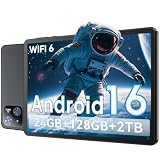
- 【Massive Storage 】Our Android tablet comes with 26GB (6+20GB) RAM 128GB ROM and maximun 2TB TF card ( not included )expandable ensures you of a fast APP launch and smooth gaming experience. COTGOD tablet also come with pre-installed Google Play Store, you can easily download any needed Apps.
- 【High Performance】The new 10 inch tablet is powered by the fast, smart and secure Android 16 with powerful built-in T606 Octa-core processors for an efficient and smooth streaming experience. No hassle from Bloatware. This electronic tablet comes with the Gemini AI engine, enjoy intelligent task optimization, faster app response, and smarter performance. Enhanced features like split-screen multitasking and blue light reduction mode make the android 15 tablet ideal for productivity and eye comfort. Access millions of apps through the Play Store
- 【HD Eyes Protection Display】The 10 inch android tablet equipped with a high resolution 1280*800 IPS display, which shows a brightly colored wide-screen for a more realistic viewing experience with sharper and brighter images.The front 5MP and rear 8MP cameras can easily satisfy video calls, online learning, etc. The tablet LCD designed with low blue light technology, the screen flicker and the damage to the eyes caused by irritating blue light will be reduced.
- 【Wi-Fi 6+ Bluetooth 5.4】Adopts the lastest 6th generation WiFi technology & upgraded BT 5.4. Dual band integrated chips make the 5g WiFi more stable,lastest BT 5.4 connection supports all your favorite accessories, highly increased the speed of data transfer.
- 【Stable Connectivity & Battery】This 2026 AI tablet is ideal for workflows and meetings,It’s the ideal tool for keeping life organised and productive. The 6000mAh large battery supports 5hrs video/4hrs gaming/30hrs music. Whether you're working remotely, taking notes, or watching movies, the tablet meets your needs. It makes an excellent gift for seniors, children, friends, or loved ones for occasions like Christmas or birthdays
Design or automation workflow
Keep one source capture per device class, then create separate 9:16, 16:9, square, Automotive and XR compositions as needed. This prevents a phone layout from being reused accidentally for a large-screen listing.
Or skip the browser setup
If you need screenshots of a web-based companion page, documentation site or marketing preview rather than an Android app screen, ScreenshotNeo can return a clean image or PDF from one request. It accepts the cookie or consent banner like a visitor and removes more than 60 known consent platforms, newsletter popups and chat widgets before capture; each cleanup step can be disabled. Bot checks, CAPTCHAs, blank pages, timeouts, failed loads and cache hits are not billed, and the response identifies the result with X-Page-Verdict and X-Billed headers. It also provides an MCP server for Claude, Cursor and other MCP clients, with take_screenshot, get_page_info and capture_pdf tools.
See the complete parameter reference in the ScreenshotNeo documentation. The following calls are runnable; replace the key and target URL, then resize the returned image to the Play canvas required for your device.
The Tool Desk
Outbyte Driver Updater FREEFix the driver behind crashes, sound loss and screen glitchesFind Drivers →Outbyte PC Repair FREERepair Windows errors before they cause bigger problemsFix Now →cURL
curl -G "https://api.screenshotneo.com/v1/shot" -d access_key=YOUR_API_KEY --data-urlencode url=https://stripe.com -o shot.webpPython
import requests
r = requests.get("https://api.screenshotneo.com/v1/shot", params={"access_key": "YOUR_API_KEY", "url": "https://stripe.com"}, timeout=90)
open("shot.webp", "wb").write(r.content)
Node.js
const q = new URLSearchParams({ access_key: 'YOUR_API_KEY', url: 'https://stripe.com' });
const res = await fetch(`https://api.screenshotneo.com/v1/shot?${q}`);
ScreenshotNeo supports PNG, JPEG and WebP, full-page and CSS-selector captures, lazy-image loading, device presets and custom viewports, retina scale, dark mode, PDF options, custom CSS and JavaScript, clicks, waits, request blocking, headers, cookies, user agents, authorization, timezone and geolocation, transparent backgrounds, resizing, TTL caching, signed links, asynchronous webhooks, bulk capture of up to 100 URLs per call, a usage API and an OpenAPI specification. Its parameter names also match those used by other screenshot APIs, which can simplify migration.
The Free plan includes 1,000 shots per month with no card. Paid plans start at $5 for 3,000 shots; Growth is $15 for 15,000, Pro $39 for 60,000, Scale $99 for 250,000 and Business $249 for 1,000,000. Yearly billing gives two months free, and every feature is on every plan. Create a free ScreenshotNeo account to get the 1,000 monthly shots without a card.
Independent reader supportYour contribution helps us test, update, and keep practical guides available for everyone.Troubleshooting rejected or poor-looking assets
“The image is too small”
Check the exported file’s actual pixels. A 1,080 × 1,920 design that was exported at 540 × 960 no longer meets 1080-class recommendation guidance. Re-export at the intended dimensions.
“The aspect ratio is invalid”
Calculate longest side ÷ shortest side. Reduce the long side or enlarge the short side until the result is 2 or less, then recheck that the device-specific ratio is still 9:16, 16:9, 1:1 or 8:5 where applicable.
What’s actually slowing this PC down?
Pick the symptom - the matching free tool is one click away.
Rank #4

- Do what you love, uninterrupted — 25% faster performance than the previous generation and is ideal for seamless streaming, reading, and gaming.
- High-def entertainment — A 10.1" 1080p Full HD display brings brilliant color to all your shows and games. Binge watch longer with 13-hour battery, 3 or 4 GB RAM, 32 or 64 GB of storage, and up to 1 TB expandable storage with micro-SD card (sold separately).
- Thin, light, durable — Tap into entertainment from anywhere with a lightweight, durable design and strengthened glass made from aluminosilicate glass. As measured in a tumble test, Fire HD 10 is 2.7 times as durable as the Samsung Galaxy Tab A8 (2022).
- Stay up to speed — Use the 5 MP front-facing camera to Zoom with family and friends, or create content for social apps like Instagram and TikTok.
- Ready when inspiration strikes — With 4,096 levels of pressure sensitivity, the Made for Amazon Stylus Pen (sold separately) offers a natural writing experience that responds to your handwriting. Use it to write, sketch in apps like OneNote, and more.
Transparency or format error
Flatten transparent layers onto an opaque background and export as JPEG or 24-bit PNG. Do not rely on a file extension; inspect the encoded format and color mode.
The screenshot looks blurry
Start from the original device or emulator capture, avoid repeated JPEG recompression, and do not enlarge a small screenshot beyond its native detail. Keep text large enough for the final listing preview.
The wrong layout appears on a device
Capture the supported device class directly. A phone screenshot does not demonstrate tablet, Chromebook, Automotive or XR behavior, even if it has been placed on a larger canvas.
FAQ
Does Google Play require 1080 × 1920?
No. It is the practical 9:16 portrait target for recommendation-ready phone assets. Standard listing uploads can use other dimensions within the 320–3,840 px and 2:1 limits.
PC Slower Than It Used to Be?
A free scan shows the junk files, broken settings and background clutter dragging Windows down - then fixes them in one click.Free scan · Windows 10 & 11Crashes, No Sound, or Screen Glitches?
Random freezes, missing sound and display glitches usually trace back to one bad driver. Find and replace yours safely.Free scan · under a minuteHow many screenshots should a listing have?
At least two screenshots across different device types are needed to publish a listing. Google suggests four 1080-class screenshots for recommendation surfaces, or three in one orientation for games.
Are screenshots measured as height × width?
Google generally writes dimensions as width × height. Therefore 1,080 × 1,920 portrait is 1,080 px wide and 1,920 px high.
Can I upload a transparent PNG?
No. The stated format is JPEG or 24-bit PNG without an alpha channel.
Quick Recap
Is the 1,280 × 720 TV image a screenshot?
No. It is the separate Android TV banner required in addition to at least one TV screenshot.
Quick wins for a faster PC:
Repair Windows errors before they cause bigger problemsFix Now →Scan for outdated or missing drivers - takes under a minuteDriver Scan →Product prices and availability are accurate as of the date/time indicated and are subject to change. Any price and availability information displayed on Amazon at the time of purchase will apply.

