

This Itechguide teaches you how to turn on SMS on Facebook.
Step 1: Add Phone Number to Your Facebook Account
Before you turn on SMS on Facebook, you have to add a mobile number to your account.
- On the top right of your Facebook News Feed page, click the menu icon.
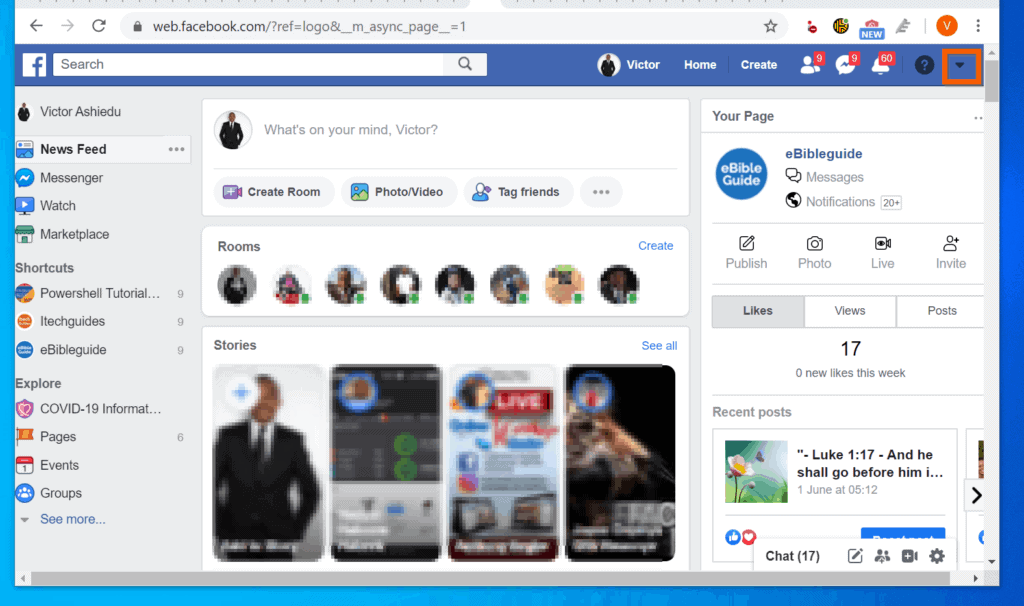
- Then, from the displayed menu options, click Settings.
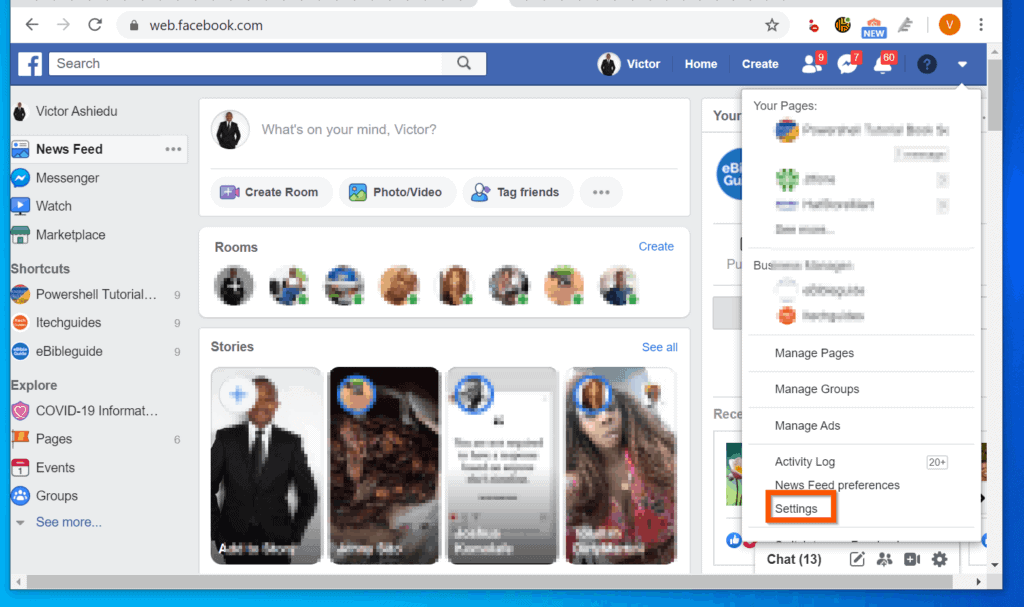
- On the left pane of the General settings screen, click Mobile.
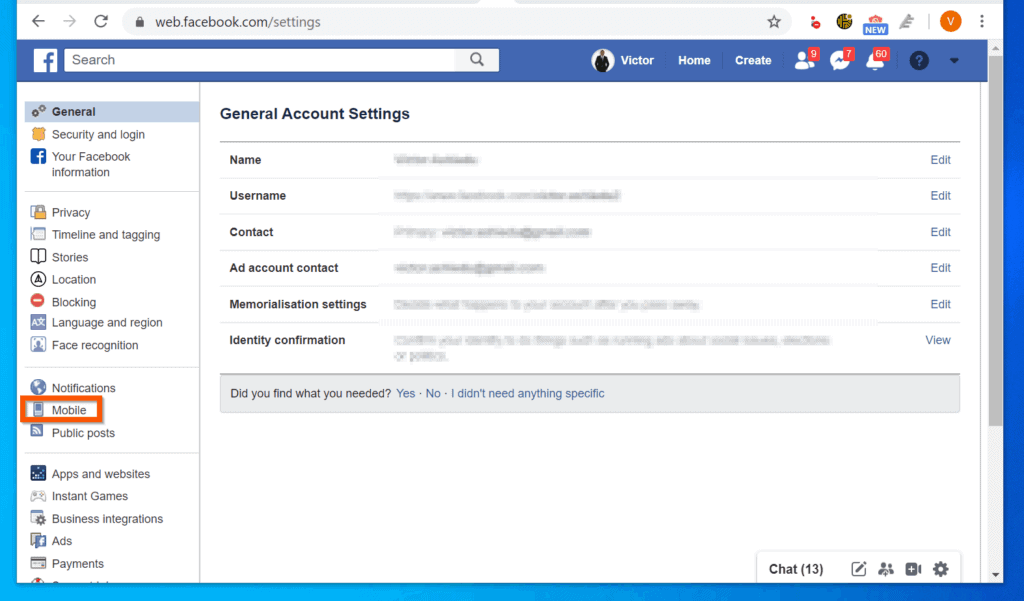
- Then, on the Mobile Settings screen, click Add a phone button.
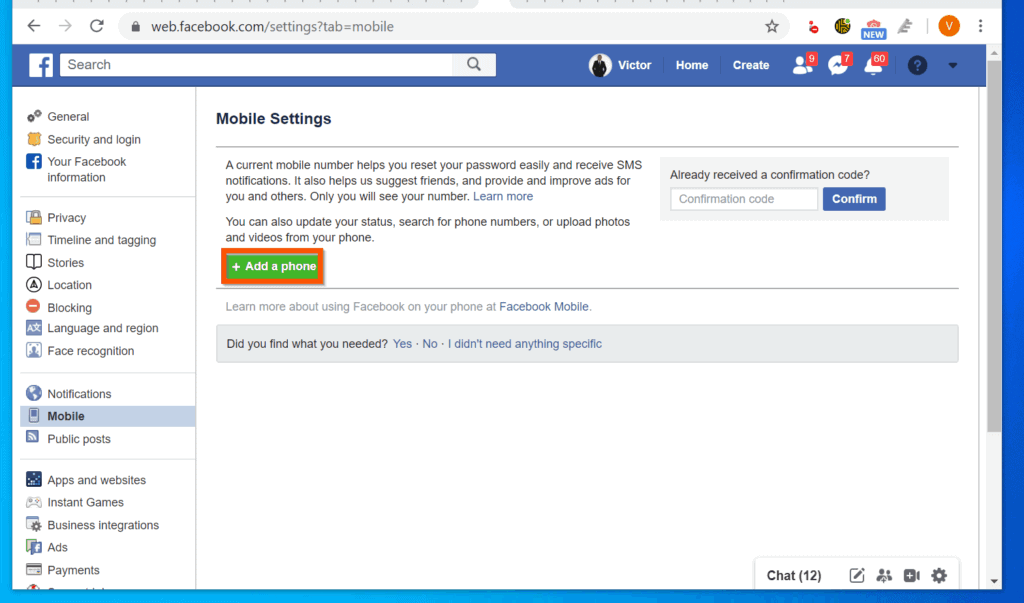
- To add a mobile phone number to Facebook, on the Confirm your number pop-up window, select a country code (usually detected automatically). Then, enter your mobile phone number and click Continue.
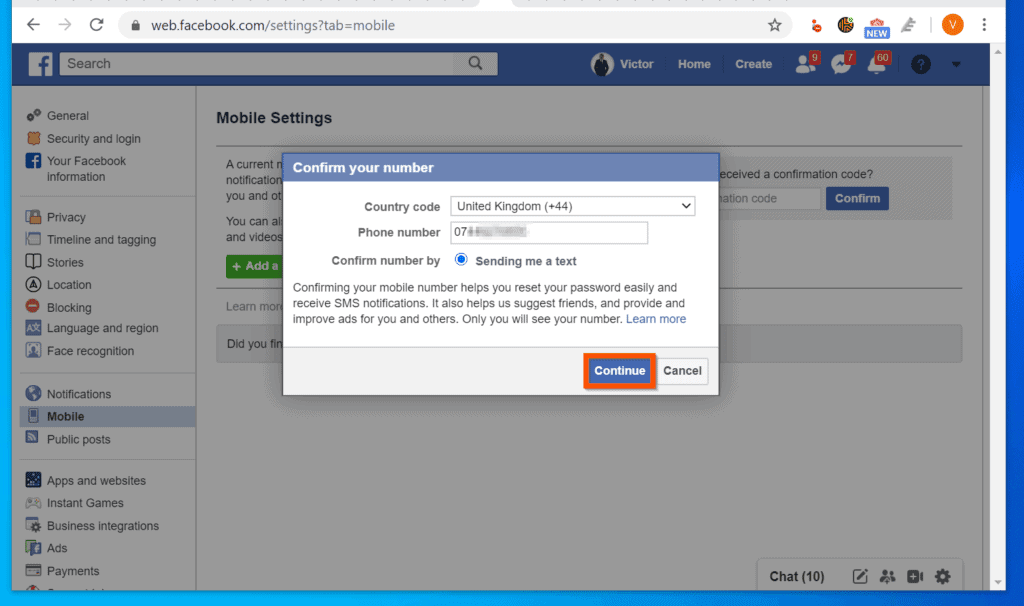
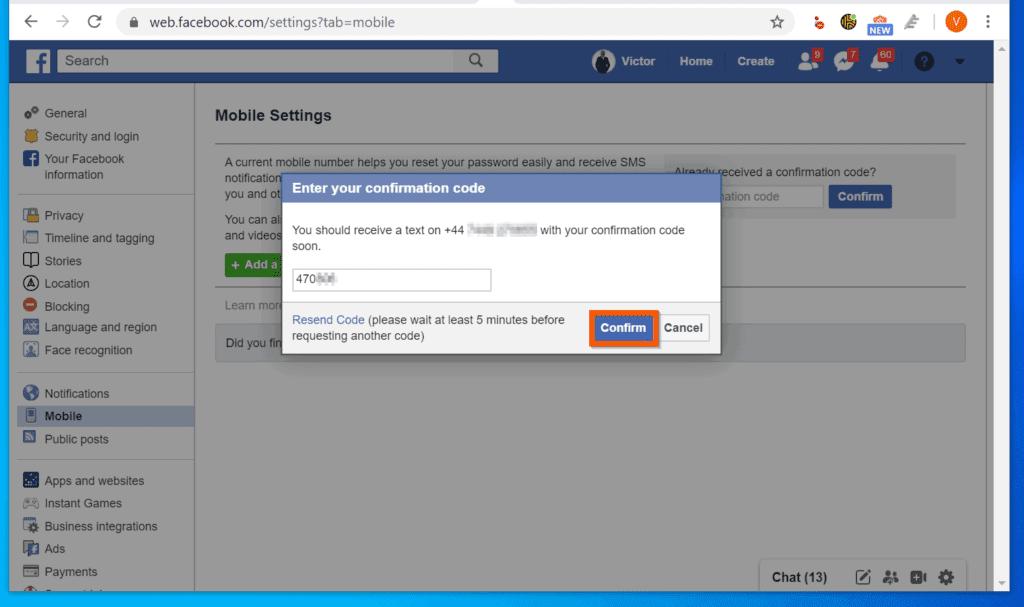
- Finally, enter the confirmation code on the pop-up window and click Confirm.
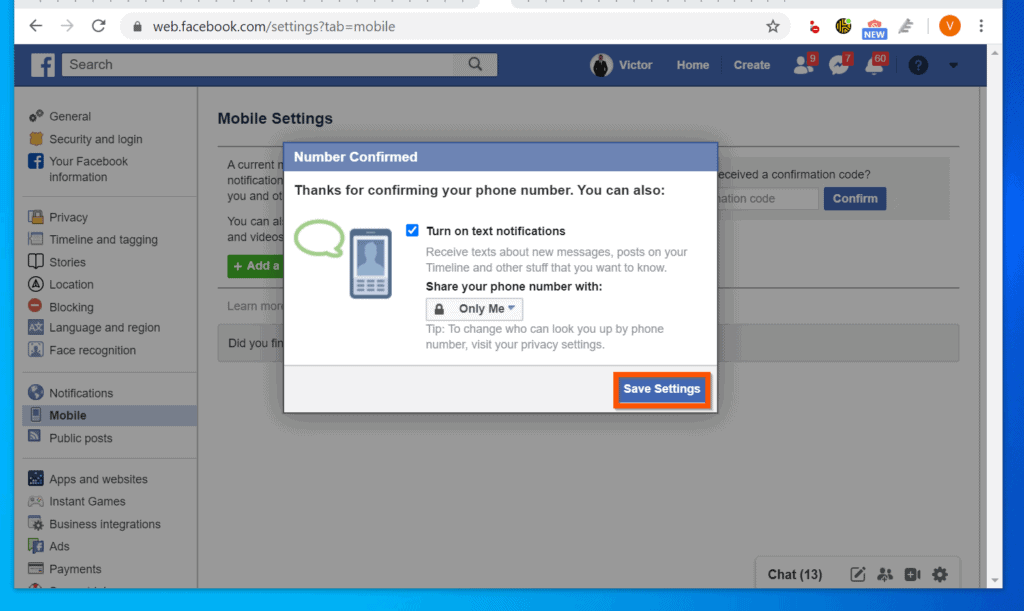
- To turn on SMS on Facebook, on the Number Confirmed pop-up, check the *Turn on text notifications check box. Then, on the **Share your phone number with drop-down, select Only Me.
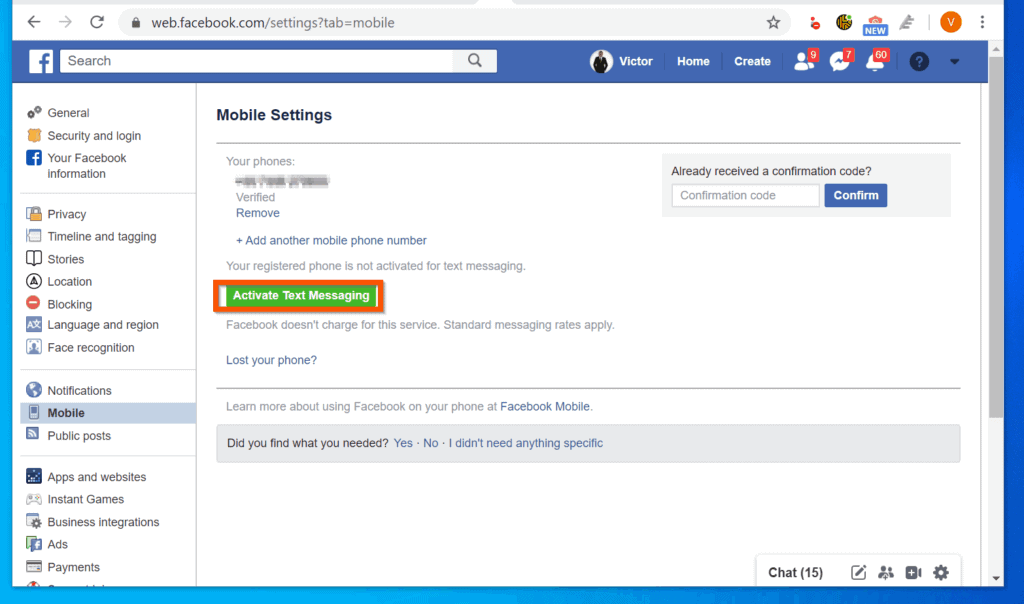
- When you finish, click Save Settings. Before you proceed to the next step, click Activate Text Messaging – see the second image below.
**This is set to Friends by default. I strongly recommend you set your phone number privacy to Only Me. Otherwise, your phone number will be viewable by all your Facebook Friends.
Step 2: Modify SMS Notification Settings
After adding a mobile phone number to Facebook, the final step to turn on SMS on Facebook is to modify SMS notifications.
- Still on your Facebook Settings screen, on the left pane, click Notifications.
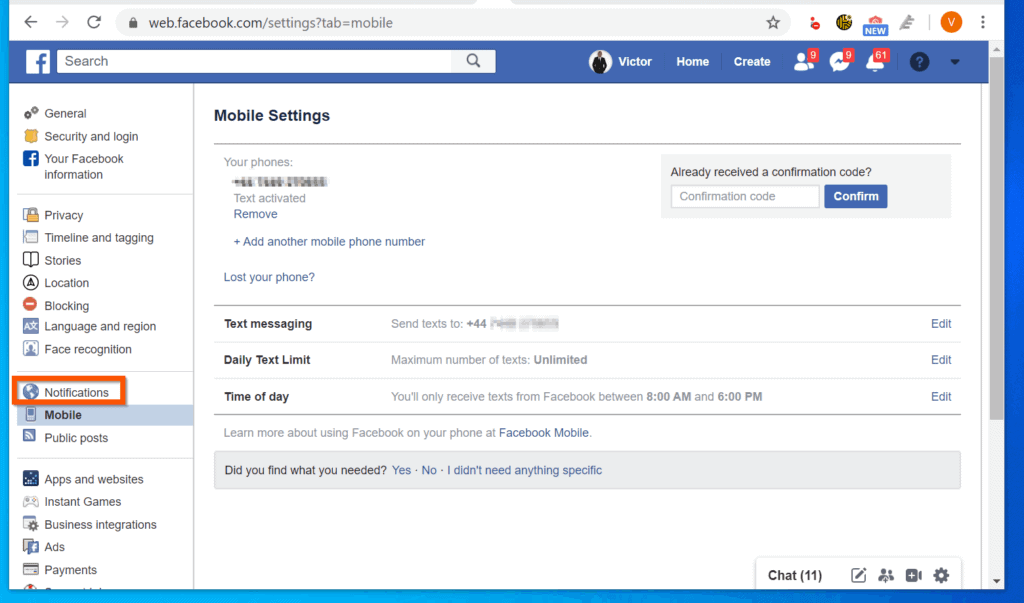
- On the Notifications screen, scroll down to SMS and click on it.
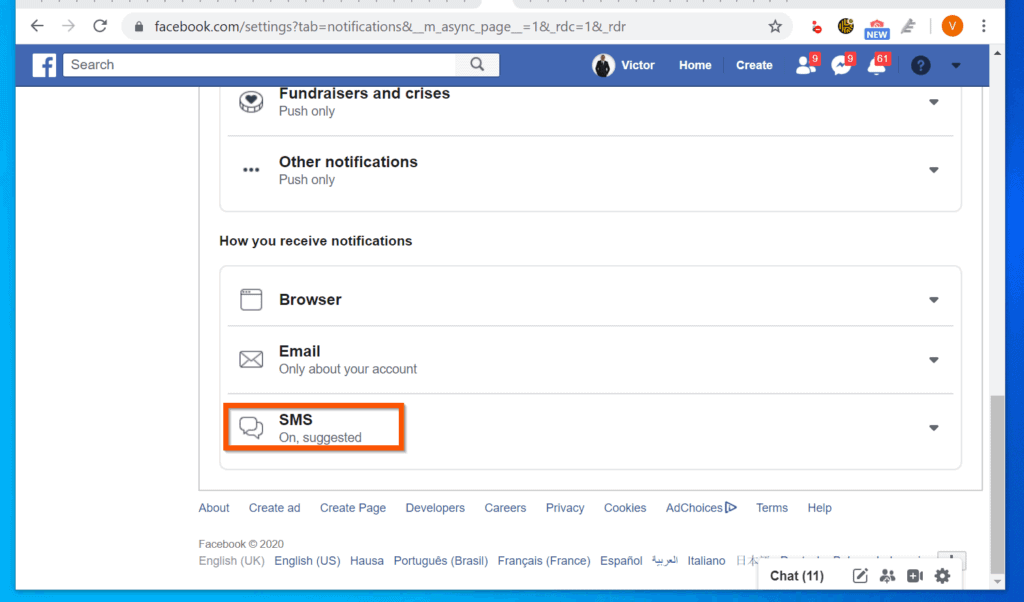
- If you wish to leave the SMS notification to “Suggested”, you have to turn on the types of notifications you wish to receive via SMS.
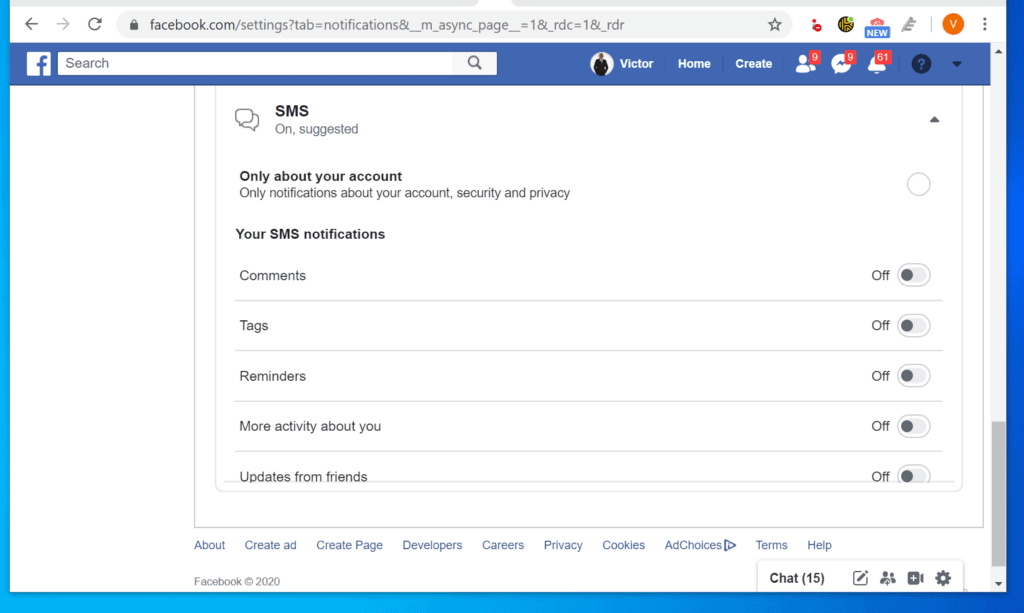
- However, you may also select the second option – “Only about your account”.

Conclusion
To learn more about SMS on Facebook, read our tech explained on this subject – Facebook SMS Notifications Explained.
Quick wins for a faster PC:
Scan for outdated or missing drivers - takes under a minuteDriver Scan →Repair Windows errors before they cause bigger problemsFix Now →#1 Best Overall

- GSM Unlocked: Enjoy seamless connectivity with your preferred GSM carrier. Compatible with T-Mobile, Metro PCS, AT&T, Cricket, Mint Mobile and other GSM networks. SIM card not included. For network compatibility, please check with your carrier. Note: Not compatible with CDMA networks like Verizon (Visible, Spectrum Mobile, US Mobile, Total Wireless, Straight Talk Wireless)
- Boundless Views: Enjoy immersive viewing on the spacious 6.5” HD+ display. Whether you're watching videos, browsing, or gaming, every detail comes through with stunning clarity.
- Smooth Performance, All Day: Powered by an efficient octa-core processor, the G35 ensures smooth performance for your everyday tasks. Enjoy faster app launches, seamless multitasking, and reliable speed.
- Snap, Share, Repeat: The G35 features a dual rear camera setup for sharp, detailed shots, and a front-facing camera that’s perfect for selfies and video calls. Capture every moment with ease and clarity.
- Effortless Access: Keep your phone secure with A.I. Face ID technology. Instantly unlock your G35 with just a glance. It's fast, easy, and secure.
I hope that you found it helpful. If you did, click on “Yes” beside the “Was this page helpful” question below.
You may also express your thoughts and opinions by using the “Leave a Comment” form at the bottom of this page.
Rank #2

- 4G LTE Bands: 1, 3, 5, 7, 8, 20, 28, 38, 40, 41 (This model does not support 5G)
- Display: PLS LCD | 6.7 inches, 108.4 cm2 (~83.8% screen-to-body ratio) | 720 x 1600 pixels, 20:9 ratio (~262 ppi density)
- Camera: 50 MP, f/1.8, (wide), AF | 2 MP, f/2.4, (depth)
- Battery: Li-Po 5000 mAh, non-removable | 25W wired
- Please note, this device does not support E-SIM; This 4G model is compatible with all GSM networks worldwide outside of the U.S. In the US, ONLY compatible with T-Mobile and their MVNO's (Metro and Standup). It will NOT work with Verizon, Spectrum, AT&T, Total Wireless, other CDMA carriers, it is also not compatible with their MVNO (Visible, Xfinity Mobile, US Mobile, Cricket Wireless, etc). Please contact the seller for more information about carrier compatibility. A power adapter is NOT included.
Finally, for more Social media Itechguides, visit our Social Media How-to page. You may also find our Work from Home page very helpful.
Quick Recap
Rank #4

- Carrier: This phone is locked to Tracfone, which means this device can only be used on the Tracfone wireless network. Activating is easy, just 3 steps.
- ACTIVATION Promotion: Includes 1500 min, 1500 texts & 1500 MB Data + add more as you need it
- CAMERA SYSTEM: 50MP Quad Pixel camera. Capture sharper, more vibrant photos day or night with 4x the light sensitivity.
- PERFORMANCE: Blazing-fast Qualcomm performance. Get the speed you need for great entertainment with a Snapdragon 680 processor and 4GB of RAM.
- 64GB built-in storage. Get plenty of room for photos, movies, songs, and apps. Made for US
Rank #3

- Carrier: This phone is locked to Tracfone, which means this device can only be used on the Tracfone wireless network. Tracfone plan required, activating is easy, just 3 steps.
- DISPLAY: Immersive viewing on a 6.7-inch super-bright 120Hz display with powerful stereo speakers and Bass Boost for cinematic entertainment.
- CAMERA SYSTEM: Advanced 50MP Quad Pixel camera captures sharp, detailed photos and videos in any lighting condition
- PERFORMANCE: Lightning-fast 5G connectivity paired with a powerful processor and RAM Boost for smooth multitasking.
- BATTERY LIFE: Long-lasting 5000mAh battery with TurboPower charging technology delivers hours of power in minutes.
Product prices and availability are accurate as of the date/time indicated and are subject to change. Any price and availability information displayed on Amazon at the time of purchase will apply.


