
The Tool Desk
Outbyte PC Repair FREERepair Windows errors before they cause bigger problemsFix Now →Outbyte Driver Updater FREEScan for outdated or missing drivers - takes under a minuteDriver Scan →The 13 best virtual mailbox services for remote business depend on address availability, mail volume, interior-scan needs, package handling, forwarding destination, team access, and compliance requirements. iPostal1 is the strongest location-first choice; PostScan Mail suits tiered business volume; Traveling Mailbox suits frequent scanning; and US Global Mail suits international, higher-touch operations.
A virtual mailbox receives physical mail at a commercial address, shows you an envelope image or notification, and lets you request scanning, forwarding, shredding, recycling, storage, or pickup through an app or browser dashboard. The monthly subscription is only the starting point: scanning pages, forwarding shipments, storage, packages, recipients, and special handling can determine the real cost.
Key takeaways
- iPostal1 advertises more than 4,250 physical street addresses and mailing plans from $9.99 per month, making it the strongest choice when city or state selection matters.
- PostScan Mail lists Starter, Standard, and Premium plans at $10, $20, and $30 per month, but open-and-scan, forwarding, storage, package, and recipient charges remain important.
- Traveling Mailbox starts at $15 per month and includes envelope and page-scan allowances, while extra scans, storage, forwarding, and check deposits can cost more.
- US Global Mail displays Scale at $49 per month and Teams at $99 per month in its monthly view, so older comparisons showing $19.95 per month are outdated.
- A virtual mailbox is not automatically a registered agent, physical operating address, bank-accepted address, or Google Business Profile location.
13 Best Virtual Mailbox Services for Remote Business: quick comparison
The table uses starting signals and feature information available in the research pass dated August 16, 2026. “Not verified” means the research did not confirm a current public price or feature; it does not mean the provider lacks the feature. Location-specific pricing and allowances should be checked at checkout.
| Provider | Best for | Starting price observed | Address model | Included scanning | Forwarding and packages | Compliance or team angle | Main drawback |
|---|---|---|---|---|---|---|---|
| iPostal1 | Address choice | From $9.99/month; business address from $14.99/month | Large advertised network of 4,250+ physical addresses | Varies by plan and location | Forwarding and packages available; fees vary | Registered-agent option advertised at $99/year in listed states | Address-level pricing and features vary |
| VirtualPostMail | Compliance-focused businesses | $20/month listed in older comparison coverage | Smaller controlled footprint; older coverage described five U.S. states | Mail automation and scanning positioning | Verify current storage and package terms | Registered-agent support | Current plan details need rechecking |
| PostScan Mail | Tiered volume and teams | $10 Starter; $20 Standard; $30 Premium | Location availability varies | Plan allowances differ; open-and-scan can be separate | Forwarding, storage, shredding, and package fees are separate considerations | Multiple recipients, business, enterprise, and higher-volume tiers | Low plan prices can rise with add-ons |
| US Global Mail | International founders | $49/month Scale; $99/month Teams | U.S. street-address service | Open-and-scan; higher tiers advertise AI summaries and categorization | International forwarding and higher-touch handling | Team roles, API, and webhooks on higher tiers | Much more expensive than older comparison prices |
| Traveling Mailbox | Frequent travelers | $15/month Basic; $25/month Extended; $55/month Small Business | Address choice affects price | Envelope and page allowances; eligible plans can roll over allowances | Worldwide forwarding; package rules and charges vary | Business names, free shredding, and check-deposit requests | Excess scans and storage add fees |
| LegalZoom Virtual Mail | Existing LegalZoom customers | $29/month listed in existing comparison coverage | Selected locations or partner availability must be confirmed | Scanning cited in existing coverage; verify current plan | Forwarding and shredding cited; verify current fees | Convenient alongside formation services | Current product scope and bundling need confirmation |
| Anytime Mailbox | Low starting price and location choice | Plans from $9.99/month; another page displays prices as low as $5.99 | 2,500+ advertised locations | Current page lists 30 incoming items and five open-and-scan pages | Forwarding, pickup, shredding, recycling, and packages vary by location | Browser and mobile access; 30-day money-back positioning | Marketplace-style location variation |
| PhysicalAddress.com | Simple address service | $7.98/month listed in existing comparison coverage | Physical-address service; ownership model needs confirmation | Scanning cited in prior coverage; verify current allowance | Storage and pickup cited; verify current rules | Money-back positioning in prior coverage | Current price and features were not independently verified |
| PostNet | Local retail pickup | Not verified | Retail-store locations | Location-specific | In-person pickup and shipping assistance may be available | Useful local counter service | Digital automation and pricing vary by store |
| Northwest Registered Agent | Registered-agent ecosystem | Mailbox price not verified | Compliance-service footprint | Full mailbox scanning not verified | Ordinary mail handling must be confirmed | Privacy and registered-agent positioning | Registered-agent service is not automatically a virtual mailbox |
| PostalAnnex | Local mailbox and shipping | Not verified | Retail locations | Location-specific | Local pickup and shipping services may be available | In-person access | May lack digital workflow features |
| L4SB | Privacy and compliance | Not verified | Business-service model | Full scanning service not verified | Forwarding and package handling must be confirmed | Formation, privacy, and compliance orientation | Do not assume it is a full digital mailbox |
| Bizee | Formation-service bundles | Mailbox price not verified | Formation-service offering | True mailbox scanning not confirmed | Forwarding and storage must be confirmed | Convenient for new founders comparing formation services | A formation address may not be a complete mailbox |
Which virtual mailbox service is best for a remote business?
iPostal1 is the best starting point for a remote business that needs a particular city or state, while PostScan Mail is better for predictable volume tiers and team access. Traveling Mailbox is a stronger fit when regular interior scans matter, and US Global Mail is better suited to international or higher-touch operations that can justify a higher subscription.
What’s actually slowing this PC down?
Pick the symptom - the matching free tool is one click away.
#1 Best Overall

- LARGE CAPACITY MIDDLE-CABINET DESIGN: This parcel drop box combines a secure package drop with a built-in metal mailbox — the drop-in door accepts small, standard, and large parcels, while the separate mail slot keeps letters, bills, and notices protected. Exterior size:40.16"x16.34"x15.16". No more missed or rain-soaked deliveries.
- KEYED LOCK BOX SECURITY: This package lock box pairs a keyed locking door with an interior anti-theft baffle that deters porch pirates from reaching in for packages — the courier simply drops your delivery in, and only your key opens it. Dependable protection while you are at work, traveling, or on vacation.
- ALL-WEATHER GALVANIZED STEEL: Made of rust-resistant galvanized steel with a full metal frame, this waterproof delivery box for outside shrugs off rain, snow, sun, and freezing temperatures — it will not warp, crack, or fade like plastic parcel boxes, keeping deliveries dry and protected all year.
- QUICK & EASY ASSEMBLY: Comes with the tools you need (screwdriver and L-shaped wrench), mounting hardware, and clear step-by-step instructions — most people finish in about a coffee break. Place it freestanding on the porch, patio, or curbside, or anchor it to the porch deck, a fence, or a gate for extra stability.
- A FIT FOR EVERY HOME: Ideal as a delivery box for front porches, curbsides, driveways, garages, vacation homes, rentals, and small businesses. Available in multiple colors to match your home's exterior. Questions? The JFHID customer service team is always ready to help.
No provider is universally best. A solo freelancer receiving five letters monthly has a different requirement from a distributed company receiving invoices, checks, packages, tax notices, and legal documents. Choose by workflow and total cost, not by the lowest number on a pricing page.
What is a virtual mailbox?
A virtual mailbox is a private mailbox service that receives physical mail, digitizes some or all of the mail, and lets the customer control the next action online. The normal workflow is:
- The provider receives a letter or package at a physical mailing address.
- The provider sends an exterior-envelope image or notification.
- The customer requests an open-and-scan, forwarding, shredding, recycling, storage hold, or local pickup.
- The provider places the digital scan in an online dashboard or app, or carries out the requested physical action.
“Virtual mailbox,” “digital mailbox,” “mail forwarding service,” and “virtual address” are often used interchangeably in marketing, but included services differ. Some plans include only an exterior envelope scan; others include a page allowance for opening and scanning documents. The category overview used for this comparison describes the core receive, digitize, forward, shred, store, and pickup model.
What is the difference between a virtual mailbox, PO Box, virtual office, and registered agent?
A virtual mailbox handles ordinary physical correspondence online; a PO Box is controlled by USPS; a virtual office may include workspace or receptionist services; and a registered agent receives service of process and specified official notices.
| Service | Primary purpose | Typical limitation |
|---|---|---|
| USPS PO Box | USPS-controlled mail collection | Generally cannot receive all private-carrier deliveries and is not a normal street address |
| Private mailbox | Commercial mailbox at a private facility | May use a PMB or box number and may have limited digital tools |
| Virtual mailbox | Online management, scanning, forwarding, disposal, and sometimes packages | Features, address eligibility, and fees vary by provider and location |
| Virtual office | Business address plus possible phone answering, meeting rooms, or workspace | Usually costs more and still may not be a physical operating location |
| Registered agent | Service of process and specified legal notices | Not a substitute for ordinary mail scanning, package receipt, or forwarding |
A provider can offer both mailbox and registered-agent products, but the two roles remain separate. A mailbox address is not automatically suitable as an LLC registered office, principal business address, physical operating address, bank-verification address, or Google Business Profile location.
Which virtual mailbox services are best for each business use case?
iPostal1: best for address choice and broad coverage
iPostal1 is the strongest location-first option. The provider advertises more than 4,250 physical street addresses, with mailing plans from $9.99 per month, a business-address tier from $14.99 per month, and virtual-office plans from $39.99 per month on its published pages. Check iPostal1’s current address network and plans before choosing a location.
iPostal1 fits remote businesses that need a particular city, state, business address, phone option, fax option, mail forwarding, or package handling. The provider also advertises registered-agent service at $99 per year in listed states through its business-address information. Review iPostal1’s business-address and registered-agent details because availability is not nationwide and the cheapest address tier may not fit the intended use.
Main caution: a large network does not prove uniform processing quality. Compare the exact address, included scans, package rules, forwarding fees, and address format before paying.
Quick wins for a faster PC:
Clear out junk files and repair common Windows errorsFree Scan →Fix the driver behind crashes, sound loss and screen glitchesFind Drivers →VirtualPostMail: best for compliance-focused businesses
VirtualPostMail is a good candidate for businesses that prioritize compliance workflows over a huge address network. Its business-focused positioning includes registered-agent support and mail automations, while older comparison coverage describes a smaller footprint of five U.S. states.
VirtualPostMail may suit an LLC owner receiving government, tax, or legal correspondence who prefers a more controlled operational footprint. The research pass lists a starting price of $20 per month from older comparison coverage, so confirm the current plan, state availability, scanning allowances, package terms, and registered-agent scope directly at VirtualPostMail.
Main caution: fewer locations mean less flexibility when a business needs a particular city or state.
PostScan Mail: best for tiered volume, multiple recipients, and teams
PostScan Mail is the clearest fit when mail volume and user access need to scale in stages. Its published pricing lists Starter at $10 per month, Standard at $20, and Premium at $30, with lower annual equivalents displayed on the pricing page. Review PostScan Mail’s current pricing and allowances before comparing it with a flat-fee provider.
Free tools Windows power users keep installed
One-click scans. No signup required.
PostScan Mail separates plan allowances from open-and-scan, forwarding, storage, shredding, package, and recipient charges. Higher business and enterprise tiers are more relevant to distributed teams than the consumer-level plans. Multiple recipients, cloud access, and more explicit add-on pricing make PostScan Mail useful for businesses with predictable volume.
Main caution: the $10 starting plan is not the same as a fully featured business mailroom. A business that frequently opens documents, stores packages, or adds recipients can pay substantially more.
US Global Mail: best for international founders and higher-touch operations
US Global Mail is the premium-oriented choice for international founders, expats, and companies managed outside the United States. Its pricing page displays Scale at $49 per month and Teams at $99 per month in the monthly view, while higher tiers advertise features such as team roles, API access, webhooks, AI summaries, and categorization. Check US Global Mail’s current plan scope and pricing before subscribing.
US Global Mail is better suited to businesses receiving checks, compliance notices, tax documents, and operational correspondence that need a higher-touch workflow. The provider also advertises SOC 2 and HIPAA compliance on its pricing page; verify that those claims apply to the selected plan and the specific information-handling workflow.
Do these 3 things before closing this tab:
1Repair Windows errors before they cause bigger problems2Scan for outdated or missing drivers - takes under a minute3Clear out junk files and repair common Windows errorsMain caution: US Global Mail should not be treated as a budget mailbox. Older comparison coverage lists $19.95 per month, but the displayed current research signal is materially higher.
Traveling Mailbox: best for frequent travelers and predictable scanning
Traveling Mailbox is a strong fit for digital nomads and remote owners who regularly need interior scans. Its published plans list Basic at $15 per month, Extended at $25, and Small Business at $55. Plans include envelope and page-scan allowances, and eligible plans can roll over allowances. Review Traveling Mailbox’s scan, storage, forwarding, and check-deposit fees.
Rank #2
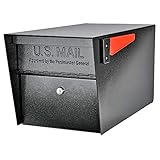
- SECURE YOUR DELIVERIES: USPS approved locking mailbox defends against mail theft; keeps mail, checks, and small packages locked away from thieves
- QUALITY: 14- and 16-gauge galvanized welded steel construction with stainless steel hinges defends against vandalism
- SECURITY: Innovative baffle door accepts small parcels, packages, and a box of checks and also deters fishing. Does not include or require mounting plate
- PATENTED: Anti-Pry latch lock mechanism stops leveraged screwdriver attacks cold; anti-drill, anti-pick commercial grade 10-disc wafer lock with thickened core and 1,000+ key cuts
- ACCESSORIES: Includes concealed outgoing mail clip, (3) all-metal laser cut keys, and required installation hardware
Traveling Mailbox supports worldwide forwarding, business-name additions, free shredding, and check-deposit requests. The provider lists a $4.95 fee per check plus postage for a check-deposit request. A forwarding shipment is advertised as postage plus a $2 shipment fee.
Main caution: excess envelopes, scan pages, package handling, and storage after the free period can change the effective price. Address choice can also affect the plan cost.
LegalZoom Virtual Mail: best for existing LegalZoom customers
LegalZoom Virtual Mail is most convenient for founders already using LegalZoom’s formation and business-service ecosystem. Existing comparison coverage lists a $29 monthly price and cites scanning, forwarding, shredding, and integrations, but the current product, location availability, partner structure, and bundle terms should be verified at LegalZoom.
LegalZoom can reduce vendor sprawl for a new founder comparing formation and mailbox services together. A high-volume business should still compare standalone mailbox specialists because ecosystem convenience does not establish better scan allowances, package handling, or support.
Main caution: confirm whether the current service is directly offered, partner-provided, location-limited, or bundled with another product.
Anytime Mailbox: best for broad location choice at a low starting price
Anytime Mailbox is a location-led marketplace option for freelancers and small businesses seeking a low advertised entry price. Current landing-page signals show more than 2,500 locations and plans from $9.99 per month, while another provider page displays prices as low as $5.99. Check the exact Anytime Mailbox location and allowance details because pricing and features vary by address.
Crashes, No Sound, or Screen Glitches?
Random freezes, missing sound and display glitches usually trace back to one bad driver. Find and replace yours safely.Free scan · under a minutePC Slower Than It Used to Be?
A free scan shows the junk files, broken settings and background clutter dragging Windows down - then fixes them in one click.Free scan · Windows 10 & 11The current page lists 30 incoming items and five open-and-scan pages as included limits for the displayed offer, along with forwarding, pickup, shredding, and recycling options. Extra pages, recipients, storage, package handling, and forwarding bundles can add fees. Anytime Mailbox also advertises a 30-day money-back positioning on current landing pages.
Main caution: do not compare the homepage price with another provider’s all-inclusive plan. Compare the exact address and the exact monthly allowances.
PhysicalAddress.com: best for a straightforward physical-address service
PhysicalAddress.com may suit a customer who wants a basic physical address and mail-management workflow. Existing comparison coverage lists $7.98 per month and cites scanning, storage, pickup, and a money-back positioning, but the research pass did not independently verify the current price or feature allowances.
Confirm the address format, carrier acceptance, scan rules, forwarding prices, package storage, cancellation terms, and whether the location is owned, operated, or partner-managed at PhysicalAddress.com.
Main caution: older price and feature claims should not be treated as current until the signup flow confirms them.
PostNet: best for local retail pickup and shipping assistance
PostNet is a practical choice when in-person retail access matters more than a fully digital mailroom. Its retail-location model may provide local pickup and shipping assistance, which can help a business that occasionally needs a counter, package service, or face-to-face support.
Pricing, scanning, forwarding, check deposits, and business-address eligibility are location-specific and were not verified in this research pass. Confirm those details with the selected PostNet location.
Main caution: a retail mailbox may not provide the same app automation, OCR, team permissions, or consistent workflow as a digital-first provider.
Recommended Free Tools
Northwest Registered Agent: best for registered-agent and privacy services
Northwest Registered Agent is primarily a registered-agent and business-privacy choice, not automatically a full virtual mailbox. The provider may fit an LLC owner who needs legal-compliance support and privacy services, but ordinary mail scanning, forwarding, package handling, user access, and storage must be confirmed at Northwest Registered Agent.
A registered agent receives service of process and specified official notices. A remote business still may need a separate mailbox for invoices, checks, customer returns, packages, and general correspondence.
Main caution: do not rank the registered-agent product as equivalent to a digital mailbox without confirming comparable mailroom features.
PostalAnnex: best for local mailbox and shipping services
PostalAnnex is best considered when a business values local access to a mailbox and shipping counter. The retail model may help owners who prefer local pickup or in-person shipping support.
Rank #3
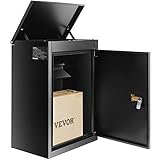
- Multiple Anti-Theft Protections: Don't worry about losing keys and being unable to retrieve your parcels. VEVOR 15.4" x 10.6" x 20.5" package delivery box for outside is equipped with a secure password lock and internal hinge to ensure your packages are well-protected. A large anti-theft baffle has also been added to the drop slot, preventing parcels from being fished out.
- Highly Durable: This locking mailbox is constructed from 0.8mm thick galvanized steel, and features a specialized coating through a spray process to prevent rust and scratches. Long-lasting lifespan of up to 10 years.
- IPX3 Waterproof Protection: Our IPX3-rated wall-mounted mailbox offers unparalleled defense against harsh weather conditions, including typhoons, and snow. The specially designed waterproof seals ensure your valuable packages remain clean and intact, no matter the elements.
- Generous Storage Capacity: With a robust weight capacity of 33-44 pounds and dimensions of 13.6 x 8 x 7.5 in for maximum package storage, this outdoor mailbox effortlessly accommodates your mail, magazines, and packages, helping you manage your deliveries with ease.
- Easy 3-Step Installation: With a set of screws and 4 pre-drilled holes on the back panel, you can easily install the extra large mailbox in just 3 steps on walls, porches, or curbside. Conveniently store and access to your packages anytime and anywhere !
Pricing, scan automation, package rules, forwarding, and business-registration suitability vary by store and were not verified in this research pass. Confirm the selected location’s services at PostalAnnex.
Main caution: PostalAnnex may be weaker than a digital-first service for OCR, shared document review, API access, and automated forwarding.
L4SB: best for privacy and compliance positioning
L4SB is a business privacy and compliance ecosystem that may appeal to founders comparing formation and address services together. The research supports privacy and compliance positioning, but it does not verify that the current product provides full digital mailbox scanning, forwarding, package handling, or storage.
Use L4SB as a compliance-oriented alternative only after confirming the exact mail-handling product. Separate privacy claims from operational claims about receiving and digitizing mail.
Main caution: do not describe L4SB as a complete virtual mailbox unless the current product page confirms that scope.
Bizee: best as a formation-service alternative
Bizee is most relevant to new founders comparing business formation with address-related services. The original comparison coverage calls Bizee a free virtual mail service, but the research pass does not verify that claim on a current product page. Confirm whether the offering is a true mailbox with scanning and forwarding or simply a formation-related business address at Bizee.
Compare renewal prices, address eligibility, scan allowances, forwarding, storage, and cancellation terms against a dedicated mailbox provider.
Main caution: an address included with formation is not automatically a complete virtual mailbox.
How much does a virtual mailbox really cost?
The real cost is the subscription plus open-and-scan fees, page fees, forwarding, storage, recipient access, package handling, special handling, postage, and international shipping. A low headline price can be economical for a nearly empty mailbox and expensive for a business that opens documents or forwards packages every week.
For example, Traveling Mailbox advertises a $2 shipment fee in addition to postage, while PostScan Mail lists a $2 first-item forwarding fee, $0.50 for each additional item, and shipping. Traveling Mailbox’s pricing page and PostScan Mail’s pricing page show why forwarding needs to be compared separately from the subscription.
| Business pattern | What to compare first | Likely decision direction |
|---|---|---|
| Five envelopes, two interior scans, one monthly shipment | Included scan pages, per-shipment fees, postage, and address price | Traveling Mailbox or a low-cost location plan may fit; calculate exact fees |
| Thirty envelopes, 50 scan pages, two recipients | Incoming-item limits, page allowances, recipient fees, and rollover | PostScan Mail or Traveling Mailbox may be more predictable than the cheapest tier |
| High-volume business mail | Business-tier limits, user permissions, storage, API, package handling, and support | PostScan Mail or US Global Mail deserves closer review |
| International founder forwarding one consolidated shipment monthly | International postage, customs paperwork, consolidation, insurance, and processing | US Global Mail or Traveling Mailbox may fit, but request a shipping estimate first |
The scenarios are comparison frameworks rather than provider quotes. Exact totals require the selected address, billing cycle, mail volume, page count, shipment weight, destination, and add-ons.
Can a virtual mailbox be used for an LLC, bank account, or Google Business Profile?
A virtual mailbox may work as a mailing address for some business tasks, but acceptance depends on the state, bank, platform, insurer, licensing authority, address format, and the purpose of the address.
- LLC: distinguish the mailing address, principal business address, registered-office address, registered-agent address, and physical operating address. Verify the state filing office’s current requirements.
- Banking: a bank may require a physical operating or residential address and may reject a commercial mailbox or PMB format. Ask the bank before subscribing.
- Licensing: regulated licenses can require a verifiable operating location, not merely a place that receives mail.
- Google Business Profile: a virtual mailbox alone may not satisfy storefront or service-area verification rules. A prestigious address does not guarantee approval.
- Proof of address: ask the receiving institution whether a private mailbox statement or utility-style document is accepted.
Use the phrase mailing address unless the provider and the relevant authority explicitly document broader eligibility.
What is USPS Form 1583 and why is it required?
USPS Form 1583 authorizes a private mailbox provider to receive mail for the customer, and private mailbox providers generally require the form before activation. Traveling Mailbox explicitly says subscribers must complete Form 1583 to establish a private mailbox. Read Traveling Mailbox’s Form 1583 and business-use FAQ for its current onboarding instructions.
Customers may need two forms of identification, a physical or residential address, notarization or an accepted remote-notary process, and authorization for the provider to receive mail. Requirements can depend on the provider, location, and current USPS or provider procedure, so do not assume same-day activation or universal remote notarization.
Independent reader supportYour contribution helps us test, update, and keep practical guides available for everyone.What is the difference between an envelope scan and an open-and-scan?
An envelope scan shows the outside of the envelope; an open-and-scan request opens the item and digitizes its contents, often subject to page limits or per-page charges.
Recommended Free Tools
| Term | What the customer receives | Why it affects cost |
|---|---|---|
| Envelope scan | Image of the outside of an incoming item | May be included per incoming item |
| Open-and-scan | Digital images or PDF of the contents | May use a page allowance or incur per-page fees |
| OCR or searchable PDF | Text-searchable digital document | Available only from some providers or plans |
| AI summary | Machine-generated document summary | Available only on some plans and not a substitute for reviewing legal, tax, banking, or contractual documents |
Traveling Mailbox includes envelope and page-scan allowances in its plans. PostScan Mail separates incoming-item allowances from open-and-scan allowances, and Anytime Mailbox also advertises separate incoming-mail and open-and-scan limits. Compare envelopes, pages, and scans as separate units rather than treating “scanning included” as a complete specification.
How should a business compare package handling and forwarding?
A business that receives packages should compare carrier acceptance, package-size limits, free-storage periods, consolidation, local pickup, signature-required delivery, restricted items, storage fees, and oversize or overweight charges.
Rank #4

- Enhanced Lockable Security for Deliveries:This package box features a built-in padlock provision, allowing you to secure the container with your own padlock (sold separately). This prevents unauthorized access and keeps your delivered items safe, making it a reliable package delivery box for outside that effectively deters theft. The secure design offers peace of mind whether you're receiving parcels from couriers or storing personal items.
- Durable Weatherproof & Watertight Construction:Constructed with heavy-duty resin materials, this outdoor storage box is engineered to create a complete seal against outdoor elements. Its watertight design prevents rain, snow, and moisture from entering, ensuring that your packages and stored belongings remain completely dry. The robust build offers reliable protection in various weather conditions.
- Large Capacity for Multiple Parcels:With a spacious internal volume, this package delivery box for outside accommodates several standard-sized packages from major delivery services. Its generous dimensions allow it to hold multiple parcels securely, making it an ideal package box for households that frequently receive deliveries. The capacity ensures efficient organization and storage for various items.
- All-Weather Resilient Performance:Designed to perform reliably year-round, this outdoor storage box utilizes UV-resistant resin that maintains its integrity under sun exposure, high temperatures, and cold conditions. The material resists fading and structural compromise, ensuring long-lasting functionality as a dependable package delivery box for outside in diverse climates.
- Quick and Simple Assembly Process:Featuring an intuitive snap-together design, this package box can be assembled in minimal time without requiring additional tools. The clean and durable appearance blends naturally with outdoor environments, providing practical outdoor storage box functionality that's ready for use almost immediately after unboxing.
Forwarding can include postage, a provider handling fee, per-item consolidation, packaging, customs forms, international shipping, insurance, storage, and possible return-to-sender charges. International forwarding can also involve customs delays, carrier restrictions, taxes, and nonstandard packaging.
Businesses receiving inventory, samples, equipment, replacement cards, or customer returns should not choose a mailbox based on monthly price alone. Request a shipping estimate and confirm how long packages remain free before subscribing.
Can a virtual mailbox deposit checks?
Some providers offer check-deposit requests, but check handling is not the same as banking and the customer’s bank must accept the process. Traveling Mailbox lists a $4.95 fee per check plus postage for a check-deposit request.
Ask whether the provider endorses the check, sends it to the customer’s bank, charges separately for postage, limits the service by plan, and supports international customers. Do not assume that a provider offering check forwarding can deposit funds directly into a bank account.
How many locations do virtual mailbox providers really have?
Location totals are advertised network counts, not guarantees of consistent service. A network may include owned facilities, partner-operated retail stores, available addresses, worldwide locations with different pricing, or addresses that do not support every feature.
iPostal1 currently advertises more than 4,250 physical street addresses, while Anytime Mailbox advertises more than 2,500 locations on its referenced landing pages. iPostal1’s location and plan page and Anytime Mailbox’s location overview should be treated as time-sensitive provider claims, not independent quality rankings.
What’s actually slowing this PC down?
Pick the symptom - the matching free tool is one click away.
A broad marketplace is useful when a business needs a particular city or state. A smaller or more controlled network may offer more consistent handling but fewer address choices. Ask whether the chosen location is owned or partner-operated and whether the location supports the exact scanning, package, pickup, and registration use you need.
How should a remote business choose a provider?
- Choose the required city and state first. If no specific location is necessary, prioritize workflow economics instead of network size.
- Estimate both incoming items and scan pages. Count envelopes, opened documents, and pages separately.
- List package needs. Include carrier types, dimensions, storage time, consolidation, signatures, and pickup.
- Calculate forwarding frequency. Include postage, handling, packaging, customs, insurance, and storage.
- Count people and entities. Check additional recipients, user seats, permissions, business names, and multiple-business rules.
- Separate compliance products. Confirm registered-agent, LLC, banking, licensing, and Google Business Profile requirements independently.
- Check automation and security. Review dashboard access, mobile apps, API or webhooks, retention, shredding, employee access, and any provider-specific SOC 2 or HIPAA claim.
- Read cancellation and refund terms. Verify annual-prepayment consequences, address changes, mail holds, forwarding after cancellation, and the treatment of stored originals.
What can go wrong and how can the business recover?
The bank rejects the address
A bank may require a physical operating address, recognize the location as a commercial mailbox, reject a PMB or suite format, or fail to match the address in its verification database. Ask the provider for the exact address format, keep a separate operating or residential address where required, and confirm bank requirements before paying.
USPS Form 1583 delays activation
Incomplete identification, an unsupported notary process, or extra location verification can delay activation. Follow the provider’s current checklist and confirm document requirements before choosing annual billing.
The business receives more mail than expected
Plans may count envelopes, pieces, pages, or scans differently, and junk mail may count toward an allowance. Track incoming items and pages for a month, then choose rollover allowances or a predictable tier if volume is variable.
Storage and package fees become expensive
Equipment, inventory, and returns can exceed free storage periods and trigger per-day, per-pound, oversize, or handling fees. Confirm limits and consolidation rules before treating the mailbox as a logistics hub.
A provider shreds an important original
Some services dispose of physical mail after a storage period unless the customer places a hold. Configure retention rules and preserve originals needed for tax, legal, identity, banking, or immigration purposes.
International forwarding costs more than expected
Customs, carrier restrictions, insurance, taxes, and packaging can make international shipments expensive or slow. Request an estimate for the actual destination and compare consolidated forwarding with individual shipments.
The provider shares an address with unrelated businesses
Shared addresses can create confusion with customers, banks, government notices, and deliveries. Ask how the provider distinguishes recipients and whether the address is an owned facility or a shared partner location.
Virtual mailbox setup checklist
- Pick the state and address.
- Confirm the address format, PMB or suite designation, carrier acceptance, and intended business use.
- Verify requirements with the bank, state filing office, platform, insurer, or licensing authority.
- Compare incoming-item limits, open-and-scan pages, forwarding, storage, package handling, recipients, and special services.
- Complete USPS Form 1583 and the provider’s identity-verification process.
- Add authorized recipients, business names, employees, or entities.
- Configure shredding, retention, storage holds, and forwarding rules.
- Test dashboard notifications and download access.
- Keep a backup address for critical legal, identity, tax, and banking documents.
Frequently Asked Questions
Is a virtual mailbox a real street address?
A virtual mailbox normally uses a physical commercial mailing address, but address formatting and eligibility vary by location. A physical mailing address is not automatically a private office, operating location, bank-accepted address, or Google Business Profile location.
Can a virtual mailbox replace a registered agent?
A virtual mailbox does not automatically replace a registered agent. A registered agent receives service of process and specified official notices, while a virtual mailbox manages ordinary mail, scans, packages, forwarding, and disposal.
Can one virtual mailbox serve multiple businesses?
Some providers support multiple recipients, business names, or entities, but the rules and fees vary by plan and location. Confirm authorization, recipient charges, address formatting, and whether each entity needs separate USPS Form 1583 documentation.
Are virtual mailbox scans included?
Some plans include exterior-envelope scans, while open-and-scan requests and page scans may use separate allowances or incur fees. Traveling Mailbox, PostScan Mail, and Anytime Mailbox illustrate why incoming items, opened items, and pages must be compared separately.
Windows Errors? Fix Them Before They Spread
Repair common Windows errors and clear accumulated junk for a smoother, more stable PC - no reinstall needed.Free scan · no reinstallCrashes, No Sound, or Screen Glitches?
Random freezes, missing sound and display glitches usually trace back to one bad driver. Find and replace yours safely.Free scan · under a minuteThe Bottom Line
The best virtual mailbox service for a remote business is the one that matches the business’s address, volume, scanning, forwarding, package, team, and compliance requirements. Start with iPostal1 or Anytime Mailbox for location choice, PostScan Mail for tiered business volume, Traveling Mailbox for included scanning, US Global Mail for international high-touch handling, and a separate registered-agent service when legal compliance requires one. Verify the exact address and checkout total before subscribing.
Quick Recap
Product prices and availability are accurate as of the date/time indicated and are subject to change. Any price and availability information displayed on Amazon at the time of purchase will apply.

