
There is no universally best desk booking software for the hybrid workplace. Enterprise buyers should choose according to the primary pricing unit—active user, employee, bookable resource, location, or custom tier—and the required scope, including desks, rooms, identity, check-in, analytics, visitors, privacy, and facilities workflows.
The strongest starting shortlist depends on the problem being solved. Robin and Eptura Engage suit broad workplace operations; Envoy suits visitor-and-workplace consolidation; OfficeRnD Workplace suits resource-priced deployments; Skedda suits rules-heavy booking; Kadence suits team coordination; and deskbird suits a mobile-first hybrid rollout.
Key takeaways
- Per-user, active-user, per-resource, location-based, and custom enterprise pricing can produce very different total costs for the same office.
- Envoy Reservations lists $5 per bookable resource per month when billed annually, but Envoy says that price excludes the platform fee.
- OfficeRnD Workplace lists plans from $99 per month annually and $399 per month annually for Professional, with resource and room charges shown separately.
- Bookings measure reservation intent, not occupancy; serious space decisions should compare bookings with check-ins, sensors, Wi-Fi, badge, or other approved presence signals.
- SSO, SCIM, HRIS synchronization, privacy controls, floor-plan administration, audit logs, and data export deserve separate procurement tests.
What does desk booking software actually do?
Desk booking software combines resource allocation, workplace policy enforcement, employee coordination, and workplace data. Enterprise platforms can manage more than shared desks: they may include rooms, parking, lockers, phone booths, assigned seating, team neighborhoods, visitors, wayfinding, check-in, auto-release, and utilization analytics.
Desk hoteling lets an employee reserve a desk for a day or time period. Hot desking lets employees reserve shared desks without permanent ownership. Assigned-desk functionality preserves fixed seating for employees who need it, while neighborhoods let teams reserve or occupy defined areas. Room, parking, locker, visitor, and other-resource booking may be included or sold as separate modules.
The Tool Desk
Outbyte PC Repair FREEClear out junk files and repair common Windows errorsFree Scan →Outbyte Driver Updater FREEFix the driver behind crashes, sound loss and screen glitchesFind Drivers →#1 Best Overall
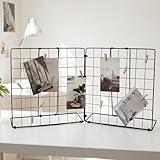
- Application: Photo display rack with double-sided display, foldable design, and detachable into 2 small display racks – simple and convenient to use.
- Material: The picture holder for desk is made of iron material, with a spray painted and electroplated surface that is sturdy and has a long service life.
- Installation: The grid display rack is easy to install and ideal for displaying photos and accessories.
- Size: The DIY photo display board measures27.5inches x 3.1 inches x 13.7 inches (length x width x height).
- Packaging: Desk Photo & Craft Display Organizer and 20 Wooden Clips.
Presence planning is different from desk booking. Presence planning records when an employee intends to be in the office; a reservation allocates a specific resource. A useful platform may support both, but buyers should not treat an office-day indication as proof that an employee occupied a desk.
Which workplace problem are you trying to solve?
The right shortlist follows the operational problem, not the longest feature list.
| Primary problem | Capabilities that matter most |
|---|---|
| Employees cannot find a desk | Live availability, maps, mobile booking, search, amenities, accessibility attributes |
| Teams want to sit together | Neighborhoods, colleague visibility, team booking, priority rules |
| Reserved desks go unused | Check-in, reminders, grace periods, auto-release, walk-up booking |
| The company is reducing office space | Utilization analytics, occupancy signals, demand trends, scenario planning |
| Multiple offices operate differently | Multi-location policies, delegated administration, regional controls, consolidated reporting |
| Facilities needs one system | Desk, room, visitor, parking, service-request, access-control, and sensor integrations |
| IT wants low administration | SSO, SCIM, HRIS sync, role-based access, audit logs, APIs |
| Employees resist another application | Teams, Slack, Outlook, Google Calendar, mobile, and conversational booking |
Which pricing model is best for a hybrid workplace?
The pricing unit is often more important than the headline monthly price. A per-active-user plan can work when a minority of employees regularly books space. A per-resource plan can work when many employees share a relatively small pool of desks. Location or tier pricing is easy to budget but may be inefficient for uneven office sizes. Custom enterprise pricing is common when security, analytics, governance, or facilities workflows are complex.
How should you calculate total cost?
Use the same requirements sheet for every vendor:
Annual software cost =
base platform fee
+ user or resource charges
+ location charges
+ room, visitor, analytics, API, or signage modules
+ hardware
+ implementation and migration
+ premium support or success services
Ask vendors to define every billing term. “User” may mean every employee, a licensed user, or an active user. “Resource” may mean each desk, room, parking space, locker, display, or other bookable item. Confirm minimum commitments, annual billing, currency, renewal increases, and whether implementation is mandatory.
Outdated Drivers Are Slowing You Down
One free scan finds every outdated or missing driver and matches the right update for your exact hardware.Free scan · exact hardware matchPC Slower Than It Used to Be?
A free scan shows the junk files, broken settings and background clutter dragging Windows down - then fixes them in one click.Free scan · Windows 10 & 11What do three office scenarios look like?
| Scenario | What to compare | Likely economic question |
|---|---|---|
| 100 employees, 60 desks, one office | 100-user versus 60-resource pricing; rooms; platform fees; SSO tier | Does the vendor charge for the whole workforce or the smaller shared-resource pool? |
| 1,000 employees, 400 desks, several rooms | 1,000-user, active-user, and 400-resource models; minimums; analytics; identity modules | Does a lower resource count outweigh room, platform, and enterprise add-ons? |
| 5,000 employees, 10 offices | Multi-location administration, regional policy, data residency, HRIS and identity sync, reporting, implementation | Can the platform govern ten locations without duplicating administration or sacrificing privacy? |
For example, Envoy lists Reservations at $5 per bookable resource per month when billed annually, excluding the platform fee. OfficeRnD lists resource-based charges and plans beginning at $99 per month annually for Start and $399 per month annually for Professional on its Workplace pricing page. Prices and packaging were observed in the supplied research on August 18, 2026; obtain a current quote before approving a purchase.
Enterprise requirements checklist
Which booking rules should the software support?
Require demonstrations of advance-booking windows, same-day and hourly reservations, recurring and multi-day bookings, partial-day bookings, maximum duration, booking limits, priority by role or team, restricted zones, assigned desks, approvals, guest reservations, and conflict prevention. Rules should be understandable to employees and configurable by authorized administrators.
Skedda describes custom rules and roles for different space-booking scenarios, including access to particular resources and specialized equipment. Buyers should still verify which rules are included in the quoted tier.
How should check-in and no-show release work?
Check-in and automatic release determine whether the system reflects real use or merely reservations. Test QR-code, mobile, Wi-Fi, sensor, desk-display, and email-confirmation methods; reminders; grace periods; cancellation notices; administrator overrides; walk-up booking; and consequences for repeated no-shows.
Rank #2

- QUALITY MATERIAL: Made of MDF wood/White, painting finish, won’t rust or corrode. uniform color, baffle design, and healthy and environmental protection, strong load-bearing.
- INNOVATIVE DESIGN: Design with sleek irregular shelves; The desktop bookshelf has 2 main parts, the position and the distance between two parts can be adjusted to meet your different storage needs; Maximize use your space.
- MULTIFUNCTIONAL RACK: Flat surface and sturdy construct, excellent craftsmanship process, With different height open shelving unit gives you ample area for storing literatures/books/magazines, organizing office supplies, showing off cherished keepsakes, display miniature potted plants, etc.
- EASY TO ASSEMBLE: Wood desktop bookshelf is easy and simple for you to install on your own. Screws are included. Dimensions (inches): L12.59(can extends to 24.01) X W6.69 X 13.77H.
- MULTIFUNCTION: It’s so much more than just an office organizer! It’s also a magnificent desk set, a cosmetic shelf, a place for plants, and a spice rack. Gives you ample area for placing toiletries, towels, sundries, shoes, books, plants, spice, or organizing books, office supplies, photo frames and other objects.
Skedda lists QR-code, Wi-Fi, and email-confirmation triggers. Eptura describes automated check-in and release using sensor integrations, while Envoy advertises smart auto-release. These are vendor-described capabilities, not independent proof that occupancy data will be accurate in every workplace.
Are interactive maps enough?
No. Ask the vendor to edit a floor plan during the demonstration: move a desk, renumber it, close a zone temporarily, add a floor, change an amenity, and delegate the update to a local administrator. The map should connect to live availability, represent multiple floors and buildings, work on mobile, support accessibility needs, and preserve consistent naming.
A map becomes operationally harmful when desks move without updates, temporary closures remain bookable, or facility drawings and app labels disagree. Score floor-plan administration separately from employee-facing map quality.
How important is employee coordination?
Team coordination features help employees see which colleagues plan to attend, find nearby teammates, reserve neighborhoods, synchronize calendars, and receive Teams or Slack notifications. Robin says its product can automatically suggest or make desk bookings based on schedules, past bookings, and preferences; buyers should test the behavior, explainability, and privacy settings rather than assuming automation is always desirable.
Kadence emphasizes team coordination and office neighborhoods. Kadence and deskbird both describe integrations with collaboration and calendar systems, but the RFP should identify whether each integration is native, API-based, marketplace-based, or dependent on professional services.
What analytics are useful for real-estate decisions?
Basic reporting counts bookings. More useful workplace analytics distinguish bookings, check-ins, no-shows, actual occupancy, peak demand, utilization by day, floor, team, and location, underused zones, demand forecasts, policy compliance, and space cost per occupied seat.
Ask about raw-data exports, APIs, retention periods, corrections, audit history, and whether reports can combine booking records with sensor, Wi-Fi, badge, or other approved occupancy data. A booking is evidence of intent, not proof of presence. Do not reduce a lease or floor-space decision solely because reservation counts are high or low.
How do identity, collaboration, and physical integrations affect procurement?
Enterprise administration normally requires Microsoft Entra ID or Azure AD, Okta or another SAML identity provider, SCIM provisioning, HRIS synchronization, role-based access, delegated administration, automated deprovisioning, audit logs, and APIs. Calendar and collaboration requirements may include Microsoft 365, Outlook, Teams, Google Workspace, Google Calendar, Slack, email, and mobile apps.
Rank #3
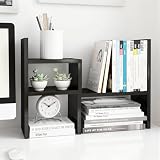
- 【OFFICE MUST HAVE】: An adjustable desktop bookshelf can help your organized countertop and is great for office storage. Office cubicle shelf up to 5 combination types, can be used as a bookshelf for tabletop, makeup organizer for vanity and corner shelves for plants, etc.
- 【ROOM DÉCOR AESTHETICS】: The Jerry and Maggie Desktop Organizers come to your choice of 6 colors, wood oak for rustic home offices and solid color matching ins style, ideal for your cute room decor aesthetic or college dorm room decor.
- 【WORKSPACE ORGANIZER】: The desk hutch is 22.5" long when extended to its maximum length, providing more desk storage space for the extra-large workspace, and 14" long when retracted to its minimum length, making the workspace ideal for working or studying on a mini-desk. Fits 24"-60" desks universally.
- 【MULTIPLE OCCASION】: The office organizer can be used in office, school, and home. It can not only organize stationery, but also cosmetics. It can be used as your child's aesthetic decoration, your family's desk decoration, or your friend's office decoration for work.
- 【OFFICE ORGANIZATION】: The desk shelf organizer is made of MDF and is really easy to install as the package comes with detailed instructions and assembly tools for you to buy with confidence. Grows with you from college to corner office.
Kadence lists Microsoft Teams, Slack, Microsoft 365, Google Calendar, SSO, Active Directory, SCIM, and an API among its integrations or enterprise capabilities. deskbird lists native Teams, Slack, Outlook, and Google Calendar integrations. Verify availability, plan limits, rate limits, and ownership of integration maintenance.
Physical-system integrations may include occupancy sensors, Wi-Fi detection, badge or access-control systems, room panels, desk displays, QR codes, digital signage, visitor kiosks, printers, and building-management systems. Ask whether each connection is native, partner-built, API-based, or a paid professional-services project.
What should enterprises ask about security and privacy?
Require written answers about hosting regions, data residency, encryption in transit and at rest, SSO and MFA, SOC 2 or ISO 27001 attestations, GDPR and other applicable obligations, subprocessors, tenant isolation, audit logging, incident notification, retention, deletion, export at termination, accessibility conformance, and regional administrative separation.
Employee location and presence data can reveal attendance patterns, working habits, team schedules, and sensitive behavior. The buyer should configure what colleagues can see, who can see it, how long records remain available, and whether administrators can access historical location data. A vendor’s enterprise-customer list is not a substitute for reviewing current security documentation, the DPA, subprocessors, and contract language.
What’s actually slowing this PC down?
Pick the symptom - the matching free tool is one click away.
Which desk booking vendors deserve a demo?
The following shortlist is organized by use case rather than presented as a universal ranking. Vendor capabilities and prices are based on the supplied research and official pages checked in the research pass on August 18, 2026.
| Product | Best fit | Pricing signal | Notable capabilities | Main limitation or risk |
|---|---|---|---|---|
| Robin | Large, multi-site enterprises wanting a unified workplace platform | Custom annual pricing | Desks, rooms, parking, lockers, assigned desks, neighborhoods, visitors, analytics, sensors, access-control integrations | May be excessive for a small desk-only office; hardware is separate |
| Eptura Engage | Enterprise workplace and facilities operations | Demo/custom pricing | Desks, lockers, parking, floor plans, team seating, hourly and shift booking, automated release, sensors, Teams booking, analytics | Potentially heavier implementation; clarify product boundaries and feature availability |
| Envoy Reservations | Desk, room, parking, and visitor-management consolidation | $5/resource/month annually, excluding platform fee | Hot desking, hoteling, assigned desks, maps, mobile booking, room displays, auto-release, visitor workflows | Platform and module fees can materially increase total cost |
| OfficeRnD Workplace | Resource-priced mid-market and enterprise workplace management | Start from $99/month annually; Professional from $399/month annually | Desks, rooms, recurring bookings, maps, neighborhoods, analytics, collaboration integrations, higher-tier SSO/SCIM, check-in, multi-location, signage | Visitors and advanced controls may require add-ons or higher tiers |
| Skedda | Configurable, rules-heavy booking | Plus from $149/month for up to 20 spaces; Premier from $199/month; visitor add-on $99/month | Custom rules and roles, maps, neighborhoods, Teams and Slack, visitor management, analytics, QR/Wi-Fi/email check-in | May not replace a full facilities-management suite |
| Kadence | Team coordination and active-user economics | Standard $4/active user/month; Enterprise custom | Neighborhoods, assigned desks, auto-release, check-in, maps, Teams, Slack, Microsoft 365, Google Calendar, SSO, SCIM, API | Confirm active-user definition and enterprise feature boundaries |
| deskbird | Mobile-first hybrid rollout | Business displayed at $5 active user/month annually in USD; monthly $6.50 | Desk, room, parking, Teams, Slack, Outlook, Google Calendar, mobile apps, check-in, ticketing, API | Advanced analytics, check-in, API, and controls may require higher tiers |
Why consider Robin?
Robin’s desk-booking product describes desks, rooms, parking, lockers, assigned desks, custom resources, neighborhoods, policies, calendar integrations, visitors, analytics, access-control, and sensor integrations. Robin says its platform is designed for organizations with more than 150 hybrid employees using an office and describes a stronger fit for companies with 500 or more employees and multiple floors, offices, or buildings. Those are vendor-stated fit signals, not independent performance findings. Robin uses annual custom pricing, and hardware is sold separately.
Why consider Eptura Engage?
Eptura Engage describes interactive floor plans, team seating, desks, lockers, parking, hourly and shift-based booking, mobile booking, automated check-in and release, sensor integrations, Teams booking, and workplace analytics. Eptura may suit facilities-led programs and organizations already using related Eptura products. Request a product map that distinguishes Engage from broader workplace products and legacy Condeco or iOffice deployments, and confirm which automation or AI features are generally available.
Why consider Envoy?
Envoy positions its workplace platform as a modular system, while its Reservations page describes desk, room, and parking booking, live maps, room displays, smart auto-release, and visitor-related workflows. Envoy’s published Reservations price is a useful comparison signal, but the platform fee and additional modules can change the economics substantially. Request one quote covering the platform, locations, resources, visitors, signage, emergency notifications, hardware, implementation, and support.
Quick wins for a faster PC:
Clear out junk files and repair common Windows errorsFree Scan →Scan for outdated or missing drivers - takes under a minuteDriver Scan →Repair Windows errors before they cause bigger problemsFix Now →Rank #4

- ★Sturdy and Durable - It is made of high-quality iron and adopts bake painting, electrostatic spraying, polishing, welding, and cutting processes, making it have good hardness, so you can use it for a long time.
- ★Large Storage Capacity - The 6-tier design can store more files, books, etc. in an orderly and separated manner, keeping your room neat and organized.
- ★Easy to Carry & Store - With its lightweight (5.5 lbs), compact size (18*11*17.5 inches), and foldable structure, you can easily carry it anywhere or store it in your cabinet or drawer when it is not in use.
- ★Stylish Appearance - Its simple lines and pleasing white/black color make it easily blend into the ambiance of your room and become part of your room's decor.
- ★Ready to Use - You can use it directly after receiving it without installation requirements, saving time and effort.
Why consider OfficeRnD Workplace?
OfficeRnD publishes Workplace pricing and feature tiers. The Start plan is listed from $99 per month when billed annually, with up to 150 users and resource-based charges shown on the pricing page. Professional is listed from $399 per month annually and adds capabilities such as SSO, automated provisioning, advanced booking policies, multi-location management, QR and Wi-Fi check-in, and digital signage. Visitor Hub is an add-on. Model both desks and rooms, and confirm user, site, retention, support, and analytics limits.
Why consider Skedda?
Skedda presents resource booking, custom rules, roles, floor plans, neighborhoods, Teams and Slack integrations, visitor management, analytics, and several check-in triggers. Skedda lists Plus from $149 per month for up to 20 spaces and Premier from $199 per month; visitor management is listed as a $99-per-month add-on. Confirm whether identity, retention, analytics, visitor, and multi-region requirements fit the selected tier.
Why consider Kadence?
Kadence lists Standard at $4 per active user per month and Enterprise as custom-priced. Kadence’s active-user model may suit a workplace where many employees are provisioned but only some regularly book. Ask exactly how active users are defined, whether viewers and occasional visitors count, and which API, analytics, retention, support, and regional controls require Enterprise.
Why consider deskbird?
deskbird displays Business pricing beginning at $5.00 per active user per month annually in USD and $6.50 with monthly billing; displayed prices vary by currency and billing selection. deskbird emphasizes mobile applications, Teams, Slack, Outlook, Google Calendar, deskbird Dock check-in, workplace ticketing, safety features, and API access. Verify annual commitments, minimums, active-user rules, and which advanced features belong to Professional or Enterprise.
What about YAROOMS, Tactic, Joan, Archie, Flexopus, and Officely?
These products are credible alternatives, but the supplied research does not provide verified current prices for all of them. YAROOMS may merit review where Microsoft 365, Teams, compliance, and hybrid-work policies are central. Tactic may suit Teams needing desk and room workflows. Joan is especially relevant when physical room or desk displays matter. Archie is more relevant to coworking and flexible-office operations. Flexopus may be worth evaluating for European privacy or hosting requirements, and Officely may suit organizations operating primarily inside Teams or Slack.
Do not publish exact prices for these alternatives from secondary comparison pages without opening the current official pricing page or obtaining a quote. The OfficeRnD 2026 comparison guide is useful for expanding a longlist, but vendor pages should control commercial claims.
How should you score shortlisted platforms?
Use a weighted scorecard, then adjust the weights for the deployment. A 100-person office should emphasize usability and price transparency. A facilities-heavy global enterprise should increase the weights for analytics, administration, physical integrations, privacy, and security.
| Criterion | Suggested weight | Test |
|---|---|---|
| Booking UX and adoption | 20% | Can a first-time employee book in under one minute on web, mobile, and the preferred collaboration app? |
| Policy and resource depth | 15% | Can administrators configure recurring bookings, restrictions, neighborhoods, accommodations, and approvals? |
| Integration and identity | 15% | Do SSO, SCIM, HRIS, calendars, Teams, Slack, APIs, and deprovisioning work as required? |
| Check-in and occupancy accuracy | 15% | Can the system combine QR, Wi-Fi, sensor, badge, walk-up, and auto-release workflows? |
| Analytics and exports | 10% | Can the buyer distinguish bookings from check-ins and actual occupancy, export raw data, and retain history? |
| Administration and floor plans | 10% | Can local administrators update layouts, closures, resources, permissions, and audit records? |
| Security and privacy | 10% | Are residency, DPA, subprocessors, retention, deletion, accessibility, and audit controls documented? |
| Total cost and contract flexibility | 5% | Are the pricing unit, minimums, modules, implementation, support, renewal increases, and exit terms clear? |
What should the RFP and live demo test?
Require every finalist to demonstrate these workflows rather than merely checking feature boxes:
Free tools Windows power users keep installed
One-click scans. No signup required.
Best Value
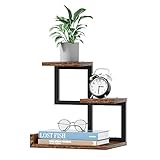
- 【Safety & Long-Lived Office Decor】The desktop shelf is made up metal frame and E1 grade MDF board, with edge sealing process, sturdy and durable, strong load-bearing, suitable for long time use and withstand lots of use.
- 【Unique Design For You】The size makes this small bookshelf perfect for any desk, writing desk, table or dresser. Take full advantage of your desktop space and keep your desktop clear. Great gift for students, kids, family and friends.
- 【Craftsmanship and Ingenuity】Flat surface and sturdy construct, excellent craftsmanship, perfect for storing books, organizing office supplies, showing off cherished keepsakes and display small potted plants,all kinds of screws are sunk into the wooden board, the pursuit of refinement !
- 【Easy to Assemble】The structure of display rack is a simple combination of metal and wood, so the assembly job can be completed within 10 minutes.Excellent waterproof boards make this side end table easier to clean.
- 【Credible Customer Service】We have professional service. If you have any concerns, please contact us by email or Amazon buyer message, we are always here.
- Book a desk near two colleagues, then change the time.
- Fail to check in and show the reminder, grace period, and automatic release.
- Make a walk-up booking after the original reservation is released.
- Reserve a team neighborhood and apply a priority rule.
- Find an accessible desk with the required equipment.
- Temporarily close a desk and verify that it disappears from availability.
- Deprovision a departing employee through the identity system.
- Add a new office and delegate its administration.
- Edit a floor plan, renumber a desk, and change an amenity.
- Continue operating when a user has no mobile service.
- Show the behavior when Teams, Slack, or calendar integration is unavailable.
- Correct a false sensor-occupancy report and record the audit trail.
- Export booking and utilization history through the interface and API.
- Hide a privacy-restricted employee from inappropriate map or colleague views.
- Apply different booking windows in two offices.
- Coordinate a room booking with a desk or neighborhood booking.
- Export all customer data after contract termination.
- Let a regional administrator manage one location without seeing another.
Obtain written answers to active-user and bookable-resource definitions, platform fees, separate charges for rooms, parking, lockers, displays, SSO, SCIM, APIs, data retention, post-cancellation deletion, implementation requirements, annual minimums, price-increase caps, and contractual support response times.
How should an enterprise implement desk booking software?
- Inventory the workplace: List desks, rooms, neighborhoods, parking spaces, lockers, phone booths, assigned seats, accessible resources, and restricted areas.
- Define the bookable model: Decide which resources are shared, permanently assigned, reservable hourly, reservable daily, or not bookable.
- Create a canonical map: Establish one naming and numbering convention across facilities drawings, the booking platform, signage, and support documentation.
- Set understandable policies: Define booking windows, duration limits, grace periods, priority rules, no-show treatment, privacy, and accommodation handling.
- Connect identity and calendars: Configure SSO, provisioning, deprovisioning, HRIS synchronization, calendars, Teams, Slack, and mobile access.
- Pilot one location or department: Measure booking completion, check-in rate, no-shows, auto-release, support tickets, and repeat use.
- Fix policy and usability problems: Do not respond to poor adoption by adding enforcement before checking whether availability is inaccurate or booking is too difficult.
- Roll out in stages: Train local office administrators and publish a short policy that employees can predict.
- Govern the data: Assign ownership for floor-plan changes, resource attributes, employee accommodations, privacy requests, reporting, and office moves.
The first launch should not attempt to automate every workplace policy. A simple policy that employees understand usually provides a better foundation than a technically sophisticated rule set that produces surprises.
What are the most common buying mistakes?
- Choosing by feature count: Most serious vendors advertise maps, mobile booking, analytics, Teams or Slack integration, auto-release, and hybrid-work support. Test operational depth, inclusion in the quoted tier, self-service administration, hardware requirements, and API access.
- Comparing headline prices: Include rooms, visitors, SSO, SCIM, analytics, signage, sensors, implementation, support, and renewal terms.
- Treating bookings as occupancy: Compare reservation, check-in, sensor, Wi-Fi, badge, and other approved data with privacy controls.
- Making every desk bookable: Preserve assigned desks, accommodations, secure workspaces, ergonomic equipment, team-specific resources, and predictable seating where necessary.
- Ignoring no-show behavior: Define reminders, grace periods, release rules, walk-up use, and repeat-offender handling before launch.
- Neglecting floor-plan ownership: A stale map undermines trust faster than a missing feature.
- Buying a broad suite for a narrow problem: A point solution integrated with existing room or visitor systems may be more rational than consolidating everything.
Which platform should you shortlist?
For a large organization with multiple locations, identity requirements, workplace analytics, and facilities workflows, begin with Robin, Eptura Engage, Envoy, and OfficeRnD Workplace. For a mid-market organization focused mainly on desk and room reservations with more predictable pricing, compare Skedda, OfficeRnD Workplace, Kadence, deskbird, and Envoy Reservations.
Choose Robin or Eptura Engage when the project is a broad workplace-operations program. Choose Envoy when visitor management and workplace modules should be consolidated. Choose OfficeRnD Workplace when resource-based pricing and public tier signals matter. Choose Skedda when configurable booking rules are the central requirement. Choose Kadence when team coordination and active-user billing fit the population. Choose deskbird when mobile-first adoption and collaboration integrations are the priority.
Do these 3 things before closing this tab:
1Fix the driver behind crashes, sound loss and screen glitches2Repair Windows errors before they cause bigger problems3Scan for outdated or missing drivers - takes under a minuteThose recommendations are conditional starting points, not universal winners. The defensible decision comes from modeling the correct pricing unit, testing real workflows, validating security and privacy documents, and piloting with actual employees and facilities administrators.
Frequently Asked Questions
Is desk booking software the same as room-booking software?
Desk booking software allocates shared desks, while room-booking software allocates meeting rooms; many workplace platforms provide both in one system. Buyers should confirm whether rooms are included, counted as separate resources, or sold as an add-on.
Is per-user or per-resource desk-booking pricing cheaper?
Neither model is always cheaper. Per-resource pricing may suit a large workforce sharing relatively few desks, while active-user pricing may suit a workplace where only a portion of employees regularly books space. Platform fees, rooms, visitors, SSO, analytics, hardware, and implementation can change the result.
Can desk-booking software prove office occupancy?
A desk reservation proves that someone intended to use a desk, not that the desk was occupied. Reliable planning should compare bookings with check-ins, auto-release records, sensors, Wi-Fi, badge data, or other approved signals, subject to privacy controls.
Recommended Free Tools
What should an enterprise test before signing a desk-booking contract?
An enterprise should test booking near colleagues, no-show auto-release, walk-up booking, accessibility accommodations, floor-plan edits, identity deprovisioning, regional permissions, integration outages, data exports, sensor errors, and contract-termination recovery.
The Bottom Line
Bottom line: Buy desk booking software according to the workplace problem, billing unit, and administrative burden—not the number of features in a product brochure. A small office may need a rules-focused resource-booking tool; a global enterprise may need identity governance, occupancy signals, visitor workflows, analytics, and regional administration. Require a complete total-cost model and a live failure-recovery demonstration before signing.
Quick Recap
Product prices and availability are accurate as of the date/time indicated and are subject to change. Any price and availability information displayed on Amazon at the time of purchase will apply.

