
The Tool Desk
Outbyte Driver Updater FREEScan for outdated or missing drivers - takes under a minuteDriver Scan →Outbyte PC Repair FREERepair Windows errors before they cause bigger problemsFix Now →Task Manager is still built into both Windows 10 and Windows 11. The quickest route is Ctrl + Shift + Esc, but you have several alternatives if a keyboard shortcut, the Start menu, or Windows Search is not responding.
Here are nine reliable ways to launch it, followed by the best option for common failure situations.
1. Press Ctrl + Shift + Esc
This is the fastest direct shortcut in Windows 10 and Windows 11.
- Press and hold Ctrl and Shift.
- Press Esc.
Task Manager should open immediately. Unlike Ctrl + Alt + Delete, this shortcut does not open an intermediate screen.
#1 Best Overall
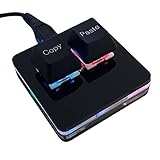
- 【Package Listing】 1*mini 2-key black keyboard 1*shaft-puller 1*5 feet long USB data cable 2*copy&paste keycaps(black and white)
- 【Copy Keyboard】For Windows User,this is Plug and Play, Out of the Box, no Software and Website Required for Copying and Pasting.
- 【Mac User Notice】 Before using, you need to connect the keyboard to the MAC computer, open the webpage link "SayoDevice. com", and manually configure the settings for the two buttons: Left Button=GUI(win)+C, Right Button=GUI(win)+V.
- 【Functions】 The default function is "Copy" and "Paste". You can also use other functions, such as Shortcut keys, Multi-step operation, Multi-key in one, Cut, Undo, Redo, Select all, Play, Pause, Volume, Switch song, Forward, Backward, Custom script, etc. You can control the light color and gradient mode of the case you want through the software or website.
2. Use the Windows Security screen
This method is useful when an application has frozen or the normal desktop is difficult to use.
- Press Ctrl + Alt + Delete.
- Select Task Manager.
Ctrl + Alt + Delete does not launch Task Manager directly. It opens the Windows Security screen, where Task Manager is one of the available options. This screen may still appear when the desktop shell or an individual application is unresponsive.
3. Open it from the Quick Link menu
Windows 10 and Windows 11 include Task Manager in the menu sometimes called the Power User or Quick Link menu.
- Press Windows + X.
- Select Task Manager.
The shortcut opens the menu; it does not start Task Manager until you select the command.
4. Right-click the Start button
This is the mouse equivalent of Windows + X.
- Right-click the Start button.
- Select Task Manager.
On Windows 11, the Start button is normally centered, although it may be aligned to the left depending on your taskbar settings. On Windows 10, it is at the lower-left corner by default.
Do not rely on older instructions that say to right-click an empty area of the taskbar. That is not the generally available Task Manager shortcut in current Windows 10 and Windows 11 builds.
5. Find it with Windows Search
Search is convenient when you do not remember a keyboard shortcut.
Rank #2

- A VERSATILE COMPACT KEYBOARD: Our computer keyboard will be an essential addition to your workstation as it will boost productivity, save space, and look great on any desk. Also, its size is great for on the go!
- EASY SETUP: Begin typing in the matter of seconds! Our mini keyboard is true plug and play, so if your computer or laptop has a USB port you are all set. A 4'7" cable gives you enough length to comfortably connect to your computer or laptop.
- COMPATIBLE WITH MAC & WINDOWS: Regardless of what operating system you use, it will work great as a mac wired keyboard or PC keyboard.
- ONE TOUCH SHORTCUT KEYS: With 13 shortcut keys like (cut/copy/paste/iTunes/etc.) for Mac and multimedia hotkeys for Windows, you will be able to effortlessly control your typing experience with the USB keyboard.
- PURCHASE WITH CONFIDENCE: At Macally we stand behind our products and are here to help when you need us. We are confident you will be satisfied with our compact keyboard as it is backed with up to 2 years of warranty and LIFETIME tech support.
- Select the Search button on the taskbar, or press Windows and begin typing.
- Type
Task Manager. - Select Task Manager in the results.
If the result offers it, you can also right-click Task Manager and select Run as administrator. Opening Task Manager normally does not automatically give it administrative elevation.
Free tools Windows power users keep installed
One-click scans. No signup required.
6. Locate it through the Start menu
You can browse to Task Manager instead of using the taskbar Search box.
Windows 11
- Open Start.
- Select All or All apps.
- Scroll through the app list and select Windows Tools, if shown.
- Open Task Manager.
Windows 10
- Open Start.
- Scroll through the alphabetical app list.
- Open the Windows System section if Task Manager is listed there.
- Select Task Manager.
The exact folder placement can vary between Windows versions and managed PCs. If browsing does not reveal it, type Task Manager after opening Start or use the Run method below.
7. Run the taskmgr command
The Run dialog provides a direct way to start the Task Manager executable without navigating through menus.
- Press Windows + R.
- Type
taskmgr. - Press Enter, or select OK.
You can also type taskmgr.exe. The extension is optional in this case; both commands launch the same Windows program.
Windows Errors? Fix Them Before They Spread
Repair common Windows errors and clear accumulated junk for a smoother, more stable PC - no reinstall needed.Free scan · no reinstallCrashes, No Sound, or Screen Glitches?
Random freezes, missing sound and display glitches usually trace back to one bad driver. Find and replace yours safely.Free scan · under a minuteThis is one of the best alternatives when Windows Search is not returning results or the Start menu is behaving incorrectly.
8. Launch it from Command Prompt
If Command Prompt is already open, start Task Manager by entering its executable name.
Rank #3

- Dual (USB A + USB C) Connection: Built-in USB C and USB A plug ensure direct compatibility with modern and legacy computers without adapters, making this a reliable apple wired keyboard across multiple systems.
- Space Saving Design: Slim, space efficient design keeps all essential keys while reducing desk clutter. This mac compatible keyboard usb c is ideal for minimalist workspaces, small desks, or travel.
- One Touch Shortcut Keys: 13 dedicated shortcut keys deliver quick access to Mission Control, brightness, media, and volume controls, giving you familiar functionality expected from a mac keyboard wired for daily productivity.
- Responsive Scissor Switch Keys: Low profile scissor switch keys offer stable, responsive typing with reduced noise and shorter key travel, creating a comfortable typing experience similar to a macbook keyboard.
- Plug and Play Reliability: No batteries, charging, or wireless dropouts to manage. The wired type c keyboard delivers consistent, uninterrupted typing you can rely on at home, in the office, or on the go.
- Open Command Prompt.
- Type the following command:
taskmgr- Press Enter.
To open Command Prompt, you can search for cmd, use Windows + R, type cmd, and press Enter. If you need Task Manager or a later action to run with elevation, open Command Prompt as administrator first.
9. Start it from PowerShell or its full path
PowerShell can launch Task Manager as a separate process:
Start-Process taskmgrOpen PowerShell, enter the command, and press Enter. You can also target the standard executable directly:
C:WindowsSystem32Taskmgr.exeThe full path works in the Run dialog, File Explorer’s address bar, Command Prompt, and PowerShell. In File Explorer, press Windows + E, select the address bar, enter the path, and press Enter.
For ordinary use, taskmgr is preferable to hard-coding the path. Windows can handle the normal executable lookup, while the full path is useful when you specifically need to identify the system copy.
Which method should you use?
| Situation | Best method |
|---|---|
| Windows is working normally | Ctrl + Shift + Esc |
| You prefer using the mouse | Right-click Start > Task Manager |
| Search is broken or gives no result | Windows + R, then taskmgr |
| An application or desktop is frozen | Ctrl + Alt + Delete > Task Manager |
| You already have a terminal open | taskmgr in Command Prompt or Start-Process taskmgr in PowerShell |
| You need to browse to the executable | C:WindowsSystem32Taskmgr.exe |
What to do if Task Manager will not open
Try the methods in this order:
- Press Ctrl + Shift + Esc.
- Press Ctrl + Alt + Delete, then choose Task Manager.
- Press Windows + R, enter
taskmgr, and press Enter. - Try
C:WindowsSystem32Taskmgr.exefrom Run or File Explorer.
If none of these works, Task Manager may be disabled by an administrator policy, blocked by security software, or affected by a damaged Windows installation. On a work or school computer, policy restrictions can be intentional. Also remember that launching Task Manager is separate from performing an action that requires administrator approval.
FAQ
Is Task Manager available in Windows 11?
Yes. Task Manager remains a built-in Windows 11 application. You can open it with Ctrl + Shift + Esc, by right-clicking Start and selecting Task Manager, or with any of the other methods listed above.
Rank #4

- 18 Programmable Keys Macro Keypad: This stream controller deck comes with 18 customizable macro keys (15 LCD visual keys + 3 physical buttons). Users may program single actions or multi-step sequences for daily operation. The keys support in-game combos, app launch and media playback control for multiple usage scenarios. Each LCD key accepts JPG, PNG and GIF images and animations to mark separate functions
- Single Tap Control: This USB macro keyboard pad supports single tap commands for quick operation. Users can trigger pre-set macros, input text, open files and web pages, adjust media playback, or switch OBS scenes with one tap. The straightforward layout fits gaming, live streaming and professional office task setup
- One Tap Multi-Shortcut: This macro controller pad streaming deck supports multi-shortcut macro programming for gamers and content creators. Custom shortcuts simplify game combo inputs, video editing, music production and photography workflows. The Operation Follow function runs multiple macro steps in custom order or simultaneous execution for adjustable task control
- Adjustable RGB Surround Light Ring - VSD M18 gaming streaming deck features an outer RGB light ring with auto color cycle mode. Custom RGB tones are available via device firmware upgrade. The light ring offers adjustable visual lighting for dim gaming, streaming and night work setups.
- Wide System Compatibility: This VSDinside macro control board works with Windows 11 and newer, macOS 11.0 and newer systems. Connect via USB-C cable for immediate use. It is compatible with mainstream software including OBS, Streamlabs, YouTube, Twitter, Discord, Excel, Word and Photoshop for daily production work. Native Linux system plug-and-play support is not available, while SDK development documents are provided for custom secondary development
Does Ctrl + Alt + Delete open Task Manager?
Not directly. It opens the Windows Security screen. You must select Task Manager from that screen.
Why is Task Manager missing when I right-click the taskbar?
Right-clicking the taskbar is not the dependable current shortcut. Right-click the Start button instead, or press Windows + X and select Task Manager.
Can I open Task Manager without Search?
Yes. Press Ctrl + Shift + Esc, use Ctrl + Alt + Delete, open the Quick Link menu with Windows + X, or press Windows + R and run taskmgr.
Quick wins for a faster PC:
Clear out junk files and repair common Windows errorsFree Scan →Fix the driver behind crashes, sound loss and screen glitchesFind Drivers →Repair Windows errors before they cause bigger problemsFix Now →What is the Task Manager command in Windows?
Use taskmgr or taskmgr.exe. The standard executable path is C:WindowsSystem32Taskmgr.exe.
Does opening Task Manager require administrator access?
No. You can normally open it without elevation. Some processes and administrative actions may require approval or an elevated account.
The Bottom Line
For everyday use, memorize Ctrl + Shift + Esc. If the desktop or Search is malfunctioning, Ctrl + Alt + Delete and Windows + R followed by taskmgr are the most dependable backups.
Quick Recap
Product prices and availability are accurate as of the date/time indicated and are subject to change. Any price and availability information displayed on Amazon at the time of purchase will apply.

