
The Tool Desk
Outbyte Driver Updater FREEScan for outdated or missing drivers - takes under a minuteDriver Scan →Outbyte PC Repair FREERepair Windows errors before they cause bigger problemsFix Now →iTechGuides is reader-supported. When you buy through links on our site, we may earn an affiliate commission. As an Amazon Associate I earn from qualifying purchases. Learn more
LibreOffice is the best free Microsoft Office replacement for most people in 2026. It gives you a complete offline desktop suite with word processing, spreadsheets, presentations, and more on Windows, macOS, and Linux. Choose Google Docs, Sheets, and Slides instead if real-time collaboration matters more than working locally; choose ONLYOFFICE if exchanging DOCX, XLSX, and PPTX files is your main concern.
The nine options below are not identical substitutes. Some are complete desktop suites, some are browser-first services, some are designed around a particular ecosystem, and one is primarily a Linux specialist. The important distinction is what each product includes, where it runs, how it handles Microsoft formats, and what its free offering actually covers.


What counts as a free Microsoft Office alternative?
Microsoft still provides free browser versions of Word, Excel, and PowerPoint, but those web apps are built around saving and sharing files through OneDrive. They are useful for light editing, but they do not provide the same experience as a full desktop Office installation.
Quick wins for a faster PC:
Fix the driver behind crashes, sound loss and screen glitchesFind Drivers →Repair Windows errors before they cause bigger problemsFix Now →For this roundup, a Microsoft Office alternative is a separate suite or platform that can handle some or all of the core Office jobs: word processing, spreadsheets, and presentations. The word free has different meanings here:
- Free and open source: LibreOffice, Apache OpenOffice, and ONLYOFFICE Desktop Editors.
- Free desktop editions: FreeOffice and the basic edition of WPS Office, with feature boundaries.
- Free personal cloud services: Google Docs, Sheets, and Slides and Zoho Office Suite.
- Free platform-based tools: Apple iWork for users in the Apple ecosystem.
Before choosing, decide whether you need a true offline replacement, a shared browser workspace, reliable Microsoft-format exchange, or tools optimized for a particular operating system.
Quick comparison
| Rank | Suite | Best for | Where it fits | Main limitation |
|---|---|---|---|---|
| 1 | LibreOffice | Best overall replacement | Full offline desktop suite | Microsoft-format fidelity is useful but not perfect |
| 2 | Google Docs, Sheets, and Slides | Real-time collaboration | Browser-first cloud suite | Requires a Google account and depends on Drive storage |
| 3 | ONLYOFFICE Desktop Editors | Microsoft-format compatibility | Offline suite with optional cloud connections | Desktop and online capabilities are not identical |
| 4 | WPS Office | All-in-one cross-platform use | Desktop, mobile, web, and PDF tools | Free and premium features differ |
| 5 | FreeOffice 2024 | A lightweight traditional desktop suite | Three-app desktop suite | Not a complete equivalent to every Microsoft 365 application |
| 6 | Zoho Office Suite | Personal browser productivity outside Google | Cloud-first suite | Personal and business plans have different features |
| 7 | Apple iWork | Mac, iPhone, and iPad users | Apple-focused suite with web access | Pages and Numbers work differently from Word and Excel |
| 8 | Apache OpenOffice | A familiar legacy open-source option | Offline desktop suite | Check the current release before installing |
| 9 | Calligra | Linux and KDE users | Modular Linux-oriented suite | Not a universal Windows and Mac replacement |
1. LibreOffice: best overall free Microsoft Office replacement
LibreOffice is the strongest default choice if you want a full office suite without a subscription or required cloud storage. It is free, open source, designed with privacy in mind, and available for Windows, macOS, and Linux.
The suite includes:
- Writer for letters, reports, books, and other documents
- Calc for spreadsheets and calculations
- Impress for presentations
- Draw for diagrams and desktop-publishing-style work
- Base for databases
- Math for formula editing
LibreOffice works offline, so it is particularly useful for students, privacy-conscious users, people with unreliable internet access, and anyone who does not want their everyday documents tied to a cloud account. It is also the most broadly suitable option for Linux users who need a general-purpose office suite.
Microsoft file compatibility
LibreOffice can open and save common Microsoft Office formats such as DOCX, XLSX, and PPTX. However, compatibility does not mean that every document will look exactly the same in both suites. LibreOffice’s primary design target is the OpenDocument family, including ODT, ODS, and ODP.
For a document you control from beginning to end, using LibreOffice’s native OpenDocument formats is usually the least troublesome approach. When you need to send a file to an Office user, save or export a copy in the requested Microsoft format and inspect page breaks, tables, formulas, charts, and presentation layouts before sending it.
Choose LibreOffice if: you want the broadest offline feature set, work across Windows, Mac, or Linux, care about local files, or need a no-cost replacement for the core Office applications.
Skip it if: your work depends on highly specialized Office workflows or requires pixel-perfect interchange with complex DOCX, XLSX, or PPTX files.
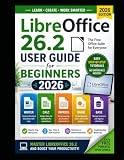
Optional learning aid: The official LibreOffice bookshelf lists a LibreOffice 26.2 guide and indicates that a printed copy is available. It is not required to use the suite, but a printed reference can help readers who are moving from Microsoft Office and want structured guidance.
2. Google Docs, Sheets, and Slides: best for real-time collaboration
Google’s free personal productivity tools are the best choice when several people need to work in the same document at the same time. Docs handles word processing, Sheets handles spreadsheets, and Slides handles presentations, all through a browser-first workflow.
Documented features include real-time co-editing, comments, suggestions, version history, templates, and offline access. Google Docs can also edit Microsoft Word files online without requiring a conversion step, which makes it practical for school assignments, shared drafts, meeting notes, and lightweight team documents.
The trade-off is that Google’s tools are cloud-first rather than a conventional offline desktop suite. A free personal setup depends on a Google account and Google Drive storage. Offline access exists, but users who want a fully local workflow should choose LibreOffice, FreeOffice, or the desktop edition of ONLYOFFICE instead.
Crashes, No Sound, or Screen Glitches?
Random freezes, missing sound and display glitches usually trace back to one bad driver. Find and replace yours safely.Free scan · under a minutePC Slower Than It Used to Be?
A free scan shows the junk files, broken settings and background clutter dragging Windows down - then fixes them in one click.Free scan · Windows 10 & 11Google Sheets is convenient for ordinary budgets, lists, schedules, and collaborative data work. Very complex spreadsheets, specialized formulas, elaborate formatting, or workflows built around desktop-only features may be better suited to a desktop suite or a paid Office installation.
Choose Google if: collaboration, comments, version history, browser access, and easy sharing are your priorities.
Skip it if: you want documents stored primarily on your computer, need a full desktop feature set, or regularly work with highly complex Office files.
3. ONLYOFFICE Desktop Editors: best for Microsoft-format compatibility
ONLYOFFICE Desktop Editors is a free, open-source suite for Windows, Linux, and macOS. It includes tools for text documents, spreadsheets, presentations, PDFs, and fillable forms.
What’s actually slowing this PC down?
Pick the symptom - the matching free tool is one click away.
The suite officially supports common formats including DOCX, XLSX, PPTX, ODT, ODS, and ODP. That makes it a strong option for people who routinely exchange Office Open XML files and want a local application rather than a browser-only editor. Its modern ribbon-like interface may also feel more familiar to recent Microsoft Office users than the menus in some traditional alternatives.
ONLYOFFICE can connect with cloud and self-hosted platforms such as Nextcloud, ownCloud, Seafile, and kDrive. This creates an offline-plus-cloud workflow: you can use desktop editors locally while storing or sharing documents through a compatible service. The connection is optional, so the desktop application can still be useful without adopting one of those platforms.
One important qualification is that the desktop and online editions do not offer exactly the same editing and collaboration capabilities. Do not assume that a feature available in one edition will work identically in the other.
Choose ONLYOFFICE if: DOCX, XLSX, and PPTX exchange is central to your work, you prefer a ribbon-style interface, or you want local editing with optional cloud integration.
Skip it if: you need the broadest offline suite beyond the core applications or want a single, uniform feature set across desktop and online editions.
4. WPS Office: best all-in-one cross-platform option
WPS Office is a compact, broad-device productivity package with Writer, Spreadsheet, Presentation, and PDF tools. Its materials describe support across Windows, macOS, Linux, Android, iOS, and the web.
It is appealing to users who want one familiar application family across a computer and a phone. Templates, document viewing, presentation work, and PDF-related tasks are part of its broader offering, while the basic Writer, Spreadsheet, and Presentation tools are available in the free tier.
WPS Office should not be described as an entirely free replacement for every premium feature. Advanced PDF capabilities, account-related features, cloud limits, advertising, and other restrictions can differ by platform and region. Check the feature shown in your particular installation before relying on it for a specific workflow.
Free tools Windows power users keep installed
One-click scans. No signup required.
Choose WPS Office if: you want a familiar all-in-one package, mobile access, templates, PDF tools, and broad device coverage.
Skip it if: you require a completely open-source suite, want every feature without advertising or tier boundaries, or prefer to keep your documents entirely local.
5. FreeOffice 2024: best lightweight traditional desktop suite
FreeOffice 2024 is a straightforward desktop suite containing:
- TextMaker for word processing
- PlanMaker for spreadsheets
- Presentations for slide decks
It is free for personal and business use and runs on Windows, macOS, and Linux. Users can select either a ribbon interface or a classic menu layout, which makes it a useful transition option for people who prefer the look and workflow of older versions of Microsoft Office.
Recommended Free Tools
PlanMaker advertises more than 430 built-in calculation functions. For ordinary documents, budgets, worksheets, and presentations, the smaller three-app design can feel less complicated than a large productivity platform.
The limitation is scope. FreeOffice is a three-application suite, not a direct substitute for every application and service associated with Microsoft 365. Advanced features and some related SoftMaker products are separate or paid.
Choose FreeOffice if: you want a conventional desktop program, a lightweight installation, classic menus, and no required cloud workflow.
Skip it if: you need integrated databases, extensive collaboration features, or a wider collection of productivity applications.
6. Zoho Office Suite: best browser-first personal suite outside Google
Zoho Office Suite combines Writer, Sheet, and Show for documents, spreadsheets, and presentations. Zoho states that the suite is completely free for personal use, while its WorkDrive documentation describes browser editing, sharing, collaboration, and free storage for Writer, Sheet, and Show files.
Zoho is a good middle ground for users who want the convenience of a browser suite but do not want to make Google’s ecosystem their default. It is suited to personal documents, shared files, lightweight project work, and users already using other Zoho services.
Do not confuse the personal offering with team or business plans. Storage, administration, organization, and collaboration controls can vary depending on the plan. The free personal tier is the relevant comparison for this list.
Choose Zoho if: you want online documents and collaboration outside Google or Microsoft and are comfortable with a browser-based account.
Skip it if: you need a full offline desktop suite or advanced spreadsheet and document features that are better handled locally.
7. Apple iWork: best for Mac, iPhone, and iPad users
Apple iWork consists of:
- Pages for documents
- Numbers for spreadsheets
- Keynote for presentations
Apple’s suite is particularly compelling for people who already use a Mac, iPhone, or iPad. It emphasizes templates, visual design, presentations, and collaboration, and the apps can also be accessed from a PC through the web.
Keynote is a strong fit for users who care about polished presentations, while Pages is comfortable for visually designed documents. Numbers is capable of many ordinary spreadsheet tasks, but its layout and workflow differ from Excel’s grid-centered approach.
iWork can import and export Microsoft formats, but complex documents should be checked after conversion. Layout-driven Pages files and sophisticated Numbers spreadsheets may not translate perfectly into Word and Excel conventions.
Do these 3 things before closing this tab:
1Fix the driver behind crashes, sound loss and screen glitches2Clear out junk files and repair common Windows errors3Scan for outdated or missing drivers - takes under a minuteChoose iWork if: Apple hardware is your main environment, you value templates and visual polish, and your collaborators are comfortable with Apple’s tools or web access.
Skip it if: you work in a mixed-platform Office-heavy organization where exact Word and Excel behavior matters.
8. Apache OpenOffice: best-known legacy open-source alternative
Apache OpenOffice remains free to download, use, and distribute. Its suite includes Writer, Calc, Impress, Draw, Base, and Math, along with native support for OpenDocument formats and the ability to work with major competing office formats.
Apache OpenOffice will feel familiar to users who have used older desktop office suites. It can still cover the basic jobs of writing documents, creating spreadsheets, building presentations, drawing diagrams, and working with databases.
However, it is not the first recommendation for everyone seeking the most current general-purpose open-source suite. LibreOffice is the safer default in this ranking because it is the more practical current choice for users who want a broad feature set and active documentation context. The Apache OpenOffice product page showed version 4.1.16 during research, so check the project’s current release information before installing.
Choose Apache OpenOffice if: you specifically prefer this established open-source project and need a familiar offline suite for ordinary office work.
Skip it if: you want the strongest default compatibility and current feature direction among the open-source options listed here.
Independent reader supportYour contribution helps us test, update, and keep practical guides available for everyone.9. Calligra: best specialized Linux-oriented alternative
Calligra is a modular productivity and creative suite centered on KDE and Linux. Its office tools include Words for word processing and Sheets for spreadsheets, alongside other creative and productivity applications.
Quick wins for a faster PC:
Repair Windows errors before they cause bigger problemsFix Now →Scan for outdated or missing drivers - takes under a minuteDriver Scan →Clear out junk files and repair common Windows errorsFree Scan →It is available on most Linux distributions, making it worth considering for users who prefer KDE software or want a suite that fits into a broader creative workflow. Its modular design can also appeal to people who do not want an all-in-one application package.
Calligra is not the strongest universal Microsoft Office replacement in 2026. Its download information says that Windows support is still being worked on, so it should not be presented as a full Windows-and-Mac alternative. It is better understood as a specialist choice for Linux users who are comfortable with a different application model and who do not require maximum Microsoft-format fidelity.
Choose Calligra if: you use Linux, prefer KDE integration, and want a modular office and creative suite.
Skip it if: you need a broadly compatible replacement for a Windows or mixed-platform Office environment.
How to choose the right alternative
Choose based on where you work
- Mostly offline: Start with LibreOffice. FreeOffice and ONLYOFFICE Desktop Editors are also strong choices.
- Mostly in a browser: Choose Google Docs, Sheets, and Slides or Zoho Office Suite.
- Across Apple devices: iWork is the natural first option.
- On Linux: LibreOffice is the broadest default; Calligra is the specialist KDE-oriented choice.
- Across desktop and mobile devices: WPS Office has the broadest stated device coverage in this list.
Choose based on file compatibility
If most of your incoming files are DOCX, XLSX, or PPTX, begin with ONLYOFFICE or LibreOffice and test representative files before committing to a workflow. ONLYOFFICE is positioned especially strongly around common Microsoft Office Open XML formats. LibreOffice also supports those formats, but its native OpenDocument formats remain its primary design target.
Google Docs can edit Word files online, and iWork can import and export Microsoft formats. Those capabilities are useful, but neither should be treated as a guarantee that every complex file will preserve its original layout or behavior.
Choose based on collaboration
Google’s tools are the clearest choice for simultaneous editing, comments, suggestions, and version history. Zoho offers a similar browser-first direction for personal users. ONLYOFFICE can participate in cloud and self-hosted workflows, but its desktop and online capabilities vary. The traditional desktop suites are better for local control than for frictionless, built-in collaboration.
Choose based on what free means to you
There is a meaningful difference between an open-source application that runs locally, a freeware desktop edition with premium upgrades, and a cloud service that provides a free personal tier. If you want no account and no required cloud storage, choose LibreOffice, Apache OpenOffice, ONLYOFFICE Desktop Editors, or FreeOffice. If you want easy sharing and accept account-based storage, Google or Zoho may be more convenient.
What’s actually slowing this PC down?
Pick the symptom - the matching free tool is one click away.
A practical switching plan
- List your regular tasks. Separate ordinary letters and reports from complex spreadsheets, presentations, PDFs, forms, or database work.
- Collect representative files. Use copies of the documents you actually exchange, including a complicated spreadsheet and a presentation if those matter to you.
- Pick a native format for ongoing work. LibreOffice and Apache OpenOffice are designed around OpenDocument formats; other suites may have different preferred workflows.
- Test the exchange path. Open a copy, save it in the format your recipients need, and check page breaks, tables, formulas, charts, fonts, and slide layouts.
- Separate editing from distribution. If recipients only need to read a finished document, a PDF can avoid many layout differences. Keep an editable copy in your working format.
- Decide where files should live. Desktop suites support local storage. Browser suites use online accounts and storage. ONLYOFFICE can also connect to compatible cloud or self-hosted platforms.
- Keep the original files during the transition. Do not overwrite important Office documents until you have confirmed that your chosen alternative handles the workflow correctly.
Which free alternative is most like Microsoft Office?
For a traditional desktop experience, LibreOffice, ONLYOFFICE Desktop Editors, and FreeOffice are the closest choices in different ways. LibreOffice has the broadest suite scope and is the best general recommendation. ONLYOFFICE emphasizes compatibility with Microsoft-format files and offers a modern ribbon-like interface. FreeOffice is simpler and lightweight, with both ribbon and classic-menu modes.
For the collaboration experience many people associate with modern Microsoft 365, Google Docs, Sheets, and Slides are the closest free browser-based substitute. They are not, however, a full offline desktop replacement.
Frequently Asked Questions
Which free Microsoft Office alternative is best overall?
LibreOffice is the best overall choice for most people because it includes Writer, Calc, Impress, Draw, Base, and Math; works offline on Windows, macOS, and Linux; and is free and open source. Its Microsoft-format compatibility is useful, but complex DOCX, XLSX, and PPTX files should still be checked.
Which alternative is best for opening DOCX, XLSX, and PPTX files?
ONLYOFFICE Desktop Editors is the strongest fit when Microsoft-format exchange is central. LibreOffice is also a capable option. No alternative guarantees perfect formatting for every complex Office file, so test copies of the documents you use regularly.
The Tool Desk
Outbyte PC Repair FREERepair Windows errors before they cause bigger problemsFix Now →Outbyte Driver Updater FREEFix the driver behind crashes, sound loss and screen glitchesFind Drivers →Are these alternatives completely free?
No. LibreOffice, Apache OpenOffice, and ONLYOFFICE Desktop Editors are the clearest free and open-source choices. Google and Zoho provide free personal cloud offerings, while WPS Office has a free basic tier and FreeOffice provides a free edition with boundaries. Apple iWork is aimed at Apple users and offers web access as well.
What is the best free Office alternative for offline use?
LibreOffice is the best default for offline use. FreeOffice, ONLYOFFICE Desktop Editors, and Apache OpenOffice also provide traditional desktop workflows. Google and Zoho are primarily browser-based, even though Google documents offline access.
The Bottom Line
Start with LibreOffice if you want the most complete free desktop replacement. Pick Google Docs, Sheets, and Slides for collaboration, ONLYOFFICE for frequent Microsoft-format exchange, WPS Office for broad device and PDF coverage, FreeOffice for a lightweight traditional interface, Zoho for a browser suite outside Google, iWork for Apple hardware, Apache OpenOffice if you specifically prefer its project, and Calligra for a Linux/KDE-focused workflow.
Quick Recap
Product prices and availability are accurate as of the date/time indicated and are subject to change. Any price and availability information displayed on Amazon at the time of purchase will apply.
Recommended Free Tools

