
Quick wins for a faster PC:
Repair Windows errors before they cause bigger problemsFix Now →Fix the driver behind crashes, sound loss and screen glitchesFind Drivers →The 8 Best Business Phone Services in 2026 are RingCentral RingEX, Nextiva, Zoom Phone, Ooma Office, Vonage, 8×8 Work, Dialpad Connect, and GoTo Connect; the best choice depends on integrations, calling regions, contracts, and hardware needs rather than headline price.
These services are cloud-based alternatives to a traditional business PBX. They can provide business numbers and extensions through apps, browsers, desk phones, or a mixture of all three, then add features such as SMS, voicemail, auto attendants, queues, recording, transcription, meetings, analytics, and CRM integrations. The prices in this guide are vendor-displayed figures from the supplied 2026 research, not standardized quotes or independent test results.
Key takeaways
- A cloud business phone service usually combines calling with some mix of SMS, voicemail, auto attendants, call queues, mobile and desktop apps, analytics, video meetings, and business-tool integrations.
- Zoom’s 2026 product page displays Zoom Phone from $10.50 per user per month, but the lowest displayed starting price is not automatically the lowest deployed cost.
- Ooma’s pricing chart, updated April 15, 2026, lists Essentials at $19.95, Pro at $24.95, and Pro Plus at $29.95 per user per month.
- Many cloud phone services work through desktop, browser, and mobile apps, so a physical desk phone is optional for many users; compatibility, provisioning, licensing, and network power requirements still need checking.
- Existing tools matter: Zoom Phone is the natural ecosystem fit for companies standardizing on Zoom Workplace, while other shortlisted providers document integrations with CRM, collaboration, and customer-support platforms.
- No independent call-quality, uptime, support-response, or customer-satisfaction test was established for this comparison; reliability percentages quoted below are vendor claims.
How do the 8 Best Business Phone Services in 2026 compare?
A cloud business phone system, often called a VoIP or unified-communications system, routes business calls over an internet connection instead of requiring a traditional on-premises PBX. The better services add business numbers, extensions, voicemail, call routing, SMS, team messaging, meetings, call recording, transcription, analytics, and integrations in one administration portal.
The comparison below uses the providers’ published product and pricing information. Prices are not laboratory results or standardized market quotes: some providers bill by user, some may bill by line, some show annual-commitment pricing, some use promotions, and some require a sales conversation. Taxes, regulatory fees, international calls, phone numbers, porting, hardware, and add-ons can change the final bill.
Do these 3 things before closing this tab:
1Fix the driver behind crashes, sound loss and screen glitches2Repair Windows errors before they cause bigger problems3Scan for outdated or missing drivers - takes under a minute#1 Best Overall

- Microsoft Teams Certified & UC Optimized: Ensure crystal-clear communication with Microsoft Teams Open Office certification and UC platform compatibility, perfect for hybrid workspaces and virtual meetings. Use of USB-A receiver required for all Microsoft Teams functionality.
- Bluetooth 5.3 & Multipoint Technology: Seamlessly switch between two devices with dual Bluetooth connections or use the USB-A receiver for plug-and-play convenience
- Advanced Noise Cancellation: Three-mic noise suppression technology blocks distractions, delivering unmatched audio clarity for professional calls or casual gaming
- Ergonomic & Lightweight Design: At only 140g, the headset features adjustable memory foam earcups and a flexible headband for extended comfort during long workdays or gaming sessions
- Unmatched Battery Life: Stay powered with up to 31 hours of talk time or 60 hours of music playback on a single charge, ensuring productivity and entertainment without interruptions
| Provider | Best for | Published price signal | Notable capabilities | Watch out for |
|---|---|---|---|---|
| RingCentral RingEX | Feature breadth and mature unified communications | The official pricing page shows Essentials, Standard, Premium, and Ultimate tiers; verify United States pricing because the cited page is a Canadian-language page. | Business phone, messaging, video, fax, integrations, administration, advanced call handling, and analytics. | Plan packaging and United States currency or contract terms should be confirmed before purchase. |
| Nextiva | Small businesses that want phone, messaging, and customer interactions together | Nextiva’s 2026 pricing page displays Core from $15 per user per month under its stated small-business annual-pricing conditions. | Phone and team messaging on every plan; higher tiers add customer-to-team SMS, toll-free minutes, reporting, inbound call-center features, live chat, and chatbot functions. | Annual commitment, taxes, fees, and current plan packaging can affect the quoted total. |
| Zoom Phone | Organizations already using Zoom Workplace | Zoom’s 2026 product page displays plans from $10.50 per user per month. | United States and Canada unlimited calling on listed plans, domestic SMS/MMS, online fax, recording, integrations, one management portal, and multi-device apps. | Compare standalone Phone pricing with the cost and features of a desired Zoom Workplace bundle. |
| Ooma Office | Transparent small-business pricing | Ooma’s chart updated April 15, 2026 lists Essentials at $19.95, Pro at $24.95, and Pro Plus at $29.95 per user per month. | Unlimited calling to the US, Canada, Mexico, and Puerto Rico; virtual receptionist, mobile access, digital fax, messaging, recording, transcription, CRM integration, hotdesking, and queues by tier. | Taxes and fees still apply; hardware, international calling, and add-ons can increase the effective cost. |
| Vonage Business Communications | Flexible app-first communications with optional desk phones | The public page presents Mobile, Premium, and Advanced tiers but the supplied research does not establish one current universal starting price. | Mobile and desktop apps, domestic calling, SMS/MMS, voicemail, desk-phone support on Premium, meetings, team messaging, integrations, recording, and transcription. | Taxes and fees are additional; annual promotional terms may require a one-year contract, and a cited promotion expired January 31, 2026. |
| 8×8 Work | Global coverage, analytics, and a path toward contact center | 8×8 Express is displayed from $15 per month on the cited 2026 product page; other plans may be custom-priced, and the page does not establish that the $15 figure uses the same per-user basis as every competitor. | Calling in more than 50 countries, SMS/MMS, cloud fax, voicemail-to-email, apps, desk phones, queues, integrations, transcription, summaries, and analytics. | Verify country coverage, number availability, taxes, the required plan, and contact-center entitlements. |
| Dialpad Connect | AI-assisted calling and a lightweight app-first setup | Dialpad’s 2026 pricing page lists Standard at $15 and Pro at $25 per user per month; Enterprise pricing is custom. | Calls, messages, meetings, real-time transcripts, AI recaps, CRM integrations, call forwarding, and desktop and mobile apps. | AI features, integrations, support, and enterprise controls depend on plan; transcription quality was not independently tested. |
| GoTo Connect | Phone, meetings, and customer-experience tools in one platform | The public pricing page emphasizes contacting sales rather than showing one universally applicable price. | Free calls to 50 countries, auto attendants, queues, dial plans, meetings for up to 250 participants, apps, support, reporting, chat, surveys, routing, and contact-center features by tier. | Request a quote based on users, destinations, toll-free minutes, SMS needs, and customer-experience features. |
For the underlying plan details, compare the RingCentral RingEX pricing and features, Nextiva plans and pricing, Zoom Phone product page, Ooma Office pricing chart, Vonage Business Communications pricing, 8×8 Work features, Dialpad pricing, and GoTo Connect plans before signing up.
Which business phone service is best for each type of company?
The best provider depends more on company workflow than on a universal ranking. A two-person company replacing a single landline has different requirements from a multinational sales team, a support queue, or a company already paying for Zoom Workplace.
RingCentral RingEX: best for feature breadth and mature administration
RingCentral RingEX is the strongest broad-platform choice for a business that expects advanced administration, integrations, multiple locations, or analytics. RingEX combines business phone functions with messaging, video, fax, integrations, administration, and higher-tier analytics or call-handling features. The official page shows Essentials, Standard, Premium, and Ultimate tiers, but the cited pricing page is Canadian-language, so United States buyers should verify currency, regional plan names, taxes, and contract terms rather than copy the displayed figures.
RingCentral is also a practical choice when a company wants a mixture of softphone users and traditional desk-phone users. RingCentral publishes a list of compatible desk phones and supports bring-your-own-device options, but compatibility should be checked by exact model and provisioning method. A broad feature catalog can be an advantage for a growing company, while a smaller company may pay for administration and collaboration features it never uses.
Recommended Free Tools
Nextiva: best for phone and customer interactions in one small-business platform
Nextiva is a good fit for a small or midsize company that wants business calling and team messaging now, with a route into basic customer-interaction tools later. Nextiva says every plan includes business phone and team messaging. Its Core plan is displayed at $15 per user per month under the page’s stated small-business annual-pricing conditions; higher tiers add customer-to-team SMS, toll-free minutes, reporting, inbound call-center features, live chat, and chatbot functions.
Nextiva’s voice product also describes calling and texting from any device, voicemail access, and AI-assisted call handling. According to Nextiva’s 2026 product page, the vendor describes the service as offering “Uptime 99.999% carrier-grade reliability.” That is a Nextiva statement, not an independently verified uptime comparison, so buyers should treat the figure as a vendor claim and ask about service-level commitments that apply to the purchased plan.
Nextiva’s displayed $15 price needs the same scrutiny as every other starting price in this guide. Confirm whether annual payment or commitment is required, whether the quote includes taxes and regulatory fees, how toll-free minutes are counted, and which customer-service features belong to each tier.
Zoom Phone: best for companies already using Zoom Workplace
Zoom Phone is the natural first comparison for an organization that already uses Zoom Workplace for meetings and collaboration. Zoom’s 2026 product page displays Phone plans from $10.50 per user per month and documents listed plans with United States and Canada unlimited calling, domestic SMS/MMS, online fax, call recording, integrations, one management portal, and calling through multiple devices and apps.
Rank #2

- 【Compatible List for Yealink IP Phones】RJ9 connectivity to Yealink IP phones, including T19(P)E2 /T20P/T21(P)E2/T22P/T23P/T23G/T26P/T27G/T28P/T29G/T30/T30P/T31/T31P/T31G/T33P/T33G/T38G/T40P/T40G/T41S/T42S/T46S/T48S/T42U/T43U/T46U/T48U/T53/T53W/T54W/T57W/T58A/VP59/T41S SFB/T42S SFB/T46S SFB/T48S SFB/T55A SFB/T56A SFB/T58A SFB/MP56 etc.Works seamlessly with most RJ9 Yealink IP phones as listed. This headset is also compatible with **RJ12 corded telephones** – please note that audio volume may be slightly lower on RJ12 devices, as this headset is optimized for RJ9 connections.
- 【Perfectly Compatible with More VoIP Phones】Supports QD(Quick Disconnect) to RJ9 plug-and-play setup can be directly connected to the landline phones. Compatible with Yealink All IP Phones, Avaya 96xx Series / 16xx Series / J1xx Series phones, Snom VoIP Phones 300 320 360 710 821 870 , Grandsteam GXP 1400 1405 1610 1615 1620 1625 1630 2000 2120 2124 2130 2135 2170 280 285 GRP2613 GRP2604P GXV3005 3006 3240 3275 3370 and more desk phones listed in description.
- 【Crystal Clear Chat & Ultra Durable Design】Wideband Sound RJ9 Telephone Headset with microphone compatible with Yealink landline phones enables excellent sound quality for natural listening experience, features Noise Cancelling Microphone to reduce background noise, Acoustic Shock Protection Circuit to protect your hearing. Precision design, quality plastics, unibody headband construction, superior quality microphone makes this call center phone headset with RJ9 jack sturdier and more durable. **For optimal audio quality, position the microphone 0.8-2 inches (2-5 cm) in front of your chin** – this placement ensures the mic captures your voice clearly while minimizing background noise.
- 【All Day Wearing Comfort & Quick Disconnect Cord】Super lightweight wired Hands-free RJ9 office Phone Headset compatible with Panasonic Grandstream Snom Desk Phones with adjustable headband to fit all head sizes, high quality and soft leatherette ear cushion enhance all-day wearing comfort. Professional Mic Mute/Volume Control built in. Quick Disconnect(QD) feature enables you to walk away from the desk without taking headset off.
- 【1-Year Warranty & Compatibility Notes】ONLY COMPATIBLE WITH SOME SPECIFIC PHONE MODELS LISTED IN DESCRIPTION (include but not limited). NOT FOR SMARTPHONES AND COMPUTERS. For Other Phones, Pls contact us for Compatibility Guide or Advice. Compete with Jabra heavy duty Telephone Headphone for Call Center, Hospital, Office, Home, Insurance, Business, School, Bank, Telephone Counselling Services.
The ecosystem fit is the main reason to choose Zoom Phone. Zoom Workplace plans can bundle phone with meetings, chat, calendar, storage, and AI features, so the correct comparison is not always Zoom Phone against a competitor’s phone-only plan. Compare the standalone Phone license with the Workplace bundle the company already owns or wants to buy. The bundle may remove duplicate collaboration tools, but a buyer should not assume that every Workplace tier includes every Phone capability.
Zoom publishes compatible phone hardware and desk-phone options through its Zoom Phone hardware catalog. App-based use remains central, so many remote and hybrid workers can use a laptop or mobile device instead of a desk phone.
Ooma Office: best for transparent published pricing
Ooma Office is the clearest value-oriented option when a small business wants visible tier prices before speaking with sales. Ooma’s pricing chart, updated April 15, 2026, lists Essentials at $19.95, Pro at $24.95, and Pro Plus at $29.95 per user per month. Essentials starts with the core office-phone experience, while higher tiers progressively add desktop calling, text messaging, video conferencing, call recording, enhanced call blocking, AI transcription, CRM integration, hotdesking, team chat, and call queues.
Ooma documents unlimited calling to the United States, Canada, Mexico, and Puerto Rico, along with a virtual receptionist, mobile access, digital fax, and optional IP phones or adapters. The geographic inclusion can make Ooma attractive to a company whose regular calling footprint is limited to those destinations. International destinations outside the included regions, taxes, regulatory fees, hardware, and add-ons still need to be priced separately.
Ooma’s transparent chart is useful for initial budgeting, not proof that Ooma will produce the lowest total bill. Compare the number of users, shared lines, toll-free numbers, porting requirements, recording needs, and hardware purchases against the other quotes.
Vonage Business Communications: best for app-first growth into desk phones
Vonage Business Communications suits teams that want to begin with desktop and mobile apps and add desk phones or richer collaboration controls as the company grows. The Mobile tier includes desktop and mobile apps, unlimited domestic calling, SMS/MMS, and voicemail. Premium adds VoIP desk-phone support, video meetings, team messaging, integrations, and single sign-on. Advanced adds on-demand call recording, visual voicemail with transcription, and call groups.
The Vonage unified-communications product page describes a cloud system that combines phone calls, video conferencing, team messaging, and an app center for integrations. The public pricing page says taxes and fees are additional and notes that some annual promotional terms require a one-year contract.
Do not carry the cited promotion into an August 2026 article: the supplied Vonage offer was stated to be valid through January 31, 2026. Check the live pricing page or checkout for the current offer, contract term, renewal price, and included features.
Crashes, No Sound, or Screen Glitches?
Random freezes, missing sound and display glitches usually trace back to one bad driver. Find and replace yours safely.Free scan · under a minuteWindows Errors? Fix Them Before They Spread
Repair common Windows errors and clear accumulated junk for a smoother, more stable PC - no reinstall needed.Free scan · no reinstallRank #3

- Designed with Skype in Mind: For professionals using Skype for Business, who require a consistently excellent hands-free communication solution
- HD Sound: Powered by a neodynium speaker for legendary Sennheiser HD sound to ensure a clearer and more natural audio experience
- Noise-Cancelling Technology: Filters out all unwanted background noise for crystal-clear conversations
- Bendable Boom Arm: Flexible arm ensures that your microphone stays in the perfect position and cannot be twisted out of place
- Comfort and Durability: Large, comfortable ear pads and solid construction create the perfect light-weight headset solution
8×8 Work: best for international teams and a contact-center path
8×8 Work is a strong candidate for a multi-location or international company that needs broader calling coverage, analytics, or a path toward contact-center products. 8×8 describes Work as a unified-communications platform with business calling, SMS/MMS, cloud fax, voicemail-to-email, desktop, web, mobile, and desk-phone access. The vendor says 8×8 Work provides phone service in more than 50 countries and includes ring groups, call queues, integrations, transcription, summaries, and call analytics.
8×8 also presents 8×8 Express with United States and Canada unlimited calling, an auto attendant, call handling, conferencing, mobile and desktop apps, and a displayed starting price of $15 per month. The $15 figure should not be treated as directly equivalent to a $15-per-user quote from another provider without confirming the billing unit, plan, user minimum, taxes, and included numbers.
International availability is not the same as unlimited calling everywhere. Ask 8×8 for the exact countries, local-number availability, emergency-calling rules, SMS eligibility, and plan required for the integrations or contact-center features the business needs.
Dialpad Connect: best for AI-assisted calling and softphone users
Dialpad Connect is a natural fit for startups, remote teams, and sales groups that want calls, messages, meetings, transcripts, and summaries in an app-first workflow. Dialpad’s 2026 pricing page lists Standard at $15 and Pro at $25 per user per month, with Enterprise pricing available by custom quote. Depending on tier, the service combines calls, messages, meetings, real-time transcripts, AI recaps, CRM integrations, support, and enterprise controls.
What’s actually slowing this PC down?
Pick the symptom - the matching free tool is one click away.
Dialpad documents desktop and mobile apps, call forwarding, real-time transcription, AI recaps, and unlimited incoming and outgoing United States and Canada calls on its basic plan. App-based calling can avoid a mandatory desk-phone purchase, which is useful for remote employees and laptop-based sales teams. The dossier did not establish an independent test of transcription accuracy, call quality, or ease of use, so AI assistance should be evaluated with a trial or business demonstration rather than assumed to be perfect.
GoTo Connect: best for phone-to-customer-experience expansion
GoTo Connect is a strong choice for a midsize business that wants a phone system today and customer-experience or contact-center tools later. GoTo describes its Phone System tier as including free calls to 50 countries, unlimited auto attendants and call queues, customizable dial plans, video meetings for up to 250 participants, mobile and desktop apps, and 24/7 support.
Higher tiers add WhatsApp, social channels, SMS campaigns, web chat, surveys, team inboxes, reporting, AI call summaries, dynamic routing, virtual assistance, and contact-center tools. The public pricing page emphasizes contacting sales rather than showing one universally applicable price, so request a quote based on user count, calling destinations, toll-free minutes, messaging volume, and the customer-experience features that will actually be deployed.
GoTo Connect states that its Phone System offering includes “24/7 support with 99.999% reliability.” The statement comes from GoTo’s 2026 pricing page and is a vendor claim, not an independent uptime test. Ask what reliability commitment, exclusions, support response, and service credits apply to the proposed contract.
The Tool Desk
Outbyte Driver Updater FREEScan for outdated or missing drivers - takes under a minuteDriver Scan →Outbyte PC Repair FREERepair Windows errors before they cause bigger problemsFix Now →Rank #4
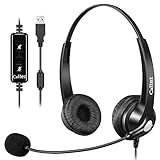
- CRYSTAL CLEAR CALLS: Business-grade Wideband Corded USB HEADSET, Digital Signal Processing (DSP) and Noise-Cancelling Mic for crystal-clear conversations, Acoustic Shock Protection(ASP) to protect your hearing.
- MOST COMFORT HEADSET: Ultra Lightweight USB headphones with adjustable headband to fit all head sizes, a flexible boom mic to suit your preference, soft and high quality ear cushion enhance all-day wearing comfort.
- ULTRA DURABLE HEADSET: Precision design, Quality plastics, uni-body headband construction, flexible metal mic boom make this Dual Ear USB Skype headset with mic more durable and sturdier. Compete with Plantronics or Jabra High-grade Office Headsets.
- SIMPLE AUDIO CONTROLS: Plug and Play, No Drivers needed for PC, Computer, Laptop, Mac…USB compatible devices. Convenient in-line Controls, easy to adjust this computer headset volume up/down, mute/un-mute the microphone or speaker.
- 2-YEAR WARRANTY & WIDE COMPATIBILITY: 45 days money back & 24-month worry-free. Works with Windows 2000/7/8/10/XP/Vista, Mac OS X and most leading UC Platforms, Softphone. Ideal for Skype Chat, Business, Call Center, Conference calls, Dictation, Dragon speak, Online courses, Webinar presentations and more.
Which business phone service is cheapest?
No provider can be declared the cheapest from the displayed starting prices alone. Among the explicitly stated per-user figures in the supplied 2026 pages, Zoom displays $10.50 per user per month, Nextiva displays $15 per user per month under annual small-business conditions, and Dialpad displays $15 or $25 per user per month depending on tier. Ooma lists $19.95, $24.95, and $29.95 per user per month. 8×8 displays $15 per month for Express, but the cited page does not establish that the figure is directly comparable to every per-user price.
RingCentral and GoTo Connect require more careful regional or sales verification in the supplied material, and Vonage’s page does not provide one universally applicable current starting price in the research. The cheapest displayed number may also exclude features that another vendor includes, such as call queues, recording, toll-free minutes, international destinations, CRM integration, or team messaging.
| Cost item | Question to ask before comparing quotes |
|---|---|
| Seats or lines | Is billing based on named users, phone numbers, lines, extensions, or a minimum quantity? |
| Billing cadence | Is the displayed price monthly, annualized, promotional, or conditional on a one-year contract? |
| Taxes and fees | Are regulatory fees, emergency-service charges, taxes, and number fees included? |
| Calling destinations | Are United States and Canada calls included, and what happens with Mexico, Puerto Rico, toll-free, or other international calls? |
| Messaging and fax | Are SMS/MMS, online fax, toll-free minutes, and campaign messages unlimited, capped, or metered? |
| Hardware and setup | Are desk phones, adapters, headsets, licenses, installation, number porting, or implementation assistance extra? |
| Add-ons and upgrades | Do recording, transcription, AI summaries, queues, analytics, CRM connectors, and contact-center tools require a higher tier? |
A useful budget formula is: recurring user or line charges plus taxes and regulatory fees, numbers and toll-free charges, international usage, hardware, porting or implementation costs, and required add-ons. Ask every vendor to quote the same user count, destinations, phone numbers, recording policy, integrations, and contract length.
Do you need a desk phone for a business VoIP service?
No. Many users can make and receive business calls through a desktop, browser, or mobile softphone, making a physical desk phone optional rather than mandatory. App-first calling is especially suitable for remote employees, traveling staff, startups, and workers who already spend most of the day at a computer. A desk phone may still be preferable at reception desks, shared work areas, warehouses, clinics, or any location where a dedicated handset is faster and easier to use.
| Setup | Best fit | Checks before purchase |
|---|---|---|
| Desktop or mobile softphone | Remote workers, sales staff, hybrid teams, and laptop-based users | Operating-system support, browser or app availability, notification behavior, microphone permissions, mobile data use, and emergency-location configuration. |
| Physical SIP/VoIP desk phone | Reception, fixed workstations, shared spaces, and users who prefer a handset | Exact provider compatibility, provisioning, firmware, licensing, Power over Ethernet, VLAN or network requirements, and replacement policy. |
| Hybrid deployment | Businesses with reception or shared phones plus mobile and remote workers | Device assignment, shared-line behavior, extension rules, number porting, emergency calling, and consistent call routing across apps and handsets. |
Compatibility is not universal. RingCentral documents compatible desk-phone models, Zoom publishes Phone hardware, and Ooma lists optional IP phones and adapters. A generic SIP/VoIP desk phone should not be assumed to work automatically with every provider because provisioning, firmware, supported features, and licensing vary.
For app-based workers, a business VoIP headset is an optional accessory that can improve hands-free use, privacy, and microphone placement. Check USB or Bluetooth compatibility with the chosen provider and computer or mobile device. Amazon Associates describes qualifying physical products as eligible Products under its program, while cloud-phone subscriptions are not the relevant Amazon product category; the hardware should be treated as optional equipment, not as a required part of a provider recommendation. The Amazon Associates Program Policies should be checked for current requirements.
Which business phone system works with Microsoft Teams, Salesforce, or Google Workspace?
The best integration depends on the exact application, plan, and workflow, not merely the provider’s claim that integrations exist. The shortlist includes providers that document integrations with collaboration, CRM, and customer-support tools, including Microsoft products, Salesforce, Zendesk, Google Workspace, and similar systems. The relevant questions are whether the integration is native, partner-built, or dependent on an API; whether the integration is included in the base plan; and whether the integration supports click-to-call, caller screen pops, logging, recording, presence, or only basic contact synchronization.
| Existing environment | First provider comparison | What to verify |
|---|---|---|
| Zoom Workplace | Zoom Phone | Whether standalone Phone or a Workplace bundle is cheaper for the required meetings, chat, calendar, storage, AI, and telephony features. |
| CRM-led sales or service workflow | Nextiva, RingCentral, Dialpad, 8×8 Work, and other providers with documented CRM integrations | Exact CRM edition, supported actions, plan requirement, data retention, recording controls, and administrator permissions. |
| Microsoft collaboration environment | Compare providers that document Microsoft integrations rather than assuming a generic compatibility label is sufficient | Teams calling model, presence sync, number ownership, calling-plan responsibility, user licensing, and whether employees use one app or two. |
| Google Workspace or browser-first work | Compare app-first services such as Dialpad, Zoom Phone, or another provider with the required integration | Single sign-on, directory sync, browser support, calendar behavior, mobile administration, and offboarding controls. |
| Customer-support or contact-center workflow | Nextiva, 8×8 Work, GoTo Connect, or RingCentral when the relevant tier fits | Queues, supervisor tools, reporting, recordings, transcription, routing, chat, surveys, and upgrade path into a contact-center product. |
Ask for a live demonstration using the company’s actual CRM and collaboration stack. A provider may advertise an integration while reserving useful functions for a higher tier, a particular region, or a separate customer-experience product.
Should you choose a phone-only plan or a unified-communications platform?
Choose a phone-only plan when the business mainly needs reliable numbers, extensions, voicemail, and routing; choose unified communications when phone, messaging, meetings, and collaboration should share one system. Choose a customer-experience or contact-center tier only when queues, reporting, routing, digital channels, or supervisor workflows justify the added complexity.
Best Value

- [ALL-IN-ONE BUNDLE DEAL] – This premium package includes our Professional Wireless Headset plus the Remote HookSwitch (EHS) Device. Gain full remote answering capabilities for a wide range of Poly Polycom phones including VVX series VVX101, 201, 300, 400, 500, 600, etc., and SoundPoint models.
- [TWO DECADES OF EXPERTISE] – With over 20 years of specializing in premium audio solutions, our office wireless headset delivers unmatched all-day comfortability and a high-performance alternative to standard DECT or Bluetooth devices. Enjoy a dedicated 2-year warranty from a brand trusted by professionals and top-tier wireless audio manufacturers worldwide.
- [CRYSTAL CLEAR CALLS & NOISE CANCEL] – Communicate professionally with our advanced Digital Noise-Canceling Microphone, designed to eliminate distracting office chatter. Combined with high-definition audio, it ensures your voice remains clear and uninterrupted for every critical business call.
- [300FT RANGE & TOTAL MOBILITY] – Break free from your desk with a massive 300-foot wireless roaming radius. The integrated remote call control allows you to answer and end calls directly from the headset, providing the ultimate mobility to multitask around the office while staying connected.
- [SUPERIOR DECT 6.0 TECHNOLOGY] – Experience 3x the range and significantly better stability than standard Bluetooth headsets. Our newest DSP DECT 6.0 technology provides a dedicated, interference-free connection for up to 12 hours of talk time, eliminating the occasional call drops common in Bluetooth devices.
| Business need | Appropriate service shape | Likely trade-off |
|---|---|---|
| One or a few business numbers, voicemail, and basic routing | Phone-focused or entry-level cloud plan | Lower complexity, but advanced collaboration and analytics may be absent. |
| Phone, team messaging, meetings, and shared administration | Unified-communications platform such as RingEX, Zoom Phone with Workplace, Vonage, or 8×8 Work | More consistent user experience, but more features and licensing tiers to manage. |
| Sales calling with searchable conversations | App-first platform with CRM integration, transcription, and summaries such as Dialpad or a suitable higher-tier competitor | AI and recording features need policy, privacy, retention, and accuracy review. |
| Support queues and customer interactions across channels | Customer-experience or contact-center tier from a provider with a documented expansion path | More capable routing and reporting, but pricing usually requires a tailored quote. |
| International or multi-site operation | Provider with verified country coverage, local numbers, analytics, and multi-site administration | Coverage, number availability, taxes, emergency calling, and international rates vary by country. |
What should you check before switching business phone providers?
A provider should pass a number-porting, emergency-calling, integration, usage, hardware, and contract checklist before the business signs an order. Use the following questions during trials and sales calls.
- Numbers and porting: Can the provider port every local, toll-free, vanity, fax, and shared number? What information, authorization, lead time, and temporary routing are required? Do not cancel the old service until porting and inbound calls are confirmed.
- Emergency calling: How are emergency addresses assigned to users, mobile apps, softphones, shared devices, and remote workers? Can employees update locations, and what limitations apply when a user calls from a laptop or mobile device?
- Calling geography: List the countries and number types the business actually uses. Confirm included minutes, per-minute charges, local-number availability, toll-free rules, Mexico and Puerto Rico coverage, and international SMS restrictions.
- Routing: Test auto attendants, IVR menus, business-hours rules, holidays, ring groups, call queues, overflow routing, simultaneous ringing, voicemail, and after-hours destinations.
- Messaging and fax: Confirm SMS/MMS availability, message limits, campaign-registration requirements, digital-fax limits, and whether shared business texting works for the intended users.
- Recording and transcription: Check whether recording is automatic or on demand, where files are stored, how long they are retained, who can access them, and how the business will meet applicable call-recording consent rules.
- Integrations: Test click-to-call, caller identification, CRM logging, presence, calendar behavior, single sign-on, directory synchronization, and offboarding with the exact editions the business uses.
- Devices and network: Decide which users need apps, browsers, headsets, desk phones, adapters, or conference hardware. Confirm supported models, firmware, Power over Ethernet, bandwidth expectations, firewall behavior, and backup calling options.
- Support and implementation: Ask whether support is 24/7, which channels are available, whether onboarding or configuration help costs extra, and how urgent outages are escalated.
- Contract and renewal: Record monthly and annual prices, promotional expiry dates, minimum seats, cancellation terms, renewal pricing, taxes, fees, number charges, add-ons, and service credits in the quote.
How reliable are these business phone services?
The supplied research does not establish an independent comparison of uptime, dropped calls, audio quality, support response, or customer satisfaction. Vendor reliability figures should therefore be labeled as claims rather than used to rank the eight services.
Nextiva’s product page states “Uptime 99.999% carrier-grade reliability,” and GoTo Connect’s pricing page states “24/7 support with 99.999% reliability.” The figures describe vendor-positioned service claims in the cited 2026 pages; neither figure is an independently verified result for every customer, location, network, device, or plan.
Free tools Windows power users keep installed
One-click scans. No signup required.
For a meaningful evaluation, run a trial with the company’s actual internet connections, mobile devices, headsets, desk phones, CRM, and call flows. Test calls at busy times, remote locations, cellular handoffs, queue overflow, emergency-address handling, and support escalation. Ask for the contractual service-level language instead of relying only on a marketing percentage.
How should a small business make the final choice?
Start with the business’s existing tools and calling footprint, then compare normalized quotes for the same users, numbers, destinations, and features. The following decision shortcuts are reasonable starting points, not universal rankings:
- Choose RingCentral RingEX when feature breadth, administration, integrations, multi-site operation, and analytics matter more than the lowest advertised entry price.
- Choose Nextiva when a small or midsize company wants phone, team messaging, and customer-interaction features in one vendor.
- Choose Zoom Phone when Zoom Workplace is already the company collaboration standard and a bundle makes financial and operational sense.
- Choose Ooma Office when published small-business tier prices are more important than a highly customized quote.
- Choose Vonage Business Communications when the company wants app-first calling now and optional desk phones, collaboration, and advanced call controls later.
- Choose 8×8 Work when verified international coverage, analytics, and a contact-center path are central requirements.
- Choose Dialpad Connect when desktop and mobile calling, real-time transcription, AI recaps, and a lightweight workflow are priorities.
- Choose GoTo Connect when the business wants phone, meetings, digital customer channels, and contact-center capabilities under one broader platform.
Before publication or purchase, recheck every price, promotion, plan name, calling destination, hardware list, and partner-program status on the provider’s current page. The supplied research is sufficient for a shortlist, but final commercial terms are regional and can change.
Frequently Asked Questions
Which business phone service is cheapest?
No single provider is objectively the cheapest because displayed prices use different billing conditions, user or line definitions, promotions, taxes, fees, calling regions, and included features. Zoom displays the lowest explicit per-user starting price in the supplied 2026 research at $10.50 per user per month, while Nextiva and Dialpad display $15 starting prices under different conditions; the final total requires a like-for-like quote.
Do I need a desk phone for a business VoIP service?
No, a desk phone is optional for many business VoIP users. Most shortlisted providers support desktop, browser, or mobile apps, but businesses should verify emergency-calling behavior, headset compatibility, desk-phone provisioning, firmware, Power over Ethernet, and licensing before choosing a device-free or hybrid setup.
Is VoIP good for a small business?
VoIP can be a good choice for a small business when the company has a suitable internet connection and needs flexible apps, business numbers, voicemail, routing, SMS, or remote access. A small business should still test call flows, emergency calling, number porting, support, and network performance before replacing an existing phone system.
What is the best business phone service for remote employees?
The best business phone service for remote employees is usually an app-first provider that supports desktop and mobile calling, business numbers, voicemail, transfers, messaging, and the company’s required CRM or collaboration tools. Dialpad and Zoom Phone are natural comparisons for app-heavy teams, but the final choice depends on calling countries, integrations, recording policy, support, and price conditions.
The Bottom Line
Bottom line: Zoom Phone has the lowest explicitly displayed per-user starting price in the supplied 2026 research, while Ooma Office offers the clearest published small-business tiers. Neither fact makes either service universally cheapest or best. Select the provider that matches the company’s collaboration tools, calling countries, routing and recording needs, hardware preferences, support expectations, and expansion plans, then compare like-for-like quotes.
Recommended Free Tools
Quick Recap
Product prices and availability are accurate as of the date/time indicated and are subject to change. Any price and availability information displayed on Amazon at the time of purchase will apply.

