
iTechGuides is reader-supported. When you buy through links on our site, we may earn an affiliate commission. As an Amazon Associate I earn from qualifying purchases. Learn more
There is no single best free and open-source VPN server software. Choose WireGuard for most personal and home-server VPNs, OpenVPN for mature compatibility, SoftEther for multi-protocol access, strongSwan for IPsec/IKEv2, Headscale for a self-hosted Tailscale-style mesh, NetBird for policy management, or Nebula for certificate-based overlays. The software may be free, but hosting and maintenance are not.
This guide compares software you can install on a Linux server, home server, router, virtual machine, or cloud VPS. The list excludes consumer VPN subscriptions, which provide access to somebody else’s exit servers rather than software for operating your own endpoint.
Key takeaways
- WireGuard is the best default for most small personal VPNs because it combines a small configuration surface with broad client support and a modern key-based peer model.
- OpenVPN Community Edition is the safer compatibility choice when certificate-based profiles, legacy environments, or established OpenVPN expertise matter.
- SoftEther is the broadest compatibility option because one server supports its own SSL-VPN protocol plus OpenVPN, IPsec, L2TP, SSTP, L2TPv3, and EtherIP modes.
- strongSwan is the strongest fit for standards-based IPsec and IKEv2 interoperability with mobile devices, routers, firewalls, and enterprise infrastructure.
- Headscale, NetBird, and Nebula are overlay-network choices rather than interchangeable replacements for a traditional VPN server.
- “Free” normally describes the software license; a public VPN endpoint still needs a server, network connection, backups, monitoring, and security updates.
Which free and open-source VPN server software should you choose?
Choose WireGuard for a personal VPN, home-LAN access, a road-warrior connection, a site-to-site tunnel, or a cloud server where manual peer management is acceptable. Choose OpenVPN Community Edition for mature documentation, certificate-based access, and older or mixed environments. Choose SoftEther when multiple protocols, Layer 2 bridging, or difficult network conditions matter. Choose strongSwan when the VPN must interoperate with standards-based IPsec equipment. Choose Headscale for a self-hosted Tailscale-compatible coordination server, NetBird for a modern web-managed WireGuard overlay, and Nebula for a certificate-based distributed network.
What’s actually slowing this PC down?
Pick the symptom - the matching free tool is one click away.
| Software | Best for | Architecture | Client and identity model | Site-to-site | Administration | Main drawback |
|---|---|---|---|---|---|---|
| WireGuard | Most personal and home VPNs | Minimal tunnel implementation | Public/private keys; manual peers unless another tool is added | Yes | Configuration files and scripts | No built-in directory, SSO, MFA, or enrollment system |
| OpenVPN Community Edition | Mature compatibility and conventional remote access | Traditional client-server VPN | Certificates, profiles, and configurable authentication | Yes | Manual or third-party tools | More PKI and configuration work |
| SoftEther VPN | Multi-protocol access and compatibility-driven deployments | Multi-protocol VPN server | Several protocol and authentication options | Yes | Management interface and automation API | Large feature and configuration surface |
| strongSwan | Enterprise IPsec/IKEv2 | Policy-based or route-based IPsec gateway | Certificates, EAP, RADIUS, LDAP-related integrations, and plugins | Yes | Daemon, plugins, and operating-system policy | Steepest learning curve among the traditional servers |
| Headscale | Self-hosted Tailscale-style mesh | WireGuard data plane plus coordination server | Tailscale-compatible clients and centrally coordinated nodes | Subnet routes and mesh connectivity | Control-server administration | Additional control-plane infrastructure |
| NetBird | Web-managed WireGuard overlay for teams | Policy-driven overlay network | Central policies, SSO, MFA, and managed enrollment | Yes | Web UI and public API | Several components must be operated and upgraded |
| Nebula | Certificate-based overlays for distributed infrastructure | Certificate-based overlay with lighthouse nodes | Node certificates, groups, and overlay firewall rules | Overlay connectivity | Certificate authority and node configuration | Less familiar to ordinary VPN users |
What does “VPN server software” mean?
VPN server software terminates or coordinates encrypted private-network connections. A traditional server such as OpenVPN, SoftEther, or strongSwan accepts client connections and applies routing and authentication rules. WireGuard supplies a lean encrypted tunnel and peer model. Headscale and NetBird add coordination, enrollment, identity, or policy around WireGuard, while Nebula uses its own certificate-based overlay architecture.
Popular on Amazon
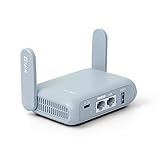
- 【DUAL BAND AX TRAVEL ROUTER】Products with US, UK, EU Plug; Dual band network with wireless speed 574Mbps (2.4G)+2402Mbps (5G); 2.5G Multi-gigabit WAN port and a 1G gigabit LAN port; USB 3.0 port; Wi-Fi 6 offers more than double the total Wi-Fi speed with the MT3000 VPN Router.
- 【VPN CLIENT & SERVER】OpenVPN and WireGuard are pre-installed, compatible with 30+ VPN service providers (active subscription required). Simply log in to your existing VPN account with our portable wifi device, and Beryl AX automatically encrypts all network traffic within the connected network. Max. VPN speed of 150 Mbps (OpenVPN); 300 Mbps (WireGuard). *Speed tests are conducted on a local network. Real-world speeds may differ depending on your network configuration.*
- 【OpenWrt 21.02 FIRMWARE】The Beryl AX is a portable wifi box and mini router that runs on OpenWrt 21.02 firmware. It supports more than 5,000 ready-made plug-ins for customization. Simply browse, install, and manage packages with our no-code interface within Beryl AX's Admin Panel.
- 【PROTECT YOUR NETWORK SECURITY】Our pocket wifi, unlike other vulnerable portable wifi hotspot for travel purposes supports WPA3 protocol–Preventive measures against password brute-force attacks; DNS over HTTPS & DNS over TLS–Protecting domain name system traffic and preventing data eavesdropping from malicious parties; IPv6–Built-in authentication for privacy protection, eliminating the need for network address translation.
- 【VPN CASCADING AT EASE】Surpassing the mediocre performance of most VPN routers for home usage, the Beryl AX is capable of hosting a VPN server and VPN client at the same time within the same device, enabling users to remote access local network resources like Wi-Fi printers or local web servers, and accessing the public internet as a VPN client simultaneously.
That distinction matters because comparing a tunnel implementation with a control plane as though both were complete VPN products produces misleading recommendations. A raw WireGuard server can be ideal for three devices but inconvenient for a business that needs centralized offboarding, MFA, and device enrollment.
1. WireGuard: the best overall choice for most self-hosters
WireGuard is the best default for a small personal, home-lab, cloud, or site-to-site VPN when the administrator can manage peers manually. The official project describes WireGuard as a general-purpose VPN designed to be faster, simpler, and leaner than IPsec and OpenVPN. WireGuard runs across Linux, Windows, macOS, BSD, iOS, and Android and exposes a straightforward tunnel interface such as wg0. See the official WireGuard project documentation for the design and supported platforms.
What WireGuard provides—and what it does not
WireGuard provides encrypted peer-to-peer tunnels based on public and private keys, UDP transport, peer definitions, and routing through allowed IP ranges. WireGuard does not natively provide a central user directory, SSO, MFA, certificate authority, billing system, web administration console, or automatic organization-wide peer enrollment. The official project leaves identity management, key distribution, and pushed configurations to higher-level tools.
That minimalism is WireGuard’s main advantage and its main limitation. A small deployment is easy to understand, while a growing team may need Headscale, NetBird, Firezone, a management script, or another control layer.
How do you generate WireGuard keys?
On a Linux system with the WireGuard tools installed, generate a private key and its matching public key with:
umask 077
wg genkey > privatekey
wg pubkey < privatekey > publickey
The umask 077 command restricts access to the generated private-key file. Never publish a private key in a support forum, commit a private key to a source repository, or place an unprotected private key in a shared backup.
How do you create a WireGuard interface?
The official quick-start documentation demonstrates the following interface commands:
Free tools Windows power users keep installed
One-click scans. No signup required.
ip link add dev wg0 type wireguard
ip address add dev wg0 192.168.2.1/24
wg setconf wg0 myconfig.conf
ip link set up dev wg0
The example uses 192.168.2.1/24 as a tunnel address, not as a universal requirement. Select a private subnet that does not overlap with the client’s home, office, container, or cloud networks. WireGuard commonly uses UDP port 51820 in examples, but the listening port is configurable and is not mandatory.
When should you use PersistentKeepalive?
Set PersistentKeepalive = 25 on a peer that sits behind NAT or a stateful firewall and needs to receive traffic after being idle, provided ordinary traffic does not already keep the mapping alive. The official WireGuard quick start identifies 25 seconds as a sensible value for many NAT situations. Do not enable persistent keepalives on every peer automatically: periodic packets create traffic and are unnecessary when the normal connection pattern works.
WireGuard advantages and disadvantages
- Advantages: small configuration surface, modern cryptographic design, broad client support, good performance potential, and a natural fit for servers, routers, containers, mobile devices, and virtual machines.
- Disadvantages: manual key and peer lifecycle management, no native central identity system, and separate configuration for routing, firewall rules, DNS, forwarding, and NAT.
- Common mistake: an overly broad
AllowedIPsentry can unintentionally create a full-tunnel route or route traffic for networks that should remain local.
2. OpenVPN Community Edition: the mature compatibility choice
OpenVPN Community Edition is the best choice when compatibility, established operational knowledge, and certificate-based client profiles matter more than minimal configuration. OpenVPN Community Edition is the open-source client-server implementation. OpenVPN’s product guidance distinguishes OpenVPN 2, the principal open-source full client-server version, from Access Server and CloudConnexa; consult the OpenVPN product comparison guidance before selecting a commercial edition.
OpenVPN has a long operational history, extensive documentation, a broad client ecosystem, and a conventional certificate and profile deployment model. OpenVPN can use UDP or TCP, although TCP-over-TCP should not be treated as a default performance solution because nested retransmission and congestion control can perform poorly.
Recommended Free Tools
When does OpenVPN make more sense than WireGuard?
OpenVPN makes more sense when an organization already operates an OpenVPN PKI, needs profile-based deployment, has legacy clients, or requires compatibility with an existing environment. OpenVPN’s certificate authority, client certificates, revocation process, and configuration profiles provide a familiar structure, but those same components increase administrative work.
OpenVPN performance varies with CPU, cipher, transport, MTU, packet size, and traffic type. Generic claims that OpenVPN is always slow or that another protocol is always fastest are not reliable without controlled measurements.
Also popular on Amazon
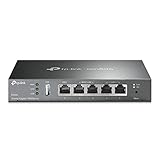
- 【Five Gigabit Ports】1 Gigabit WAN Port plus 2 Gigabit WAN/LAN Ports plus 2 Gigabit LAN Port. Up to 3 WAN ports optimize bandwidth usage through one device.
- 【One USB WAN Port】Mobile broadband via 4G/3G modem is supported for WAN backup by connecting to the USB port. For complete list of compatible 4G/3G modems, please visit TP-Link website.
- 【Abundant Security Features】Advanced firewall policies, DoS defense, IP/MAC/URL filtering, speed test and more security functions protect your network and data.
- 【Highly Secure VPN】Supports up to 20× LAN-to-LAN IPsec, 16× OpenVPN, 16× L2TP, and 16× PPTP VPN connections.
- Security - SPI Firewall, VPN Pass through, FTP/H.323/PPTP/SIP/IPsec ALG, DoS Defence, Ping of Death and Local Management. Standards and Protocols IEEE 802.3, 802.3u, 802.3ab, IEEE 802.3x, IEEE 802.1q
Important commercial distinction: OpenVPN Access Server is a separate commercial management product built around the open-source core. Access Server is not an unlimited-free replacement for Community Edition. The Access Server product page lists two free simultaneous connections for testing; additional connections require a paid license.
3. SoftEther VPN: the broadest protocol-compatibility option
SoftEther VPN is the best fit when a single server must support multiple VPN protocols, SSL-VPN-style access, Windows-heavy environments, or Layer 2 bridging. SoftEther describes itself as free, open-source, cross-platform software released under the Apache License 2.0. SoftEther runs on Windows, Linux, macOS, FreeBSD, and Solaris; the SoftEther project site documents its platforms and capabilities.
The stable project repository lists SoftEther’s own SSL-VPN protocol, OpenVPN compatibility, IPsec, L2TP, SSTP, L2TPv3, and EtherIP support. SoftEther supports both Layer 3 routing and Layer 2 bridging, which gives administrators more topology options than a minimal routed tunnel.
Why is SoftEther useful on difficult networks?
SoftEther can offer SSL-VPN behavior and HTTPS-like transport modes that may improve reachability in some restrictive networks. “Can pass through firewalls” does not mean SoftEther defeats every modern firewall, proxy, censorship system, or traffic classifier. Network operators can identify, block, rate-limit, or inspect traffic patterns.
What are SoftEther’s trade-offs?
SoftEther’s breadth is also its cost. More protocols and bridging modes create more configuration surface and more opportunities for insecure or confusing deployments. Layer 2 bridging can extend broadcasts across sites and complicate segmentation, troubleshooting, and failure isolation. Administrators should enable only the protocols they need and document why each exposed listener exists.
4. strongSwan: the standards-based IPsec and IKEv2 choice
strongSwan is the best choice when interoperability with IPsec routers, firewalls, mobile operating systems, or enterprise authentication systems is a primary requirement. strongSwan is an open-source, modular IPsec implementation that supports policy-based and route-based VPNs. The project documents IKEv2 under RFC 7296, IPv6 IPsec, MOBIKE for clients changing networks, and multiple authentication and integration options on the strongSwan project site.
Do these 3 things before closing this tab:
1Repair Windows errors before they cause bigger problems2Scan for outdated or missing drivers - takes under a minute3Clear out junk files and repair common Windows errorsThe strongSwan homepage listed version 6.0.7, released June 7, 2026, when checked. Version information is volatile and should be rechecked before publication or installation.
What makes strongSwan suitable for business VPNs?
IKEv2 is widely supported by mobile devices, operating systems, routers, and security appliances. MOBIKE helps mobile clients maintain an IPsec session while changing network locations. strongSwan also supports certificate authentication, EAP methods, RADIUS, LDAP-related integrations, and other features through plugins.
strongSwan is not the easiest beginner option. Administrators must understand proposals, selectors, policies, traffic modes, certificates, identities, routing, and firewall behavior. strongSwan is technically serious and highly interoperable, but compatibility still depends on matching cipher suites, identities, certificates, and traffic selectors on both ends.
5. Headscale: a self-hosted Tailscale-style control plane
Headscale is the best choice for a self-hosted, Tailscale-compatible mesh when centralized coordination is more valuable than a conventional VPN-server workflow. Headscale is an open-source, self-hosted implementation of the Tailscale control server. Headscale coordinates WireGuard-based nodes, assigns addresses, exchanges public keys, and manages advertised routes; Headscale is not merely another standalone tunnel daemon.
The Tool Desk
Outbyte PC Repair FREEClear out junk files and repair common Windows errorsFree Scan →Outbyte Driver Updater FREEScan for outdated or missing drivers - takes under a minuteDriver Scan →The architecture looks like this:
Client applications
        ↓
Tailscale-compatible client
        ↓
WireGuard data plane
        ↓
Headscale coordination server
Headscale reduces the need to manually exchange and edit every WireGuard peer configuration. Headscale can run on a VPS or home server and is aimed particularly at self-hosters, hobbyists, and small open-source organizations.
What are Headscale’s limitations?
The Headscale control server is additional infrastructure that must be secured, updated, monitored, and backed up. Headscale is not a drop-in replacement for an OpenVPN server, and its scope is narrower than Tailscale’s commercial control plane. Headscale’s documentation also advises selecting documentation that matches the stable release tag rather than blindly following the development branch; use the Headscale repository and release documentation for the appropriate version.
Headscale is not “WireGuard with a web UI.” Headscale is a coordination system layered around WireGuard. Headscale is also not affiliated with Tailscale, even though Headscale implements the Tailscale control-server protocol for compatible clients.
Also popular on Amazon
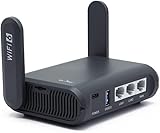
- 【AXT1800 WiFi 6 Wireless Router】Slate AX offers powerful Wi-Fi 6 network connection with a dual-band combined Wi-Fi speed of 1800 Mbps (600 Mbps for 2.4GHz and 1200 Mbps for 5GHz). Enhance Wi-Fi performance with MU-MIMO, OFDMA, BSS color and able to connect to up to 120 devices simultaneously.
- 【Fast and Secure Browsing】IPv6 supported; OpenVPN & WireGuard pre-installed, compatible with 30+ VPN service providers, OpenVPN speed up to 500 Mbps; WireGuard speed up to 550 Mbps. Cloudflare encryption supported to protect the privacy.
- 【Easy File Sharing】Our NAS feature supports SAMBA and WebDav protocol. By plugging an external USB hard disc into the router, you can create a private network to store and share your documents.
- 【Runs on OpenWrt 21.02】Slate AX runs on the latest OpenWrt 21.02 operating system (Kernel version 4.4.60), with mass device connection capabilities, and significantly reduced signal interference. You can customize the router and install applications based on your preferences.
- 【Repeater for Public, Hotel WiFi】Convert a public network(wired/wireless) to a private network(wired/wireless) for secure surfing. Work with Captive Portal. (Note: Most of the Free Public Wi-Fi hotspot set a time limit for users, which will disconnect your devices once the time is over. To deal with this situation, please reconnect your router to the wifi.)
6. NetBird: a policy-driven WireGuard overlay with a web interface
NetBird is the best fit for teams that want WireGuard-based connectivity with centralized policies, a web administration interface, SSO, MFA, and self-hosting options. NetBird describes itself as a WireGuard-based overlay network that connects machines while providing centralized management and access policies. The NetBird project repository lists an admin web UI, SSO and MFA support, a public API, and self-hosting capabilities.
PC Slower Than It Used to Be?
A free scan shows the junk files, broken settings and background clutter dragging Windows down - then fixes them in one click.Free scan · Windows 10 & 11Crashes, No Sound, or Screen Glitches?
Random freezes, missing sound and display glitches usually trace back to one bad driver. Find and replace yours safely.Free scan · under a minuteNetBird reduces manual peer management and is useful for multi-site networks, cloud infrastructure, development environments, and controlled access to internal services. Policy management and centralized enrollment can be more practical for a team than distributing raw WireGuard configuration files.
What should you verify before deploying NetBird?
Self-hosting NetBird creates operational responsibilities beyond those of a single WireGuard interface. Verify the current deployment model, supported databases, reverse-proxy requirements, identity-provider integration, backup procedure, and upgrade path before using NetBird in production. NetBird’s architecture and feature set may evolve faster than long-established VPN projects.
Headscale and NetBird should not be ranked by a simplistic “which is faster” or “which is more secure” claim. Headscale is a narrower Tailscale-compatible coordination server; NetBird is a broader administration and policy platform. The right choice depends on whether compatibility and simplicity or centralized policy and administration are more important.
7. Nebula: a certificate-based overlay for distributed infrastructure
Nebula is the best choice for engineering teams that want certificate-based node identity, explicit overlay networking, and a distributed private network for many machines. Nebula’s maintainers describe Nebula as a scalable overlay networking tool focused on performance, simplicity, and security. Nebula supports Linux, macOS, Windows, iOS, and Android and is designed for networks ranging from a few computers to tens of thousands; see the Nebula project repository for its architecture and platform information.
Quick wins for a faster PC:
Repair Windows errors before they cause bigger problemsFix Now →Fix the driver behind crashes, sound loss and screen glitchesFind Drivers →Clear out junk files and repair common Windows errorsFree Scan →Nebula uses certificates, groups, lighthouse nodes, overlay addresses, and firewall rules. The certificate authority gives administrators a deliberate node-identity and revocation model, which can suit distributed infrastructure better than manually maintained peer files.
When is Nebula excessive?
Nebula may be excessive for one laptop connecting to a home server. Nebula requires administrators to understand certificate issuance, lighthouse operation, groups, firewall rules, and overlay addressing. Readers looking for a conventional VPN server that generates a client profile may find Nebula’s architecture unfamiliar.
How do the seven options differ by architecture?
The most important comparison is not simply protocol name. The options belong to three practical categories:
| Category | Examples | What the category provides | Typical reason to choose it |
|---|---|---|---|
| Minimal tunnel implementation | WireGuard | Encrypted transport and peer model | Small, fast-to-understand personal or site-to-site deployment |
| Traditional VPN server | OpenVPN, SoftEther, strongSwan | Server termination, authentication, routing, and conventional client access | Compatibility, certificates, IPsec interoperability, or specialized transports |
| Overlay network and control plane | Headscale, NetBird, Nebula | Coordination, enrollment, identity, policy, mesh connectivity, or certificate-based node management | Many devices, changing networks, centralized policy, or distributed infrastructure |
Which VPN software is best for each use case?
| Use case | Recommended shortlist | Why | Important qualification |
|---|---|---|---|
| Access a home LAN from a phone or laptop | WireGuard; Headscale for multiple devices | Simple clients and strong support for routed private networks | Router forwarding, return routes, DNS, and overlapping subnets still need configuration |
| Full-tunnel internet access on public Wi-Fi | WireGuard or OpenVPN | Both can route client internet traffic through a server | Full tunneling requires forwarding, NAT, DNS, bandwidth, and IPv6 planning |
| Small business remote access | OpenVPN, NetBird, strongSwan, or Headscale | Choice depends on certificates, SSO/MFA, IPsec compatibility, and central administration | Plan offboarding, backups, monitoring, and control-plane recovery |
| Site-to-site connection to a router or firewall | strongSwan or WireGuard | strongSwan offers standards-based IPsec; WireGuard offers simpler peer tunnels | Confirm that both devices support the selected protocol and routing model |
| Legacy or mixed VPN clients | OpenVPN or SoftEther | Mature clients and broader protocol options | Disable unused legacy protocols and avoid unnecessary exposure |
| Many distributed infrastructure nodes | Nebula, NetBird, or Headscale | Overlay coordination, policies, or certificate-based identity reduce manual peer work | Additional control-plane, lighthouse, relay, or certificate infrastructure may be required |
| CGNAT or changing client networks | Headscale, NetBird, Nebula, or WireGuard with an appropriate hub | Coordination, NAT traversal, lighthouses, relays, or a reachable hub can help | No product guarantees a solution for every CGNAT or firewall; test the actual network |
What does self-hosted VPN software cost?
Self-hosted VPN software can cost nothing to download or license, but a public endpoint still needs infrastructure. Typical requirements include a machine, network connection, reachable address or suitable coordination architecture, DNS, backups, monitoring, and security maintenance.
DigitalOcean’s pricing page listed a smallest Droplet at $4 per month when checked on August 18, 2026. The listed configuration was 512 MiB RAM, one vCPU, 10 GB SSD, and 500 GiB transfer. DigitalOcean also listed a 1 GiB plan at $6 per month. These are infrastructure prices, not VPN software prices; see the DigitalOcean Droplets pricing page for current availability and regional terms.
| Option | What you pay for | Best fit | Trade-off |
|---|---|---|---|
| Home server or router | Existing hardware, electricity, ISP service, and administration | Home-LAN access and local control | CGNAT, changing public addresses, power outages, and limited upload bandwidth |
| Cloud VPS | Monthly compute, storage, transfer, and possibly backups or reserved addresses | Publicly reachable hub or full-tunnel gateway | Provider dependency, exposure to internet scanning, and recurring cost |
| Managed coordination service | Provider subscription or terms-based free tier | Users who want simpler enrollment and less control-plane maintenance | Less self-hosting and possible commercial or usage limitations |
| Commercial management layer | Software license plus underlying infrastructure | Organizations needing support and an administrative console | Not the same as unlimited-free open-source software |
Self-hosted VPN versus a commercial VPN service: what is the difference?
A self-hosted VPN generally gives the user a private route to the user’s own server, home network, office, or cloud infrastructure. A commercial privacy VPN gives the user an exit through a provider’s server network. Self-hosting provides control over the endpoint and configuration, but self-hosting does not automatically provide anonymity.
A VPS provider, home ISP, cloud operator, and destination website can still observe different parts of a self-hosted traffic path. A VPN encrypts traffic between its endpoints; a VPN does not make the endpoint trustworthy, secure the client device, prevent browser fingerprinting, or eliminate destination-site tracking.
Do you need a public IP address?
A conventional VPN server usually needs an inbound-reachable endpoint, such as a public IPv4 address, port forwarding, or reachable IPv6. Exceptions include a coordination system using NAT traversal, an outbound relay or rendezvous architecture, a VPS acting as a hub, or a topology where the client initiates all required connections.
Also popular on Amazon

- Entry-Level Privacy Gateway: Designed for users who want simple online privacy protection at an affordable level—ideal for basic home networking and daily internet use.
- Secure Browsing for Everyday Needs: Perfect for email, social media, online shopping, and standard streaming—protecting your connection while keeping setup and operation easy.
- Lightweight Protection Against Common Online Threats: Helps reduce exposure to unwanted ads, trackers, and risky websites, improving online safety for your household.
- Simple Setup, No Technical Skills Required: Plug it in, follow the quick steps, and start using—an excellent choice for beginners who don’t want complicated network configurations.
- Decentralized VPN (DPN) Included – No Monthly Payments: Get built-in decentralized VPN access with lifetime free usage, helping you stay private without paying recurring subscription fees
CGNAT is a key qualification. A home server behind carrier-grade NAT may not accept inbound connections even when the router appears correctly configured. Headscale, NetBird, and Nebula may offer architectures involving direct peer connections, relays, or lighthouses, but no tool guarantees that every ISP, firewall, proxy, or restricted network will permit direct connectivity.
What hardware can run a self-hosted VPN?
Small personal VPNs can run on a low-cost Linux VPS, home server, Raspberry Pi-class device, router or firewall appliance, virtual machine, or supported container. The practical limits are usually bandwidth, routing, encryption CPU cost, MTU behavior, mobile-network conditions, and operational reliability rather than a simple user-count threshold.
A tiny VPS can be enough for occasional personal access, but a business gateway may need more CPU, memory, transfer capacity, redundancy, monitoring, and a tested recovery plan. A home server may have ample local resources but poor upload bandwidth or unreliable inbound reachability.
How should full-tunnel and split-tunnel VPNs be configured?
Full tunnel sends all client internet traffic through the VPN server. Full tunnel is useful on untrusted public networks or when the server must provide the internet exit, but full tunnel increases server bandwidth use and makes DNS, NAT, forwarding, and IPv6 configuration essential.
Outdated Drivers Are Slowing You Down
One free scan finds every outdated or missing driver and matches the right update for your exact hardware.Free scan · exact hardware matchWindows Errors? Fix Them Before They Spread
Repair common Windows errors and clear accumulated junk for a smoother, more stable PC - no reinstall needed.Free scan · no reinstallSplit tunnel sends only selected private networks through the VPN. Split tunnel is usually more efficient for reaching a home or office LAN because ordinary internet traffic continues through the client’s local connection.
In WireGuard, AllowedIPs = 0.0.0.0/0 is a common IPv4 full-tunnel indicator, but IPv6 and DNS need separate consideration. An IPv4-only route does not automatically explain or control IPv6 traffic, and a working tunnel does not automatically provide a private DNS resolver.
What ports do VPN servers require?
Required ports depend on the software and configuration. WireGuard normally uses UDP and commonly demonstrates port 51820, although the port is configurable. OpenVPN can use UDP or TCP. SoftEther can expose its own protocol ports and HTTPS-like modes. IPsec commonly involves IKE and NAT traversal considerations. Overlay systems may rely on outbound connections, direct peer traffic, relays, or lighthouses.
Open only the listeners required by the selected deployment, restrict administrative interfaces, and consult the current project documentation before creating firewall rules. A universal port table would be misleading because protocol choice, NAT, transport, and topology change the answer.
The Tool Desk
Outbyte PC Repair FREERepair Windows errors before they cause bigger problemsFix Now →Outbyte Driver Updater FREEFix the driver behind crashes, sound loss and screen glitchesFind Drivers →How should you deploy a small personal WireGuard VPN?
- Choose the endpoint: select a reachable VPS, home server, router, or VM and confirm the available upload bandwidth and public-address situation.
- Install supported packages: use the operating system’s supported WireGuard package source rather than an unknown installer.
- Generate server and client keys: keep private keys protected and generate one peer identity per device.
- Choose a non-overlapping tunnel subnet: avoid networks already used by the client’s home LAN, office, containers, or cloud VPC.
- Configure the interface and peers: assign tunnel addresses, public keys, endpoints, and narrowly scoped
AllowedIPs. - Enable forwarding: enable IP forwarding when the server must route traffic to a LAN or the internet.
- Configure NAT when required: full-tunnel internet access normally requires masquerading and an appropriate forwarding policy.
- Open the selected UDP port: apply the rule in the server firewall, cloud security group, and home router if applicable.
- Test in layers: test the tunnel IP, then private-LAN IPs, then DNS, then internet egress.
- Add keepalive selectively: use
PersistentKeepalive = 25only for peers that need NAT mapping maintenance. - Back up recovery material: store configurations, keys, firewall rules, and restore instructions securely.
The official WireGuard quick-start documentation supports the key-generation and interface commands above, but its demonstration transport should not be treated as production hardening. The official page labels its demo transport as insecure and intended only for demonstration.
What security work remains after VPN installation?
- Patch the operating system and VPN software on a defined schedule.
- Protect private keys and certificate-authority keys with restrictive permissions and secure backups.
- Disable password-based SSH where appropriate and restrict administration to trusted networks or a separate management path.
- Use least-privilege firewall and forwarding rules rather than allowing unrestricted access between every tunnel and LAN segment.
- Remove departed users and devices promptly.
- Revoke certificates or disable control-plane nodes when the identity model supports revocation.
- Keep DNS configuration intentional and check for IPv6 or DNS leakage in full-tunnel deployments.
- Monitor failed connections, unusual traffic, disk space, certificate expiration, and control-plane health.
- Back up configuration and recovery material securely, then test restoration before an outage.
- Keep administrative web panels off the public internet unless strong authentication, patching, and access controls are in place.
How do you troubleshoot a VPN that connects but carries no traffic?
- Check peer identity: verify the server and client public keys and confirm that each private key belongs to the expected public key.
- Check addresses: confirm tunnel addresses, subnet masks, and the absence of overlapping LAN, container, or cloud networks.
- Check routes: inspect
AllowedIPs, client routes, server routes, and return routes. A cryptographic handshake does not prove that routing is correct. - Check forwarding: verify server-side IP forwarding and firewall forwarding rules.
- Check NAT: full-tunnel internet access generally needs masquerading on the server and an allowed forwarding path.
- Check the cloud or router firewall: security groups and home-router rules can block traffic even when the operating-system firewall is correct.
- Check MTU: fragmented or oversized packets can cause partial connectivity, especially across tunnels and mobile links.
- Check DNS separately: test a known IP address before diagnosing hostname resolution.
Why does a VPN client connect only briefly?
A short-lived connection commonly results from an expired NAT mapping, incorrect endpoint, stateful-firewall expiration, a changing client network, missing persistent keepalive, or duplicate tunnel addresses. The official WireGuard quick-start guidance identifies persistent keepalives as a remedy for a peer that needs to receive traffic after sitting idle behind NAT or a stateful firewall.
Why does a VPN work by IP address but not by hostname?
Working IP connectivity with failed hostnames usually indicates a DNS or search-domain problem rather than an encryption problem. Check which DNS server the client uses, whether private DNS zones are reachable through the tunnel, whether full-tunnel clients should use the VPN’s resolver, and whether IPv6 DNS traffic is escaping the intended path.
Why does full-tunnel mode break internet access?
Full-tunnel failure usually comes from missing NAT, missing forwarding, an incorrect default route, unavailable DNS, an unhandled IPv6 route, or cloud-provider security-group restrictions. Test the tunnel address, a private destination, a public IP address, and a hostname separately.
Which VPN software has the easiest user and device offboarding?
Offboarding should influence the initial choice. WireGuard requires removing the peer’s public key and associated routes. OpenVPN generally requires revoking certificates and distributing updated configuration. strongSwan requires disabling or revoking the relevant identity and certificate. Headscale and NetBird allow node or user removal through the control plane. Nebula requires stopping trust in the relevant certificate through its certificate-management process.
Also popular on Amazon

- 【Flexible Port Configuration】1 2.5Gigabit WAN Port + 1 2.5Gigabit WAN/LAN Ports + 4 Gigabit WAN/LAN Port + 1 Gigabit SFP WAN/LAN Port + 1 USB 2.0 Port (Supports USB storage and LTE backup with LTE dongle) provide high-bandwidth aggregation connectivity.
- 【High-Performace Network Capacity】Maximum number of concurrent sessions – 500,000. Maximum number of clients – 1000+.
- 【Cloud Access】Remote Cloud access and Omada app brings centralized cloud management of the whole network from different sites—all controlled from a single interface anywhere, anytime.
- 【Highly Secure VPN】Supports up to 100× LAN-to-LAN IPsec, 66× OpenVPN, 60× L2TP, and 60× PPTP VPN connections.
- 【5 Years Warranty】Backed by our 5-years warranty and free technical support from 6am to 6pm PST Monday to Fridays
A system that is easy to install but difficult to revoke can be a poor business choice. Test user removal, device replacement, key rotation, and emergency recovery before production deployment.
How do you avoid making the VPN server a single point of failure?
A single VPS or home server is not highly available. Business deployments should consider a secondary gateway or failover design, configuration backups, DNS failover, multiple gateways, key and certificate recovery, provider-outage planning, and monitoring from outside the VPN.
High availability adds complexity. A carefully backed-up single WireGuard VPS may be appropriate for personal access, while a business network may justify multiple gateways and documented recovery procedures. Do not call a single-server deployment highly available merely because the software itself is reliable.
Managed and commercial alternatives
Self-hosting is not the only way to obtain a private mesh or an administrable VPN. Managed and commercial options trade some control for simpler enrollment, support, or hosted coordination.
| Service or product | Useful when | Published pricing or licensing signal | Why it may not fit |
|---|---|---|---|
| DigitalOcean Droplets | You need a public VPS for WireGuard, OpenVPN, Headscale, NetBird, Nebula, or strongSwan | Smallest listed Droplet was $4/month when checked August 18, 2026 | Not managed VPN software; you still handle security, updates, backups, and networking |
| Tailscale | You want a managed alternative to operating Headscale or manually managing WireGuard peers | Pricing page listed Personal at $0, up to 6 users, Standard at $8/user/month, and Premium at $18/user/month when checked August 18, 2026 | The Personal plan is intended for non-commercial use, and the control plane is managed rather than fully self-hosted |
| OpenVPN Access Server | You need a supported administrative layer around OpenVPN | Two free simultaneous connections for testing; additional connections require a paid license | It is not unlimited-free OpenVPN Community Edition and adds commercial licensing |
| Hetzner Cloud and other VPS providers | You need a regional or cost alternative to a particular VPS provider | Prices vary by region, VAT, plan, and availability | Current pricing must be checked directly before purchase |
See Tailscale’s official pricing page for current plan terms and OpenVPN Access Server’s official product page for its supported deployment model. Commercial services should not be presented as equivalent to installing and operating open-source server software.
Final recommendations
For most readers installing a VPN on a Linux server, home server, router, VM, or cloud VPS, start with WireGuard. WireGuard is the clearest choice when one administrator can manage a limited number of key-based peers and the deployment needs standard routed tunnels.
Choose OpenVPN Community Edition when compatibility and mature certificate workflows outweigh simplicity. Choose SoftEther when multi-protocol support or Layer 2 bridging is central. Choose strongSwan when IPsec/IKEv2 interoperability with routers, firewalls, and enterprise authentication is non-negotiable.
Do these 3 things before closing this tab:
1Repair Windows errors before they cause bigger problems2Scan for outdated or missing drivers - takes under a minute3Clear out junk files and repair common Windows errorsChoose Headscale when you want a self-hosted Tailscale-style mesh, NetBird when centralized policy and web administration matter, and Nebula when certificate-based identity and distributed infrastructure are the defining requirements. In every case, select the architecture that matches the user-management, routing, reachability, and recovery work you are prepared to operate.
Frequently Asked Questions
Is open-source VPN server software safe?
Open-source VPN server software can be safe when the project is maintained and the deployment is patched and correctly configured, but open-source status does not remove risks from exposed administration, stolen keys, weak firewall rules, incorrect routing, or outdated dependencies. Security depends on the software, its version, the operating system, and ongoing maintenance.
Is self-hosting a VPN cheaper than using a commercial VPN?
Self-hosting may cost only the price of existing hardware or a small VPS, but self-hosting also requires administration, bandwidth, backups, monitoring, and maintenance. DigitalOcean listed a smallest Droplet at $4 per month when checked August 18, 2026, while managed services and commercial administration products use their own plan or licensing terms.
Can you run open-source VPN software on a Raspberry Pi?
A Raspberry Pi-class device can run a small self-hosted VPN when the operating system, software, bandwidth, and router support the deployment. Home-server limitations such as CGNAT, changing public addresses, power outages, and limited upload bandwidth can matter more than the device’s CPU.
Quick wins for a faster PC:
Fix the driver behind crashes, sound loss and screen glitchesFind Drivers →Repair Windows errors before they cause bigger problemsFix Now →Does a self-hosted VPN hide your IP address or make you anonymous?
A self-hosted VPN does not automatically provide anonymity. A self-hosted VPN can route traffic through your own VPS or network and protect traffic between endpoints, but the VPS provider, home ISP, cloud operator, and destination websites can still observe different parts of the connection, and endpoint tracking still applies.
Which open-source VPN is easiest for beginners?
WireGuard is usually the easiest starting point for a small personal or home VPN because its peer configuration and tunnel model are compact. WireGuard still requires separate routing, forwarding, NAT, firewall, DNS, key protection, and offboarding configuration.
The Bottom Line
Bottom line: WireGuard is the best general-purpose starting point for most self-hosted VPNs, but WireGuard is a tunnel implementation rather than a complete identity and administration platform. Choose OpenVPN, SoftEther, or strongSwan when compatibility and traditional VPN features matter; choose Headscale, NetBird, or Nebula when you need an overlay network with coordination, policy, or certificate-based identity.

