
If your Pixel keeps shifting focus, struggles with a night scene, or stitches a panorama unevenly, the fix is often to choose the right built-in control and use it deliberately. These four practical techniques cover focus and exposure lock, Night Sight, Motion effects, and panoramas. Feature names and availability vary by Pixel model and Camera app version, so check your camera interface and Google’s current Pixel Camera Help before following model-specific steps.
1. Lock focus and exposure when your subject moves
When a person, pet, or other subject moves, the camera may refocus or change exposure as the scene changes. To keep the camera’s attention on the subject, Google’s Pixel Camera Help says to point the camera at it and tap it. A tracking circle should follow the subject; tap Lock to lock focus and exposure.
This is useful when you want the subject to remain the priority rather than letting the camera repeatedly choose a different focus point or brightness. The control’s wording and availability can vary by model or Camera app version. If you do not see the tracking circle or Lock control, check your model’s current Camera interface and help page rather than assuming the feature is available on every Pixel.
2. Use Night Sight with a steady phone
In dim conditions, select Night Sight directly, or let it turn on automatically in Photo or Portrait mode when the camera detects low light. Hold the phone as still as you can while it captures the scene. Movement during a low-light exposure can undermine the result.
The Tool Desk
Outbyte PC Repair FREERepair Windows errors before they cause bigger problemsFix Now →Outbyte Driver Updater FREEScan for outdated or missing drivers - takes under a minuteDriver Scan →#1 Best Overall
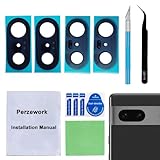
- 【OEM Camera Glass Lens and perfectly Fit】Brand new original OEM Sapphire camera glass lens replacement compatible with Google Pixel 7 (Not for Pixel 7 Pro).
- 【Included Step By Step Installation Manual】Our camera lens replacement repair set come with a detailed step by step installation manual to help you complete the repair process faster,reduce your time-consuming and greatly increases your odds of a successful installation. We also have 24 hours online after-sales staff to help you at any time.
- 【2 Set Lens to Fix Your Phone Camera Brand New Again】This is the rear-facing camera glass lens replacement if you have a scratched or broken external camera lens,they will fix your phone camera same as new one!Include 2 set means 2 times chance in case you fail at first time or back up for future using.
- 【Include Toolkit You Need】Included a professional repair toolkit which make your repair much more easier,no need to open your phone.Strong pre-installed adhesive will firmly hold.
- 【100% Satisfaction And Product Guaranteed】We provide one year warranty for our product. We can send a new glass camera lens if you are not 100% satisfied with this product. Our brand's customer service team is online 24 hours a day, you are welcome to contact us directly by email at any time if there are any questions.
For stars: stabilize the phone and wait for Astrophotography
For a night sky, move away from artificial light and place the phone on a steady surface or tripod. Google recommends taking star photos at least 45–90 minutes after sunset. Wait until the Astrophotography shutter state appears before taking the picture; a three-second timer can reduce movement caused by tapping the shutter. A tripod is optional if you have another stable support.
Google says that on Pixel 4a (5G) and later, astrophotography works only at zoom settings equal to or greater than 1x. If the astrophotography option does not appear, check the current support instructions for your model and Camera app version.
Rank #2

- Compatibility : The 7 Back Rear Camera Lens Glass is perfectly compatible with Google Pixel 7 .Please check your model before buying.
- Excellent Quality : This lens cap is made of high quality glass and is used to replace damaged/broken/scratched camera glass lens on your equipment.
- Easier replacement: Piexl 7 Camera Lens Glass Replacement includes the specialized repair tools needed to meet all your needs during the replacement cess, without having to disassemble your phone!
- Save Money : If your camera lens cover is broken, you don't need to spend more money on a new phone, just a little money on a new lens cover, what a great deal!
- Package Includes : 1 pack 7 Back Rear Camera Lens Glass with Reparing Toolkits.
3. Match the Motion effect to what should blur
Action Pan and Long Exposure create different effects. Choose based on whether you will move the camera to follow the subject or keep the camera still while the subject moves.
| Mode | What moves | Phone position | Intended result | Availability note |
|---|---|---|---|---|
| Action Pan | You follow a moving subject with the camera. | Move the camera along with the subject. | Blurred background that suggests motion while emphasizing the subject. | Not available on every Pixel; check Google’s feature availability information for your model. |
| Long Exposure | The subject moves while you keep the camera still. | Keep the phone steady. | The moving subject appears blurred. | Not available on every Pixel; Google’s availability table lists Long Exposure but not Action Pan for Pixel 8a, and neither for Pixel 6a. |
Look for the Motion options in your Camera app and use the one that matches the result you want. If neither appears, your model may not support them; Google’s current feature list is the appropriate compatibility check.
Rank #3
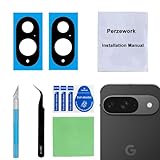
- 【OEM Camera Glass Lens and perfectly Fit】Brand new original OEM Sapphire camera glass lens replacement compatible with Google Pixel 9 (Not for Pixel 9 Pro or Pixel 9 Pro XL).
- 【Included Step By Step Installation Manual】Our camera lens replacement repair set come with a detailed step by step installation manual to help you complete the repair process faster,reduce your time-consuming and greatly increases your odds of a successful installation. We also have 24 hours online after-sales staff to help you at any time.
- 【2 Set Lens to Fix Your Phone Camera Brand New Again】This is the rear-facing camera glass lens replacement if you have a scratched or broken external camera lens,they will fix your phone camera same as new one!Include 2 set means 2 times chance in case you fail at first time or back up for future using.
- 【Include Toolkit You Need】Included a professional repair toolkit which make your repair much more easier,no need to open your phone.Strong pre-installed adhesive will firmly hold.
- 【100% Satisfaction And Product Guaranteed】We provide one year warranty for our product. We can send a new glass camera lens if you are not 100% satisfied with this product. Our brand's customer service team is online 24 hours a day, you are welcome to contact us directly by email at any time if there are any questions.
4. Move smoothly when taking a panorama
Uneven camera movement can shift perspective and leave a panorama with jagged joins. Google panorama creator Tristan advises rotating the camera while standing in place, rather than turning your whole body: “Rather than rotating your whole body when taking a panorama, just rotate the camera as much as you can while standing in place,” Tristan says.
- Stand in one place and rotate the camera smoothly.
- Use the level indicator to help keep the camera aligned as you move.
- For a Night Sight panorama, pause at each guide dot and stay as still as possible.
These techniques help the camera capture a more consistent sequence of overlapping views for stitching.
Rank #4

- 【Compatible Model】Only compatible for Google Pixel 10 Pro XL.Including 3 pack tempered glass camera lens protector. Please confirm if your phone model is Pixel 10 Pro XL before ordering.
- 【Easy Installation】 Precisely cut for Google Pixel 10 Pro XL. Simple to install with no bubbles and no fingerprints.
- 【HD Image Quality】Our Pixel 10 Pro XL camera protector adopts high transparent 9H tempered glass with 99.99% optical transmittivity, which does not affect the shooting quality and retains the original photo quality.
- 【Anti-Flash Design】This Pixel 10 Pro XL camera lens protector does not affect the picture after using the flash. Prevent flash glare in the dark.
- 【Excellent After-Sale Service】Our goal is to provide the highest standard of service to each and every customer. Whether it is a simple question or a complex technical problem,we are here to help you.
Optional: Camera Coach and Pro Controls are model-specific
Camera Coach on Pixel 10
Google describes Camera Coach as a Pixel 10 feature powered by cloud-based Gemini models. It previews a scene, lets you choose a focus, and suggests framing, lighting, composition, zoom, and camera modes. It is not a universal Pixel feature. Because it uses cloud-based models, scene analysis involves cloud processing.
Pro Controls on supported Pro models
Google lists Pro Controls for Pixel 8 Pro, Pixel 9 Pro, and Pixel 9 Pro XL. Its separate 50 MP feature information also includes Pixel 10 Pro and Pixel 10 Pro XL; availability depends on model and feature. These controls are optional, not required for the four techniques above.
PC Slower Than It Used to Be?
A free scan shows the junk files, broken settings and background clutter dragging Windows down - then fixes them in one click.Free scan · Windows 10 & 11Crashes, No Sound, or Screen Glitches?
Random freezes, missing sound and display glitches usually trace back to one bad driver. Find and replace yours safely.Free scan · under a minuteIn Google’s explanation, a faster shutter speed can freeze motion, while a longer shutter speed can blur it. Higher ISO can increase noise; lower ISO can reduce it in suitable bright or stabilized scenes. Long shutter speeds require a steady phone or tripod. Google Pixel Camera product manager Alex King explains: “A lower ISO means the sensor is less sensitive to light, which results in less noise.”
Camera features, names, and menus can change with device generation, regional rollout, and app updates. For exact controls and compatibility, use Google’s current Pixel Camera Help for photography and Google’s Pro Controls guidance before relying on a model-specific option.
Quick Recap
Product prices and availability are accurate as of the date/time indicated and are subject to change. Any price and availability information displayed on Amazon at the time of purchase will apply.

