
There is no single software package that every engineer must install. The most useful engineering stack depends on whether you work mainly with code, mechanical designs, circuits, physical prototypes, simulations, or project coordination. However, these 13 applications cover the recurring digital work that appears across most engineering disciplines: calculating and modeling, designing physical systems, writing code, validating behavior, and coordinating work.
This guide groups the tools by job rather than pretending they are one universal ranking. You may need only five or six of them. A software engineer, mechanical designer, electrical engineer, controls engineer, and engineering student will choose very different combinations.
Product capabilities and release details were checked for a U.S.-oriented audience and are current as of August 12, 2026. Pricing, licensing, education plans, supported operating systems, AI features, and availability can vary by country, plan, institution, and date.
There is no single software package that every engineer must install. The most useful engineering stack depends on whether you work mainly with code, mechanical designs, circuits, physical prototypes, simulations, or project coordination. However, the 13 applications below cover the recurring digital work that appears across most engineering disciplines: calculating and modeling, designing physical systems, writing code, validating behavior, and coordinating work.
Free tools Windows power users keep installed
One-click scans. No signup required.
#1 Best Overall

- Ideal for curricula in which graphing technology may not be permitted.
- MultiView display shows multiple calculations at the same time on screen.
- MathPrint shows math expressions, symbols and stacked fractions as they appear in textbooks
- Ideal for high school through college: Algebra 1 & 2, Geometry, Trigonometry, Statistics, Calculus, Biology, etc.
- Convert fractions, decimals and terms including Pi into alternate representations.
This guide groups the tools by job rather than pretending they are one universal ranking. You may need only five or six of them. A software engineer, mechanical designer, electrical engineer, controls engineer, and engineering student will choose very different combinations.
Product capabilities and release details below were checked for a U.S.-oriented audience and are current as of August 12, 2026. Pricing, licensing, education plans, supported operating systems, AI features, and availability can vary by country, plan, institution, and date.
Quick comparison: the 13 engineering apps
| Application | Primary job | Strongest fit | Important qualification |
|---|---|---|---|
| Visual Studio Code | Code editing, debugging, scripting, and automation | Software, data, embedded, controls, and automation engineers | An editor is not a complete build, test, or lifecycle system. |
| GitHub | Version control, review, collaboration, and CI/CD | Software, embedded, data, controls, and automation teams | Large CAD binaries need specialized storage and product-data practices. |
| MATLAB | Numerical computing, analysis, visualization, and algorithms | Electrical, controls, robotics, signal-processing, and research engineers | It is commercial and toolbox-dependent; Python may be a better fit for some teams. |
| Docker Desktop | Reproducible local development and test environments | Software, data, DevOps, automation, and simulation-support workflows | Licensing, security, hardware access, and performance require review. |
| Jira | Requirements, defects, dependencies, releases, and work tracking | Cross-functional engineering teams | It represents work but does not create good requirements or verification practices. |
| AutoCAD | Precision 2D drafting and general-purpose 3D design | Civil, construction, facilities, documentation, and layout work | Parametric mechanical CAD or BIM workflows may require another product. |
| Fusion 360 | Cloud-connected 3D CAD, CAM, and fabrication | Product designers, makers, prototyping, and machining workflows | Cloud dependence, licensing, and large-assembly performance need evaluation. |
| SOLIDWORKS | Parametric parts, assemblies, drawings, and manufacturing documentation | Mechanical and product-development engineers | It is not a universal tool for software, civil, or process engineering. |
| Ansys Mechanical | Finite-element structural and multiphysics analysis | Structural, thermal, vibration, and validation work | Results depend on model quality, not just the software. |
| KiCad | Schematics, PCB layout, design checks, and fabrication outputs | Electrical engineers, students, makers, and open hardware teams | Enterprise library governance and high-speed design needs may favor commercial EDA. |
| LTspice | SPICE circuit simulation and waveform analysis | Analog, power, electronics, and mixed-signal engineers | Simulation does not replace measurements or hardware validation. |
| Arduino IDE 2 | Writing and uploading sketches to Arduino boards | Embedded education, rapid prototypes, sensors, and robotics | Production embedded work often needs a more controlled toolchain. |
| Simulink | Graphical dynamic-system modeling and model-based design | Controls, automotive, aerospace, robotics, and mechatronics | It complements MATLAB and can add substantial licensing and governance needs. |
1. Visual Studio Code: the broadest coding foundation
Visual Studio Code is the strongest general-purpose code editor in this list because it supports far more than conventional application programming. Engineers use it to write Python scripts, firmware, test utilities, data-processing programs, automation tools, configuration files, documentation, and simulation-support code.
Its built-in capabilities include syntax-aware editing, IntelliSense suggestions, code navigation, refactoring, task automation, debugging, test execution, Git integration, and an integrated terminal. Extensions can add language support, debuggers, linters, formatters, hardware workflows, and discipline-specific integrations without forcing every engineering team into one programming language.
Quick wins for a faster PC:
Fix the driver behind crashes, sound loss and screen glitchesFind Drivers →Clear out junk files and repair common Windows errorsFree Scan →Scan for outdated or missing drivers - takes under a minuteDriver Scan →Best for: coding, scripts, firmware, data analysis, automation, and files stored in engineering repositories.
Why it belongs in an engineering stack: engineers frequently need small programs around their primary tools. A mechanical engineer may automate calculations or rename exported files; an electrical engineer may process measurement data; a controls engineer may generate test cases; and an embedded engineer may inspect firmware and serial output. A flexible editor handles these jobs in one place.
What it does not replace: Visual Studio Code is an editor, not a complete engineering lifecycle platform. You still need version control, build systems, package management, tests, continuous integration, and a documented workflow. Its usefulness also depends on selecting extensions carefully and keeping the project configuration reproducible.
2. GitHub: traceability for engineering work
GitHub is best known for hosting Git repositories, but its engineering value extends to pull requests, code review, project management, CI/CD, security tooling, Codespaces, and related Copilot workflows. The core benefit is traceability: a team can see what changed, who reviewed it, why it changed, and which tests or checks ran.
That traceability is valuable outside traditional software. Teams can version firmware, MATLAB scripts, simulation inputs, test fixtures, documentation, build instructions, infrastructure definitions, and CAD-export automation. Instead of sending files through email or leaving the latest copy on one engineer’s computer, the team has a reviewable history.
Best for: source control, code review, open-source collaboration, engineering automation, documentation, and CI/CD.
Important limitation: GitHub is most directly useful for text-based and code-heavy engineering workflows. Large binary CAD files can be difficult to manage with ordinary Git practices. Teams may need Git Large File Storage, a product-data-management system, a dedicated CAD platform, or rules that keep generated binaries out of the repository. GitHub also cannot compensate for weak branching, review, release, or backup practices.
Useful pairing: Visual Studio Code and GitHub form a practical baseline for engineers who write code. Docker Desktop can make the development environment more repeatable, while Jira can connect repository changes to requirements, defects, and releases.
3. MATLAB: numerical computing without building every tool yourself
MATLAB is an engineering and scientific-computing environment for algorithm development, numerical methods, data analysis, visualization, signal and image processing, control systems, wireless communications, robotics, optimization, and code generation. Its major advantage is an integrated environment in which engineers can explore data, plot results, test algorithms, and use specialized domain toolboxes.
It is particularly effective when a team already has MATLAB expertise, established models, required toolboxes, or a workflow that moves from algorithm prototyping toward generated code. Researchers and engineers can often express a numerical idea quickly without first assembling and maintaining a large collection of general-purpose libraries.
Rank #2

- Fundamental, two-line calculator that combines statistics and advanced scientific functions for high school math and science
- Two-line display shows the entry and calculated result at the same time for easy understanding of the calculation
- Fraction features, conversions, and basic scientific and trigonometric functions
- Solar and battery powered
- Approved for use on SAT, ACT and AP exams
Best for: numerical analysis, plotting, signal processing, controls, optimization, robotics, and algorithm prototypes.
Trade-off: MATLAB is commercial software, and the required toolbox can matter as much as the base application. Many comparable workflows can be built with Python and open-source libraries, which may be preferable when deployment cost, cloud integration, or a team’s existing programming standards are the priority. The sensible choice is based on workflow fit, licensing, support, reproducibility, and the skills already available—not on the claim that one language is universally superior.
What’s actually slowing this PC down?
Pick the symptom - the matching free tool is one click away.
4. Docker Desktop: repeatable environments on an engineer’s computer
Docker Desktop packages local container-development tools into one environment. Its capabilities include Docker Engine, the command-line interface, Compose, Build, Kubernetes support, volume management, debugging features, and extensions. Containers are useful when an engineering project depends on a particular operating-system package, compiler, database, service, Python environment, or test setup.
For example, a team can define a service used by a test harness, package a data-processing environment, reproduce a simulation-support workflow, or run a local copy of development infrastructure without asking every engineer to install identical dependencies manually. The same configuration can then support local testing and CI, although production deployment still requires its own operational decisions.
Best for: reproducible development environments, service integration, local testing, DevOps, CI support, and portable engineering utilities.
Before adopting it: review Docker Desktop’s licensing terms for your organization, security configuration, resource consumption, filesystem performance, network behavior, and access to USB, GPU, or other hardware. A container can standardize software dependencies; it does not automatically standardize physical instruments, proprietary drivers, timing behavior, or the underlying operating system.
Windows Errors? Fix Them Before They Spread
Repair common Windows errors and clear accumulated junk for a smoother, more stable PC - no reinstall needed.Free scan · no reinstallOutdated Drivers Are Slowing You Down
One free scan finds every outdated or missing driver and matches the right update for your exact hardware.Free scan · exact hardware match5. Jira: coordinating engineering work
Jira is a planning and tracking platform for requirements, defects, dependencies, sprint or Kanban work, releases, reporting, automation, and team workflows. Its engineering use cases include developer teams, platform engineering, and engineering leadership, with integrations for source control and CI/CD systems.
A well-designed Jira workflow can connect a requirement to implementation tasks, code reviews, test evidence, defects, and a release. Dependency and ownership views can also make blocked work visible before it becomes a schedule surprise. This is especially useful when hardware, software, manufacturing, compliance, and product teams must coordinate the same project.
Best for: requirements tracking, bugs, dependencies, release planning, engineering metrics, and cross-functional coordination.
What Jira cannot do: Jira helps a team represent work; it does not establish sound requirements engineering, architecture, risk analysis, verification, or project-management discipline. Excessively complicated workflows can make teams spend more time maintaining tickets than delivering work. Start with a small set of issue types, clear ownership, useful acceptance criteria, and links to the technical evidence.
The Tool Desk
Outbyte Driver Updater FREEScan for outdated or missing drivers - takes under a minuteDriver Scan →Outbyte PC Repair FREEClear out junk files and repair common Windows errorsFree Scan →Physical design and validation
6. AutoCAD: precision drafting and technical documentation
AutoCAD is a precision 2D and 3D design application used by engineers, architects, construction professionals, and designers. It is especially useful for technical drawings, layouts, annotations, documentation, and general-purpose drafting. The AutoCAD 2026 product overview also describes automation, APIs, industry toolsets, collaboration, and access through desktop, web, and mobile experiences.
Engineers may use it for plans, schematics that do not require full electrical-EDA features, site or facility layouts, manufacturing drawings, dimensioned details, and documentation exchanged with other disciplines. Its familiarity and broad drafting capabilities make it a practical choice when the deliverable is primarily a drawing rather than a tightly constrained parametric assembly.
Best for: 2D technical drawings, layouts, annotation, documentation, and basic 3D modeling.
Do not choose it by default for every 3D job: a product-development team that needs design intent, parametric parts, complex assemblies, manufacturing features, or integrated CAM may be better served by Fusion 360 or SOLIDWORKS. A building-information-modeling workflow may also require a different Autodesk product. The right choice depends on the type of artifact the team must produce and exchange.
Rank #3

- Advanced ClassWiz Scientific Calculator with high-definition quadruple-graded LCD and Natural Textbook Display for easy equation input and review.
7. Fusion 360: an integrated product-development workflow
Fusion 360 is a cloud-based 3D CAD/CAM platform that combines design, engineering, and fabrication workflows. It is attractive to engineers who move from a concept to a parametric part, prototype, machining operation, fabrication output, or collaborative design review without changing applications at every stage.
Its integrated approach can be valuable for small product teams, students, makers, and prototyping groups. A design can be developed with manufacturing in mind, and the same environment can support CAM or fabrication preparation. Cloud collaboration can also simplify access to shared project data, provided the team understands the platform’s file-management and permission model.
Best for: parametric product design, CAM, prototyping, fabrication, and cloud-connected mechanical workflows.
Check before standardizing: cloud dependence, plan limits, licensing terms, offline behavior, file ownership and recovery, data governance, and performance with large assemblies. An integrated platform is not automatically the best enterprise platform. Teams should test representative assemblies and manufacturing workflows rather than relying on a small demonstration project.
Do these 3 things before closing this tab:
1Clear out junk files and repair common Windows errors2Scan for outdated or missing drivers - takes under a minute3Repair Windows errors before they cause bigger problems8. SOLIDWORKS: professional mechanical CAD
SOLIDWORKS is a professional 3D CAD platform for mechanical parts, assemblies, production-ready drawings, and product development. It is widely aligned with workflows that depend on parametric design intent: changing a dimension or feature should update related geometry, drawings, and assembly relationships in a controlled way.
Current SOLIDWORKS offerings include locally installed and cloud-enabled options, browser-based xDesign capabilities, collaboration and revision-management features, and 2026 product enhancements. The exact experience depends on the product and plan selected, so a team should distinguish between traditional desktop workflows and newer cloud services during evaluation.
Best for: mechanical engineering, product design, assemblies, engineering drawings, design intent, and manufacturing documentation.
Important boundary: SOLIDWORKS is primarily a mechanical and product-development recommendation. It is not a universal answer for civil layouts, software development, process engineering, or every analysis task. Teams should also decide how SOLIDWORKS files will be reviewed, versioned, released, and connected to product-data-management or manufacturing systems.
Recommended Free Tools
9. Ansys Mechanical: validating designs with finite-element analysis
Ansys Mechanical is a finite-element-analysis application for structural engineering. It supports structural, thermal, acoustics, transient, nonlinear, CAD-connected, and parameterized analyses. Ansys also provides a broader simulation portfolio covering areas such as fluids, electronics, optics, and other physics, but Mechanical is the relevant choice here for structural and related finite-element work.
Engineers use FEA to investigate stresses, strains, deformation, natural frequencies, thermal behavior, transient response, contact, nonlinear materials, and design alternatives before or alongside physical testing. CAD connectivity and parameterized studies can help teams compare design variants, but only when the model has been constructed and interpreted appropriately.
Best for: structural validation, thermal analysis, vibration, transient response, nonlinear problems, and design-space exploration.
The most important caveat: Ansys does not guarantee an accurate real-world prediction. Credible results depend on geometry idealization, material data, contacts, loads, constraints, mesh quality, solver settings, convergence, verification, and comparison with physical or analytical evidence. A highly detailed contour plot can still be wrong if the boundary conditions do not represent the real assembly. Treat simulation as an engineering method that requires review and validation, not as an authority that replaces testing.
Electronics and embedded engineering
10. KiCad: an open-source PCB design suite
KiCad is an open-source electronics-design-automation suite covering schematic capture, PCB layout, design-rule checking, 3D visualization, Gerber and other fabrication outputs, and integrated SPICE simulation. It is a strong option for students, prototypes, open-hardware projects, and engineers who need a capable EDA workflow without a license cost for the application itself.
A typical KiCad workflow begins with a schematic, assigns footprints, lays out the board, runs electrical and design-rule checks, reviews the board in 3D, and generates manufacturing files. The design-rule and library steps deserve as much attention as the visual layout: an attractive board can still contain incorrect footprints, inadequate clearances, poor return paths, or manufacturing violations.
Rank #4
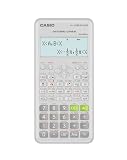
- Advanced scientific calculator with Natural Textbook Display showing expressions exactly as in textbooks.
Version note: as of August 12, 2026, the KiCad site lists version 10.0.4 as a June 2026 release and a 10.0.5 release candidate from July 2026. Confirm the current stable release before installation because release status can change.
Best for: schematics, PCB layout, prototypes, fabrication output, open-source electronics, and education.
The Tool Desk
Outbyte Driver Updater FREEFix the driver behind crashes, sound loss and screen glitchesFind Drivers →Outbyte PC Repair FREEClear out junk files and repair common Windows errorsFree Scan →When it may not be enough: organizations with demanding high-speed constraints, large managed libraries, formal enterprise support, complex collaboration, or strict product-lifecycle controls may choose a commercial EDA platform. KiCad’s no-license-cost advantage does not remove the need for library governance, design review, manufacturing checks, or controlled releases.
11. LTspice: exploring circuit behavior before building hardware
LTspice is a free, high-performance SPICE simulator from Analog Devices. It includes schematic capture, a waveform viewer, device models, and analysis tools for exploring analog-circuit behavior. It is particularly useful for power supplies, amplifiers, filters, transients, operating points, frequency response, and early circuit experimentation.
Before ordering components or assembling a prototype, an engineer can use LTspice to test whether a circuit behaves plausibly across time or frequency. Waveform inspection can reveal startup behavior, overshoot, settling, ripple, gain, phase, and other problems that are expensive to discover after hardware is built.
Best for: analog simulation, power-supply design, transient and AC analysis, waveform inspection, and early circuit exploration.
Outdated Drivers Are Slowing You Down
One free scan finds every outdated or missing driver and matches the right update for your exact hardware.Free scan · exact hardware matchPC Slower Than It Used to Be?
A free scan shows the junk files, broken settings and background clutter dragging Windows down - then fixes them in one click.Free scan · Windows 10 & 11Do not confuse a model with reality: simulation may omit component tolerances, parasitics, layout effects, thermal behavior, noise, EMI/EMC interactions, unavailable device conditions, or nonideal measurement equipment. Use realistic models where possible, vary important parameters, check whether the circuit converges for the right reasons, and validate the design on the bench.
12. Arduino IDE 2: a low-friction route into embedded prototypes
Arduino IDE 2 is Arduino’s actively developed desktop environment for writing and uploading sketches to Arduino boards. Its documented features include autocomplete, syntax highlighting, project navigation, a built-in debugger, and board and library management. Arduino IDE 2 should be distinguished from the legacy Arduino IDE 1.8.19 when following older tutorials or troubleshooting instructions.
The IDE is valuable because it shortens the distance between an idea and a working hardware experiment. Students and engineers can connect sensors, motors, displays, and communication modules, write a small program, upload it to a board, and observe the result without first building a full production embedded toolchain.
Best for: embedded education, rapid prototyping, sensor projects, hardware experiments, robotics, and proof-of-concept work.
Do these 3 things before closing this tab:
1Scan for outdated or missing drivers - takes under a minute2Repair Windows errors before they cause bigger problems3Fix the driver behind crashes, sound loss and screen glitchesProduction boundary: Arduino IDE is not a complete replacement for professional embedded toolchains, controlled build systems, hardware-abstraction frameworks, formal testing, secure update processes, or safety-critical development practices. A prototype that works on a desk may still need a different processor, board support package, compiler workflow, diagnostics, and verification process for production.
When selecting an Arduino development board, match the board to the required voltage levels, processor, memory, peripherals, communication interfaces, power needs, and physical form factor. The IDE supports the development workflow, but the board determines what the prototype can actually measure or control.
Useful hardware alongside engineering apps
Software is only part of an engineering workflow. For students and engineers who need a portable numerical cross-check, a TI-36X Pro scientific calculator is a practical companion for engineering-course mathematics and everyday calculations; it is not a replacement for MATLAB, Python, or simulation software.
For electronics work, PCB prototyping and soldering tools are a natural next step after creating a KiCad design or exploring a circuit in LTspice. Choose equipment based on temperature control, electrical safety, tip availability, workspace ventilation, and the components you actually plan to assemble rather than buying a generic kit solely because it contains many pieces.
Quick wins for a faster PC:
Scan for outdated or missing drivers - takes under a minuteDriver Scan →Clear out junk files and repair common Windows errorsFree Scan →For embedded debugging, a USB logic analyzer can help inspect digital timing and protocols, but sampling rate, input-voltage compatibility, channel count, supported protocols, probe quality, and analysis software matter. It is a debugging aid, not a substitute for an oscilloscope, a multimeter, or a properly designed test plan.
Best Value

- Professional Grade Scientific Calculator With 240 Scientific Functions.
- 10+2-Digit Widescreen HD Display
- It Has 2-Line Display Shows Entry And Calculated Result At Same Time
- Protective Hardcover Prevents Scratches And Dings
- Meets The Ergonomics Design And Offers A Comfortable Grip, Manufacture Recommended Age +3 Years, CPSIA : No Warning Applicable
13. Simulink: system-level modeling and model-based design
Simulink is a graphical block-diagram environment for multidomain simulation and model-based design. It is complementary to MATLAB: MATLAB is often used for numerical work, scripting, data analysis, and algorithm development, while Simulink represents dynamic systems as interconnected blocks that can be simulated and tested over time.
Simulink supports system-level design, simulation, reusable block libraries, project management, automatic code generation, continuous test and verification, and hardware support. That makes it especially relevant to control systems, automotive, aerospace, robotics, embedded systems, and mechatronics. A team can model a controller and plant, inspect behavior under different conditions, test interfaces, and in some workflows generate implementation code or connect to hardware.
Best for: dynamic-system models, control systems, embedded design, model-based workflows, hardware-in-the-loop scenarios, and system verification.
What’s actually slowing this PC down?
Pick the symptom - the matching free tool is one click away.
Do not treat it as a MATLAB replacement: Simulink and MATLAB commonly work together. Simulink can also introduce substantial licensing, model-governance, testing, configuration-management, and review requirements. For safety- or mission-critical work, the model, generated code, requirements, test evidence, and tool qualification questions all need deliberate handling.
How to choose a stack instead of installing all 13
The right question is not “Which apps are the most popular?” It is “What artifact am I responsible for, and how will it be calculated, designed, tested, and released?” Use the following starting points as combinations, not rigid prescriptions.
| Role or workflow | Practical starting stack | Why |
|---|---|---|
| Software, data, or automation engineering | Visual Studio Code, GitHub, Docker Desktop, Jira, and optionally MATLAB | Covers implementation, review, repeatable environments, coordination, and numerical work where needed. |
| Mechanical and product engineering | Fusion 360 or SOLIDWORKS, AutoCAD where drafting or exchange requires it, Ansys Mechanical, and Jira | Separates parametric product design, documentation, analysis, and project coordination. |
| Electrical and electronics engineering | KiCad, LTspice, MATLAB where numerical or signal work is needed, plus GitHub | Covers schematics and PCB output, circuit behavior, analysis, and versioned design support. |
| Embedded and robotics engineering | Visual Studio Code, GitHub, Arduino IDE for prototypes, MATLAB, Simulink, and Docker Desktop where the workflow benefits from reproducibility | Connects firmware, source control, numerical algorithms, dynamic models, and consistent environments. |
| Students and makers | Visual Studio Code, GitHub, KiCad, LTspice, Arduino IDE, Fusion 360, and an engineering calculator | Provides accessible ways to learn code, circuits, PCBs, embedded hardware, mechanical design, and calculations without requiring every enterprise platform. |
| Civil, construction, or facilities work | AutoCAD, Jira where coordination is needed, and discipline-specific analysis or documentation tools | AutoCAD is more relevant to drafting and layouts than to product-focused mechanical assemblies. |
A practical selection checklist
- Identify the deliverable. Is it source code, a calculation, a PCB, a part or assembly, a drawing, a simulation result, a test record, or a release plan? The deliverable usually narrows the tool choice quickly.
- Separate design from validation. CAD creates geometry; Ansys can analyze a model. KiCad creates a board design; LTspice can explore circuit behavior. Neither pair removes the need for design rules, measurements, reviews, and physical tests.
- Check the team standard before choosing individually. A technically excellent tool can create friction if colleagues, suppliers, manufacturing partners, or reviewers cannot open, inspect, or exchange its files.
- Calculate the total access cost. Consider licenses, required toolboxes, cloud plans, storage, training, support, hardware, plugins, and the time required to maintain the workflow. “Free download” and “low total cost” are not always the same thing.
- Test a representative project. Use a real assembly, board, repository, simulation, or release process—not just a tutorial. Check performance, file exchange, version history, export quality, collaboration, and recovery from mistakes.
- Design the evidence trail. Decide where requirements, assumptions, calculations, design files, test results, reviews, and released versions will live. GitHub and Jira can help with software-heavy work, but CAD and simulation teams may also need PDM, PLM, document control, or lab-record systems.
- Keep the stack understandable. Every additional application creates integration, training, licensing, and data-governance work. Choose the smallest set that supports the required engineering process.
Example: how the apps can work together on a robotics project
Suppose a team is developing a sensor-equipped robotic device. The team might begin in MATLAB and Simulink to explore the control algorithm and dynamic behavior. It could prototype sensor and actuator code with Arduino IDE, then move the maintained firmware into a more structured Visual Studio Code project. GitHub would store the firmware, scripts, model-support files, documentation, and review history, while Docker Desktop could standardize the test environment used by each developer and by CI.
KiCad could capture the production schematic and PCB layout. LTspice could investigate the power supply and sensitive analog sections before the board is assembled. A logic analyzer could help inspect digital communication during bring-up. Fusion 360 or SOLIDWORKS could define the enclosure and mechanical assembly, AutoCAD could support a required drawing or layout exchange, and Ansys Mechanical could investigate structural or thermal questions that justify analysis. Jira could connect requirements, design tasks, defects, test results, and release decisions.
Free tools Windows power users keep installed
One-click scans. No signup required.
This example uses all 13 because it describes a broad multidisciplinary project. A typical engineer should not interpret it as a shopping list. Most people need only the subset related to their responsibilities.
Bottom line
The most broadly useful starting point is usually Visual Studio Code plus GitHub for code and traceability, with Jira for coordination and Docker Desktop when repeatable environments matter. Add MATLAB or Simulink for numerical, controls, and model-based work; choose AutoCAD, Fusion 360, or SOLIDWORKS according to the kind of physical design you produce; and use Ansys Mechanical, KiCad, LTspice, or Arduino IDE for the relevant validation, electronics, and embedded tasks.
The strongest engineering stack is not the one with the most applications. It is the smallest set that lets your team create the right artifact, review it, validate it, and preserve enough evidence to reproduce or improve the result.
Frequently Asked Questions
Do all engineers need all 13 applications?
No. The list is a cross-disciplinary toolkit, not a requirement to install every application. A software engineer may need Visual Studio Code, GitHub, Docker Desktop, and Jira, while a mechanical engineer may prioritize SOLIDWORKS or Fusion 360 and Ansys Mechanical.
Recommended Free Tools
What is the difference between MATLAB and Simulink?
MATLAB is primarily a numerical-computing and algorithm-development environment. Simulink is a graphical block-diagram environment for modeling and simulating dynamic systems. They are commonly used together rather than as substitutes.
Should I choose AutoCAD, Fusion 360, or SOLIDWORKS?
AutoCAD is strongest for precision drafting, layouts, and technical documentation. Fusion 360 combines cloud-connected 3D CAD with CAM and fabrication workflows. SOLIDWORKS is primarily a professional parametric mechanical-CAD platform for parts, assemblies, and manufacturing drawings.
Is LTspice enough for PCB design?
LTspice and KiCad serve different but complementary purposes. LTspice simulates circuit behavior, while KiCad creates schematics, PCB layouts, design checks, and fabrication outputs. Neither eliminates the need to test the finished hardware.
The Bottom Line
Bottom line: these 13 applications cover the major engineering workflows, but no engineer needs all of them. Start with the tools that match your deliverables, then add software only when it improves calculation, design, validation, or coordination.
Quick Recap
Product prices and availability are accurate as of the date/time indicated and are subject to change. Any price and availability information displayed on Amazon at the time of purchase will apply.

