
If your Samsung Galaxy wakes or opens things in your pocket, first turn off Lift to wake and Double tap to wake in Settings > Advanced features > Motions and gestures. Then enable Accidental touch protection under Settings > Display. These controls address different parts of the problem: wake gestures light the display, while accidental-touch protection is designed to limit input when the phone is somewhere dark, such as a pocket or bag. Menu names and availability vary by model and software version.
Why does a Galaxy screen turn on in your pocket?
Samsung identifies Lift to wake and Double tap to wake as common settings to check when a phone wakes in a pocket or bag. Lift to wake turns on the display when the phone is lifted or removed from a pocket; double-tap wake can also switch on the screen. Samsung says turning off both may work better than disabling only one. Samsung’s pocket-wake troubleshooting guide and gesture settings guidance describe these controls.
A screen that briefly lights is not necessarily a sign that accidental-touch protection has failed. Samsung Support Canada explains that movement or contact can briefly wake the display even when protection is on; the feature is intended to help prevent unintended interactions, not guarantee that the screen never illuminates. Samsung Canada’s guidance was updated June 13, 2026 and applies to Galaxy phones sold in Canada. Settings may differ by country, carrier, model, or software version.
Turn off wake gestures you do not use
- Open Settings > Advanced features > Motions and gestures.
- Turn off Lift to wake.
- Turn off Double tap to turn on screen or Double tap to wake, depending on the label shown.
With these conveniences disabled, use the Side/Power button or another available interaction to wake the phone. Samsung notes that motion and gesture options vary across models and software versions. If you do not see the menu, search Settings for “Lift to wake” or “Double tap to wake.”
Recommended Free Tools
#1 Best Overall

- Compatible with Samsung Galaxy A17/A16/A26: Please choose the correct model/size of your phone before purchasing; If you find any problem, please contact customer service
- Premium Materials and Unique Design: Case is made of high quality durable PU leather with Shockproof TPU Soft Shell, providing full protection for your phone and screen; Using relief carving technology and flower design makes your phone case stylish, pretty
- Wallet Case with Zipped Pocket: Designed with 6 dedicated card slots for IDs/credit cards and a spacious main compartment for coins. Features an interior side pocket optimized for cash or business cards. Keep all your essentials in one place, eliminating the need for an extra wallet
- Magnetic Closure and Hand Strap: The phone case has a good and effective reversible magnetic buckle, which can open and close the phone case securely; The durable hand strap is very sturdy and convenient to hang the phone on your wrist, Reduces the risk of accidentally dropping your phone
- Kickstand Function and Precise Cutouts: An adjustable stand is ideal for watching movies and video conferencing or surfing the Internet; Precise cutouts and responsive snaps is easy access to all ports cameras, speakers, mics, etc
Enable Accidental touch protection
- Open Settings > Display.
- Turn on Accidental touch protection.
Samsung describes this feature as keeping the screen inactive in a dark place such as a pocket or bag. If a lock icon appears when you want to use the phone in a dark place, swipe the icon left or right to dismiss the protection.
If you have a Galaxy Z Flip
If accidental fingerprint touches or lockouts are part of the problem, check Fingerprint always on. Search for that setting in Settings; depending on your configuration, you may be able to disable it or limit it to selected screens. Samsung includes this as a check in its pocket-wake troubleshooting guidance.
Rank #2

- Perfect Compatibility: This case is compatible with Samsung Galaxy Tab S10 Lite 5G 10.9 inch (Model SM-X400/X406B) 2025 Release, Samsung Galaxy Tab S10 FE 5G 10.9 inch (Model SM-X520/X526B/X528U) 2025 Release, Samsung Galaxy Tab S9 FE 5G 10.9 inch (Model SM-X510/X516B/X518U), Samsung Galaxy Tab S9 11 inch (Model SM-X710/X716B/X718U) 2023 Release tablet. It will NOT work for any other model device
- Premium Material: Built from premium synthetic leather exterior and soft microfiber interior - snug fit, durable and protective. Protect your tablet from scratches, dirt and grime
- S Pen Holder: Secures the S Pen with a magnetic back attachment for wireless charging and includes an elastic band to prevent loss, even with the case on
- Adjustable Angles: This case allows you to adjust the tablet to multiple angles securely. Document Card Pocket is designed for you to store your business cards, bank cards, notes or bills while on the go
- Auto Wake/Sleep: Automatically wakes or puts your new Tab S10 Lite / S10 FE / S9 FE / S9 to sleep when the lid is opened and closed (only when the function of your tablet turned on)
Check Touch sensitivity only if the phone still reacts too easily
Samsung suggests switching off Touch sensitivity under Settings > Display if the screen remains too sensitive. This control is not available on every model. It is intended to improve responsiveness in situations such as using a screen protector, so turning it off may make the display less responsive with some protectors or gloves. Samsung’s troubleshooting page and feature guidance note that settings vary.
Keep a lock screen to prevent unintended access
A PIN, pattern, or fingerprint lock helps prevent someone—or accidental pocket input—from accessing the phone if the display lights. A screen lock does not stop the display itself from waking. Samsung Support Canada notes that a brief light-up from sensed movement or contact can occur even with Accidental touch protection enabled; that does not by itself mean the setting is malfunctioning. Samsung Canada recommends using a secure lock as an additional safeguard.
Rank #3
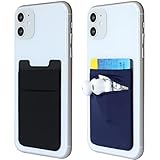
- Highly elastic&Put more-This phone pocket(1black&1navy blue color in the package) is made of stretchy Spandex fabric,which holds the content of the pocket from falling, even when the pocket is upside down.Touch much soft than silicone and leather card holder. Perfect phone wallet for daily usage.Small but very handy&functional for mobile phone.
- Strong adhesive-This stick on wallet is a sleeve applied with self adhesive tape backing for a strong,firm,attachable,long-lasting sticky effect,provides a strong attachment to the surface of your phone.No worry that the card or money may loose.
- Double pocket and protective-With double pocket design,you may put your money, earphone or keys in different pocket.The separate storage makes it much more easy to find your thing and more tidy also more protective.At the same time the pocket can firmly hold all the items you fit in.Brings you convenience.
- Compatible with-iPhone 7/7 Plus/8/8 Plus/X/6/6 Plus/5/5s/5c/4/4s,Google Pixel,Samsung Galaxy S9/S8/S8+/S9+/S7/S6/S5/S4/ S3/S2,Galaxy Note 9/8/5/4/3/2/1,Galaxy A8/A6,LG G6/G5/G6/G5/G4/G3/G2/X/Optimus series,Nexus 6/5/4,HTC M8/EVO/Desire/Sense,iPod Touch, Sony Xperia,HUAWEI P9 Lite,ZET,coolpad and much more! Works with nearly ANY phone case including: Spigen,Ringke,Otterbox,Lifeproof, CaseMate,Belkin,Speck,Apple and more.(PS:for anti-fingerprint glass back phone please apply on a phone case)
- Fashion and convenient- The design is unique brings you fashion feeling. The color black and grey is not easily to get dirty than light color like pink or mint.Perfect color for men.You may put some money,earphone,key,even gum in this card holder.And no more wallet needed when you out.Just take a phone with this card holder. Especially during exercise,go travelling,in the gym,running,doing sport.Indeed a handy&practical small phone wallet for your beloved phone.
Look for other wake triggers if the problem continues
If changing the wake gestures and enabling accidental-touch protection do not resolve the issue, isolate other possible sources before assuming the phone has a hardware fault. Samsung lists several checks in its troubleshooting guidance:
- Case pressure: Remove the case briefly and see whether it was pressing the Side/Power or Bixby button.
- Notifications: Review notification settings. Some apps can turn on the display to show an alert.
- Bixby: Check whether Bixby voice wake-up is enabled and contributing to the behavior.
- Third-party apps: Test the phone in Safe mode. If the issue stops there, consider recently installed or updated apps as possible causes.
- Wireless charging: If the issue happens while charging, test whether it is tied to a third-party wireless fast charger. Samsung advises using Samsung-approved chargers for optimal performance and notes that some third-party fast chargers may cause unexpected wake-ups.
Would a flip or wallet case help?
A model-compatible flip or wallet-style case is an optional physical measure: its cover can shield the display while closed and help keep it dark in a pocket or bag. Samsung Canada recommends this type of cover to reduce accidental touches. It is not a guaranteed fix, and it should fit the exact Galaxy model. Check that the closed cover shields the display without interfering with buttons or fingerprint access; Samsung’s guidance does not compare case brands, durability, or prices. Samsung Canada’s case guidance explains the cover’s intended role.
Quick Recap
Best Value

- Perfect Compatibility: This case is compatible with Samsung Galaxy Tab A11+ / A11 Plus 11 Inch Model (SM-X230/X236/X238) 2025 Release, Samsung Galaxy Tab A9+ / A9 Plus 11 Inch Model (SM-X210/X216/X218) 2023 Release tablet. It will NOT work for any other model device
- Adjustable Angles: This Samsung Tab A11 Plus/A9 Plus Case allows you to adjust the tablet to multiple angles securely
- Auto Wake/Sleep: Automatically wakes or puts your new Tab A11+/A9+ 11 to sleep when the lid is opened and closed (only when the function of your tablet turned on)
- Front Pocket: A front Document Pocket to store your business cards, bank cards, notes, bills or other personal belongs while on the go
- Simple Fashion Design: Built from premium synthetic leather exterior and soft microfiber interior - snug fit, durable and protective. Protect your tablet from scratches, dirt and grime
Rank #4

- Card Case Compatible with Samsung Galaxy S23 FE Fan Edition 2023 6.4 inches Display.Confirm phone model from: Settings - About Phone - Product Name: Galaxy S23 FE
- Jiunai for Samsung Galaxy S23 FE Case has Built-in Card Slot for up to 2 Cards. You can carry Id and Credit Cards with your phone instead of Bulky & Thick Purse
- Jiunai for Galaxy S23 FE Card Holder Case is super protective. Unique Dual Layer design can handle strong impact, shock or scratch. Fully Guard up your phone
- Wallet Case for Samsung Galaxy S23 FE is Sleek & Minimalist. Support Wireless Charging for your New phone. Just need to take all the cards out ahead(Please do!)
- Jiunai for Samsung S23 FE Case offers precise cutouts for Speakers, Cameras and Buttons. Easy Access with case on
Product prices and availability are accurate as of the date/time indicated and are subject to change. Any price and availability information displayed on Amazon at the time of purchase will apply.

