
Crashes, No Sound, or Screen Glitches?
Random freezes, missing sound and display glitches usually trace back to one bad driver. Find and replace yours safely.Free scan · under a minutePC Slower Than It Used to Be?
A free scan shows the junk files, broken settings and background clutter dragging Windows down - then fixes them in one click.Free scan · Windows 10 & 11A USB Guitar Link is an audio interface; Guitar Rig 2 is guitar-processing software. If you already have both, connect the interface, select it as Guitar Rig 2’s input, and choose an audio output for listening. The exact steps depend on the interface model and computer, and the old bundle references do not prove that every USB Guitar Link included a Guitar Rig 2 license.
What “USB Guitar Link” and Guitar Rig 2 mean
“USB Guitar Link” can refer to a USB guitar interface, not to one universal cable or software package. The interface carries your guitar’s signal to the computer; Guitar Rig 2 processes that signal in software so you can hear it through a selected output.
One identifiable interface is the Behringer GUITAR LINK UCG102. Behringer lists a quarter-inch instrument input, built-in USB connection, headphone output with volume control, clip LED, and Hi/Lo input-level switch. Check the label or product model before applying UCG102-specific guidance to another device.
How to route a USB Guitar Link through Guitar Rig 2
The basic signal path is guitar → interface → Guitar Rig 2 → audio output. The input and output may be different devices: for example, the interface can receive the guitar while the computer’s speakers or another audio device plays the processed sound.
#1 Best Overall
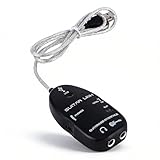
- Stereo Headphone output lets you jam with your computer and can also be used for monitoring with active monitor speakers.
- Easy Plug and Play Installation. USB bus powered--Requires no external power.
- USB Guitar Link Cable is a professional tool that enables you to turn your PC computer into fantastic working on which you can use the classic effects, in the studio as well as on stage
- Variable-speed file playback function for MP3, WAV, AIFF audio files for easy learning and practicing
- Support OS: (SP2) and Vista,for OS 8.5 or
- Connect the guitar and interface. Plug the guitar into the interface’s instrument input, then connect the interface to the computer. For a UCG102, use the Hi/Lo switch and clip indicator to help manage the input level; the correct setting depends on the guitar’s signal and how strongly you play.
- Check device recognition. Behringer’s UCG102 installation guide says the device can be recognized as a generic USB audio device for basic connection without installing a driver. That is guidance for the UCG102, not a guarantee for every USB guitar interface.
- Select an input in Guitar Rig 2. Choose the USB interface as the audio input. In one individual Windows setup account, the device appeared as “USB PnP Sound Device”; that name is an anecdotal example, not a universal device label or guaranteed menu path. (See the Guitar Rig 2 setup account.)
- Select an output separately. Choose where you want to hear the processed guitar, such as the interface’s headphone output or the computer’s playback device. The same setup account notes that output can default to the USB device’s headphone jack and recommends checking the audio settings and routing panels if you hear nothing.
- Address latency if you are on Windows. For UCG102 real-time use, Behringer recommends installing its included USB AUDIO driver to reduce latency. The installation guide says to consult the system requirements for the relevant drivers and applications; its historical compatibility statements do not establish support for current Windows or macOS releases.
If the input meter does not respond, check the guitar connection, selected input, and interface level. If the input responds but you hear no processed sound, check the selected output and routing. Exact labels and available choices vary by interface, operating system, and software configuration.
Was Guitar Rig 2 included with a USB Guitar Link?
Not necessarily. Behringer’s UCG102 software guide lists Native Instruments Guitar Combos, Audacity, and a Behringer USB audio driver on one disc, with energyXT2 Compact on a second CD. It does not list Guitar Rig 2 as an included UCG102 item. A separate individual setup account mentions a Guitar Rig 2 setup program on a supplied CD, but that account does not establish what came with every interface or bundle.
Rank #2

- [PLUG AND PLAY]: Experience the hassle-free USB bus-powered setup, no external power required, and instantly start your music journey
- [STEREO HEADPHONE OUTPUT]: Whether you are playing with a computer or using active speakers for monitoring, enjoy immersive stereo sound throughout the whole process
- [VARIABLE SPEED FILE PLAYBACK]: Support MP3, WAV, AIFF formats, easily adjust the speed, and perfectly adapt to learning and practice needs
- [PROFESSIONAL-LEVEL MUSIC TOOLS]: Load your computer with classic sound effects, whether it is a recording studio or a stage performance, instantly transform it into a professional music workstation
- [WIDE OPERATING SYSTEM COMPATIBILITY]: Fully compatible with Windows XP, Vista and Mac OS 8.5 and above, transcending platform restrictions
The UCG102 guide says, “Your UCG102 is compatible with both PC and Mac computers.” That is a statement from a historical guide, which also directs users to observe the system requirements for the included drivers and applications. It should not be read as confirmation of compatibility with current operating systems.
No consulted source verifies whether Guitar Rig 2 can currently be downloaded or activated, whether a license transfers with used hardware, or whether the software runs on current Windows or macOS releases. Owning an interface does not by itself establish ownership of a software license. Avoid unofficial installer mirrors; verify software entitlement and compatibility through the relevant rights holder before relying on an old disc or used listing.
Quick wins for a faster PC:
Fix the driver behind crashes, sound loss and screen glitchesFind Drivers →Repair Windows errors before they cause bigger problemsFix Now →Rank #3
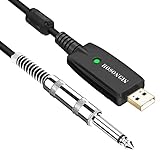
- Plug & Play Setup: Use this USB Guitar Cable by plugging the 1/4" TS plug into your guitar and the USB interface into your computer, converting your computer into a guitar amplifier and recording system without the need for any additional hardware or driver installation
- Durable Construction: Heavy duty metal housing 6.35mm 1/4" TS plug with solid craftsmanship, featuring spring protection at the connection point to prevent breaking and extend service life
- Professional Quality Cable: Precisely machined and carefully hand assembled 10-foot cable designed for dependable performance in guitar recording and amplification applications
- Wide System Compatibility: Compatible with Windows XP/VISTA/Win 7/Win 8/Win 10/Mac OS X System and works with most recording software including Guitar Combo Amps, Audacity, Amplitude, and Yousician
- High-Quality Sound Conversion: Features an anti-jamming magnetic ring to reduce noise and a built-in 16BIT / 44.1KHZ digital-analog conversion chip that improves sound authenticity and delivers high definition signal without hum or distortion when connecting guitar to USB
Choosing an interface if you do not have one
Before buying, confirm the physical connector and platform compatibility you need, how the device connects to the computer or mobile device, whether it provides a headphone output, and whether input-level controls are available. Treat any bundled software as a separate license question: a product listing or old package contents do not establish that a legacy Guitar Rig 2 license is included or transferable.
The IK Multimedia iRig USB is a distinct, currently marketed guitar/bass interface option. Its manufacturer lists USB-C, headphone and amp outputs, and compatibility with Mac, PC, iPad, and iPhone 15, plus TONEX and AmpliTube applications. The manufacturer describes a separate adapter need for Lightning devices. These product details do not establish compatibility with Guitar Rig 2; check the seller’s current listing for included apps, adapters, and platform requirements.
Rank #4

- [ Widly Used ] The guitar cable is widly compatible with mainstream operating systems (Windows/macOS) and PS2/3/4/XBOX.Compatible with most eletronic instruments such as guitar.
- [ Plug & Play ] A high-performance digital conversion cable designed for electric guitars/basses, enabling direct connection between 6.35mm audio interfaces and USB devices.Supports recording, live streaming, teaching, and other scenarios.
- [ High-Fidelity Sound Quality ] Signal-to-Noise Ratio (SNR) ≥90dB, 48kHz sampling rate, low latency (≤5ms).Gold-plated connectors resist oxidation and minimize signal loss.
- [ Portability & Ease of Use ] 3.05-meter cable length with lightweight design.
- [ Enjoy Music ] USB Guitar Cable record high-quality digital tracks, ideal for content creators, aspiring artists, or anyone ready to amplify their sound online!
Do not confuse the UCG102 with Behringer’s similarly named GUITAR 2 USB. Electori’s page identifies GUITAR 2 USB as a different model and marks it discontinued; specifications shown for that product do not apply to the UCG102. Electori’s GUITAR 2 USB listing
Quick Recap
Best Value

- 【Excellent Compatibility】- Our guitar to pc interface is design-driven and ensures heightened functionality across different platforms. It works seamlessly with (SP2) and Vista, OS 8.5, and above for optimal performance. USB Guitar Link Cable is a professional tool that enables you to turn your PC computer into fantastic working on which you can use classic effects.
- 【Adaptable Speed Playback】- Discover different modes of learning and practicing with our guitar recording equipment. Designed to work with mp3, wav, and aiff audio files, it caters to distinct learning , putting a fun to mastering guitar.
- 【Simplified Setup】- Experience a hassle- installation with our rocksmith cable. Its excellent plug and play feature eliminates need for external power, making setup process a breeze.
- 【High-output Stereo Headphones】- Jam out with your computer using our pc . Suitable for monitoring with active speakers, allowing you to go or work in unison with your device. Stereo Headphone output lets you jam with your computer and can also be used for monitoring with active monitor speakers.
- 【High-performing Professional Tool】- Turn your PC into a dynamic setting with guitar interface for pc. Its functionality transforms your gadget into an impressive work platform for classic effects or use in studio. No need to install extra drivers, just plug usb connector to your computer or , your computer install all necessary drivers automatically in munites, then cable is ready for working.
Product prices and availability are accurate as of the date/time indicated and are subject to change. Any price and availability information displayed on Amazon at the time of purchase will apply.
The Tool Desk
Outbyte Driver Updater FREEFix the driver behind crashes, sound loss and screen glitchesFind Drivers →Outbyte PC Repair FREEClear out junk files and repair common Windows errorsFree Scan →
