
What’s actually slowing this PC down?
Pick the symptom - the matching free tool is one click away.
iTechGuides is reader-supported. When you buy through links on our site, we may earn an affiliate commission. As an Amazon Associate I earn from qualifying purchases. Learn more
To check if your hotel room has hidden cameras, combine a physical inspection of private areas with a flashlight lens-reflection check, a dark-room light check, and—when practical—a cautious Wi-Fi check. No consumer method proves a room is camera-free: wired, powered-off, local-storage, cellular, and concealed cameras can evade every scan.
A sensible first sweep takes about five to 10 minutes and does not require specialist equipment. The purpose is to identify credible warning signs, not to treat every smoke detector, charger, mirror, or unfamiliar network device as evidence of surveillance.

Key takeaways
- Prioritize the bathroom, shower, toilet, bed-facing objects, and changing areas because privacy expectations and camera sightlines are highest there.
- A flashlight can reveal a concentrated lens reflection, but ordinary glass, polished plastic, metal, and dust can create similar glints.
- A Wi-Fi scan may reveal a transmitting camera only when the camera is visible on the network you can inspect; it will not reliably find wired, cellular, powered-off, or local-storage cameras.
- RF detectors identify some radio-frequency emissions, not cameras themselves, and can miss non-transmitting devices while producing false positives from ordinary hotel electronics.
- If you find a credible camera in a private space, photograph it safely, avoid touching or resetting it, leave if appropriate, and contact local police, management, and the booking platform.
How do you check if your hotel room has hidden cameras?
Start with a physical sweep of the bathroom and bedroom, then inspect objects aimed at the bed, shower, toilet, or changing area. Turn off the lights to look for unusual indicator lights, use a flashlight from several angles to look for lens reflections, and optionally check for infrared light with both phone cameras. A network check can add information, but a clean result is not proof that no camera exists.
The five-to-10-minute arrival routine
- Move personal items temporarily. Keep luggage, clothing, and other private belongings away from likely camera sightlines while you inspect the room.
- Begin in the bathroom. Check the shower, toilet, mirror area, ceiling, vents, and any object with a direct view of the room. Then check the bedroom, especially the bed-facing wall, nightstand, ceiling, television, and dressing area.
- Inspect unfamiliar or modified objects. Look for tiny holes, lens-like glass, unusual seams, duplicated equipment, unexplained cables, loose fittings, or an object that appears newly installed or poorly aligned.
- Check the line of sight. A device facing a blank wall is less concerning than a pinhole aligned with a bed or shower. Suspicion should come from the combination of placement, modification, power, and an unexplained opening—not from the object’s category alone.
- Turn off the room lights. Look for visible status lights or infrared illumination. Do not assume that the absence of a light means the room is clear.
- Perform a flashlight check. Scan likely openings and reflective surfaces slowly from multiple angles, holding the flashlight close to your eyes or face.
- Optionally check infrared. Test your phone against a television remote first, then inspect suspicious devices in the dark with both the front and rear cameras if possible.
- Use a Wi-Fi check only when its limits are understood. An unfamiliar device on an accessible network is a lead for investigation, not proof of a camera.
UCSB Police guidance on hidden cameras recommends visual inspection, turning off lights, using a light to look for lens reflections, and checking Wi-Fi-connected devices.
Popular on Amazon
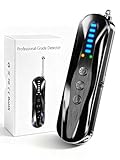
- 【Wide-Area Wireless Scan】Think your meeting is private? In larger meeting rooms or hotel spaces, scanning for hidden devices often takes time as you walk around until a signal becomes clear. As your camera detector spy camera finder, its extendable antenna helps steady RF pickup, giving a better sense of direction in wide areas. With adjustable sensitivity, you can avoid missing WiFi cameras. And for non-WiFi pin-hole cameras, the infrared scan reveals disguised tools like a prepared privacy pen.
- 【Infrared Scan】Ever wonder what’s watching you in a new hotel room? Tiny pin-hole cameras can hide in smoke detectors, clothing hooks, chargers, or fixtures you’d never notice. In a completely dark room, the infrared scan in this camera finder hidden camera detector makes hidden lenses reflect as a bright spot—revealing what the eye can’t see. Sweep mirrors, vents, picture frames, chargers, and wall fixtures; it also works as a hidden bug and camera detector to give you peace of mind before you settle in.
- 【Anti-Theft Alarm Mode】Don’t Let Danger Catch You Off Guard. While you’re asleep in a hotel room, hang this anti spy detector on the door handle—any attempt to open the door triggers an instant alert, waking you before someone gets close. And when you’re out and your luggage isn’t always in sight, attaching it to your suitcase adds protection; even slight movement sets off a loud alarm to alert you to theft. Paired with your hidden camera finder, it keeps you aware and protected wherever you go.
- 【Anti-GPS Tracking Scan】Is your car truly safe? GPS trackers can cling to your car with magnets and quietly send out your location. As your gps tracker detector, this device detects the magnetic fields where a tracker is attached and the signals its rf detector picks up when your location is shared. Sweep hiding spots—under seats, along bumpers, near the inside edge of tires. Before you drive, this spy camera detector helps you catch hidden trackers early and avoid someone following you.
- 【Pocket-Size & Long Battery Life】Every hotel room and office you enter should feel safe. With up to 25 hours of battery life and a true pocket-size build, this device stays ready all day—no hunting for outlets during trips or long workdays. Use it as your bug detector & camera finder, recording device detector, or privacy pen hidden camera detector. Slip it into your pocket for hidden camera detectors for travel, quick hotel scans, or fast checks of unfamiliar offices—giving you steady peace of mind wherever you go.
Where should you look first?
Look first where people reasonably expect privacy and where a device could obtain a useful view: the bathroom and shower, the bedroom and bed-facing objects, and the dressing or changing area. After those zones, inspect ceiling and wall fixtures and electronics that face private spaces.
| Priority | Areas or objects | What makes the item worth checking |
|---|---|---|
| 1 | Bathroom, shower, toilet, and mirror area | A direct view toward a private activity, especially from an unexplained opening or powered object. |
| 2 | Bed, nightstands, alarm clocks, and digital displays | An object aimed toward the bed, a pinhole, unusual glass, or wiring that does not match its apparent purpose. |
| 3 | Dressing and changing areas | A camera-like opening positioned toward where clothing is changed. |
| 4 | Smoke detectors and motion sensors | Modification, duplication, poor alignment, or an unexplained lens-like element. Do not remove or open them. |
| 5 | Chargers, USB adapters, outlets, power strips, and vents | An unfamiliar device, unexplained power connection, or opening aimed at a private area. |
| 6 | Televisions, streaming boxes, smart speakers, artwork, shelves, and decorations | A moved or added object, visible lens, unusual accessory, or device that appears capable of recording. |
Many normal hotel devices contain sensors, microphones, LEDs, or reflective surfaces. An ordinary smoke detector is not suspicious merely because it is a smoke detector. An object becomes more concerning when its placement, physical alteration, power source, and apparent view do not make sense together.
UCSB Police crime-prevention guidance identifies unknown, modified, or unclaimed electronics—particularly powered objects—as items to inspect, with bedrooms, bathrooms, and changing rooms as priority areas.
The Tool Desk
Outbyte Driver Updater FREEFix the driver behind crashes, sound loss and screen glitchesFind Drivers →Outbyte PC Repair FREEClear out junk files and repair common Windows errorsFree Scan →How do you perform a physical inspection safely?
A physical inspection is the most useful free method because it can find a camera regardless of whether the device transmits a signal. The inspection is visual and non-destructive: look at the object in place, compare it with normal room equipment, and photograph anything genuinely suspicious rather than dismantling it.
- Examine tiny holes, glass or lens-like surfaces, unusual seams, and objects aimed toward private areas.
- Follow power cables and ask whether each cable matches the device’s apparent function.
- Compare an unfamiliar item with the same equipment elsewhere in the room or with photographs of the property’s normal equipment, if those photographs are available.
- Check whether an object appears newly installed, moved, duplicated, loose, or inconsistent with the room’s other fixtures.
- Photograph a credible concern in place before touching anything, provided doing so is safe.
Do not pull fixtures from walls, open electrical outlets, remove ceiling devices, dismantle a smoke detector, or interfere with fire-safety equipment. A visual sweep can identify obvious concealment, but it cannot provide forensic clearance.
How does the flashlight lens-reflection check work?
A flashlight can sometimes make a camera lens produce a small, sharp glint because curved optical surfaces reflect light toward the observer. The flashlight test is a screening technique, not confirmation that a camera is present or absent.
- Reduce or switch off the room lighting.
- Hold the flashlight close to your face or eyes so the light and your viewing angle are close together.
- Slowly scan suspicious objects, openings, and surfaces from different angles.
- Look for a concentrated pinpoint reflection rather than a broad shine.
- Recheck any glint from another angle and ask whether ordinary glass, polished metal, plastic, trim, or dust explains it.
The flashlight method can fail when a lens is recessed, covered, angled away, hidden behind a surface, too small to distinguish, or not powered. A camera can still record to local storage when it is not transmitting or emitting visible illumination. UCSB Police’s written guidance recommends using a phone flashlight to look for reflective lenses, particularly in darkness.
Recommended Free Tools
Can a phone camera detect infrared hidden cameras?
A phone camera may reveal infrared illumination from some night-vision cameras in a dark room, but phone models differ and many cameras do not use infrared illumination. Treat a glowing dot as a lead that needs physical verification, not as proof of a hidden camera.
- Point a television remote at the phone’s camera and press a button. If the phone displays a bright or purplish light from the remote, that camera can see at least some infrared light.
- Turn off the room lights and inspect suspicious objects with the phone camera.
- Try both the rear-facing and front-facing cameras. One camera may filter infrared while the other displays it.
- Investigate any unusual glowing point and compare it with ordinary status LEDs or reflections.
The test may miss cameras that use no infrared, use a wavelength the phone does not display, are powered off, or have no visible night illumination. The camera app can also change exposure, color, and sensitivity, so phone infrared screening is an optional supplement to physical inspection.
Do Wi-Fi scans find hidden cameras?
A Wi-Fi scan can identify an unfamiliar connected device only when the camera is transmitting over the local network and the guest’s scan can see that device. Hotel guest networks often isolate clients or contain many legitimate devices, so an unfamiliar network entry is a reason to investigate—not proof of surveillance.
Also popular on Amazon

- The new R4w continues Uniden’s tradition of leading innovation. featuring Extreme Long-Range Record Shattering Performance, Blackfin DSP (Digital Signal Processor), with visual and voice alerts on an color OLED display. Also, Wi-Fi, Bluetooth, GPS, R/TACH app support, and our Speed and Red-Light database included.
- BUILT-IN GPS WITH AUTO MUTE MEMORY - The R4w can remember and automatically mute false alerts (such as retail store door alarm), along your routes so you never have to listen to the same false alert twice.
- MULTI-COLOR OLED DISPLAY - An easy-to-read display allows for more useful information to be displayed at once, improving your overall situational awareness.
- VOICE ALERTS - Voice alerts provide clear communication allowing for hands-free operation. Voice alerts are programmable to fit your style so you can keep your eyes on the road with no distractions.
- ADVANCED K/KA BAND FILTERING - The R4w has the best K/KA Band filtering resulting in fewer false alerts from blind-spot monitoring and collision avoidance systems.
When a network check can help
- You are connected to the relevant local network.
- The suspected camera is an IP camera transmitting over Wi-Fi.
- The network exposes client devices to the scan.
- The camera is not on a separate VLAN, guest network, or hidden network.
- The device has not been configured to conceal its identity.
When a network check will miss a camera
- The camera records to an SD card or other local storage.
- The camera is wired rather than wireless.
- The camera uses cellular service or another network.
- The camera is powered off or transmits only intermittently.
- The hotel network prevents guests from seeing other clients.
A hotel network may show legitimate access points, televisions, room-control systems, printers, smart devices, and other guests’ equipment. Avoid logging into, probing, resetting, or attempting to access an unfamiliar device. The 2022 research paper on wireless hidden-camera detection describes network-traffic analysis as a possible detection route while noting that commercial spy-camera detectors can be difficult for ordinary users to operate.
Free tools Windows power users keep installed
One-click scans. No signup required.
Do RF detectors work in hotel rooms?
RF detectors can locate some active wireless transmitters, but RF activity is not the same thing as a camera. An RF detector is a supplementary locator that can produce false positives and miss cameras that do not transmit.
| Method | Can help with | Important blind spots or false positives | Practical verdict |
|---|---|---|---|
| Physical inspection | Any camera that can be seen or whose concealment changes an object | Requires access, time, and careful observation | Best first step; free and broadest in scope |
| Flashlight reflection | Some visible or partially concealed optical lenses | Ordinary reflective materials; recessed, covered, angled, or unpowered lenses | Useful screening layer, never proof |
| Dark-room check | Visible status lights and some night-vision illumination | Many cameras show no visible light | Fast supplement |
| Phone infrared check | Some infrared night-vision emitters | Phone filtering, camera design, non-IR cameras, powered-off devices | Optional lead, not confirmation |
| Wi-Fi scan | Some transmitting IP cameras visible on the accessible network | Local storage, wired or cellular cameras, separate networks, client isolation, intermittent transmission | Useful only with network visibility |
| RF detector | Some active wireless or cellular transmitters | Wi-Fi, Bluetooth, phones, routers, access points, smart TVs, non-transmitting and local-storage cameras | Supplementary signal locator, not a camera detector |
| Professional counter-surveillance sweep | Higher-risk, investigative, or sensitive situations | Cost, availability, provider competence, and scope | Consider qualified providers when the risk justifies it |
RF detectors can miss wired cameras, cameras recording to memory cards, devices that transmit only periodically, powered-off devices, low-power or shielded transmitters, and equipment outside the detector’s effective range. RF detectors can also react to ordinary hotel electronics. Consumer reporting on RF scanning notes that self-contained cameras recording locally may not emit a signal for an RF detector to find.
If buying equipment makes sense for repeated sensitive travel, evaluate the detection type, frequency coverage, filtering controls, false-positive behavior, continuous versus intermittent transmission detection, battery life, return policy, warranty, and independent technical documentation. Do not accept a product claim that a negative scan proves a room is camera-free.
What should you check on smart TVs, speakers, and room technology?
Modern hotel equipment can include microphones, motion sensors, status lights, and video-call accessories without being a concealed camera. Check whether a smart TV has a built-in camera or attached video accessory, whether a smart speaker is disclosed, and whether an unusual USB device or adapter is plugged into hotel equipment.
Do not unplug essential hotel systems or interfere with fire alarms, access-control systems, or medical devices. If an installed device is concerning, photograph it and ask management to identify the device and its function in writing. An explanation should account for the object’s location, lens or opening, power connection, and intended purpose.
What should you not do?
- Do not dismantle smoke alarms or fire-safety equipment. Tampering can create a safety hazard and may violate building rules.
- Do not open outlets or pull wall fixtures. Electrical injury and property damage are greater risks than an uncertain scan.
- Do not reset, connect to, log into, or remove a suspected device. Those actions may alter evidence or create legal complications.
- Do not confront a host, employee, or suspected installer. Leave and use police or other appropriate authorities when a credible device is found.
- Do not treat every network device or RF alert as a camera. Hotels contain many legitimate wireless and networked devices.
- Do not upload intimate images or identifying evidence publicly. Preserve original files and provide them to investigators or legal counsel.
- Do not make the mirror “fingernail test” your evidence. A reflection test is not a reliable forensic determination that a mirror is two-way.
What should you do if you find a hidden camera?
If a credible camera appears to record a bedroom, bathroom, shower, toilet, or changing area, prioritize safety and evidence preservation over further searching. Photograph the device in place if safe, avoid handling it, leave the room when appropriate, contact local police, and notify the property and booking platform.
If there is immediate danger
- Leave the room and move to a public or otherwise safe location.
- Do not confront a suspected installer, host, or employee.
- Call emergency services if there is an immediate threat.
- Ask for a different room or leave the property if you do not feel safe.
If there is no immediate danger but the device is credible
- Photograph or video the device in place, including its position, surrounding objects, wiring, and apparent field of view.
- Record the room number, property address, date, and time.
- Keep the reservation confirmation, payment record, check-in details, and room assignment.
- Save texts, emails, platform messages, and communications with management. Preserve original files without deleting or editing them.
- Do not remove a memory card, destroy the device, throw it away, or cover the lens before documenting it unless temporary covering is necessary for immediate privacy and can be done without creating a safety or evidence problem.
- Contact the local police department and request a report or incident number.
- Notify hotel management, the property manager, and the booking platform through its safety channel. Ask for written confirmation.
UCSB Police recommends photographing a discovered camera if safe, removing yourself from the situation, filing a police report, and seeking support. If intimate images may have been recorded or distributed, consider speaking with a lawyer familiar with the jurisdiction. If you are abroad, contact local authorities and, when appropriate, your country’s consulate for practical assistance.
If the object is ambiguous
Photograph the object without touching it, request a room change, and ask management to identify the equipment in writing. An ambiguous object is not proof of surveillance, but you do not need to remain in a room that makes you feel unsafe while the property investigates.
PC Slower Than It Used to Be?
A free scan shows the junk files, broken settings and background clutter dragging Windows down - then fixes them in one click.Free scan · Windows 10 & 11Crashes, No Sound, or Screen Glitches?
Random freezes, missing sound and display glitches usually trace back to one bad driver. Find and replace yours safely.Free scan · under a minuteWhat is the difference between hotel-room and vacation-rental camera rules?
Hotel rooms and vacation rentals are not governed by one universal camera policy. Airbnb’s current policy for homes prohibits indoor security cameras and recording devices, including devices that are turned off or disconnected, while hotel listings and public common areas can have separate rules.
Also popular on Amazon
According to Airbnb’s current camera policy, Airbnb prohibits hidden cameras and indoor recording devices in homes, including bedrooms, bathrooms, hallways, living rooms, and guest houses. The policy took effect globally on April 30, 2024. Airbnb’s rules for outdoor devices include disclosure and location restrictions, and Airbnb’s policy update explains the separate treatment of some hotel common areas, such as lobbies, hallways, and restaurants.
| Stay type or location | How to interpret the issue | First reporting route |
|---|---|---|
| Hotel bedroom or bathroom | Hotel platform policy may not control the legal question. Privacy, voyeurism, audio-recording, criminal, and civil rules vary by jurisdiction. | Local police and hotel management; preserve booking records and evidence. |
| Airbnb home interior | Airbnb’s policy prohibits indoor security cameras and recording devices in homes, even when switched off or disconnected. | Local police when credible or urgent, plus Airbnb’s safety/reporting channel. |
| Hotel lobby, hallway, or restaurant | Public or common areas have different privacy expectations and may be covered by disclosed security systems or separate platform rules. | Management, platform, and local authorities depending on the facts. |
| Outdoor rental device | Outdoor cameras may be permitted under disclosure and placement restrictions on a platform, but local law still matters. | Platform and local authorities if the device is hidden, undisclosed, or threatening privacy. |
Do not state that every camera in every hotel room is automatically illegal everywhere. The legal analysis can depend on the jurisdiction, location, whether audio was recorded, consent, intent, and the applicable statutes.
When is a professional counter-surveillance sweep worthwhile?
A professional sweep may be reasonable for executives, public figures, legal investigators, people facing stalking or harassment, sensitive business travel, repeated incidents, or a location where a documented technical inspection matters. A professional service is usually excessive for an ordinary one-night stay and does not become trustworthy merely because it uses expensive equipment.
Quick wins for a faster PC:
Clear out junk files and repair common Windows errorsFree Scan →Fix the driver behind crashes, sound loss and screen glitchesFind Drivers →Repair Windows errors before they cause bigger problemsFix Now →Before hiring a provider, ask for credentials, geographic availability, a written scope, the equipment and detection methods used, reporting details, evidence-handling or chain-of-custody procedures, and clear pricing. A qualified professional should explain what the inspection can and cannot establish. Consumer gadgets do not provide equivalent assurance.
Printable hidden-camera check checklist
- ☐ Bathroom, shower, and toilet checked.
- ☐ Bed-facing objects and nightstands checked.
- ☐ Dressing or changing area checked.
- ☐ Smoke detectors, motion sensors, vents, outlets, chargers, and adapters visually inspected without tampering.
- ☐ Unfamiliar or modified electronics identified.
- ☐ Lights-off scan completed.
- ☐ Flashlight reflection scan completed from several angles.
- ☐ Phone infrared check attempted, if desired, with both phone cameras.
- ☐ Wi-Fi scan interpreted cautiously, if the network is meaningfully inspectable.
- ☐ Suspicious item photographed in place.
- ☐ Room exited and police, management, or the platform notified when appropriate.
Frequently Asked Questions
Can a hotel Wi-Fi scan prove that a room has no hidden camera?
No. A Wi-Fi scan can miss cameras using local storage, wired connections, cellular service, another network, intermittent transmission, or a hotel network that isolates guest devices. A clean scan cannot certify privacy.
Can a phone detect every hidden camera?
No. A phone may show infrared illumination from some night-vision cameras, but phone cameras differ in infrared filtering and many hidden cameras use no visible infrared light. Physical inspection remains the primary method.
Should I remove a suspected hidden camera from a hotel room?
No. Photograph the device in place if safe, avoid dismantling or resetting it, leave if necessary, and contact local police and property management. Handling the device can damage evidence or create safety and legal problems.
Are hidden cameras illegal in hotel rooms everywhere?
Not automatically under one universal rule. Legality varies by jurisdiction and can depend on the location, whether audio was recorded, consent, intent, and applicable privacy or criminal statutes. A camera aimed at a bedroom or bathroom can represent a serious privacy violation and should be reported.
The Bottom Line
Bottom line: Use your eyes first, then add a flashlight, dark-room, phone infrared, and—when its limitations are understood—network check. No negative scan guarantees that a hotel room is camera-free. If you find a credible device in a private space, do not dismantle it: document it safely, leave if appropriate, and report it to local police, the property, and the booking platform.

