
Free tools Windows power users keep installed
One-click scans. No signup required.
iTechGuides is reader-supported. When you buy through links on our site, we may earn an affiliate commission. As an Amazon Associate I earn from qualifying purchases. Learn more
Solutions for providing internet access to rural areas include fiber, cable, fixed wireless, 4G/5G home internet, low Earth orbit satellite, geostationary satellite, cooperatives, and community networks. The best choice depends on the exact address, terrain, population density, backhaul, budget, required performance, installation conditions, and whether service is needed immediately or can wait for construction.
Rural connectivity is not only a question of finding a signal. A workable solution must also account for middle-mile backhaul, household affordability, equipment, power, maintenance, digital skills, device access, network capacity, and outage recovery.
Key takeaways
- Fiber is generally the strongest long-term option for capacity, latency, upload performance, and upgrade potential, but remote extensions can be expensive and slow to build.
- Fixed wireless and local WISPs can serve rural homes faster than buried fiber when a tower, suitable backhaul, and usable radio path exist.
- 4G/5G home internet is address- and capacity-dependent: a strong phone signal does not guarantee a reliable home gateway connection.
- Low Earth orbit satellite can reach many isolated properties without a nearby terrestrial network, while geostationary satellite has substantially higher latency and may impose tighter data limits.
- Public Wi-Fi, libraries, school buses, and telehealth centers are valuable bridges, but they do not replace a private household connection.
- For farms, clinics, businesses, and emergency services, a primary connection with cellular or satellite failover may be more important than the highest advertised download speed.
What does rural internet access include?
Rural internet access includes more than technical availability. A complete assessment separates five related questions:
| Measure | What it means | Why it matters |
|---|---|---|
| Availability | A provider can technically offer service at the location. | A nearby line, tower, or coverage polygon does not prove that the exact premise is serviceable. |
| Adoption | The household, business, school, or clinic actually subscribes. | People may remain offline because of cost, installation barriers, lack of devices, or limited digital skills. |
| Affordability | The customer can sustainably pay for service and equipment. | A connection that works technically but cannot be retained is not a durable access solution. |
| Performance | The connection meets the user’s needs for work, education, healthcare, business, or entertainment. | Upload speed, latency, consistency, and data policies can matter more than headline download speed. |
| Reliability and equity | The service remains usable during congestion, weather, outages, and power interruptions, including for underserved groups. | Tribal lands, low-income households, people with disabilities, and isolated communities may need targeted planning and support. |
According to the U.S. Department of Agriculture’s rural broadband overview, connectivity supports agriculture, manufacturing, forestry, healthcare, education, and rural economic activity. USDA coverage comparisons can vary by FCC dataset, speed threshold, geography, and reporting date, so a broad rural statistic should not be treated as proof that a particular address can order service.
Popular on Amazon
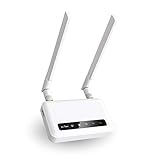
- 【ADVANCED VERSION OF SPITZ (GL-X750)】Comes with the redesigned PCBA and optimized antennas to improve the 4G performance. Spitz (GL-X750V2) with the EC25-AFFA CAT4 module is now an AT&T certified device (AT&T IoT Data Plans) (refer to the user guide PDF), the coverage of Spitz is improved, especially for rural places.
- 【Dual-band 4G LTE NETWORK- EMERGENCY BACKUP SOLUTION】Comes with micro sim card slot, transfers 4G LTE signal to 300Mbps(2.4G)+433Mbps(5G) Wi-Fi. Average 4G speed is 15-20Mbps, compatible with both AT&T and T-Mobile telecommunication companies. (Note: Depending on your carrier and location, the speed performance may be different.)
- 【KEEP YOUR INTERNET SAFE】OpenVPN & WireGuard pre-installed, compatible with 30+ VPN service providers. Cloudflare supported. Increase your privacy and security by preventing eavesdropping and manipulation of DNS data via man-in-the-middle attacks.
- 【OPEN SOURCE & PROGRAMMABLE, LARGER STORAGE】OpenWrt/LEDE pre-installed, unlocked open source. Extremely extendable in functions, backed by software repository. 128MB RAM, 16MB NOR Flash, up to 128GB TF slot, USB 2.0 port, dual Ethernet ports (10/100M), with two SMA Antenna.
- 【PACKAGE CONTENT】 GL-X750V2 (Spitz) 4G LTE smart router with 2-year warranty (Quectel EC25-AFFA 4G module pre-installed) X1, Power adapter (US Plug) X1, Ethernet cable X1, user manual X1.
Why is rural broadband difficult to deploy?
Rural broadband is difficult because network construction must cover long distances between relatively few premises. Providers may need to build miles of fiber, obtain pole access and rights-of-way, cross mountains or waterways, clear vegetation, and maintain equipment in places that are difficult to reach seasonally.
- Low customer density increases the cost per passing and reduces the number of potential subscribers supporting the network.
- Mountains, forests, snow, water, protected land, and long private driveways complicate trenching, tower placement, and radio links.
- Rights-of-way, pole make-ready work, permitting, and utility coordination can delay construction.
- A rural access network needs middle-mile fiber, microwave, millimeter-wave, or satellite backhaul; a fast local link is not useful if the upstream connection is congested.
- Small communities may have limited construction, technical-support, and network-operations labor.
- Electrical outages can disable gateways, towers, community Wi-Fi, and satellite terminals even when the internet network itself is operating.
- Provider coverage maps can be inaccurate, stale, or based on claimed rather than tested service.
Population coverage and premise-level availability are different. A carrier may cover a large percentage of people while leaving scattered homes, valleys, farms, and Tribal communities without an orderable connection.
How should a household check rural internet availability?
The first step in choosing a solution for providing internet access to rural areas is an exact-address check, not a ZIP-code search or a glance at a regional coverage map.
Recommended Free Tools
- Enter the exact street address into the FCC National Broadband Map.
- Check the relevant state broadband map, county broadband office, electric cooperative, rural telephone cooperative, and local WISP.
- Enter the address directly into each provider’s service checker and ask whether the result is orderable now.
- Ask whether the quoted speed is “up to” or guaranteed, whether the provider has spare capacity, and whether a waiting list applies.
- Confirm all installation charges, construction contributions, pole or tower work, equipment fees, taxes, contract terms, and early-return obligations.
- Ask whether the installer will perform a line-of-sight or physical-site survey and what happens if the installation fails.
- Test upload speed, latency, packet loss, and performance at busy times rather than measuring download speed once.
- Save the provider’s support number, promised installation date, service terms, and any written statement about availability.
A planned fiber project is not the same as active service. Before waiting for a future network, look for a published construction schedule, funding award, permits, construction phase, and serviceable-premise commitment.
Which rural internet technology is best?
No technology wins at every rural address. The following comparison shows the practical trade-offs without assuming unsupported universal speed figures.
| Technology | Availability pattern | Strengths | Main limitations | Installation and site needs | Best fit |
|---|---|---|---|---|---|
| Fiber-to-the-home | Rural towns, dense corridors, cooperative footprints, funded builds | High capacity, low latency, strong uploads, good upgrade path | High construction cost and long timelines for isolated premises | Trenching or aerial construction, permits, pole work, and possible private-driveway work | Clusters of homes, anchor institutions, businesses, and long-term community infrastructure |
| Cable/HFC | Rural towns and roads near existing cable routes | Strong downloads and relatively economical reuse of existing plant | Shared capacity, potentially weaker uploads, expensive extensions | Existing coaxial route or new plant extension | Small towns and established cable-service areas |
| DSL or legacy copper | Locations with telephone lines but no newer access network | Uses existing infrastructure and may be quick to activate | Distance-sensitive speeds, limited uploads, aging-copper failures | Active telephone line and nearby provider equipment | Light use or temporary service while awaiting an upgrade |
| Licensed fixed wireless | Homes within engineered tower coverage | Faster deployment than fiber in some terrain, good latency, less interference risk than unlicensed spectrum | Terrain, foliage, shared capacity, tower power, and backhaul dependencies | Elevated tower and an outdoor customer receiver with a usable radio path | Open terrain, valleys, road corridors, and medium-density rural areas |
| Local WISP or unlicensed fixed wireless | Homes near local towers or relay sites | Local support, incremental expansion, often lower latency than GEO satellite | Line-of-sight, interference, variable provider quality, and backhaul bottlenecks | Radio path, outdoor antenna, tower or relay access | Communities overlooked by national carriers |
| 4G/5G home internet | Eligible addresses within a carrier’s signal and capacity area | Fast self-installation, no trench to the home, often unlimited data | Congestion, address restrictions, signal variation, and changing eligibility | Indoor or suitable outdoor gateway placement; sometimes an external antenna | Homes with stable cellular signal and spare tower capacity |
| LEO satellite | Many remote locations with an unobstructed sky view | Broad reach, lower latency than GEO satellite, independent of nearby terrestrial lines | Equipment cost, obstructions, weather, congestion, power dependence, variable uploads | Dish, clear sky view, safe mount, cable route, grounding, and backup power if needed | Isolated farms, ranches, mountain properties, and homes without terrestrial service |
| GEO satellite | Very broad reach where the dish can see the required part of the sky | Can serve places beyond terrestrial networks | High latency, weather sensitivity, and possible data allowances or traffic management | Dish alignment, mounting, power, and a clear southern-sky path where required | Basic connectivity when other options are unavailable |
| Community or public network | Municipal, cooperative, Tribal, nonprofit, or public-private projects | Local accountability, shared investment, and the ability to solve weak commercial economics | Requires sustainable operations, realistic take rates, governance, and maintenance | Network design, funding, backhaul, operations, and adoption planning | Communities, Tribal governments, public agencies, and anchor institutions |
Is fiber-to-the-home worth building in rural areas?
Fiber-to-the-home is usually the strongest long-term infrastructure where enough premises are clustered to justify construction, but fiber is not automatically the right immediate answer for every property.
Fiber carries data over optical cable from the provider’s network to the premise. Fiber generally offers high capacity, low latency, strong upload performance, and a favorable upgrade path as network electronics improve. Upload capacity is especially valuable for telework, cloud backups, telehealth, security cameras, remote desktops, and business applications.
The Tool Desk
Outbyte PC Repair FREERepair Windows errors before they cause bigger problemsFix Now →Outbyte Driver Updater FREEScan for outdated or missing drivers - takes under a minuteDriver Scan →The weakness is construction economics. Trenching, aerial construction, permitting, pole make-ready work, difficult crossings, and long private driveways can make a remote extension expensive. A fiber route passing the road does not prove that a distant house can be connected without a substantial construction charge.
Earlier NTIA BEAD technology guidance identified fiber as a priority technology, while subsequent policy changes moved BEAD toward a more technology-neutral approach. The practical implication is that fiber should be evaluated against terrain, cost, timing, resilience, and the needs of the unserved premises rather than treated as the only legitimate rural solution.
When are cable, DSL, and fixed wireless practical?
Cable is practical where existing cable plant already reaches a rural town or road corridor. Cable or hybrid fiber-coaxial networks can provide strong downloads, but upload performance, shared neighborhood capacity, and the cost of extending plant to scattered homes need direct verification.
DSL is best viewed as a legacy bridge unless the provider has substantially upgraded the access network. DSL speeds decline sharply with distance from provider equipment, and aging copper is vulnerable to water, corrosion, and maintenance problems. DSL may support light use or temporary connectivity, but it is often a poor fit for several simultaneous video calls, cloud applications, or modern business workflows.
Do these 3 things before closing this tab:
1Clear out junk files and repair common Windows errors2Scan for outdated or missing drivers - takes under a minute3Repair Windows errors before they cause bigger problemsLicensed fixed wireless uses an elevated tower or site to send a radio signal to an outdoor receiver. Licensed spectrum can reduce interference compared with unlicensed systems, but licensed fixed wireless still depends on tower height, terrain, foliage, distance, receiver installation, shared capacity, backhaul, and power.
Local WISPs may be the only practical provider in a rural area. A WISP can expand incrementally and may offer lower latency than traditional satellite, but the advertised coverage radius is not a guarantee. Two houses a mile apart can have opposite results because of a ridge, trees, elevation, antenna height, tower-sector capacity, or relay placement.
Ask a WISP whether the installer will test the radio path, what backhaul connects the tower, how congestion is managed, what upload performance is expected, and how long repairs typically take.
Also popular on Amazon

- input voltage:100 -240V
- DUAL-BAND DUAL-CONCURRENT WI-FI Stream DIRECTV,2 music, or live gaming from up to 20 connected devices.
- SECURE ACCESS Get peace of mind with secure Wi-Fi access, content filtering, device blocking, and scheduler.
- DATA OFFLOADING Save on data plan usage by offloading to existing Wi-Fi or Ethernet.
- 24-HOUR BATTERY LIFE With the long-lasting 5040 mAh battery, you can power through your day and night.3
Does 4G or 5G home internet work in rural areas?
4G/5G home internet works well for some rural homes, but eligibility and performance depend on the exact address, signal conditions, spectrum, tower capacity, gateway placement, and network prioritization.
A phone showing a usable signal does not guarantee good fixed-wireless performance. A home gateway may use different bands, receive different network priority, or be restricted to an address where the carrier has calculated available capacity. Rural LTE can outperform weak or distant 5G.
| Provider example | Published price signal in the dossier | Important qualification |
|---|---|---|
| T-Mobile 5G Home Internet | $50, $60, and $70 per month with AutoPay; lower displayed prices may apply with an eligible voice line | Availability is limited to eligible addresses, and speeds vary with network conditions and prioritization. See the T-Mobile plan page. |
| Verizon 5G Home Internet | $60, $70, and $85 per month displayed; a $35 starting price was shown with a qualifying mobile plan | Availability, discounts, price-lock terms, and eligibility are plan-specific. See Verizon’s 5G Home page. |
| AT&T Internet Air | Starting at $55 per month, subject to AutoPay and paperless billing | Taxes, address availability, and possible congestion-related speed reductions apply. See AT&T Internet Air information. |
These are dated commercial examples, not universal rural prices. Provider offers, taxes, promotions, equipment terms, and address eligibility can change, so check the exact address before making a decision. “Unlimited” data can still coexist with congestion management, prioritization, or acceptable-use rules.
When is low Earth orbit satellite the best rural option?
Low Earth orbit satellite is often the most immediately deployable option for an isolated home when fiber, cable, fixed wireless, and usable cellular service are unavailable, but the property must have a suitable view of the sky.
LEO satellites orbit closer to Earth than geostationary satellites, which generally reduces latency. LEO service does not require a nearby tower, telephone exchange, or cable route, making it useful for ranches, mountain properties, and remote farms.
Crashes, No Sound, or Screen Glitches?
Random freezes, missing sound and display glitches usually trace back to one bad driver. Find and replace yours safely.Free scan · under a minuteWindows Errors? Fix Them Before They Spread
Repair common Windows errors and clear accumulated junk for a smoother, more stable PC - no reinstall needed.Free scan · no reinstallLEO satellite still requires a physical-site survey. Check trees, buildings, rooflines, seasonal foliage, snow and ice, lightning exposure, cable length, safe installation access, grounding, and a suitable indoor power and Ethernet route. Heavy obstructions can cause interruptions even when the service is technically available.
An FCC document dated April 29, 2026 described Starlink U.S. residential offerings as including a Residential Lite plan stated at up to 250 Mbps download and 35 Mbps upload for $80 per month, and a Residential plan stated at up to 305 Mbps download and 40 Mbps upload for $120 per month. Those figures are a dated regulatory-document snapshot, not a guarantee of current local pricing, capacity, or performance. Customers should use the provider’s current address checker before ordering.
LEO is a weaker fit where fiber or strong fixed wireless already exists, where the sky is heavily obstructed, where equipment cost is prohibitive, or where consistent latency and uploads are critical. A satellite terminal also stops working when its local power fails unless the household provides backup power.
How is geostationary satellite different from LEO satellite?
Geostationary satellite reaches a very broad geographic area, but its much higher latency makes it materially different from LEO satellite and terrestrial connections.
What’s actually slowing this PC down?
Pick the symptom - the matching free tool is one click away.
| Characteristic | LEO satellite | GEO satellite |
|---|---|---|
| Orbit and latency | Lower orbit and generally lower latency than GEO | Much higher latency because satellites are much farther from Earth |
| Coverage | Available in many remote locations subject to provider capacity and sky visibility | Very broad reach where the dish can see the required part of the sky |
| Common concerns | Obstructions, weather, congestion, equipment cost, and power dependence | High latency, data allowances or traffic management, weather, and dish alignment |
| Use-case impact | Usually better for modern interactive applications than GEO | Can be acceptable for basic access but is a poor fit for some VPNs, gaming, interactive telehealth, and fast two-way work |
“Satellite internet” should never be treated as one performance category. Ask which orbit the provider uses, what data policy applies, what latency is expected, and how weather interruptions are handled.
What role do cooperatives, municipalities, and Tribal networks play?
Community networks can solve the business case where an incumbent provider will not invest, especially when local organizations can combine grants, loans, utility assets, rights-of-way, and local knowledge.
- Electric cooperatives may already have poles, rights-of-way, billing systems, field crews, and community trust.
- Telephone cooperatives can extend or modernize an existing rural network.
- Municipal and county networks can coordinate public assets and anchor institutions.
- Tribal governments can plan networks around local geography, sovereignty, affordability, and community needs.
- Public-private partnerships can combine public funding or assets with private construction and operations.
- Open-access middle-mile networks can let multiple providers use shared transport infrastructure.
Community ownership does not remove operational risk. A network still needs competent network operations, customer support, maintenance, power resilience, realistic subscriber take rates, sound debt assumptions, and a plan for equipment replacement after grant-funded construction ends.
The BEAD program is a $42.45 billion federal program intended to support broadband deployment, adoption, planning, workforce development, and related activities. Rules and implementation have changed, so earlier BEAD requirements should not be presented as current without a policy date. Funding does not guarantee immediate construction, retail availability, or fiber to every premise.
Quick wins for a faster PC:
Clear out junk files and repair common Windows errorsFree Scan →Fix the driver behind crashes, sound loss and screen glitchesFind Drivers →For Tribal lands, the Tribal Broadband Connectivity Program is a separate major funding channel supporting deployment, telehealth, distance learning, affordability, and adoption.
Also popular on Amazon

- [Easy Plug and Play Setup] : Just plug in using the convenient usb power source, insert your sim card, and enjoy seamless 4g network access anytime, anywhere.
- [High Speed Connection] : Experience up to 300mbps speeds, making it for all your devices including phones, tablets, laptops, computers, and tvs.
- [Support 4g and 3g] : Enjoy fast fdd lte b1 b3 b5 b8 and tdd lte b38 39 40 41, as well as wcdma b1 b8 connectivity for reliable internet access.
- [Multi-device Connectivity] : Connect up to 10 devices simultaneously with this mobile hotspot, ensuring everyone stays connected on the .
- [Enhanced Security Features] : Stay protected with wpa, wpa2 encryption and advanced security, preventing network intrusions and ensuring data control.
What are useful interim solutions when home broadband is unavailable?
Libraries, schools, community centers, public Wi-Fi, cellular hotspots, telehealth rooms, shared workspaces, school-bus Wi-Fi, and mobile-library Wi-Fi can reduce the harm of being unconnected while a permanent network is planned.
These options are bridges or complements, not complete last-mile substitutes. Public access may lack privacy, accessibility, evening availability, sufficient upload capacity, or support for always-on devices such as security cameras and farm sensors. A central fixed-wireless connection distributed through local Wi-Fi can help a small settlement, but the shared backhaul and privacy model must be clearly designed.
How should a community design a rural broadband project?
A community or public agency should combine address-level mapping, field validation, demand aggregation, technology selection, affordability planning, and long-term operations before construction begins.
- Map every premise, farm, business, school, clinic, library, emergency facility, and other community anchor institution.
- Challenge inaccurate provider claims using address-level evidence and field checks.
- Inventory existing fiber, towers, poles, utility routes, public buildings, backhaul, rights-of-way, and possible mounting sites.
- Divide the service area by density, terrain, vegetation, distance, and construction cost.
- Use fiber in economically viable corridors, fixed wireless or cable where the engineering supports it, and LEO satellite or other alternatives for difficult outliers.
- Aggregate demand through pre-subscriptions, cooperative membership, anchor-institution commitments, or other credible take-rate evidence.
- Design affordability, device, accessibility, and digital-skills programs before the network launches.
- Require measurable service obligations, outage reporting, repair targets, maintenance commitments, and transparent construction milestones.
- Plan redundant backhaul, backup power, spares, cybersecurity, and a responsible network-operations function.
- Publish realistic phases and dates; do not describe an awarded project as available service until premises can actually order it.
What should farms, clinics, schools, and rural businesses evaluate?
Critical rural users should evaluate the entire workflow rather than selecting a connection from its download number.
| Requirement | Questions to ask |
|---|---|
| Uploads | Can the connection support cloud backups, cameras, telehealth, video meetings, farm data, or large file transfers? |
| Latency and packet loss | Will VPNs, remote desktops, voice calls, point-of-sale systems, and interactive applications work consistently? |
| Reliability | How does the service perform during storms, congestion, tower outages, power failures, and backhaul failures? |
| Business features | Are static IPs, inbound connections, VPNs, business use, or priority support required and supported? |
| Data policy | Is the plan truly unrestricted, or are there thresholds, prioritization rules, acceptable-use limits, or congestion reductions? |
| Failover | Can a second carrier, satellite link, or physically separate connection keep essential operations online? |
| Support | What is the repair process, expected response time, and availability of local technicians? |
How can a rural connection be made more resilient?
A hybrid design uses one connection as primary service and another as failover. Examples include fiber or fixed wireless with cellular backup, satellite with cellular backup, or two cellular carriers using separate networks.
- Use a dual-WAN router that can switch between the primary and backup links.
- Put the modem, router, access points, cellular equipment, and satellite equipment on a UPS or battery system.
- Use separate antennas or physically diverse paths where practical.
- Keep a written outage plan, provider support number, equipment inventory, and manual failover procedure.
- Test failover rather than assuming the backup connection will work when the primary fails.
A UPS keeps local equipment powered; a UPS does not keep a provider’s tower, fiber route, backhaul, or satellite gateway operating. Weather affects technologies differently: satellite can experience rain fade or snow accumulation, microwave links can be affected by heavy precipitation, fiber is generally less affected after installation, and cellular service may fail when a tower loses power or backhaul.
What should be included in the total rural internet cost?
Total cost includes more than the advertised monthly service price. Budget for the connection, installation, customer-premises equipment, trenching, pole or tower work, roof or dish mounts, inside wiring, external antennas, backup power, repairs, truck rolls, taxes, devices, accessibility tools, and digital-literacy support.
For a household, compare total first-year cost and ongoing annual cost. For a community, include construction, network operations, maintenance, subscriber acquisition, replacement equipment, backhaul, utility power, staffing, debt service, and affordability assistance. A technically excellent network can remain financially weak if too few eligible households subscribe.
Rural internet verification and troubleshooting checklist
- Verify the exact address with the provider, not only a coverage map.
- Ask whether service is available now, under construction, wait-listed, or merely planned.
- Confirm the installation path, tower or dish survey, private-road access, tree clearing, grounding, and cable route.
- Measure download and upload performance at morning, evening, and other busy periods.
- Check latency, packet loss, jitter, and VPN or remote-desktop behavior.
- Read data-cap, prioritization, congestion, acceptable-use, and equipment-return terms.
- Confirm monthly price, promotion duration, taxes, installation, equipment, mobile-bundle requirements, and early-termination charges.
- Ask for repair procedures, outage communication, and expected restoration targets.
- Test the connection with the actual work, school, telehealth, camera, farm, or business applications.
- Plan backup power and a second connection when an outage would threaten income, safety, healthcare, or essential services.
Choosing the right solution by rural setting
| Setting | Strong starting point | Important qualification |
|---|---|---|
| Rural subdivision or small town | Fiber or cable; fixed wireless if terrestrial plant is absent | Check whether the provider serves every road and whether shared capacity is adequate. |
| Isolated farmhouse or ranch | LEO satellite, local WISP, or cellular if signal and capacity are strong | Survey sky visibility, tower line-of-sight, power, and long driveway or outbuilding wiring. |
| Mountain valley | Fiber along the valley, engineered fixed wireless, or LEO satellite | Ridges can block radio links and satellite views; one property may work while the next does not. |
| Forested property | Fiber, cable, cellular with a suitable external antenna, or LEO satellite after an obstruction survey | Trees and seasonal foliage can defeat fixed wireless and satellite links. |
| Tribal community | Tribal-led fiber, fixed wireless, cooperative, or hybrid network | Combine deployment with affordability, telehealth, education, training, and long-term local operations. |
| Farm or rural business | Fiber or reliable fixed wireless with cellular or satellite failover | Prioritize uploads, latency, VPNs, cameras, cloud systems, support, and outage recovery. |
| Clinic, school, or emergency facility | Fiber or diverse terrestrial connections with redundant backhaul and power | Use satellite or cellular as a backup where it meets the application’s latency and capacity needs. |
| Area awaiting funded fiber | Temporary fixed wireless, cellular, or LEO satellite | Verify the future project’s award, permits, construction phase, and actual service date before waiting. |
The best solution for providing internet access to rural areas is the one that delivers acceptable performance at a sustainable total cost, reaches the actual premises, has a realistic installation and maintenance plan, and includes an upgrade or outage strategy.
Frequently Asked Questions
What is the best solution for providing internet access to rural areas?
There is no universally best rural internet solution. Fiber is generally the strongest long-term choice where construction is economically feasible, while fixed wireless, cellular, LEO satellite, cooperative networks, and hybrid connections can be better for remote or difficult properties.
Can a strong cell phone signal guarantee good 5G home internet?
No. A strong phone signal does not guarantee good 4G/5G home internet because home gateways can use different bands, receive different network priority, and depend on address-specific tower capacity. Test the gateway at the actual property and during busy periods.
Is satellite internet the same as broadband from fiber or fixed wireless?
No. LEO satellite generally has lower latency than GEO satellite, but terrestrial fiber and well-engineered fixed wireless usually provide more consistent performance and uploads. Satellite also requires a suitable sky view and local power.
Can public Wi-Fi replace a household internet connection?
Public Wi-Fi can provide an important bridge, but it usually cannot replace a private household connection for privacy, accessibility, remote work, telehealth, always-on devices, and reliable daily use.
What should a rural customer ask before ordering service?
Ask whether the exact address is orderable now, what installation and equipment charges apply, whether speeds are guaranteed or advertised as “up to,” how congestion and data policies work, whether line-of-sight or a clear sky is required, and what happens if installation fails.
The Bottom Line
Bottom line: Rural connectivity works best as an address-specific, technology-mix decision. Check fiber and cable first, investigate local fixed wireless and cellular options, use LEO satellite for many isolated properties, treat GEO satellite and legacy DSL as specialized fallbacks, and add backup power or a second link when connectivity is essential.
Quick wins for a faster PC:
Repair Windows errors before they cause bigger problemsFix Now →Scan for outdated or missing drivers - takes under a minuteDriver Scan →Clear out junk files and repair common Windows errorsFree Scan →
