
What’s actually slowing this PC down?
Pick the symptom - the matching free tool is one click away.
iTechGuides is reader-supported. When you buy through links on our site, we may earn an affiliate commission. As an Amazon Associate I earn from qualifying purchases. Learn more
Converting your old stereo receiver to Bluetooth usually requires no internal modification: connect an externally powered Bluetooth audio receiver to an unused AUX, CD, Tape, or other line-level input with RCA cables, select that input, and pair your phone. Never connect a standard Bluetooth receiver to the PHONO input or speaker terminals.
Your vintage receiver is not being converted internally. The Bluetooth adapter simply becomes another source component, much like a CD player, while the receiver continues handling source selection, volume, tone controls, amplification, and speaker power.
Key takeaways
- An external Bluetooth audio receiver is the normal reversible solution for adding phone streaming to a working vintage receiver.
- Use an AUX, CD, Video, D-TV, Line In, or suitable Tape Play input; do not use PHONO, MIC, speaker outputs, REC OUT, or PREAMP OUT.
- The Bluetooth adapter needs separate power because RCA and 3.5-mm audio cables carry audio, not operating power.
- A Bluetooth receiver accepts audio from a phone, while a Bluetooth transmitter sends receiver audio to headphones or wireless speakers.
- Bluetooth version alone does not determine sound quality; codec support must match between the source device and the adapter.
- Bluetooth delay can be acceptable for music but noticeable with television and games, so video users should check latency and codec compatibility.
How does converting your old stereo receiver to Bluetooth work?
Converting your old stereo receiver to Bluetooth means adding a small Bluetooth audio receiver between your phone and an unused analog line input. The adapter receives wireless stereo audio and sends that audio through RCA or 3.5-mm cables to the vintage receiver.
The Tool Desk
Outbyte Driver Updater FREEScan for outdated or missing drivers - takes under a minuteDriver Scan →Outbyte PC Repair FREEClear out junk files and repair common Windows errorsFree Scan →Phone, tablet, or computer
↓ Bluetooth
Bluetooth audio receiver
↓ RCA or 3.5-mm analog cable
Vintage receiver line input
↓
Receiver amplifier → passive speakersThe receiver still performs its original jobs: selecting the source, controlling volume and tone, amplifying the signal, and driving the speakers. Because the installation is external, the receiver remains reversible and you normally do not need to drill holes, solder wires, or alter its internal circuitry.
Popular on Amazon
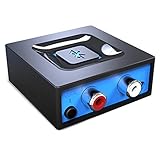
- Listen music wireless: Connect with computer speakers, home stereo systems or other speaker systems via the 3.5 mm or RCA cable, then pair with the Bluetooth audio devices such as smartphones or tablet for streaming music.
- Easy setup and automatic reconnect: There is a big bluetooth symbol button in bluetooth receiver middle. Pair your bluetooth device to this adapter with a single button press. Click once means Bluetooth Connect/Disconnect. Hold the botton 3 second mean ON/OFF. It can reconnect automatically with the previously paired device.
- Wireless range: Indoors(without obstacles) connect rang up 30-40 ft (10-12 m).
- Works with most device: Bluetooth enabled device including smartphones, tablets, computers, laptops upon and any powered PC speakers, home stereo systems and A/V receivers.
- NOTE: This adapter doesn't have built-in battery, power by AC to DC power adapter or USB cable. This product is a bluetooth receiver ONLY, not a bluetooth transmitter. Only to give Bluetooth capabilities to an existing stereo / powered speaker / PA. If you have any problems, please contact us at any time by Amazon Order, and we will speed up the process to resolve the issue.
The receiver must be electrically functional for the setup to work. Bluetooth cannot repair a dead channel, noisy volume control, failed input selector, blown fuse, bad speaker relay, severe hum, or defective power supply. Before buying an adapter, play the receiver’s tuner or another known-working source and confirm that both channels operate normally.
What do you need to add Bluetooth?
A basic installation needs five pieces of working equipment: a Bluetooth audio receiver, an analog audio cable, a power supply for the adapter, the stereo receiver with a suitable input, and passive speakers. Many adapters include both an RCA cable and a power adapter; check the contents before buying.
| Item | What it does | What to check |
|---|---|---|
| Bluetooth audio receiver | Receives music wirelessly from the phone and outputs analog audio | Receiver mode, RCA output, A2DP support, power requirement, and compatible codecs |
| RCA stereo cable | Connects the adapter’s left/right output to the receiver’s input | Red plug for right; white or black plug for left |
| 3.5-mm-to-RCA cable | Connects an adapter with a headphone-style output to RCA inputs | Use a stereo cable, not a mono cable |
| Power supply | Runs the Bluetooth adapter | Use the supplied adapter or a power source matching the product’s instructions |
| Working stereo and speakers | Amplifies and plays the received signal | Verify both channels with another source first |
Which receiver inputs are safe to use?
Connect the Bluetooth adapter to a normal stereo line-level input. Look for input labels such as AUX, CD, Video, D-TV, Line In, or Tape In/Play. An RCA-output Bluetooth receiver can feed any ordinary stereo line input that accepts left and right analog audio. Audioengine’s setup documentation confirms connection to a music system’s standard analog audio input.
Suitable input labels
- AUX: Usually the simplest choice.
- CD: A normal line-level input, even when the receiver is decades older than the adapter.
- Video, D-TV, or Line In: Generally suitable when the input is an analog left/right pair.
- Tape In or Tape Play: Usually suitable, but Tape Monitor controls can change how the receiver routes sources.
- Tuner: Use only if the receiver has a separate analog tuner input that is not already occupied and the manual permits reassignment; the label describes the input, not a special Bluetooth function.
Inputs and connectors to avoid
| Connector or label | Why it is unsuitable |
|---|---|
| PHONO | Phono inputs expect the much lower signal from a turntable cartridge and usually apply RIAA equalization. A normal Bluetooth line output can sound badly distorted, overloaded, or excessively bass-heavy through PHONO. |
| MIC | A microphone input is not a normal consumer line input and may have different sensitivity, impedance, or processing. |
| Speaker outputs | Speaker terminals carry powered amplifier output. Connecting an adapter there can damage the adapter or receiver. |
| REC OUT or TAPE OUT | These are generally outputs for recording equipment, not inputs for feeding music into the receiver. |
| PREAMP OUT | This is an output from the receiver’s preamplifier, not the input required for this installation. |
What is the difference between a Bluetooth receiver and a transmitter?
A Bluetooth receiver is the correct product when the goal is to play phone audio through the old stereo. A Bluetooth transmitter is normally the opposite: it takes audio from the receiver or television and sends that audio to Bluetooth headphones, earbuds, or a wireless speaker.
| Product type | Signal direction | Use for this project? |
|---|---|---|
| Bluetooth audio receiver | Phone or computer → adapter → stereo line input | Yes |
| Bluetooth transmitter | Receiver or TV audio output → headphones or wireless speaker | No, unless the goal is private listening |
| Bluetooth transceiver | Can receive or transmit, depending on selected mode | Possibly; confirm receiver mode and analog RCA output |
Sony’s explanation of Bluetooth connections shows the transmitter path from an audio output to wireless headphones or speakers. That direction is different from feeding a phone’s audio into a vintage receiver.
Product names can be confusing. Search for “Bluetooth music receiver,” “Bluetooth audio receiver,” or “Bluetooth DAC,” and read the specifications for an analog output. Do not buy a transmitter-only model simply because its listing contains the words “Bluetooth audio.”
How do you connect the Bluetooth adapter to the receiver?
Use this connection sequence for a typical RCA-output adapter. Turn the receiver’s volume down before testing, and switch the receiver off while making the cable connections to reduce pops and accidental mistakes.
Also popular on Amazon

- SEAMLESS WIRELESS MUSIC STREAMING: Whether you want to upgrade your home stereo as a Bluetooth receiver for home stereo, breathe new life into an old system using it as a Bluetooth adapter for old receiver, or add Bluetooth to your stereo receiver, this device is the key to a modern, wire-free listening setup.
- MULTIFUNCTIONAL CONNECTIVITY: This Bluetooth adaptor for old stereo is a connectivity powerhouse. With support for RCA and 3.5mm jacks, it's compatible with 99% of speakers. From classic AV receivers to your car or home stereo, a Bluetooth audio receiver fits right in. Plus, its TF card music playback support gives you extra ways to enjoy your tunes.
- FAST NFC QUICK CONNECT: Our Bluetooth to RCA adapter features a built-in NFC chip. Just bring your NFC-enabled smartphone or tablet close, and you're instantly connected. No more tedious manual pairing. It's the quickest way to start streaming your favorite music.
- PREMIUM CRYSTAL CLEAR SOUND: Experience audio like never before. Our aux to Bluetooth adapter ensures crystal-clear sound. The 3D music playback mode creates a rich, surround-sound experience. Whether it's soft ballads or high-octane tracks, you get distortion-free sound, even at full volume.
- EFFORTLESS AUTOMATIC PAIRING: Once you've set it up, the Bluetooth RCA receiver pairs automatically every time you power it on. No more struggling with wires or complex connections. Just turn it on and let the music play.
- Turn off the stereo receiver. Turn down its volume before switching it back on.
- Connect the audio cable. Plug the adapter’s RCA OUT into the receiver’s AUX, CD, Video, or other line-level input. Connect red RCA to red/right and white or black RCA to white/left.
- Use a 3.5-mm cable when necessary. Connect the adapter’s stereo 3.5-mm output to the receiver’s left/right RCA input with a 3.5-mm-to-RCA cable.
- Power the adapter. Connect its supplied power adapter or USB power cable. RCA cables normally carry audio only and do not power the Bluetooth unit.
- Select the matching receiver input. Turn on the stereo and choose AUX, CD, or the exact input pair used by the adapter.
- Check Tape Monitor controls. If the adapter is connected to Tape In/Play, select the correct tape source or monitor setting for the receiver. On some vintage models, enabling Tape Monitor routes tape playback rather than the ordinary selected input.
- Put the adapter in pairing mode. Press its pairing button if it does not enter pairing mode automatically. A blinking status light commonly indicates that the adapter is powered but not connected; a steady light commonly indicates an established connection, although the exact behavior is model-specific. Audioengine documents these status-light behaviors for the B1.
Correct wiring looks like this:
Bluetooth receiver RCA OUT (red/right)   → receiver AUX IN (red/right)
Bluetooth receiver RCA OUT (white/left)  → receiver AUX IN (white/left)
Bluetooth receiver power input            → supplied power adapter or USB power
How do you pair a phone, tablet, or computer?
Pairing sends the device’s stereo audio to the adapter rather than to the phone’s built-in speaker or another saved Bluetooth device.
- Open Bluetooth settings on the phone, tablet, or computer.
- Scan for nearby devices.
- Select the adapter’s name.
- Accept a pairing request or enter a code if the adapter asks for one.
- Start music playback and verify that the phone’s audio output is set to the Bluetooth adapter.
- Begin with the phone at moderate volume and use the stereo receiver’s volume control for ordinary listening.
Android, iPhone, Windows, and macOS use different menu names, so the exact labels vary. Logitech’s setup instructions illustrate the general RCA/3.5-mm connection and pairing process, but the adapter’s own manual takes priority for reset buttons, pairing memory, and indicator lights.
How should you set volume, codecs, and adapter placement?
Set the receiver’s volume low before playback, set the phone to roughly 60–80% as a practical starting point, and then adjust normal listening volume with the stereo receiver. If distortion occurs, lower the phone volume, lower the receiver volume, confirm that the adapter is connected to a line input rather than PHONO, and try another cable or input.
Do not assume that every adapter has the same output level. According to Audioengine’s B1 Next Gen technical specifications page (retrieved August 18, 2026), the B1 Next Gen lists a 2.0-V RMS full-scale output. Other Bluetooth receivers can output more or less, so the specification is not universal.
Free tools Windows power users keep installed
One-click scans. No signup required.
A2DP is the relevant Bluetooth profile for stereo music streaming. SBC is the baseline audio codec; AAC, aptX, aptX HD, and aptX Adaptive are optional and depend on the source device and receiver. Codec negotiation means the adapter cannot force a phone or computer to use a codec that the source does not support. According to Audioengine’s current B1 Next Gen specifications, that model lists Bluetooth 5.3, Qualcomm QCC3040 hardware, A2DP, and aptX Adaptive, aptX HD, aptX, AAC, and SBC support.
Bluetooth 5.3 alone does not guarantee better sound. Bluetooth version, codec selection, antenna design, digital-to-analog conversion, analog output stage, wireless interference, and source-device support are separate factors. Claims that Bluetooth is always equal to wired audio, that aptX is universally lossless, or that every phone will use aptX are too broad.
Keep the adapter reasonably clear of large metal objects, power bricks, and dense bundles of AC cables. A nearby, unobstructed adapter can be more reliable than one hidden behind a receiver even when the advertised range appears sufficient.
Also popular on Amazon

- 【Enjoy Wireless Streaming Music】This car Bluetooth adapter can be connected to non-Bluetooth car audio systems, home stereos, speakers, wired headphones via the 3.5mm AUX adapter; And equipped with a Bluetooth 5.3 chip for stable connection / fast transmission / wide signal range. Just pair it with your phone and start listening to your favorite music!
- 【Intelligent Noise Reduction Tech】Our Bluetooth audio receiver adopts the latest CVC8.0 Noise Cancellation and Digital Signal Processor (DSP) technologies, which can eliminate echo and block out intrusive background noise (such as wind, traffic, or crowds), providing you with crystal-clear calling sounds.
- 【Up to 16 Hours of Battery Life】The working time of this aux Bluetooth adapter is up to 16 hours when making calls or playing music. And it takes only 2.5 hours to fully charge the device by using a Type-C fast charging cable (Included in the package). In addition, this Bluetooth music adapter can be used while charging, which is very convenient.
- 【Hands-free Calling & Navigation】A built-in microphone and one “MFB” button to answer / redial / hang up / reject calls, help you make hands-free calls. And the Bluetooth audio adapter supports broadcasting voice notification from existed navigation App. You don’t have to look down the phone on the move. Make sure you drive safely!
- 【Dual Connection】The portable Bluetooth stereo adapter can be paired with 2 devices at the same time. You can enjoy your music and never worry about missing any calls. Once paired, the car receiver will automatically reconnect to your last paired Bluetooth devices, as long as they are within the wireless range.
How far does Bluetooth reach, and how much delay should you expect?
Advertised range is a manufacturer estimate, not a guaranteed indoor distance. According to Audioengine’s technical specifications page (retrieved August 18, 2026), the B1 Next Gen lists up to 100 feet / 30 meters typical range. Logitech’s technical specifications page (retrieved August 18, 2026) lists up to 65 feet / 20 meters for its older Bluetooth Music Receiver, which uses Bluetooth 3.0. Walls, furniture, people, Wi-Fi congestion, and the phone’s antenna can reduce either distance.
Do these 3 things before closing this tab:
1Scan for outdated or missing drivers - takes under a minute2Repair Windows errors before they cause bigger problems3Fix the driver behind crashes, sound loss and screen glitchesLatency is normally unimportant for music but can be noticeable with television and games. Audioengine’s current B1 Next Gen specifications list approximately 80 milliseconds, while an older B1 specification lists approximately 30 milliseconds; the figures apply to different generations and should not be treated as one universal “B1 latency” figure. For video, look for a low-latency mode and a codec supported by both the source and receiver, or use wired audio when lip-sync is critical.
Which Bluetooth adapter should you choose?
Choose according to the way the stereo will be used rather than Bluetooth version alone.
| Need | Best direction | Important checks |
|---|---|---|
| Simple phone streaming | Basic Bluetooth receiver | RCA output, included power supply, A2DP, return policy, and reliable pairing |
| Higher-end vintage system | Premium Bluetooth DAC receiver | Analog output quality, codec compatibility, optical output, enclosure, warranty, and support |
| Whole-home or app-based streaming | Wi-Fi network streamer | Analog outputs, supported ecosystems, multi-room features, and whether the phone acts as controller rather than audio source |
| Headphones or wireless speaker from the stereo | Bluetooth transmitter or receiver/transceiver in transmitter mode | Appropriate receiver output, headphone codec support, and latency |
| Receiver with no line input | External input solution or professional modification | Preserve the receiver rather than connecting Bluetooth to PHONO or speaker terminals |
A premium example: Audioengine B1 Next Gen
Audioengine’s B1 Next Gen illustrates the premium category with Bluetooth 5.3, A2DP, RCA and optical outputs, external power, and the codec support listed above. The official US store showed a price of $189.00 when retrieved on August 18, 2026, along with a listed three-year warranty, 60-day audition signal, and in-stock status. Check the official B1 Next Gen product page immediately before publication because price, inventory, and commercial terms can change.
The B1 Next Gen is a sensible fit for a quality vintage system when the buyer values an optical option, polished hardware, higher-end specifications, and manufacturer support. The premium price is harder to justify for a secondary stereo that only needs occasional basic phone streaming.
Crashes, No Sound, or Screen Glitches?
Random freezes, missing sound and display glitches usually trace back to one bad driver. Find and replace yours safely.Free scan · under a minuteWindows Errors? Fix Them Before They Spread
Repair common Windows errors and clear accumulated junk for a smoother, more stable PC - no reinstall needed.Free scan · no reinstallRefurbished and older alternatives
The official Audioengine refurbished page showed a B1 at $151.00, reduced from $189.00, when retrieved. Audioengine’s refurbished listing also notes that its 60-day trial applies to products bought directly through the Audioengine online store; inventory and condition-specific terms can change.
Logitech’s Bluetooth Music Receiver is an older/basic option with RCA and 3.5-mm outputs, A2DP, Bluetooth 3.0, no additional Logitech software requirement, and a manufacturer-advertised range of up to 65 feet / 20 meters according to Logitech’s technical specifications. The official material is support documentation rather than a clearly active current store listing, and no current official US purchase price was found in the supplied research. Treat availability, warranty, and support as uncertain when considering a used or older unit.
Also popular on Amazon

- High sound quality LDAC decoding: The Bluetooth audio adapter features the LDAC audio codec, audio sampling rates up to 24bit/96KHz, delivering uncompromised high-definition sound quality; the audio receiver also obtained Hi-Res Audio Gold Label professional sound quality certification. Whether listening to classical or pop, experience audio at its best. (LDAC requires devices to support, some older devices may not be compatible.)
- Latest Bluetooth 6.0 Chip Technology: Equipped with the latest Bluetooth 6.0 chip, this bluetooth audio receiver provides a more stable and lower latency wireless audio transmission, and reduces the possibility of signal interruption and power consumption.(Bluetooth version mainly affects connection stability and range, not sound quality )
- Dual Pairing: This bluetooth receiver for home stereo supports connecting two phones simultaneously, letting you share musical experiences with close lovers or friends. However, when one device plays music, the other device needs to be paused first
- Long Battery Life: The bluetooth stereo adapter provides up to 15 hours of uninterrupted playback time for long-time use; it supports USB C charging and can be fully charged in 2 hours, and can be used while charging
- AUX 3.5mm/RCA audio receiver : There are 3.5mm or RCA output port for home old stereo speakers/wired headphones and more to connect mobile phones, computers, tablets to play music via Bluetooth. Turning ordinary audio equipment into Bluetooth devices and enjoying the music feast. (If the volume is too low, enable “Volume Sync” in your Bluetooth device settings.)
For a budget purchase, select a reputable basic receiver with RCA output and a return policy rather than relying on an unverified price or a Bluetooth-version label. For a Wi-Fi alternative, verify the streamer’s analog outputs and supported services; a network streamer is a different category, not automatically a drop-in Bluetooth replacement.
How do you troubleshoot a Bluetooth receiver that does not work?
Start with the symptom rather than repeatedly pairing the phone. The table below covers the most common failure paths.
| Symptom | Most likely cause | First fix |
|---|---|---|
| No sound | Wrong receiver input, adapter power, or phone output selection | Select the exact AUX/CD/Tape input used, confirm the adapter is powered and connected, and make sure the phone is sending audio to it. |
| Loud or bass-heavy sound | Adapter connected to PHONO or excessive level | Move the adapter to AUX, CD, or another line input; then reduce phone volume if needed. |
| Only one speaker plays | Loose or damaged RCA cable, balance setting, input jack, adapter output, speaker, or wire | Swap the left and right RCA plugs. If the dead side moves, investigate the cable or adapter; if it stays with the same speaker, investigate the receiver, speaker, or speaker wire. |
| Loud hum | Ground-loop interaction, noisy power, damaged cable, interference, or receiver fault | Try another outlet and short shielded RCA cable; separate signal and AC cables; use a battery pack temporarily as a diagnostic test for a USB-powered adapter. |
| Pairing fails | Adapter is connected elsewhere, saved pairing is stale, or pairing mode was not entered | Forget the adapter, toggle Bluetooth off and on, reboot both devices, move within a few feet, and follow the model-specific reset instructions. |
| Adapter disconnects repeatedly | Excessive range, 2.4-GHz interference, unstable power, remembered-device conflicts, or antenna obstruction | Move the source closer, improve adapter placement, try stable supplied power, and disconnect unused remembered devices. |
| Audio and video are out of sync | Normal Bluetooth latency | Use compatible low-latency equipment or wired audio for critical lip-sync. |
No sound
- Confirm that the receiver is powered on.
- Confirm that the correct input is selected.
- Confirm that the adapter is powered and shows a connected status.
- Check that the phone is not sending sound to another speaker, car, or headphones.
- Push the RCA or 3.5-mm plugs fully into both devices.
- Raise the phone and receiver volume from zero, starting cautiously.
- Try another line input, another cable, or another known-working source.
One channel is missing
Check the receiver’s balance control, RCA plugs, cable, input jack, speaker wire, and speaker. Swap left and right RCA connections at one end. A changed dead side points upstream toward the adapter or cable; a dead side that remains with the same speaker points toward the receiver, speaker, or speaker wiring.
Hum and ground-loop diagnosis
First determine whether the hum appears only when the Bluetooth input is selected. Try another wall outlet, keep the adapter and audio cable away from AC cables and power bricks, and test with a short shielded RCA cable. For a USB-powered adapter, temporarily use a battery pack as a diagnostic test. Do not defeat the safety ground on mains-powered equipment. If the hum also occurs with the receiver’s other sources, the receiver itself may need service.
Pairing and disconnection recovery
Disconnect the adapter from the last phone or computer, toggle Bluetooth off and on at the source, forget the adapter from the saved-device list, reboot both devices, and retry with the source nearby. Check that a nearby phone is not automatically connecting first. Pairing-button hold times and reset procedures differ by model, so use the adapter’s manual rather than assuming a universal button duration.
Independent reader supportYour contribution helps us test, update, and keep practical guides available for everyone.What if the receiver has only PHONO or no RCA inputs?
If the receiver truly has only PHONO, a standard Bluetooth adapter is not a direct match. Look again for a differently labeled line input, such as Tape Play or an auxiliary input hidden on a separate panel. If no line input exists, use a suitable external preamp or input switcher, arrange a qualified internal modification, or use a different amplifier or receiver.
Quick wins for a faster PC:
Fix the driver behind crashes, sound loss and screen glitchesFind Drivers →Repair Windows errors before they cause bigger problemsFix Now →Scan for outdated or missing drivers - takes under a minuteDriver Scan →If the receiver has no RCA inputs but does have another line-level connector, use the appropriate cable or adapter. An FM transmitter is a last-resort convenience option and generally introduces more noise and interference than a direct line connection. A permanent modification may be reasonable for a carefully restored receiver, but an external adapter is safer, reversible, and less likely to compromise collector or restoration value.
Also popular on Amazon

- 【Upgrade Your Old Stereo with Wireless Music Streaming】Bring Bluetooth to your existing home stereo, amplifier, or powered speakers. Stream music wirelessly from your phone, tablet, or laptop and enjoy modern convenience without replacing your favorite audio equipment. Note: B06+ is a Bluetooth Receiver Only, Not a Transmitter.
- 【aptX HD & aptX Adaptive & 3D Surround】As a Bluetooth adapter for stereo receiver, it features Bluetooth 5.3 chip to ensure high-fidelity Bluetooth audio signal for music streaming to powered speakers and home stereo systems that don't have built-in wireless capability. It also supports aptX HD and aptX Adaptive. And the 3D audio can be switched on or off by pressing the "3D" button on the Bluetooth audio receiver. The green LED will be on when switched to 3D audio.
- 【Easy Setup, Easy to Use】Easy plug, pair and play. This updated 1Mii B06 Plus Bluetooth receiver for home stereo comes with a USB power adapter. Plug into computer speakers, home stereo systems or other speaker systems via the 3.5 mm or RCA cable, then pair with Bluetooth audio devices such as smartphones or tablets. After that, you can enjoy wireless music streaming.
- 【98FT Long Range】With Class 1 Bluetooth technology, the 1Mii Bluetooth audio receiver can achieve a range of up to 98ft (30m) line-of-sight in open air and up to 50-70ft (15-20m) indoors(without obstacles).
- 【Power on and Reconnect Automatically】When plugged into a power outlet, the 1Mii Bluetooth receiver can power on automatically and reconnect with the previously paired device.
When is Bluetooth not the best answer?
Bluetooth is convenient when a phone is the playback source and occasional compression is acceptable. Bluetooth is less attractive when the listener wants the phone to act only as a controller, multi-room playback, internet radio, AirPlay, Chromecast, Spotify Connect, or a permanent network-based source. A Wi-Fi streamer may better fit those needs, provided the streamer has compatible analog outputs and supports the desired ecosystem.
Use a transmitter instead when the desired path is the receiver’s audio to Bluetooth headphones, earbuds, or a wireless speaker. Confirm that the stereo has an appropriate audio output and that the transmitter supports the desired headphones and latency behavior.
Use a wired DAC or another wired source when video synchronization, maximum consistency, or avoidance of wireless interference matters more than convenience. Do not claim that Bluetooth always sounds as good as wired audio; the result depends on codec, source, receiver, DAC, analog stage, wireless conditions, and the rest of the system.
Recommended Free Tools
One-minute compatibility test
- With the receiver off, inspect the back panel.
- Find an unused pair labeled AUX, CD, Video, D-TV, Line In, or Tape In/Play.
- Confirm that the receiver already plays another source through both speakers.
- Buy a Bluetooth receiver with RCA output and its own power supply.
- Plan to connect RCA OUT on the adapter to the selected line input, never to PHONO or speaker terminals.
- Check whether television use requires low latency and whether the adapter supports the source device’s codec.
If all six checks pass, the installation is normally straightforward and reversible.
Final preservation and safety checklist
- Turn the receiver volume down before first playback.
- Use only line-level inputs for a normal Bluetooth receiver.
- Never connect the adapter to speaker outputs.
- Do not use PHONO unless the adapter documentation explicitly specifies phono-compatible output, which ordinary Bluetooth receivers do not.
- Use the supplied or correctly rated power supply.
- Do not defeat safety grounds to cure hum.
- Service the receiver first if other sources also hum, distort, or lose a channel.
- Prefer an external adapter when preserving an original receiver and its reversibility matters.
Frequently Asked Questions
Can I connect a Bluetooth receiver to a vintage stereo’s PHONO input?
No. A standard Bluetooth receiver should connect to AUX, CD, Tape Play, or another line-level input, not PHONO. PHONO inputs expect a much lower turntable-cartridge signal and usually apply RIAA equalization, which can cause severe distortion or excessive bass with Bluetooth audio.
Do I need to open my old stereo receiver to add Bluetooth?
Usually no. An externally powered Bluetooth audio receiver connects to an unused line-level input with an RCA or 3.5-mm cable, leaving the vintage receiver’s internal circuitry unchanged. Internal modification is an option only when no suitable line input exists and a qualified technician considers the modification appropriate.
What is the difference between a Bluetooth receiver and a Bluetooth transmitter?
A Bluetooth receiver accepts audio from a phone or computer and outputs it to the stereo, which is the direction needed for this project. A Bluetooth transmitter sends audio from a receiver or television to Bluetooth headphones, earbuds, or wireless speakers.
Why does Bluetooth audio have a delay when I watch TV?
Ordinary Bluetooth audio introduces latency, and the delay can be noticeable with television or games even though it is normally unimportant for music. Choose equipment with compatible low-latency support on both the source and receiver, or use wired audio when accurate lip sync is essential.
The Bottom Line
The safest, simplest way to add Bluetooth to an old stereo receiver is an external, powered Bluetooth audio receiver connected to AUX, CD, Tape Play, or another line-level input. Select the matching source, pair the phone, and keep PHONO and speaker terminals out of the signal path. Test the receiver first, choose codecs and latency for the way you listen, and keep the installation reversible.

