
PC Slower Than It Used to Be?
A free scan shows the junk files, broken settings and background clutter dragging Windows down - then fixes them in one click.Free scan · Windows 10 & 11Outdated Drivers Are Slowing You Down
One free scan finds every outdated or missing driver and matches the right update for your exact hardware.Free scan · exact hardware matchThe SparkFun Pro Micro RP2040 (SKU DEV-18288) is a compact RP2040 development board in the familiar Pro Micro footprint. It pairs USB-C programming and 16 MB of external flash with a Qwiic connector, buttons, LEDs, and castellated pads. Its main practical trade-off is that SparkFun lists 20 multifunction GPIO pins on the board—not all 30 programmable GPIO of the RP2040 chip are broken out.
What the SparkFun Pro Micro RP2040 offers
SparkFun describes DEV-18288 as a low-cost, high-performance board built around the Raspberry Pi Foundation RP2040. The board measures 1.3 × 0.7 inches and uses a Pro Micro footprint with castellated pads. Its listed features include USB-C for programming, a 3.3 V AP2112 regulator, 16 MB external flash, a resettable PTC fuse, reset and boot buttons, a power LED, and a WS2812 addressable LED. See the SparkFun product page for the current product details.
Board pins versus RP2040 chip capabilities
The RP2040 chip has two Cortex-M0+ processors running at up to 133 MHz, 264 kB of embedded SRAM, programmable I/O, and USB 1.1 host/device functionality. Those are chip-level specifications, not a promise that every capability or GPIO is accessible on this board. SparkFun lists 20 multifunction GPIO pins broken out on the Pro Micro RP2040, compared with the chip’s 30 programmable GPIO.
| Board-listed resource | Specification |
|---|---|
| Multifunction GPIO broken out | 20 pins |
| ADC | Four 12-bit channels |
| PWM | Ten channels |
| UART | Two |
| I2C | One interface; Qwiic enabled |
| SPI | One interface |
These are manufacturer-listed specifications, not independent measurements. Before assigning pins or planning a circuit, check the board-specific pinout and electrical details rather than relying on the RP2040 chip specification alone.
#1 Best Overall

- RP2040 General Features: Dual Cortex M0+ processors, up to 133 MHz; 264 kB of embedded SRAM in 6 banks; 6 dedicated IO for QSPI flash, supporting execute in place (XIP); 30 programmable IO for extended peripheral support
- Also Features: SWD interface; Timer with 4 alarms; Real time counter (RTC); USB 1.1 Host/Device functionality; Supported programming languages: MicroPython, C/C++
- SparkFun Pro Micro - RP2040 Features: Raspberry Pi Foundation's RP2040 microcontroller; AP2112 3.3V voltage regulator; Support programming languages: MicroPython, C/C++; On-board USB-C connector for programming: USB 1.1 Host/Device functionality
- Also Features: Built-in Resettable PTC Fuse, PTH pads w/ castellated edges; 20x multifunctional GPIO Pins [1]: 4x 12-bit ADC channels with internal temperature sensor, 0.5 MSa/s, 12-bit; 10x PWM channels; Serial Peripherals; 2x UARTs; 1x I2C (Qwiic enabled); 1x SPI
- Also Features: Buttons: Boot, Reset; LEDs: Power, WS2812 Addressable LED; 16MB External Flash Memory; Dimensions: 1.3in x 0.7in. [1] Note: The GPIO pins are muxed so you can reconfigure the pins for the digital interface of your choice! Check out the RP2040 datasheet for more information on the pins that are broken out on the board. Note: Board only.
Pro Micro RP2040 pinout and hookup guide
Use the SparkFun Pro Micro RP2040 graphical datasheet for the board’s physical pin mapping and the SparkFun Pro Micro RP2040 hookup guide for practical setup and integration. SparkFun says the headers are omitted, leaving builders to choose how to connect the plated through-hole pads. Depending on the installation, that may mean soldering headers or using another suitable connection method.
A shared Pro Micro footprint does not, by itself, make another board’s pin assignments or electrical behavior interchangeable. Compare the actual mapping, voltage and electrical limits, mounting approach, and project requirements before swapping boards or adapting an existing design.
Rank #2

- SparkFun Thing Plus - RP2040 Features: Raspberry Pi Foundation's RP2040 microcontroller; 16MB QSPI Flash Memory; JTAG PTH Pins
- Thing Plus (or Feather) Form-Factor: 18[1]x Multifunctional GPIO Pins[2]; Four available 12-bit ADC channels with internal temperature sensor (500kSa/s); Up to eight 2-channel PWM; Up to two UARTs; Up to two I2C buses; Up to two SPI buses
- [1] Note: GPIO 08 is not included in this count, as it passes through the WS2812 addressable RGB LED first. GPIO 07 and GPIO 23 are counted as a single GPIO because they are tied together. [2] Note: The GPIO pins are programmable so you can reconfigure the pins! Check out the RP2040 datasheet for more information on the GPIO functionality
- USB-C Connector: USB 1.1 Host/Device functionality; 2-pin JST Connector for a LiPo Battery (not included): 500mA charging circuit; Qwiic Connector; Buttons: Boot, Reset; LEDs: PWR - Red 3.3V power indicator, CHG - Yellow battery charging indicator, 25 - Blue status/test LED (GPIO 25), WS2812 - Addressable RGB LED (GPIO 08); Four Mounting Holes: 4-40 screw compatible, Dimensions: 2.3" x 0.9"
- RP2040 General Features: Dual Cortex M0+ processors, up to 133 MHz; 264 kB of embedded SRAM in 6 banks; 6 dedicated IO for QSPI flash, supporting execute in place (XIP); 30 programmable IO for extended peripheral support; SWD interface; Timer with 4 alarms; Real time counter (RTC); USB 1.1 Host/Device functionality; Supported programming languages: MicroPython, C/C++
Does the SparkFun Pro Micro RP2040 have a Qwiic connector?
Yes. SparkFun lists a Qwiic connector, and the board’s single I2C interface is Qwiic enabled. A Qwiic cable or peripheral is relevant when the project uses that connection; check the selected peripheral’s compatibility, voltage, and pin mapping against the current board documentation.
What programming languages does the Pro Micro RP2040 support?
SparkFun lists MicroPython and C/C++ as supported programming environments. Its product documentation links to Raspberry Pi Pico SDK materials and the RP2040 datasheet, alongside the schematic and board-specific setup resources. Choose the environment that fits your software and workflow, then follow its current setup instructions.
The Tool Desk
Outbyte Driver Updater FREEFix the driver behind crashes, sound loss and screen glitchesFind Drivers →Outbyte PC Repair FREEClear out junk files and repair common Windows errorsFree Scan →Rank #3

- The SparkFun RP2350 Pro Micro provides a powerful development platform in our compact Pro Micro form factor built around the RP2350 from Raspberry Pi
- RP2350 features: Dual ARM CortexM33 and Hazard3 RISC-V Processors, User-selectable for dual-cores, 520kB integrated SRAM in 10 banks, 3.3V-tolerant GPIO, Peripherals, 2x UART, 2x SPI, 2x I2C, 24x PWM Channels, 12x PIO State Machines
- RP2350 Pro Micro: A unique dual-core microcontroller running up to 150 MHz; With 2 M33 processors and 2 Hazard3 RISC-V processors featuring 520kB SRAM
- The Pro Micro also includes two other expanded memory options: 16MB external Flash as well as 8MB PSRAM which is connected to the RP2350's QSPI controller
- Pro Micro - RP2350 uses the "A" version microcontroller which has 30 3.3V-tolerant GPIO and 4 analog inputs while including the following peripheral options: 2x UART, 2x SPI, 2x I2C, 24 PWM, USB 1.1 Controller, 12 PIO State Machines, 1x High-Speed Transmit (HSTX) Peripheral for DVI/DSI support (not available on Pro Micro)
Who should consider this board?
The board makes sense to consider when a project needs an RP2040 in a small Pro Micro-style footprint and can use its USB-C connection, Qwiic option, onboard buttons and LEDs, or external flash. It may also suit builders who want to decide their own through-hole header or mounting arrangement. SparkFun’s RP2040 overview positions the platform as an option for less complex projects that do not need a full Raspberry Pi; that is general context, not a performance test or a guarantee of fit for a particular workload.
For a meaningful comparison with another RP2040 or Pro Micro-footprint controller, check exposed pin count and mapping, mounting method, USB and boot/reset access, onboard flash and peripherals, electrical limits, software support, documentation, and current price and availability. The available information does not establish a full like-for-like comparison with other boards.
Rank #4
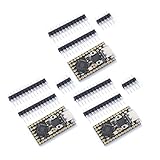
- Stamp hole design, which can be directly welded and integrated into the user designed base plateUSB 1.1 Host and Device Support
- Supports low-power sleep and sleep modesCan be recognized as mass storage through USB for drag and drop download programsUp to 26 multifunctional GPlO pins
- 2 SPl, 2 12C,2 UART, 3 12-bit ADC, 16 controllable PWM channelsAccurate on-chip clock and timertemperature sensor On chip accelerated floating point
- 8 programmable l/0 (Pl0) state machines for custom peripheral support
Price and availability
SparkFun’s product listing showed $11.25 and “In stock” when it was crawled roughly two weeks before September 30, 2026. Those are time-sensitive listing details, not a guaranteed current price or availability; check the product page before ordering.
Quick Recap
Best Value

- RP2040 Pro Micro 4M compatible with Micro Python, allowing for easy programming and implementation of complex tasks; RP2040 Pro Micro Development Board Dual-Core 264KB 4MB USB-C Type-C for Micropython
- Dual-Core Processing :The RP2040 Pro Micro Development Board features a dual-core processing unit, ensuring fast and efficient performance for your computer applications.
- The RP2040 ProMicro is a main control board developed based on the RP2040, pin-compatible with the Pro Micro 32u4, featuring 4M, 16M flash memory, dual-arm Cortex-M0@133MHz and 264kB SRAM.
- Built in 264KB and 2MB on-chip Flash;Low-power sleep and dormant modes;
- Equipped with a dual core ARM Cortex M0+processor, running at a frequency of up to 133MHz with a flexible clock
Product prices and availability are accurate as of the date/time indicated and are subject to change. Any price and availability information displayed on Amazon at the time of purchase will apply.
Recommended Free Tools

