
ZPLab
ZPLab: A free, open-source ZPL editor with validation, variable data, and batch printing. Ranked #2 of 35 in Barcode Labeling Software by our editors (9.3/10); pricing: Free plan; best for ZPL-focused teams needing advanced validation.
At a glance
- Editor score9.3 / 10
- PricingFree plan
- Best forZPL-focused teams needing advanced validation
- Free planYes
- Paid fromFree
- DeploymentHybrid
- Facts checked19 Sep 2026
Where it wins
- Imports, edits, previews, and exports ZPL and PRN files
- Supports 28 barcode symbologies with GS1 and EAN/UPC validation
- Prints variable labels in batches from CSV, Excel, and databases
Where it doesn't
- Focused on ZPL-compatible printers rather than broader label formats
- No documented label or print automation API
- Advanced workflows may require familiarity with ZPL source
Our verdict on ZPLab
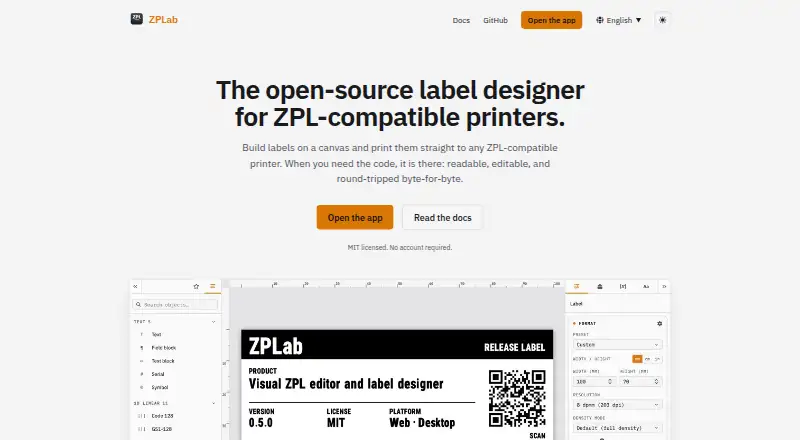
ZPLab is an MIT-licensed, open-source barcode labeling application for teams designing and printing labels for ZPL-compatible printers. It is available through a browser, self-hosted web deployment, or desktop applications for Windows, macOS, and Linux. The product combines a visual canvas with editable ZPL source, live preview, variable fields, serial counters, barcode and QR design, and ZPL export. It is particularly suited to teams that need control over ZPL output while also working with structured label data.
Its strongest fit is validation and data-driven production. ZPLab supports 28 barcode symbologies, includes a GS1 content builder, and provides EAN/UPC validation. Batch printing can draw from CSV, Excel, SQLite, PostgreSQL, and MySQL, while integrations with Labelary and Zebra printers support preview and connected-printer workflows. These capabilities give it a wider operational scope than a basic label canvas, especially for recurring batches and labels that combine fixed content with variable fields. An MCP server is also available for local AI-assisted label editing.
The main trade-off is its narrow ZPL orientation. Teams using ZPL-compatible printers can edit existing ZPL and PRN files directly and choose between browser, self-hosted, and desktop deployment. Teams that need a format-neutral label system, a documented automation API, or workflows outside ZPL should consider a different product. ZPLab is a strong choice for organizations that value open-source software, local control, validation, and database-backed batch printing without an account requirement.
Your product? Our editors can test ZPLab in depth and publish a review, labelled as paid · from $149/mo →
ZPLab pricing
ZPLab fact sheet
| Free plan | Yes |
|---|---|
| Paid from | Free |
| Deployment | Hybrid |
| Variable data | Yes |
| Batch printing | Yes |
| Data import | Yes |
| API access | Not verified |
| Included users | Not verified |
| Print limit | Not verified |
| Deployment | Cloud, Desktop, Self-hosted |
| Platforms | Web, Windows, macOS, Linux |
| Integrations | 7 integrations: Labelary, Zebra printers, CSV, Excel, SQLite, PostgreSQL … |
| Pricing | Free plan |
| Website | zplab.org |
| Facts checked | 19 Sep 2026 |
ZPLab integrations
ZPLab lists 7 integrations on its own site.
- Labelary
- Zebra printers
- CSV
- Excel
- SQLite
- PostgreSQL
- MySQL
Alternatives to ZPLab
- BarcodeLabelGenA free, open-source workflow for designing, importing, and printing barcode labels.9.4
- PrintSpiritA broad labeling toolkit for teams that need APIs, databases, and remote printing.9.1
- Label ToolkitA free cloud label tool for variable-data designs, batch printing and ZPL workflows.8.9
ZPLab vs the competition
- ZPLab vs BarcodeLabelGen
- ZPLab vs PrintSpirit
- ZPLab vs Label Toolkit
- ZPLab vs BarTender
- ZPLab vs Loftware NiceLabel
- ZPLab vs Rosistem Barcode Software



Compare ZPLab with any tool side by side →
Also Ranked In
ZPLab is ranked in 5 of our directories.
Used ZPLab? Be the first to review it
The editor score above is our own research. What this page doesn't have yet is a reader's view — what you used ZPLab for, what worked and what didn't. No stars are seeded and no review is paid for; an editor reads every one before it appears.
Write a reviewTwo minutes · verified accounts only · read by an editor before it appears
Featured on iTechGuides

ZPLab is listed in our Barcode Labeling Software directory. Add the badge to your site — it links back to this page.
<a href="https://www.itechguides.com/products/zplab/"><img src="https://www.itechguides.com/best/badge/zplab.svg" alt="Featured on iTechGuides" width="230" height="46"></a>
Reviewed by iTechGuides Editors · Editorial team · Updated Oct 2026
Advertiser disclosure: iTechGuides is reader-supported. Vendors can pay for top positions in our rankings and for a place on other products' pages, and we may earn a commission when you click some links. Bought places stand at the number bought; this page and our disclosure say so. Paying vendors may get a fuller, more detailed review from our editors, and that review can change their score. How we rank.
Last updated · How we research and update