
Xodo Compress PDF
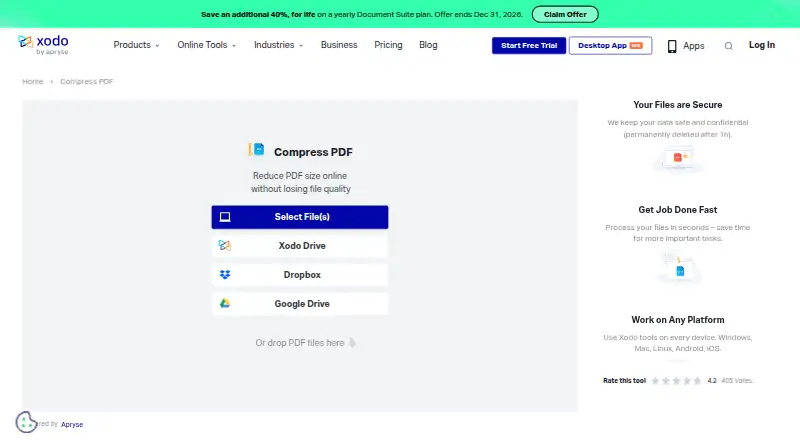
Xodo Compress PDF: A flexible PDF compressor for users moving between web, desktop, and mobile. Ranked #7 of 36 in PDF Compression Software by our editors (8.6/10); pricing: Free plan · 3-day trial; best for users wanting compression across many devices.
At a glance
- Editor score8.6 / 10
- PricingFree plan · 3-day trial
- Best forUsers wanting compression across many devices
- Free planYes
- Paid from$7.99/mo
- Facts checked19 Sep 2026
Where it wins
- Low and High compression with free daily online access
- Offline batch compression through Xodo PDF Studio
- Web, Windows, macOS, Linux, Android, and iOS coverage
Where it doesn't
- Online compression uses an upload and download workflow
- Compression choices are limited to Low and High
- Paid plans show annual billing for monthly-priced access
Our verdict on Xodo Compress PDF
Xodo Compress PDF reduces document file sizes through an online upload, compression, and download workflow. It is aimed at individuals and organizations that handle PDFs across multiple devices, especially users who need both browser-based access and offline desktop compression. The product also includes PDF editing, annotation, conversion, signing, OCR for scanned documents, and integrations with Xodo Drive, Dropbox, and Google Drive.
The published plans show a free daily online compression action, a three-day free trial, and paid access billed annually. Xodo Web costs $7.99 per month and includes 40+ online tools, unlimited document downloads, and browser-based use. Xodo Desktop (PDF Studio) costs $9.99 per month and adds 60+ professional tools, offline use, and support for Windows, macOS, and Linux. Xodo Document Suite costs $14.99 per month and combines web, desktop, and mobile access with 40+ online tools and 60+ desktop tools. The tier structure suits buyers who want to choose access by platform rather than pay only for compression.
Its main strength is coverage: compression is available on the web, through PDF Studio offline, and across Windows, macOS, Linux, Android, and iOS. PDF Studio also supports batch processing of multiple files, which makes the desktop option more suitable for repeated document work. Uploaded files requiring processing are deleted after one hour. Buyers should note that the documented compression controls are Low and High, rather than a broader set of compression modes. Choose Xodo for cross-device access, offline desktop work, and related PDF tools; choose an alternative if you need compression settings beyond those two levels or prefer a purely online workflow without uploads.
Your product? Our editors can test Xodo Compress PDF in depth and publish a review, labelled as paid · from $149/mo →
Xodo Compress PDF pricing
All 3 Xodo Compress PDF plans and prices →
Xodo Compress PDF fact sheet
| Free plan | Yes |
|---|---|
| Paid from | $7.99/mo |
| Compression modes | Not verified |
| Maximum file size | Not verified |
| Batch compression | Yes |
| Offline desktop app | Yes |
| API access | Not verified |
| Supported platforms | web, windows, macos, linux, android, ios |
| Free trial | 3 days |
| Deployment | Cloud, Desktop, Mobile |
| Platforms | Web, Windows, macOS, Linux, Android, iOS |
| Integrations | 3 integrations: Xodo Drive, Dropbox, Google Drive |
| Pricing | Free plan · 3-day trial (source) |
| Website | xodo.com |
| Facts checked | 19 Sep 2026 |
Xodo Compress PDF integrations
Xodo Compress PDF lists 3 integrations on its own site.
- Xodo Drive
- Dropbox
- Google Drive
Alternatives to Xodo Compress PDF
- BentoPDF Hyper CompressA flexible compression engine with private processing and developer-focused interfaces.9.3
- iText pdfOptimizerA developer-focused PDF optimizer with detailed controls, automation, and flexible licensing.9.1
- PDFOptimA flexible PDF compressor with previews, batch processing, and cross-platform coverage.9.0



See all Xodo Compress PDF alternatives →
Xodo Compress PDF vs the competition
- Xodo Compress PDF vs BentoPDF Hyper Compress
- Xodo Compress PDF vs iText pdfOptimizer
- Xodo Compress PDF vs PDFOptim
- Xodo Compress PDF vs FS PDF Compressor
- Xodo Compress PDF vs PDF.co
- Xodo Compress PDF vs PDF2Go



Compare Xodo Compress PDF with any tool side by side →
Used Xodo Compress PDF? Be the first to review it
The editor score above is our own research. What this page doesn't have yet is a reader's view — what you used Xodo Compress PDF for, what worked and what didn't. No stars are seeded and no review is paid for; an editor reads every one before it appears.
Write a reviewTwo minutes · verified accounts only · read by an editor before it appears
Featured on iTechGuides

Xodo Compress PDF is listed in our PDF Compression Software directory. Add the badge to your site — it links back to this page.
<a href="https://www.itechguides.com/products/xodo-compress-pdf/"><img src="https://www.itechguides.com/best/badge/xodo-compress-pdf.svg" alt="Featured on iTechGuides" width="230" height="46"></a>
Reviewed by iTechGuides Editors · Editorial team · Updated Oct 2026
Advertiser disclosure: iTechGuides is reader-supported. Vendors can pay for top positions in our rankings and for a place on other products' pages, and we may earn a commission when you click some links. Bought places stand at the number bought; this page and our disclosure say so. Paying vendors may get a fuller, more detailed review from our editors, and that review can change their score. How we rank.
Last updated · How we research and update