
BentoPDF Hyper Compress
BentoPDF Hyper Compress: A developer-focused compression engine with broad interfaces and self-hosting options. Ranked #100 of 102 in PDF Editors by our editors (3.0/10); pricing: Free plan; best for developers needing open-source PDF compression.
At a glance
- Editor score3.0 / 10
- PricingFree plan
- Best forDevelopers needing open-source PDF compression
- Free planYes
- Paid from$99/yr
- Facts checked19 Sep 2026
Where it wins
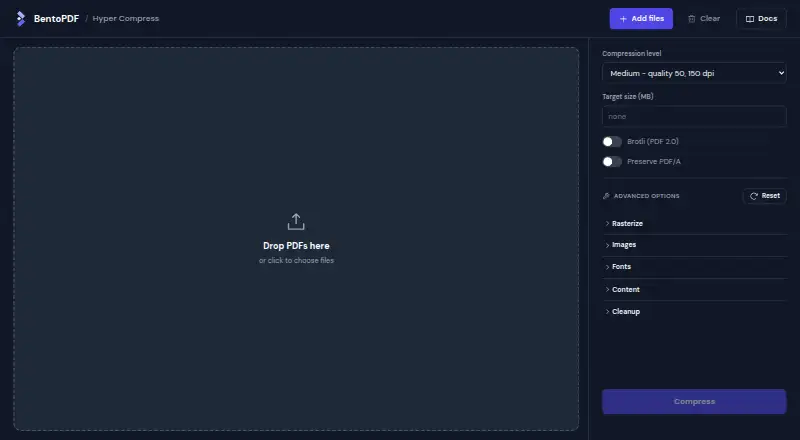
- Lossless, lossy, and target output-size compression modes
- CLI, SDK, C API, HTTP, and WebAssembly interfaces
- Browser-local processing without file uploads
Where it doesn't
- Focused on compression rather than general PDF editing
- Commercial plans cover one closed-source product
- OEM licensing is required for redistribution or service offerings
Our verdict on BentoPDF Hyper Compress
BentoPDF Hyper Compress is an open-source PDF compression engine for developers and organizations that need local or self-hosted processing. It supports web, Windows, macOS, Linux, API, and self-hosted deployments. The product is designed for teams embedding compression into software, running it on their own infrastructure, or processing files locally in a browser rather than uploading them.
Its strongest area is compression depth. Published capabilities include a lossless preset, low, medium, and high compression presets, target output-size compression, image re-encoding and downsampling, font subsetting and optimization, metadata removal, and optional PDF 2.0 Brotli stream compression. These options give developers control over the trade-off between file size and fidelity. Hyper Compress is therefore a better fit for document pipelines and embedded compression workflows than for buyers seeking a broad, end-user PDF editing suite.
The interface choices also suit varied development environments: the product provides a command-line interface, Node SDK, C API, HTTP service, and WebAssembly build. Browser-local processing can keep files on the client, while self-hosting supports customer infrastructure. The AGPL-3.0 / Self-hosted plan supports open-source projects under an AGPL-compatible license, self-hosting, and internal use. Commercial annual plans start at $99 per product per year for Solo, with higher tiers for broader company revenue, developer, support, or distribution requirements. Choose Hyper Compress when compression and deployment control are priorities; choose another PDF editor when document creation or general editing is the central need.
Your product? Our editors can test BentoPDF Hyper Compress in depth and publish a review, labelled as paid · from $149/mo →
BentoPDF Hyper Compress pricing
All 5 BentoPDF Hyper Compress plans and prices →
BentoPDF Hyper Compress fact sheet
| Free plan | Yes |
|---|---|
| Paid from | $99/yr |
| Text editing | Not verified |
| Annotation tools | Not verified |
| OCR | Not verified |
| PDF conversion | Not verified |
| Form creation | Not verified |
| Supported platforms | web, windows, macos, linux, api, self_hosted |
| Deployment | Cloud, Desktop, Self-hosted |
| Platforms | Web, Windows, macOS, Linux |
| Pricing | Free plan (source) |
| Website | hyper.bentopdf.com |
| Facts checked | 19 Sep 2026 |
Alternatives to BentoPDF Hyper Compress
- Foxit PDF EditorA mature PDF workspace with deep editing, OCR, forms, security, and integrations.9.3
- iLovePDFA broad PDF toolkit with free access, offline desktop processing, and cross-device apps.9.2
- SmallpdfA broad PDF toolkit for simple editing across web, Windows, mobile, and Chrome.9.1



See all BentoPDF Hyper Compress alternatives →
Also Ranked In
BentoPDF Hyper Compress is ranked in 2 of our directories.
Used BentoPDF Hyper Compress? Be the first to review it
The editor score above is our own research. What this page doesn't have yet is a reader's view — what you used BentoPDF Hyper Compress for, what worked and what didn't. No stars are seeded and no review is paid for; an editor reads every one before it appears.
Write a reviewTwo minutes · verified accounts only · read by an editor before it appears
Featured on iTechGuides

BentoPDF Hyper Compress is listed in our PDF Editors directory. Add the badge to your site — it links back to this page.
<a href="https://www.itechguides.com/products/bentopdf-hyper-compress/"><img src="https://www.itechguides.com/best/badge/bentopdf-hyper-compress.svg" alt="Featured on iTechGuides" width="230" height="46"></a>
Reviewed by iTechGuides Editors · Editorial team · Updated Oct 2026
Advertiser disclosure: iTechGuides is reader-supported. Vendors can pay for top positions in our rankings and for a place on other products' pages, and we may earn a commission when you click some links. Bought places stand at the number bought; this page and our disclosure say so. Paying vendors may get a fuller, more detailed review from our editors, and that review can change their score. How we rank.
Last updated · How we research and update