
wxMEdit
wxMEdit: A capable open-source editor for text, column, and hexadecimal work. Ranked #21 of 32 in Hex Editors by our editors (6.7/10); pricing: Open source; best for users wanting a cross-platform hex and text editor.
At a glance
- Editor score6.7 / 10
- PricingOpen source
- Best forUsers wanting a cross-platform hex and text editor
- Paid fromFree
- Facts checked21 Sep 2026
Where it wins
- Combines text, column, and hexadecimal editing modes
- Supports regex search, many encodings, and runtime encoding changes
- Opens files up to 32 GB in hexadecimal mode
Where it doesn't
- Raw disk editing is outside its stated scope
- Binary comparison and binary templates are outside its stated scope
- Hex-mode file support is capped at 32 GB
Our verdict on wxMEdit
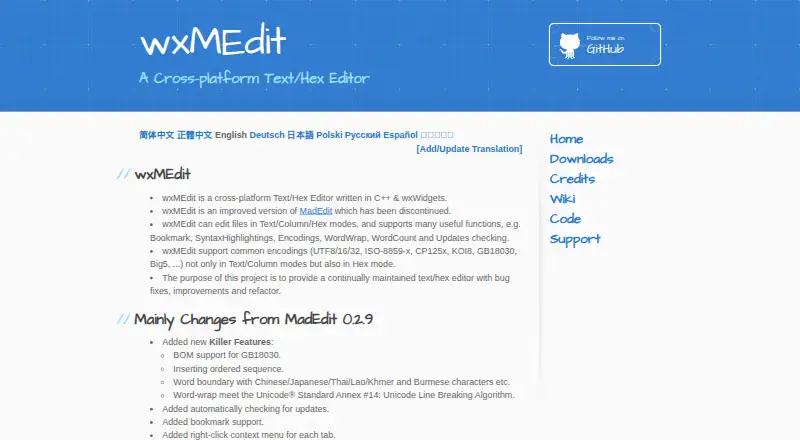
wxMEdit is an open-source desktop editor for users who need text, column, and hexadecimal editing in one application. It runs on Windows, Linux, and macOS, with official downloads also available for FreeBSD, ReactOS, and other Unix-like systems. Its feature set suits developers, technical users, and anyone working across ordinary text files and binary data. Multiple character encodings, syntax highlighting, bookmarks, word wrapping, and multi-file editing support common editing workflows, while hexadecimal mode handles files up to 32 GB.
Its strongest advantage is the combination of editing modes and encoding controls. Users can switch between text, column, and hexadecimal views, search and replace with regular expressions, and change runtime encoding settings. Syntax highlighting covers many programming languages, and bookmarks help navigate larger files. Multi-file editing in a single instance keeps related work together. These capabilities make wxMEdit a practical fit for users who want one cross-platform desktop tool instead of separate text and hex editors.
The product has a focused scope. Its stated capabilities center on opening and editing files, with no documented emphasis on raw disk editing, binary comparison, binary templates, or scripting. The 32 GB limit applies specifically to hexadecimal mode, which may matter for larger binary workloads. Users seeking a straightforward open-source editor for text, structured columns, and hex data should consider wxMEdit. Users who need disk-level operations, comparison workflows, or automation features should choose a tool designed around those requirements instead.
Your product? Our editors can test wxMEdit in depth and publish a review, labelled as paid · from $149/mo →
wxMEdit pricing
wxMEdit fact sheet
| Free plan | Not verified |
|---|---|
| Paid from | Free |
| Supported platforms | Windows, Linux, macOS |
| Binary comparison | Not verified |
| Binary templates | Not verified |
| Scripting support | Not verified |
| Plugin support | Not verified |
| Disk editing | Not verified |
| Deployment | Desktop |
| Platforms | Windows, Linux, macOS |
| Support | Community |
| Built for | Solo, Small business (editorial estimate) |
| Pricing | Open source |
| Website | wxmedit.github.io |
| Facts checked | 21 Sep 2026 |
Alternatives to wxMEdit
- ImHexImHex packs advanced binary analysis, editing, and inspection into a free cross-platform desktop tool.9.4
- 010 EditorA deep cross-platform editor for structured binary work, debugging, and disk analysis.9.2
- Hex Editor NeoA broad free Windows toolkit for binary editing, analysis, comparison, and recovery work.8.9


See all wxMEdit alternatives →
Used wxMEdit? Be the first to review it
The editor score above is our own research. What this page doesn't have yet is a reader's view — what you used wxMEdit for, what worked and what didn't. No stars are seeded and no review is paid for; an editor reads every one before it appears.
Write a reviewTwo minutes · verified accounts only · read by an editor before it appears
Featured on iTechGuides

wxMEdit is listed in our Hex Editors directory. Add the badge to your site — it links back to this page.
<a href="https://www.itechguides.com/products/wxmedit/"><img src="https://www.itechguides.com/best/badge/wxmedit.svg" alt="Featured on iTechGuides" width="230" height="46"></a>
Reviewed by iTechGuides Editors · Editorial team · Updated Oct 2026
Advertiser disclosure: iTechGuides is reader-supported. Vendors can pay for top positions in our rankings and for a place on other products' pages, and we may earn a commission when you click some links. Bought places stand at the number bought; this page and our disclosure say so. Paying vendors may get a fuller, more detailed review from our editors, and that review can change their score. How we rank.
Last updated · How we research and update