
WPS Writer
WPS Writer: Affordable Word-compatible editing with offline work, collaboration, AI, and PDF tools. Ranked #4 of 45 in Word Processing Software by our editors (8.9/10); pricing: Free plan · 3-day trial; best for affordable Microsoft-compatible editing.
At a glance
- Editor score8.9 / 10
- PricingFree plan · 3-day trial
- Best forAffordable Microsoft-compatible editing
- Free planYes
- Desktop appsYes
- Founded1988 · Singapore
- Facts checked22 Sep 2026
Where it wins
- Edits DOC and DOCX files offline across desktop, mobile, and web
- Real-time co-editing includes comments, permissions, and version history
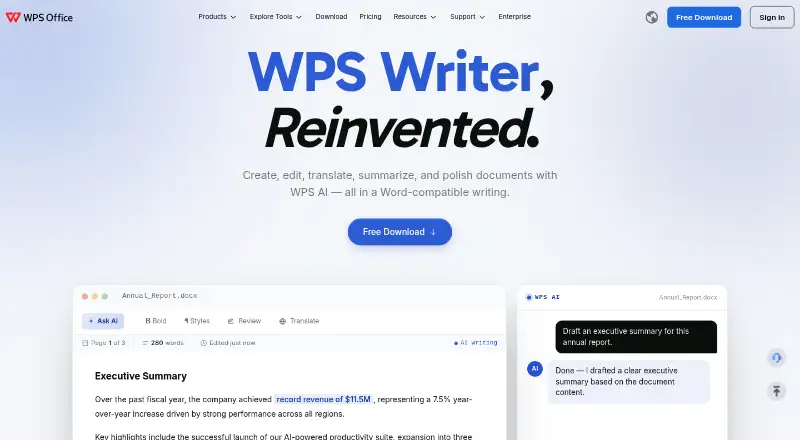
- AI supports drafting, rewriting, summaries, translation, and spell checking
Where it doesn't
- Listed cloud integrations are limited to Google Drive and Dropbox
- WPS Standard includes only 1 GB of cloud storage
- WPS Pro+ AI tools have usage limits
Our verdict on WPS Writer
WPS Writer is the word-processing application in the WPS Office suite, designed for individuals, students, professionals, and teams working with Word-compatible documents. It creates, edits, saves, and shares DOC and DOCX files, while also supporting templates, styles, page layouts, comments, version history, and tracked insertions, deletions, and formatting changes. Installed applications support offline editing, and the product is available on web, Windows, macOS, Linux, iOS, and Android.
The published plans show a free option alongside paid tiers. WPS Standard includes basic PDF features, 1 GB of cloud storage, limited template downloads, and support for 47 file formats. The Sharing Plan costs $2.49 per user per month when billed annually and adds multiple users under one subscription, 20 GB of cloud space per user, AI integrated into workflows, and PDF conversion tools. WPS Pro+ costs $5.83 per month when billed annually and adds full PDF editing and conversion, unlimited template downloads, 20 GB of cloud storage, and essential AI tools with usage limits. Pricing displayed by the vendor can vary by region and platform.
Its feature set covers everyday document production as well as review-heavy work. Users can co-edit documents in real time, manage permissions, add comments, review version history, and track changes. AI features address drafting, rewriting, summarization, translation, and spell checking, while PDF-to-Word conversion and PDF export extend the workflow beyond standard editing. Google Drive and Dropbox are the listed integrations, so organizations needing a wider connected ecosystem may prefer another editor. WPS Writer suits buyers prioritizing low-cost Microsoft-compatible editing across many platforms; teams seeking broader integrations should look elsewhere.
Your product? Our editors can test WPS Writer in depth and publish a review, labelled as paid · from $149/mo →
WPS Writer pricing
All 3 WPS Writer plans and prices →
WPS Writer fact sheet
| Free plan | Yes |
|---|---|
| Paid from | Not verified |
| Desktop apps | Yes |
| Offline editing | Yes |
| Real-time collaboration | Yes |
| Track changes | Yes |
| Desktop platforms | Windows, macOS, Linux |
| Maximum document size | Not verified |
| Free trial | 3 days |
| Money-back guarantee | 30 days |
| Deployment | Cloud, Desktop, Mobile |
| Platforms | Web, Windows, macOS, Linux, iOS, Android |
| Compliance & security | GDPR |
| Support | Email, Docs · 24/7 |
| Built for | Solo, Small business, Mid-market, Enterprise (editorial estimate) |
| Integrations | 3 integrations: Google Drive, Dropbox, WPS Cloud |
| Pricing | Free plan · 3-day trial (source) |
| Website | wps.com |
| Facts checked | 22 Sep 2026 |
WPS Writer integrations
WPS Writer lists 3 integrations on its own site.
- Google Drive
- Dropbox
- WPS Cloud
Alternatives to WPS Writer
- Microsoft WordA complete word processor with strong collaboration, review, accessibility, and Microsoft ecosystem support.9.4
- Google DocsA strong browser-first word processor for teams that edit documents together.9.2
- Zoho WriterA broad free word processor for teams needing cross-platform editing and workflow features.9.0


See all WPS Writer alternatives →
WPS Writer vs the competition
- WPS Writer vs Microsoft Word
- WPS Writer vs Google Docs
- WPS Writer vs Zoho Writer
- WPS Writer vs ONLYOFFICE Docs
- WPS Writer vs Apple Pages
- WPS Writer vs LibreOffice Writer



Compare WPS Writer with any tool side by side →
Also Ranked In
WPS Writer is ranked in 2 of our directories.
Used WPS Writer? Be the first to review it
The editor score above is our own research. What this page doesn't have yet is a reader's view — what you used WPS Writer for, what worked and what didn't. No stars are seeded and no review is paid for; an editor reads every one before it appears.
Write a reviewTwo minutes · verified accounts only · read by an editor before it appears
Featured on iTechGuides

WPS Writer is listed in our Word Processing Software directory. Add the badge to your site — it links back to this page.
<a href="https://www.itechguides.com/products/wps-writer/"><img src="https://www.itechguides.com/best/badge/wps-writer.svg" alt="Featured on iTechGuides" width="230" height="46"></a>
Reviewed by iTechGuides Editors · Editorial team · Updated Oct 2026
Advertiser disclosure: iTechGuides is reader-supported. Vendors can pay for top positions in our rankings and for a place on other products' pages, and we may earn a commission when you click some links. Bought places stand at the number bought; this page and our disclosure say so. Paying vendors may get a fuller, more detailed review from our editors, and that review can change their score. How we rank.
Last updated · How we research and update