Woxgen Auto-Record
Woxgen Auto-Record: Automates guided web-app walkthrough videos, with limited monthly Auto-Records on paid plans. Ranked #31 of 39 in AI Screen Recorders by our editors (5.7/10); pricing: Free plan; best for teams automating guided web-app walkthrough videos.
At a glance
- Editor score5.7 / 10
- PricingFree plan
- Best forTeams automating guided web-app walkthrough videos
- Free planYes
- Paid from$19/mo
- AI transcriptionNo
- Facts checked25 Sep 2026
Where it wins
- Records a web-app walkthrough from a URL, with optional flow instructions
- Generates voice-over and synced subtitles, with click-focused zoom effects
- Timeline editing covers script, voice, timing and zoom
Where it doesn't
- Free plan excludes Auto-Record and charges per video for renders
- Monthly Auto-Record allowances range from 2 to 4 across paid plans
- Focused on browser walkthroughs rather than general-purpose screen recording
Our verdict on Woxgen Auto-Record
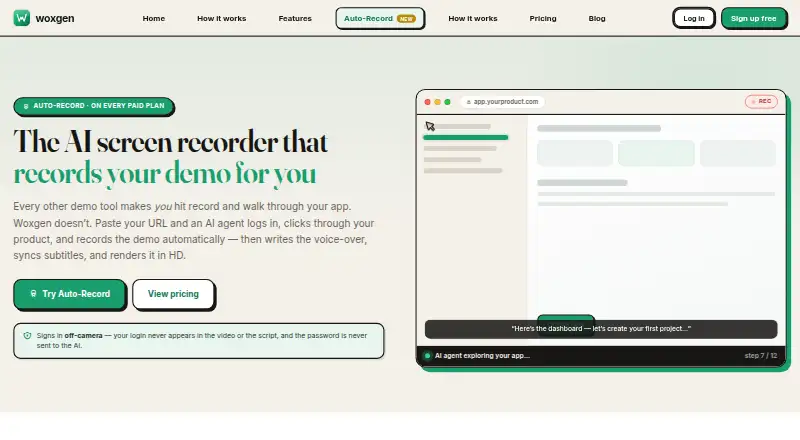
Woxgen Auto-Record is a browser-based feature for turning a web-app URL into a product walkthrough video. Its AI agent can navigate the app, use optional test-login details for apps behind sign-in, and follow optional instructions about which flows to demonstrate. Woxgen then generates voice-over and synced subtitles, adds click-focused zoom effects, and renders an HD MP4. It suits solo users and small teams that need guided demo creation more than everyday screen recording.
The plan structure puts Auto-Record behind paid tiers. The Free plan is free, but excludes Auto-Record and charges per video for renders. Plus costs $19 per month and includes 2 Auto-Records monthly; Teams costs $49 per month for 3, and Pro costs $199 per month for 4. Each paid plan states no per-video fee. These fixed monthly allowances make the feature easier to budget than per-video rendering, but the number of automated recordings remains limited, particularly on the lower tiers.
The editing workflow is a notable fit for teams that want a narrated, polished walkthrough without manually capturing every step: users can adjust script, voice, timing, and zoom in a timeline editor. The broader Woxgen service also accepts uploaded screen recordings for AI-assisted demo production, so teams have another route when they already have footage. Auto-Record is a feature of Woxgen, not a standalone service, and is available on the web. Choose it for repeatable web-app demo creation with narration and subtitles; look elsewhere if your main need is unrestricted, general-purpose screen recording or a large monthly volume of automated demos.
Your product? Our editors can test Woxgen Auto-Record in depth and publish a review, labelled as paid · from $149/mo →
Woxgen Auto-Record pricing
All 4 Woxgen Auto-Record plans and prices →
Woxgen Auto-Record fact sheet
| Free plan | Yes |
|---|---|
| Paid from | $19/mo |
| AI transcription | No |
| AI summaries | No |
| Documentation output | No |
| Speaker identification | No |
| Recording limit | 10 minutes |
| Platform support | Browser |
| Export formats | MP4 |
| Deployment | Cloud |
| Platforms | Web |
| Compliance & security | GDPR |
| Support | |
| Built for | Solo, Small business (editorial estimate) |
| Pricing | Free plan (source) |
| Website | woxgen.com |
| Facts checked | 25 Sep 2026 |
Alternatives to Woxgen Auto-Record
- LoomA polished screen recorder with broad integrations, AI options, and a higher paid entry point.9.2
- ZightA broad AI capture and administration tool with a useful free tier.9.0
- ScreenPalA feature-rich freemium recorder with 4K capture, AI tools, and broad device coverage.8.8



See all Woxgen Auto-Record alternatives →
Used Woxgen Auto-Record? Be the first to review it
The editor score above is our own research. What this page doesn't have yet is a reader's view — what you used Woxgen Auto-Record for, what worked and what didn't. No stars are seeded and no review is paid for; an editor reads every one before it appears.
Write a reviewTwo minutes · verified accounts only · read by an editor before it appears
Featured on iTechGuides

Woxgen Auto-Record is listed in our AI Screen Recorders directory. Add the badge to your site — it links back to this page.
<a href="https://www.itechguides.com/products/woxgen-auto-record/"><img src="https://www.itechguides.com/best/badge/woxgen-auto-record.svg" alt="Featured on iTechGuides" width="230" height="46"></a>
Reviewed by iTechGuides Editors · Editorial team · Updated Oct 2026
Advertiser disclosure: iTechGuides is reader-supported. Vendors can pay for top positions in our rankings and for a place on other products' pages, and we may earn a commission when you click some links. Bought places stand at the number bought; this page and our disclosure say so. Paying vendors may get a fuller, more detailed review from our editors, and that review can change their score. How we rank.
Last updated · How we research and update