WindowBlinds
WindowBlinds: A broad Windows visual customization suite with capable taskbar controls. Ranked #8 of 34 in Taskbar Customization Software by our editors (7.8/10); pricing: 30-day trial; best for windows-wide visual skin customization.
At a glance
- Editor score7.8 / 10
- Pricing30-day trial
- Best forWindows-wide visual skin customization
- Free planNo
- PlatformWindows
- Founded1991 · Plymouth, Michigan, United States
- Facts checked20 Sep 2026
Where it wins
- Customizes taskbars, window frames, and desktop interface elements
- Offers colors, textures, fonts, backgrounds, and transparency controls
- Includes presets, skin browsing, and custom-skin creation with SkinStudio
Where it doesn't
- Supports Windows only
- Requires a paid product; no free plan is listed
- Taskbar customization is part of a broader visual suite, not its sole focus
Our verdict on WindowBlinds
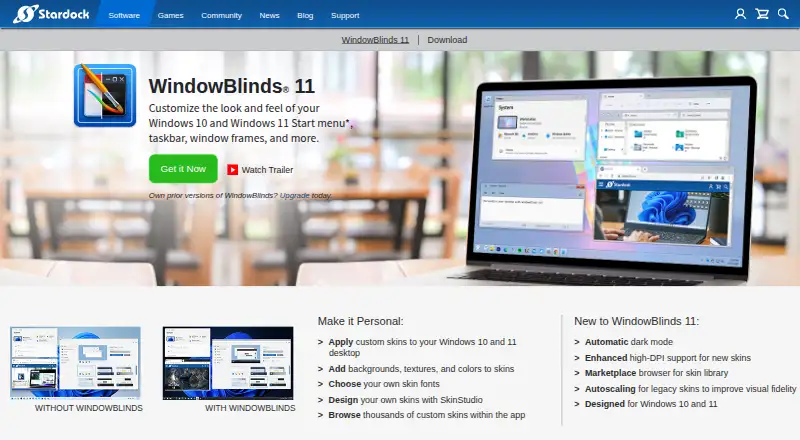
WindowBlinds is Windows desktop-customization software from Stardock for people who want to change the appearance of Windows 10 or Windows 11 beyond standard personalization options. It applies visual skins across taskbars, window frames, control buttons, and other desktop interface elements. Users can adjust colors, backgrounds, textures, fonts, and transparency, then save preferred arrangements as presets. The product is aimed at Windows users who want system-wide visual changes rather than a taskbar-only utility.
Its broad customization scope is the main distinction. WindowBlinds can apply different skins to different application types, browse thousands of custom skins within the app, and use automatic dark mode and enhanced high-DPI support. Marketplace browsing and autoscaling for legacy skins add discovery and compatibility-oriented features, while SkinStudio lets users create custom skins. These capabilities make it suitable for users who want a coordinated desktop appearance across several interface areas, not just a modified taskbar.
The platform fit is focused: WindowBlinds requires Windows 10 or Windows 11, and the current version supports up to five active installs. It is a paid product with a 30-day trial, so it suits buyers who want to evaluate a full Windows skinning workflow before committing. Choose it if taskbar changes are part of a wider desktop redesign involving windows, controls, fonts, and transparency. A narrower taskbar-only tool may be a better fit for users who do not need system-wide skins or the included SkinStudio workflow.
Your product? Our editors can test WindowBlinds in depth and publish a review, labelled as paid · from $149/mo →
WindowBlinds pricing
WindowBlinds fact sheet
| Free plan | No |
|---|---|
| Paid from | Not verified |
| Platform | Windows |
| Taskbar positioning | Not verified |
| Transparency controls | Yes |
| App grouping controls | Not verified |
| Multi-monitor support | Not verified |
| Taskbar sizing | Not verified |
| Portable version | Not verified |
| Free trial | 30 days |
| Deployment | Desktop |
| Platforms | Windows |
| Support | Community, Tickets |
| Built for | Solo, Small business (editorial estimate) |
| Pricing | 30-day trial (source) |
| Website | stardock.com |
| Facts checked | 20 Sep 2026 |
Alternatives to WindowBlinds
- ObjectDockA feature-rich Windows dock replacement with strong customization and multi-monitor support.9.2
- TaskbarXA free, portable Windows 10 taskbar customizer with limited modern Windows 11 support.8.8
- YASB RebornA flexible Windows taskbar replacement for users comfortable with deep customization.8.6


See all WindowBlinds alternatives →
WindowBlinds vs the competition
- WindowBlinds vs ObjectDock
- WindowBlinds vs TaskbarX
- WindowBlinds vs YASB Reborn
- WindowBlinds vs ExplorerPatcher
- WindowBlinds vs TranslucentTB
- WindowBlinds vs Start11

Compare WindowBlinds with any tool side by side →
Also Ranked In
WindowBlinds is ranked in 2 of our directories.
Used WindowBlinds? Be the first to review it
The editor score above is our own research. What this page doesn't have yet is a reader's view — what you used WindowBlinds for, what worked and what didn't. No stars are seeded and no review is paid for; an editor reads every one before it appears.
Write a reviewTwo minutes · verified accounts only · read by an editor before it appears
Featured on iTechGuides

WindowBlinds is listed in our Taskbar Customization Software directory. Add the badge to your site — it links back to this page.
<a href="https://www.itechguides.com/products/windowblinds/"><img src="https://www.itechguides.com/best/badge/windowblinds.svg" alt="Featured on iTechGuides" width="230" height="46"></a>
Reviewed by iTechGuides Editors · Editorial team · Updated Oct 2026
Advertiser disclosure: iTechGuides is reader-supported. Vendors can pay for top positions in our rankings and for a place on other products' pages, and we may earn a commission when you click some links. Bought places stand at the number bought; this page and our disclosure say so. Paying vendors may get a fuller, more detailed review from our editors, and that review can change their score. How we rank.
Last updated · How we research and update