WifiInfoView
WifiInfoView: A free Windows tool for detailed Wi-Fi discovery, inspection, filtering, and export. Ranked #34 of 37 in Network Diagnostic Software by our editors (5.1/10); pricing: Free plan; best for free Windows Wi-Fi inspection.
At a glance
- Editor score5.1 / 10
- PricingFree plan
- Best forFree Windows Wi-Fi inspection
- Free planYes
- Paid fromFree
- Path visualizationNo
- Founded2001
- Facts checked22 Sep 2026
Where it wins
- Detailed SSID, signal, channel, frequency, security, and router data
- Exports results to text, CSV, HTML, XML, JSON, and PCAP
- Command-line controls support scanning, filtering, sorting, and exporting
Where it doesn't
- Windows-only desktop utility
- Focused on Wi-Fi inspection rather than broader network diagnostics
- Advanced information displays may require technical interpretation
Our verdict on WifiInfoView
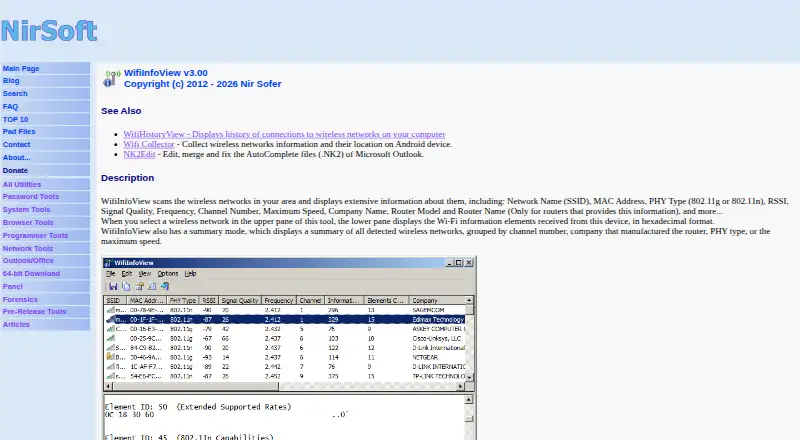
WifiInfoView is a portable Windows utility for scanning and inspecting nearby wireless networks. It is suited to people who need local Wi-Fi discovery, channel and signal information, access-point details, or exportable scan results without a paid subscription. The product displays SSID, MAC address, PHY type, RSSI, signal quality, frequency, channel, security, maximum speed, router model, and router name when available. It also shows received Wi-Fi information elements in hexadecimal format and can connect to a selected access point.
Its strongest fit is detailed wireless inspection combined with flexible output. Summary views group networks by channel, company, PHY type, or maximum speed, helping users examine nearby networks from different angles. Scan results can be exported to text, CSV, HTML, XML, or JSON, while selected access-point information can be exported to PCAP. Command-line support adds scanning, filtering, sorting, and exporting controls for repeatable workflows or scripted use.
The trade-off is scope and platform coverage. WifiInfoView is a Windows desktop utility supporting Windows Vista, Windows 7, Windows 8, Windows Server 2008, Windows 10, and Windows 11 in 32-bit and x64 versions. Its focus is wireless network discovery and inspection, not general network path analysis, DNS diagnostics, or packet-loss analysis. Choose it for a free, portable way to examine nearby Wi-Fi networks and work with structured scan output. Choose another category of tool when the priority is broader network troubleshooting beyond the wireless environment.
Your product? Our editors can test WifiInfoView in depth and publish a review, labelled as paid · from $149/mo →
WifiInfoView pricing
WifiInfoView fact sheet
| Free plan | Yes |
|---|---|
| Paid from | Free |
| Deployment | Desktop |
| Path visualization | No |
| DNS diagnostics | No |
| Packet-loss analysis | No |
| Command-line interface | Yes |
| Target limit | Not verified |
| Supported platforms | Windows Vista, Windows 7, Windows 8, Windows Server 2008, Windows 10, Windows 11; 32-bit and x64 |
| Deployment | Desktop |
| Platforms | Windows |
| Support | |
| Built for | Solo, Small business (editorial estimate) |
| Pricing | Free plan |
| Website | nirsoft.net |
| Facts checked | 22 Sep 2026 |
Alternatives to WifiInfoView
- GlobalpingA broad, open-source toolkit for diagnosing network behavior across global locations.9.4
- RIPE AtlasA free platform for distributed measurements, path analysis, and public Internet reachability data.9.2
- PingPlotterA focused tool for tracking latency, packet loss, jitter, and network paths.9.0



See all WifiInfoView alternatives →
Used WifiInfoView? Be the first to review it
The editor score above is our own research. What this page doesn't have yet is a reader's view — what you used WifiInfoView for, what worked and what didn't. No stars are seeded and no review is paid for; an editor reads every one before it appears.
Write a reviewTwo minutes · verified accounts only · read by an editor before it appears
Featured on iTechGuides

WifiInfoView is listed in our Network Diagnostic Software directory. Add the badge to your site — it links back to this page.
<a href="https://www.itechguides.com/products/wifiinfoview/"><img src="https://www.itechguides.com/best/badge/wifiinfoview.svg" alt="Featured on iTechGuides" width="230" height="46"></a>
Reviewed by iTechGuides Editors · Editorial team · Updated Oct 2026
Advertiser disclosure: iTechGuides is reader-supported. Vendors can pay for top positions in our rankings and for a place on other products' pages, and we may earn a commission when you click some links. Bought places stand at the number bought; this page and our disclosure say so. Paying vendors may get a fuller, more detailed review from our editors, and that review can change their score. How we rank.
Last updated · How we research and update