VirtuaWin
VirtuaWin: A free, open-source desktop switcher for organized Windows workspaces. Ranked #15 of 65 in Window Management Software by our editors (7.9/10); pricing: Free plan; best for windows virtual desktops.
At a glance
- Editor score7.9 / 10
- PricingFree plan
- Best forWindows virtual desktops
- Free planYes
- Paid fromFree
- Founded1999
- Facts checked21 Sep 2026
Where it wins
- Up to nine virtual desktops with hotkeys, mouse controls, and menus
- Window rules, dual-monitor support, and portable installation
- Free, open-source design with modules for added functionality
Where it doesn't
- Windows-only, with no macOS or Linux support
- Focuses on desktop switching rather than modern window tiling
- Visual pager modules are optional extensions rather than the core experience
Our verdict on VirtuaWin
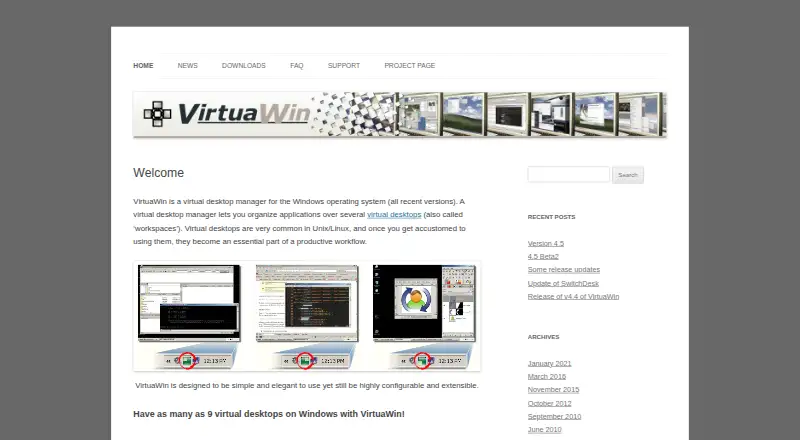
VirtuaWin is a free, open-source virtual desktop manager for Windows. It helps users separate applications across up to nine desktops and move between workspaces with hotkeys, mouse controls, menus, or optional visual pager modules. Its audience is Windows desktop users who want clear workspace separation without adopting a full window-tiling or layout-automation system. Portable installation, dual-monitor support, Unicode, and 64-bit support on newer Windows versions broaden its fit for practical desktop use.
VirtuaWin’s main strength is focused workspace switching. Users can create distinct desktops for different activities, then configure window rules to control application behavior. The module interface also allows functionality to be extended, while pager modules offer a more visual way to navigate desktops. This makes the product a good match for people who prefer keyboard-driven or menu-based control and want a traditional virtual-desktop model that can be adjusted through rules and extensions.
The trade-off is a narrower scope than modern window managers. VirtuaWin centers on switching between virtual desktops rather than automatically arranging windows into tiling layouts or managing complex screen layouts. It is also limited to Windows, so it is not suited to teams or individuals who need the same tool across macOS or Linux. With a free, open-source model and no paid plans, it suits users seeking desktop separation without subscription costs. Choose it for straightforward Windows workspace organization; consider another category option if automatic tiling or broader platform coverage is central to your workflow.
Your product? Our editors can test VirtuaWin in depth and publish a review, labelled as paid · from $149/mo →
VirtuaWin pricing
VirtuaWin fact sheet
| Free plan | Yes |
|---|---|
| Paid from | Free |
| Platforms | windows |
| Maximum displays | Not verified |
| Layout presets | Not verified |
| Application rules | Yes |
| Window grouping | Not verified |
| Virtual desktop controls | Yes |
| Deployment | Desktop |
| Platforms | Windows |
| Support | Community, Docs |
| Built for | Solo, Small business (editorial estimate) |
| Pricing | Free plan |
| Website | virtuawin.sourceforge.io |
| Facts checked | 21 Sep 2026 |
Alternatives to VirtuaWin
- i3A configurable X11 window manager for Linux users who want precise tiling and workspace control.9.4
- SwayA free, open-source Wayland compositor for configurable window layouts and i3 users.9.3
- HyprlandA flexible Linux building block for users who want to configure their own desktop.9.2



See all VirtuaWin alternatives →
Used VirtuaWin? Be the first to review it
The editor score above is our own research. What this page doesn't have yet is a reader's view — what you used VirtuaWin for, what worked and what didn't. No stars are seeded and no review is paid for; an editor reads every one before it appears.
Write a reviewTwo minutes · verified accounts only · read by an editor before it appears
Featured on iTechGuides

VirtuaWin is listed in our Window Management Software directory. Add the badge to your site — it links back to this page.
<a href="https://www.itechguides.com/products/virtuawin/"><img src="https://www.itechguides.com/best/badge/virtuawin.svg" alt="Featured on iTechGuides" width="230" height="46"></a>
Reviewed by iTechGuides Editors · Editorial team · Updated Oct 2026
Advertiser disclosure: iTechGuides is reader-supported. Vendors can pay for top positions in our rankings and for a place on other products' pages, and we may earn a commission when you click some links. Bought places stand at the number bought; this page and our disclosure say so. Paying vendors may get a fuller, more detailed review from our editors, and that review can change their score. How we rank.
Last updated · How we research and update