
Vidari Studio
Vidari Studio: A capable free OBS-based studio for Windows streamers who want integrated production tools. Ranked #20 of 44 in Game Streaming Software by our editors (7.2/10); pricing: Free plan; best for windows users wanting an OBS-compatible free studio.
At a glance
- Editor score7.2 / 10
- PricingFree plan
- Best forWindows users wanting an OBS-compatible free studio
- Free planYes
- Paid fromFree
- Facts checked20 Sep 2026
Where it wins
- Free, open-source desktop software with no account tier
- Imports OBS scenes, sources, filters, layouts, and audio
- Adds alerts, chat, replay, vertical output, and audio tools
Where it doesn't
- Windows 10/11 only
- Multistreaming is not available
- macOS support is still in progress
Our verdict on Vidari Studio
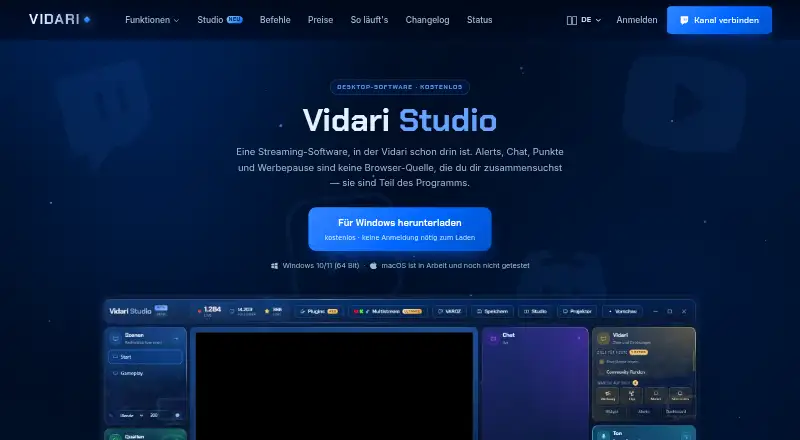
Vidari Studio is free, open-source streaming software for Windows 10 and 11, built on OBS Studio. It is aimed at game streamers who want local encoding and broadcasting in a desktop studio, while adding integrated production features. Its workflow covers studio mode with separate preview and program views, built-in alerts and chat, recording, replay buffers, vertical 9:16 output, and post-broadcast session reports. There is no account tier, and the software is released under GPLv2.
Its strongest fit is for streamers moving from OBS or maintaining an OBS-based workflow. Vidari Studio can import OBS scenes, sources, filters, layouts, and audio, which gives existing setups a direct path into the application. The integration set includes Twitch, Discord, Spotify, VTube Studio, Elgato Stream Deck, and Macro Deck. Stream Deck and Macro Deck plugins extend control options, while microphone calibration, audio ducking, and independent tracks support separate audio handling for recordings, replays, livestreams, and Twitch archives. Camera shaping and visual effects add further control over presentation.
The main trade-off is platform scope. Vidari Studio supports Windows 10/11, while macOS support is described as in progress. Multistreaming is not available, and the product’s published direction says that multistreaming plans have not yet been decided. That makes Vidari Studio a focused choice for Windows users who want a free OBS-compatible studio with alerts, replay, vertical output, and audio controls in one application. Streamers who need macOS support or multistream distribution should choose an alternative with those capabilities.
Your product? Our editors can test Vidari Studio in depth and publish a review, labelled as paid · from $149/mo →
Vidari Studio pricing
All 1 Vidari Studio plans and prices →
Vidari Studio fact sheet
| Free plan | Yes |
|---|---|
| Paid from | Free |
| Max output resolution | Not verified |
| Multistreaming | No |
| Hardware encoding | Yes |
| Alerts and widgets | Yes |
| Custom RTMP output | Not verified |
| Virtual camera | Not verified |
| Supported platforms | Windows 10/11 |
| Deployment | Desktop |
| Platforms | Windows |
| Support | |
| Built for | Solo, Small business (editorial estimate) |
| Integrations | 6 integrations: Twitch, Elgato Stream Deck, Macro Deck, Discord, Spotify, VTube Studio |
| Pricing | Free plan (source) |
| Website | vidari.de |
| Facts checked | 20 Sep 2026 |
Vidari Studio integrations
Vidari Studio lists 6 integrations on its own site.
- Twitch
- Elgato Stream Deck
- Macro Deck
- Discord
- Spotify
- VTube Studio
Alternatives to Vidari Studio
- OBS StudioA flexible desktop studio with deep production tools and no software cost.9.4
- PRISM Live StudioA cross-platform encoder with scheduling, interaction tools, and six-channel multistreaming.9.1
- SplitCam MultistreamA free encoder for creators who want broad multistreaming without a cloud relay.9.0



See all Vidari Studio alternatives →
Also Ranked In
Vidari Studio is ranked in 4 of our directories.
Used Vidari Studio? Be the first to review it
The editor score above is our own research. What this page doesn't have yet is a reader's view — what you used Vidari Studio for, what worked and what didn't. No stars are seeded and no review is paid for; an editor reads every one before it appears.
Write a reviewTwo minutes · verified accounts only · read by an editor before it appears
Featured on iTechGuides

Vidari Studio is listed in our Game Streaming Software directory. Add the badge to your site — it links back to this page.
<a href="https://www.itechguides.com/products/vidari-studio/"><img src="https://www.itechguides.com/best/badge/vidari-studio.svg" alt="Featured on iTechGuides" width="230" height="46"></a>
Reviewed by iTechGuides Editors · Editorial team · Updated Oct 2026
Advertiser disclosure: iTechGuides is reader-supported. Vendors can pay for top positions in our rankings and for a place on other products' pages, and we may earn a commission when you click some links. Bought places stand at the number bought; this page and our disclosure say so. Paying vendors may get a fuller, more detailed review from our editors, and that review can change their score. How we rank.
Last updated · How we research and update