ViceVersa
ViceVersa: A focused Windows file backup tool with synchronization, replication, and versioning. Ranked #98 of 150 in Backup Software by our editors (3.0/10); pricing: Free plan · 30-day trial; best for windows teams needing synchronization and replication.
At a glance
- Editor score3.0 / 10
- PricingFree plan · 30-day trial
- Best forWindows teams needing synchronization and replication
- Free planYes
- Paid from$999.75/user/yr
- Server backupYes
- Founded2001 · Fullarton, South Australia, Australia
- Facts checked22 Sep 2026
Where it wins
- Supports scheduled, event-driven, interval-based, and real-time jobs
- Backs up open files and locked databases with version archiving
- Offers CRC and SHA-256 verification, encryption, and compression
Where it doesn't
- Windows-only platform support
- File-based scope rather than bare-metal or mobile backup
- Paid desktop pricing starts at $72.95 per device
Our verdict on ViceVersa
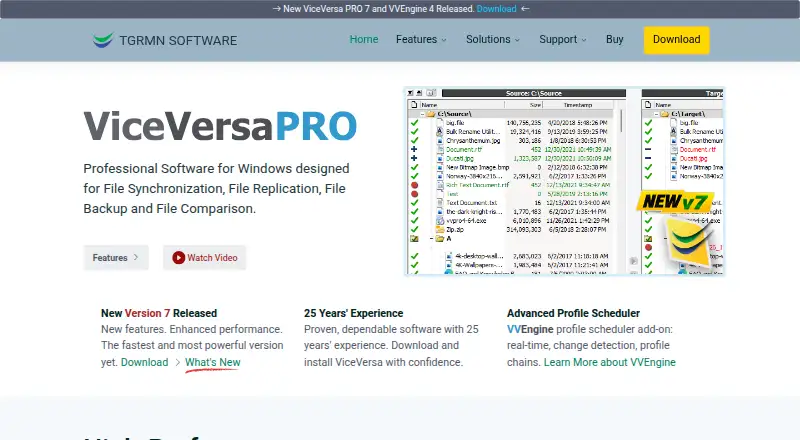
ViceVersa is Windows software for backing up, synchronizing, replicating, and comparing files and folders. It serves desktops, laptops, workstations, Windows servers, NAS devices, USB drives, network locations, and other storage media. Its file-oriented design suits Windows teams that need controlled copies between computers, servers, and storage, particularly when synchronization or replication matters alongside backup. Jobs can run manually, on schedules, at intervals, in response to events, or in real time.
The free ViceVersa FREE edition includes file synchronization and file backup with a reduced feature set. ViceVersa PRO Desktop costs $72.95 per device and adds file replication and file comparison, with support for up to 2 computers for one user. Server Standard costs $189.95 per server and provides Windows Server support with backup, synchronization, and replication. Server Premium costs $249.95 per server and adds extended VSS support. ViceVersa PRO Technician costs $999.75 per technician per year and includes a floating license for technician use. A 30-day free trial is also available.
Its strongest technical fit is file-level protection with operational control. ViceVersa can copy changed or open files, back up locked databases, preserve previous versions, preview operations before execution, and verify backups with CRC or SHA-256 hashes. Encryption and compression apply to stored files. Windows Task Scheduler, Hyper-V, MS SQL Server, Oracle databases, NAS, SMB, VPN, and USB storage support broader Windows environments, while VVEngine provides Windows Service operation and command-line support. Choose ViceVersa for Windows file backup, synchronization, and replication; choose another category of tool when bare-metal recovery or mobile backup is central.
Your product? Our editors can test ViceVersa in depth and publish a review, labelled as paid · from $149/mo →
ViceVersa pricing
All 5 ViceVersa plans and prices →
ViceVersa fact sheet
| Free plan | Yes |
|---|---|
| Paid from | $999.75/user/yr |
| Computer backup | Yes |
| Mobile backup | Not verified |
| Server backup | Yes |
| Backup scope | Mixed |
| Restore modes | File |
| Ransomware protection | Not verified |
| Supported platforms | windows |
| Free trial | 30 days · no card needed |
| Money-back guarantee | 14 days |
| Deployment | Desktop |
| Platforms | Windows |
| Support | Email, Community, Docs |
| Built for | Solo, Small business, Mid-market, Enterprise (editorial estimate) |
| Integrations | 8 integrations: Windows Task Scheduler, Hyper-V, MS SQL Server, Oracle databases, NAS, SMB … |
| Pricing | Free plan · 30-day trial (source) |
| Website | tgrmn.com |
| Facts checked | 22 Sep 2026 |
ViceVersa integrations
ViceVersa lists 8 integrations on its own site.
- Windows Task Scheduler
- Hyper-V
- MS SQL Server
- Oracle databases
- NAS
- SMB
- VPN
- USB storage
Alternatives to ViceVersa
- Veeam Backup & ReplicationA wide-ranging backup platform for enterprise virtual and hybrid environments.9.4
- Rubrik Security CloudA cyber-recovery platform built around immutable backup, threat investigation, and clean-state recovery.9.2
- NAKIVO Backup & ReplicationA broad VM backup platform with recovery, replication, and disaster-recovery workflows.8.8

See all ViceVersa alternatives →
Used ViceVersa? Be the first to review it
The editor score above is our own research. What this page doesn't have yet is a reader's view — what you used ViceVersa for, what worked and what didn't. No stars are seeded and no review is paid for; an editor reads every one before it appears.
Write a reviewTwo minutes · verified accounts only · read by an editor before it appears
Featured on iTechGuides

ViceVersa is listed in our Backup Software directory. Add the badge to your site — it links back to this page.
<a href="https://www.itechguides.com/products/viceversa/"><img src="https://www.itechguides.com/best/badge/viceversa.svg" alt="Featured on iTechGuides" width="230" height="46"></a>
Reviewed by iTechGuides Editors · Editorial team · Updated Oct 2026
Advertiser disclosure: iTechGuides is reader-supported. Vendors can pay for top positions in our rankings and for a place on other products' pages, and we may earn a commission when you click some links. Bought places stand at the number bought; this page and our disclosure say so. Paying vendors may get a fuller, more detailed review from our editors, and that review can change their score. How we rank.
Last updated · How we research and update