
VerseCAST
VerseCAST: A low-cost, mobile-first presentation tool for Scripture, lyrics, media, and streams. Ranked #12 of 35 in Church Presentation Software by our editors (6.7/10); pricing: Free plan · paid from $3.49/mo; best for mobile-first churches on a low budget.
At a glance
- Editor score6.7 / 10
- PricingFree plan · paid from $3.49/mo
- Best forMobile-first churches on a low budget
- Free planYes
- Paid from$3.49/mo
- Lyrics displayYes
- Facts checked20 Sep 2026
Where it wins
- Free tier supports Bible presentation with mobile and web access.
- Multiple outputs include stage, lobby, main screens, and streaming subtitles.
- Integrates with YouVersion, OnSong, SongBookPro, OBS, vMix, and ATEM.
Where it doesn't
- The free version has slide-count and functionality limits.
- Monthly pricing makes themes and stream displays extra.
- Song imports are specified for OnSong and SongBookPro.
Our verdict on VerseCAST
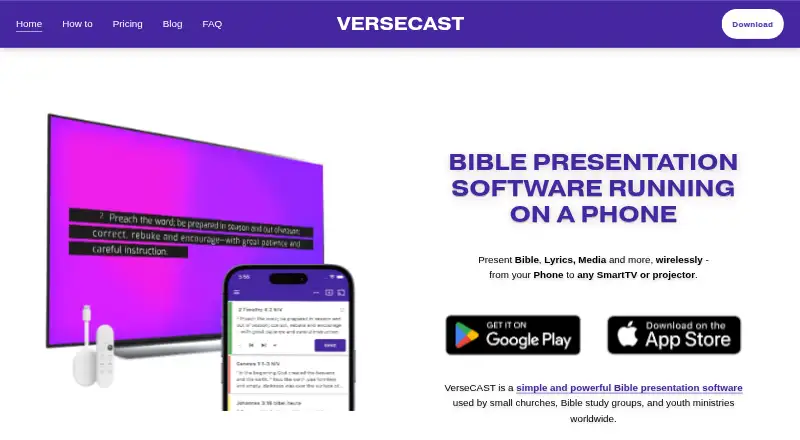
VerseCAST is a mobile Bible presentation application for small churches, Bible study groups, youth ministries, and volunteer-led services. It runs on iOS, Android, and the web, presenting Scripture, song lyrics, announcements, media, and countdowns to smart TVs, projectors, browsers, and Google Cast devices. Multiple outputs cover main presentation screens, stage displays, lobby screens, and streaming subtitles, giving small teams several presentation roles from one app.
The published plans use a freemium structure. The free version provides Bible presentation but has slide-count and functionality limits. The Monthly plan costs $3.49 per month, removes usage limits and watermarks on lyrics, announcements, and timers, and adds automatic verse summary; themes and stream displays cost extra. The Yearly plan costs $24.99 per year with the same features as the monthly subscription and includes a basic theme pack. The Perpetual plan costs $49.99 one time and includes current and future app features otherwise sold separately, all themes, and stream displays. The plan structure suits churches that want to begin with a free option and choose between recurring access or a one-time purchase.
VerseCAST fits workflows that connect Bible content, song resources, and livestream production. YouVersion supports Scripture presentation, while OnSong and SongBookPro support song imports. OBS, vMix, and ATEM integrations extend the presentation workflow into streaming and production setups, and wireless output works through web browsers or Google Cast. Its main tradeoff is focus: the product is designed around mobile and browser-based presentation rather than a broader desktop-platform lineup. Churches seeking phone-led services, multiple screens, and a low-cost path should consider VerseCAST; teams needing presentation workflows beyond its listed platforms and integrations should look elsewhere.
VerseCAST pricing
All 3 VerseCAST plans and prices →
VerseCAST fact sheet
| Free plan | Yes |
|---|---|
| Paid from | $3.49/mo |
| Lyrics display | Yes |
| Scripture display | Yes |
| Stage display | Yes |
| Multi-screen output | Yes |
| Media playback | Yes |
| Supported platforms | iOS, Android, web browsers |
| Output screen limit | Not verified |
| Deployment | Mobile, Browser extension |
| Platforms | Web, iOS, Android |
| Support | Email, Docs |
| Built for | Solo, Small business (editorial estimate) |
| Integrations | 7 integrations: YouVersion, OnSong, SongBookPro, OBS, vMix, ATEM … |
| Pricing | Free plan · paid from $3.49/mo (source) |
| Website | versecast.app |
| Facts checked | 20 Sep 2026 |
VerseCAST integrations
VerseCAST lists 7 integrations on its own site.
- YouVersion
- OnSong
- SongBookPro
- OBS
- vMix
- ATEM
- Google Cast
Alternatives to VerseCAST
- Church PresenterA free, open-source choice for churches needing broad presentation and broadcast coverage.9.0
- FreeShowA broad, free church presentation tool for lyrics, Scripture, media, and live outputs.9.0
- EasyWorshipA paid church presentation suite with broad production outputs and mobile control.8.2


See all VerseCAST alternatives →
Used VerseCAST? Be the first to review it
The editor score above is our own research. What this page doesn't have yet is a reader's view — what you used VerseCAST for, what worked and what didn't. No stars are seeded and no review is paid for; an editor reads every one before it appears.
Write a reviewTwo minutes · verified accounts only · read by an editor before it appears
Featured on iTechGuides

VerseCAST is listed in our Church Presentation Software directory. Add the badge to your site — it links back to this page.
<a href="https://www.itechguides.com/products/versecast/"><img src="https://www.itechguides.com/best/badge/versecast.svg" alt="Featured on iTechGuides" width="230" height="46"></a>
Reviewed by iTechGuides Editors · Editorial team · Updated Sep 2026
Advertiser disclosure: iTechGuides is reader-supported. We may earn a commission when you click some links. How we rank.
Last updated · How we research and update