Universal x86 Tuning Utility
Universal x86 Tuning Utility: A free Windows utility for processor, GPU, power, undervolting, and preset control. Ranked #4 of 31 in PC Overclocking Software by our editors (8.5/10); pricing: Free plan; best for free open-source x86 tuning.
At a glance
- Editor score8.5 / 10
- PricingFree plan
- Best forFree open-source x86 tuning
- Free planYes
- Paid fromNone
- CPU tuningYes
- Facts checked20 Sep 2026
Where it wins
- Processor and GPU controls for supported x86 systems
- Adaptive TDP and AutoOC undervolting for supported Zen systems
- Custom presets, automations, and an in-game overlay
Where it doesn't
- Windows-only availability
- Feature access depends on supported hardware
- Misuse may cause instability or malfunction
Our verdict on Universal x86 Tuning Utility
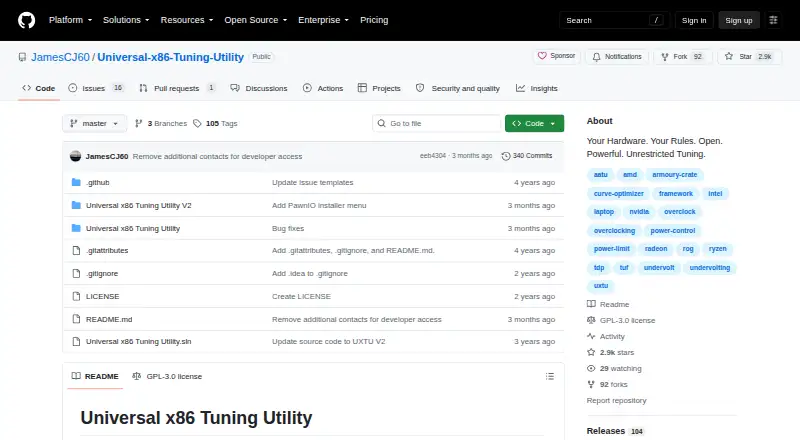
Universal x86 Tuning Utility is a free, open-source Windows desktop application for tuning supported x86 laptops and computers. It is aimed at users who want operating-system controls for processor and GPU settings, including power limits and adaptive tuning. The project focuses primarily on Zen-based AMD CPUs and APUs, while also supporting Intel CPUs from the fourth generation onward. Its multi-vendor scope is useful, but the actual controls available depend on the system’s hardware support.
The standout feature set centers on presets and adaptive tuning. Premade presets are available for Zen-based processors, while custom presets can be created, saved, and applied. Adaptive TDP adjusts power limits based on temperature, and AutoOC provides adaptive learning undervolting for supported Zen-based CPUs and APUs. Automations can apply settings during specified events, while the customizable in-game overlay and system information display help keep key tuning and hardware details accessible. A game library for viewing and launching installed games adds convenience around game-focused use without changing the utility’s main tuning role.
There is no paid tier to compare: the project is free and open source. That makes it a practical choice for users who want configurable tuning controls without a subscription or license cost. However, the project is marked as work in progress, and misuse may cause system instability or malfunction. Users with supported Windows x86 hardware who are comfortable managing processor, GPU, and power settings should find the feature coverage relevant. Those whose systems fall outside supported hardware should choose a tool designed for their platform instead.
Your product? Our editors can test Universal x86 Tuning Utility in depth and publish a review, labelled as paid · from $99/mo →
Universal x86 Tuning Utility pricing
Universal x86 Tuning Utility fact sheet
| Free plan | Yes |
|---|---|
| Paid from | None |
| CPU tuning | Yes |
| Memory tuning | Not verified |
| Motherboard controls | Not verified |
| Automatic overclocking | Yes |
| Supported platforms | Windows |
| Hardware scope | Multi-vendor |
| Deployment | Desktop |
| Platforms | Windows |
| Support | Community, Tickets |
| Built for | Solo, Small business (editorial estimate) |
| Pricing | Free plan |
| Website | github.com |
| Facts checked | 20 Sep 2026 |
Alternatives to Universal x86 Tuning Utility
- Saku OverclockA free, open-source AMD tuning suite with broad controls and a focused hardware scope.9.4
- HYDRAA Windows toolkit for tuning CPU, GPU, and DDR4/DDR5 memory.9.2
- HypertuneA cross-vendor Windows optimizer with CPU, GPU, RAM, and automated tuning tools.8.6



See all Universal x86 Tuning Utility alternatives →
Universal x86 Tuning Utility vs the competition
- Universal x86 Tuning Utility vs Saku Overclock
- Universal x86 Tuning Utility vs HYDRA
- Universal x86 Tuning Utility vs Hypertune
- Universal x86 Tuning Utility vs OCCT
- Universal x86 Tuning Utility vs Quick CPU
- Universal x86 Tuning Utility vs ZenMaster

Compare Universal x86 Tuning Utility with any tool side by side →
Used Universal x86 Tuning Utility? Be the first to review it
The editor score above is our own research. What this page doesn't have yet is a reader's view — what you used Universal x86 Tuning Utility for, what worked and what didn't. No stars are seeded and no review is paid for; an editor reads every one before it appears.
Write a reviewTwo minutes · verified accounts only · read by an editor before it appears
Featured on iTechGuides

Universal x86 Tuning Utility is listed in our PC Overclocking Software directory. Add the badge to your site — it links back to this page.
<a href="https://www.itechguides.com/products/universal-x86-tuning-utility/"><img src="https://www.itechguides.com/best/badge/universal-x86-tuning-utility.svg" alt="Featured on iTechGuides" width="230" height="46"></a>
Reviewed by iTechGuides Editors · Editorial team · Updated Oct 2026
Advertiser disclosure: iTechGuides is reader-supported. Vendors can pay for top positions in our rankings and for a place on other products' pages, and we may earn a commission when you click some links. How we rank.
Last updated · How we research and update