Ungit
Ungit: A local, browser-based Git GUI with desktop packages and repository monitoring. Ranked #25 of 32 in Git GUI Clients by our editors (6.7/10); pricing: Free plan; best for users wanting a browser-based local Git GUI.
At a glance
- Editor score6.7 / 10
- PricingFree plan
- Best forUsers wanting a browser-based local Git GUI
- Free planYes
- Paid fromFree
- Supported platformsweb, windows, macos, linux
- Facts checked20 Sep 2026
Where it wins
- Runs locally through a browser with Windows, macOS, and Linux packages
- Monitors repositories and refreshes automatically
- Supports GitHub, Gerrit plugins, and external merge tools
Where it doesn't
- Requires a local Node.js server and command-line startup
- Gerrit integration depends on a plugin
- No AI features are provided
Our verdict on Ungit
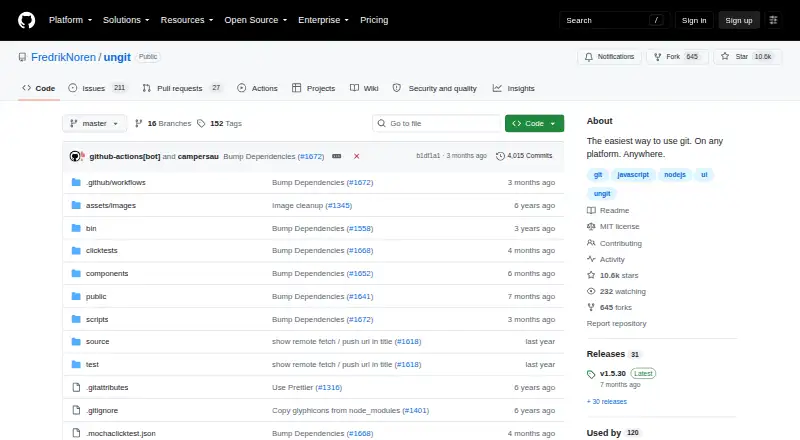
Ungit is an open-source graphical interface for Git that runs through a locally served web interface. It is aimed at developers who want to view changes, work with branches and commits, monitor repositories, and resolve conflicts without using a traditional desktop-only client. The project can run on the web through a local Node.js server, and Electron desktop packages are available for Windows, macOS, and Linux. It can also run locally or on a remote machine, depending on how the server is used.
The browser-based design is Ungit's defining feature. A command-line startup launches the local Node.js server, while the interface provides automatic repository refresh and support for configured external graphical merge tools. The project also supports PGP-signed Git commits and includes category capabilities for submodules and conflict editing. These features make Ungit a practical fit for developers who prefer a visual workflow but want the interface delivered through a browser rather than a conventional native application.
Its ecosystem covers GitHub compatibility, Gerrit integration through a plugin, and connections with Atom, Brackets, and Visual Studio Code. That combination suits teams whose Git work spans hosted repositories, code editors, or Gerrit-based workflows. Ungit is a strong choice for users who value an open-source, browser-based interface and flexible platform access. Users seeking a more deeply verified Git workflow, built-in AI assistance, or a setup that avoids running a local Node.js server should consider another Git GUI.
Your product? Our editors can test Ungit in depth and publish a review, labelled as paid · from $149/mo →
Ungit pricing
Ungit fact sheet
| Free plan | Yes |
|---|---|
| Paid from | Free |
| Supported platforms | web, windows, macos, linux |
| Offline mode | Not verified |
| Git LFS support | Not verified |
| Git submodules | Yes |
| Interactive rebase | Not verified |
| Conflict editor | Yes |
| Deployment | Cloud, Self-hosted, Desktop |
| Platforms | Web, Windows, macOS, Linux |
| Support | Community, Docs |
| Built for | Solo, Small business, Mid-market (editorial estimate) |
| Integrations | 5 integrations: GitHub, Gerrit, Atom, Brackets, Visual Studio Code |
| Pricing | Free plan |
| Website | github.com |
| Facts checked | 20 Sep 2026 |
Ungit integrations
Ungit lists 5 integrations on its own site.
- GitHub
- Gerrit
- Atom
- Brackets
- Visual Studio Code
Alternatives to Ungit
- GitemberA broad, free Git desktop client with history, review, LFS, submodules, and local AI.9.4
- platypusgitDeep Git control across macOS, Windows, and Linux without accounts or telemetry.9.3
- GitKraken DesktopA mature Git GUI with deep repository workflows, hosting integrations, and team tiers.9.1



Also Ranked In
Ungit is ranked in 3 of our directories.
Used Ungit? Be the first to review it
The editor score above is our own research. What this page doesn't have yet is a reader's view — what you used Ungit for, what worked and what didn't. No stars are seeded and no review is paid for; an editor reads every one before it appears.
Write a reviewTwo minutes · verified accounts only · read by an editor before it appears
Featured on iTechGuides

Ungit is listed in our Git GUI Clients directory. Add the badge to your site — it links back to this page.
<a href="https://www.itechguides.com/products/ungit/"><img src="https://www.itechguides.com/best/badge/ungit.svg" alt="Featured on iTechGuides" width="230" height="46"></a>
Reviewed by iTechGuides Editors · Editorial team · Updated Oct 2026
Advertiser disclosure: iTechGuides is reader-supported. Vendors can pay for top positions in our rankings and for a place on other products' pages, and we may earn a commission when you click some links. Bought places stand at the number bought; this page and our disclosure say so. Paying vendors may get a fuller, more detailed review from our editors, and that review can change their score. How we rank.
Last updated · How we research and update